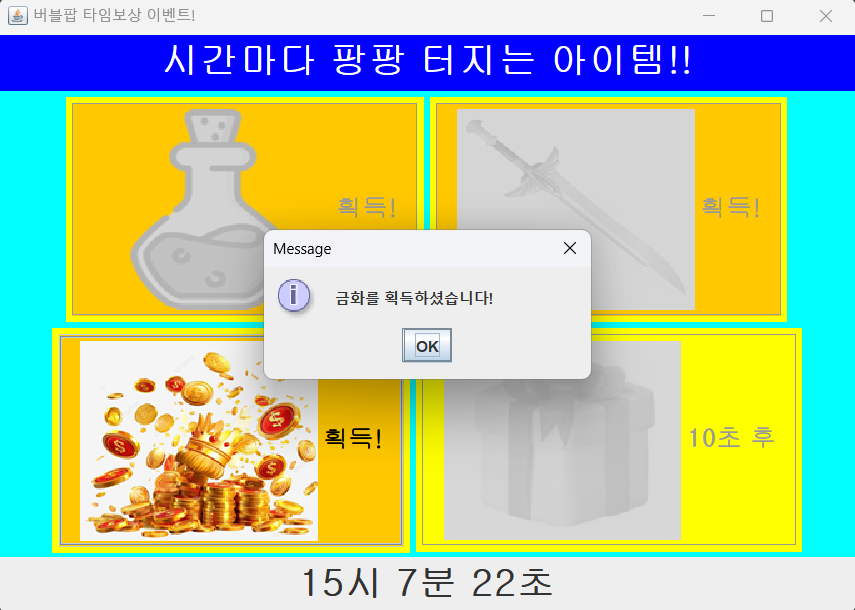
멀티스레드 연습을 위해 게임 내 시간 보상 이벤트를 swing으로 구현해보았다.
게임 접속 후 일정 시간이 지나면 아이템을 받을 수 있는 이벤트들이 있다.
어릴적 크레이지아케이드를 즐겨했을 때 PC방에 가면 바늘을 줘서 가끔 받았던 기억이 난다.
이와 비슷하게 일정 시간이 지나면 아이템 상자를 오픈할 수 있는 프로그램을 구현해보았다.
간략하게 정리하면 다음과 같다.
- 일정 시간이 지나기 전에는 오픈 버튼 비활성화
- 일정 시간이 지나면 오픈 버튼 활성화
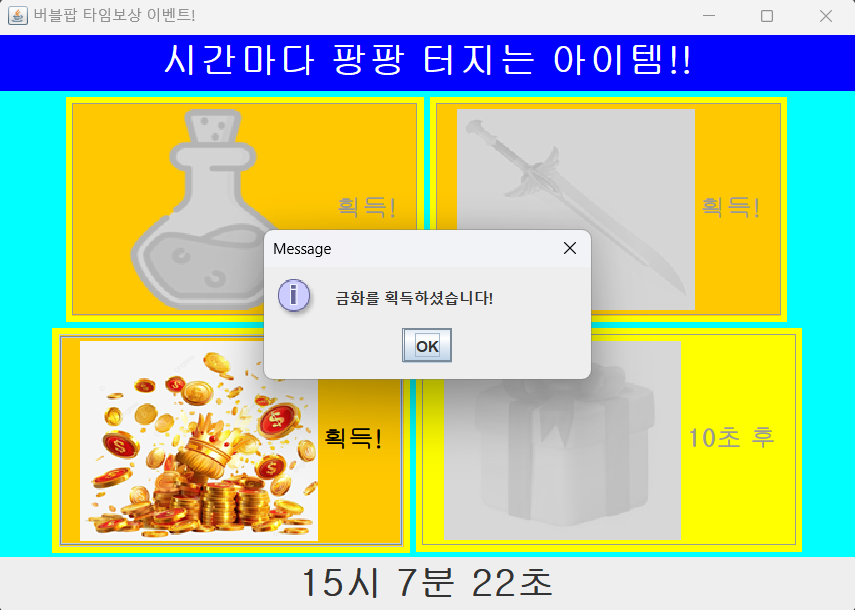
- 버튼 누르면 아이템 획득
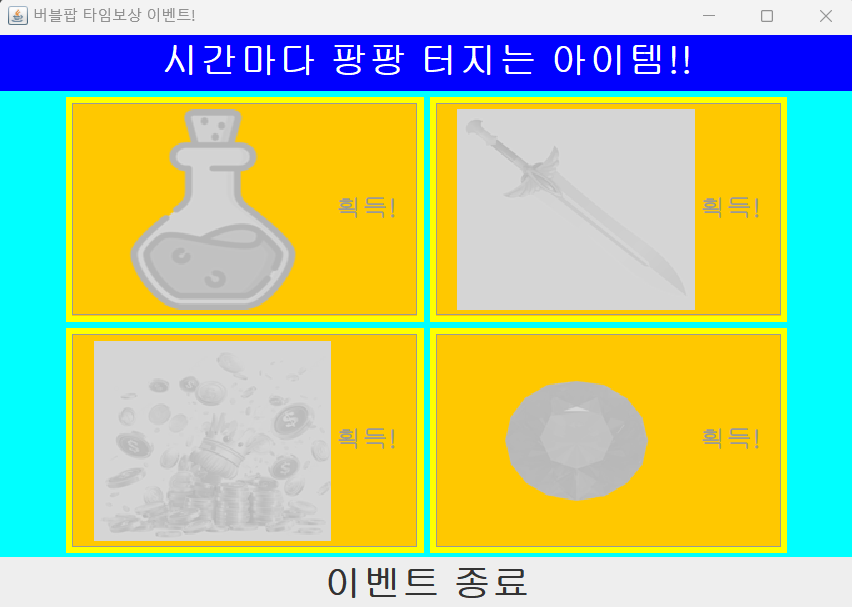
- 모든 아이템 획득 시 이벤트 종료 알림 및 종료
빠른 확인을 위해 시간은 2초, 5초, 7초, 10초로 설정하였다.
[View클래스]
import javax.swing.*;
import java.awt.*;
import java.awt.event.ActionEvent;
import java.awt.event.ActionListener;
import java.util.Date;
import java.util.HashMap;
import java.util.Map;

public class View {
    private JFrame f;
    private JPanel titleP;
    private JPanel mainP;
    private JPanel timeP;
    private Font font1 = new Font("굴림", Font.BOLD, 20);
    private Font font2 = new Font("굴림", Font.BOLD, 30);
    private Present p1;
    private Present p2;
    private Present p3;
    private Present p4;

    public View() {
        f = new JFrame();
        f.setSize(700, 500);
        f.setTitle("버블팝 타임보상 이벤트!");
        f.setDefaultCloseOperation(JFrame.EXIT_ON_CLOSE);
        f.setBackground(Color.white);
        initHeadP();
        initMainP();
        setTimeP();
        f.setVisible(true);
    }

    public void initHeadP() {
        titleP = new JPanel();
        titleP.setBackground(Color.BLUE);
        JLabel titleL = new JLabel("시간마다 팡팡 터지는 아이템!!");
        titleL.setFont(font2);
        titleL.setForeground(Color.white);
        titleP.add(titleL);
        f.add(titleP, BorderLayout.PAGE_START);
    }

    public void initMainP() {
        mainP = new JPanel();
        mainP.setBackground(Color.cyan);

        p1 = new Present(2000, "물약");
        p2 = new Present(5000, "무기");
        p3 = new Present(7000, "금화");
        p4 = new Present(10000, "현자의 돌");

        p1.start();
        p2.start();
        p3.start();
        p4.start();

        f.add(mainP);
    }

    public void setTimeP() {
        timeP = new JPanel();
        Time time = new Time();
        time.start();
        f.add(timeP, BorderLayout.PAGE_END);
    }

    class Present extends Thread {
        private boolean isOpened = false; // 아이템 획득(오픈) 여부
        private int time;
        private JPanel presentP;
        private ImageIcon img;
        private JButton btn;

        // 선물 리스트
        private Map<String, String> reward = new HashMap<>() {{
            put("물약", "potion.png");
            put("무기", "weapon.png");
            put("금화", "coin.png");
            put("현자의 돌", "stone.png");
        }};

        public Present(int time, String item) {
            // instance 생성 시 오픈 시간, 아이템 설정
            this.time = time;
            time = time / 1000;
            presentP = new JPanel();
            presentP.setBackground(Color.yellow);
            img = new ImageIcon("img/close.png");
            btn = new JButton(time + "초 후");
            btn.setFont(font1);
            btn.setBackground(Color.YELLOW);
            btn.setForeground(Color.GRAY);
            btn.setIcon(img);
            btn.setEnabled(false); // 버튼 비활성화

            btn.addActionListener(new ActionListener() {
                @Override
                public void actionPerformed(ActionEvent e) {
                    ImageIcon img2 = new ImageIcon("img/" + reward.get(item));
                    btn.setIcon(img2);
                    btn.setText("획득!");
                    btn.setForeground(Color.black);
                    btn.setBackground(Color.ORANGE);
                    JOptionPane.showMessageDialog(f, item + "를 획득하셨습니다!");
                    btn.setEnabled(false); // 버튼 비활성화
                    setOpened(true); // 아이템 오픈되었음을 알림
                }
            });
            presentP.add(btn);
            mainP.add(presentP);
        }

        public void change() {
            btn.setForeground(Color.red);
            btn.setEnabled(true); // 버튼 활성화
            btn.setText("Click!");
        }

        public void setOpened(boolean opened) {
            isOpened = opened;
        }

        public boolean getOpened() {
            return isOpened;
        }

        @Override
        public void run() {
            try {
                Thread.sleep(time);
                change();
            } catch (InterruptedException e) {
                throw new RuntimeException(e);
            }
        }
    }

    class Time extends Thread {
        @Override
        public void run() {
            JLabel timeL;
            timeL = new JLabel();
            timeL.setFont(font2);
            timeP.add(timeL);
            while (true) {
                // 모든 아이템 오픈 시 time 스레드 종료
                if (p1.getOpened() && p2.getOpened() && p3.getOpened() && p4.getOpened()) {
                    JOptionPane.showMessageDialog(f, "모든 아이템을 획득하셨습니다.");
                    interrupt();
                }
                Date today = new Date();
                String time = today.getHours() + "시 " + today.getMinutes() + "분 " + today.getSeconds() + "초";
                timeL.setText(time);
                try {
                    Thread.sleep(1000);
                } catch (InterruptedException e) {
                    timeL.setText("이벤트 종료");
                    return;
                }
            }
        }
    }
}
Present클래스와 Time클래스는 각각 Thread를 상속받고 View클래스의 내부 클래스로 만들었다. 모든 아이템을 획득하면 무한반복시킨 Time클래스에 interrup를 주어 종료되게하였다.
[Run클래스]
public class Run {
    public static void main(String[] args) {
        new View();
    }
}
[예시]
본 포스팅은 멀티캠퍼스의 멀티잇 백엔드 개발(Java)의 교육을 수강하고 작성되었습니다.

성장하는 개발자, 하지은입니다.