[SpringBoot] spring legacy에서 spring boot로 변환 - 3. 일정 (JSP -> thymeleaf)
로그인을 제외하고 다른 부분은 spring이나 spring boot나 뒷단의 코드는 거의 똑같다.
JSP에서 thymeleaf로 변환하는게 정말 무진장 어려웠다...ㅠㅠ
시간을 갖고 문법을 하나하나 바꾸면 되긴 시간은 없고 아는것이 별로 없으니 더 어렵게 느껴졌던 것 같다.
이번 포스팅에서는 [일정] 메뉴의 소스코드를 복기하고 특히 jsp에서 thymeleaf로 바꾼 부분을 위주로 적겠다.
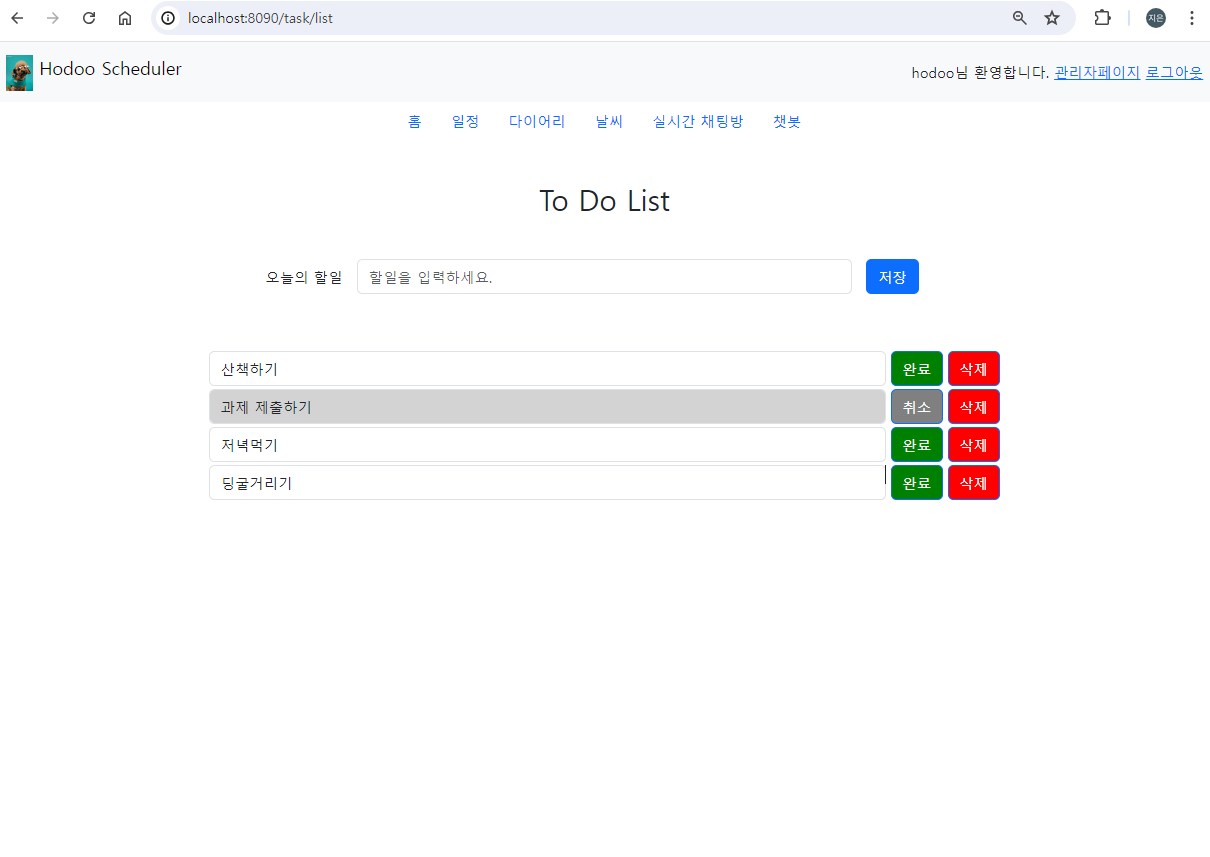
화면은 지난번 spring때와 동일하다.
바로 소스코드를 보겠다.
소스코드
[TaskController.java]
import com.multi.hodooScheduler.task.model.dto.TaskDTO;
import com.multi.hodooScheduler.task.service.TaskService;
import com.multi.hodooScheduler.user.model.dto.UserDTO;
import com.multi.hodooScheduler.user.service.UserService;
import org.springframework.beans.factory.annotation.Autowired;
import org.springframework.stereotype.Controller;
import org.springframework.ui.Model;
import org.springframework.web.bind.annotation.PostMapping;
import org.springframework.web.bind.annotation.RequestBody;
import org.springframework.web.bind.annotation.RequestMapping;

import java.security.Principal;
import java.util.ArrayList;
import java.util.Map;
import java.util.UUID;

@Controller
@RequestMapping("/task")
public class TaskController {

	private TaskService taskService;
	private UserService userService;

	@Autowired
	public TaskController(TaskService taskService, UserService userService) {
		super();
		this.taskService = taskService;
		this.userService = userService;
	}

	@RequestMapping("/list")
	public String taskMain() {

			return "task/taskMain";


	}

	@PostMapping("/insert")
	public String insertTask(TaskDTO taskDTO, Model model, Principal principal) {

		taskDTO.setUserId(principal.getName());
		taskDTO.setTaskId(UUID.randomUUID().toString());
		String page = "";

		try {
			int result = taskService.insertTask(taskDTO);
			if (result > 0) {
				page = "redirect:/task/list";
			} else {
				model.addAttribute("msg", "할일 저장 실패");
				page = "redirect:/task/list";
			}
		} catch (Exception e) {
			e.printStackTrace();
			model.addAttribute("msg", "할일 저장 실패");
			page = "redirect:/task/list";
		}

		return page;
	}

	@RequestMapping("/taskList")
	public void selectTaskList(Model model, Principal principal) {

        try {
			UserDTO loginUser = userService.findUserById(principal.getName());
			ArrayList<TaskDTO> list = taskService.selectTaskList(loginUser);
			model.addAttribute("list", list);

		} catch (Exception e) {
			// TODO Auto-generated catch block
			e.printStackTrace();
		}

	}

	@PostMapping("/taskComplete")
	public String updateTask(@RequestBody Map<String, String> data, Model model, Principal principal) {

		TaskDTO taskDTO = new TaskDTO();
		String complete = data.get("btn").contains("완료") ? "Y" : "N";
		String page = "";
		taskDTO.setComplete(complete);
		taskDTO.setTaskId(data.get("taskId"));

		try {
			UserDTO loginUser = userService.findUserById(principal.getName());
			ArrayList<TaskDTO> list = taskService.updateTask(taskDTO, loginUser);
			model.addAttribute("list", list);
			page = "task/taskList";
		} catch (Exception e) {
			e.printStackTrace();
			model.addAttribute("msg", "할일 업데이트 실패");
			page = "redirect:/task/list";
		}

		return page;
	}

	@PostMapping("/taskDelete")
	public String deleteTask(@RequestBody Map<String, String> data, Model model, Principal principal) {

		TaskDTO taskDTO = new TaskDTO();
		System.out.println(data.get("btn"));
		String page = "";

		taskDTO.setTaskId(data.get("taskId"));

		try {
			UserDTO loginUser = userService.findUserById(principal.getName());
			ArrayList<TaskDTO> list = taskService.deleteTask(taskDTO, loginUser);
			model.addAttribute("list", list);
			page = "task/taskList";

		} catch (Exception e) {
			e.printStackTrace();
			model.addAttribute("msg", "할일 삭제 실패");
			page = "redirect:/task/list";
		}

		return page;
	}

}
[TaskServiceImpl.java]
import com.multi.hodooScheduler.task.model.dao.TaskDAO;
import com.multi.hodooScheduler.task.model.dto.TaskDTO;
import com.multi.hodooScheduler.user.model.dto.UserDTO;
import org.mybatis.spring.SqlSessionTemplate;
import org.springframework.beans.factory.annotation.Autowired;
import org.springframework.stereotype.Service;
import org.springframework.transaction.annotation.Transactional;

import java.util.ArrayList;

@Service
public class TaskServiceImpl implements TaskService {
	private TaskDAO taskDAO = new TaskDAO();
	private SqlSessionTemplate sqlSession;

	@Autowired
	public TaskServiceImpl(TaskDAO taskDAO, SqlSessionTemplate sqlSession) {
		super();
		this.taskDAO = taskDAO;
		this.sqlSession = sqlSession;
	}

	@Override
	public int insertTask(TaskDTO taskDTO) {
		int reult = taskDAO.insertTask(sqlSession, taskDTO);

		return reult;
	}

	@Override
	public ArrayList<TaskDTO> selectTaskList(UserDTO loginUser) throws Exception {

		ArrayList<TaskDTO> list = taskDAO.selectTaskList(sqlSession, loginUser);

		return list;

	}

	@Transactional(rollbackFor = Exception.class)
	@Override
	public ArrayList<TaskDTO> updateTask(TaskDTO taskDTO, UserDTO loginUser) throws Exception {

		int result = taskDAO.updateTask(sqlSession, taskDTO);
		if (result <= 0) {
			throw new Exception("task 업데이트 실패!");
		}
		ArrayList<TaskDTO> list = taskDAO.selectTaskList(sqlSession, loginUser);
		return list;
	}

	@Transactional(rollbackFor = Exception.class)
	@Override
	public ArrayList<TaskDTO> deleteTask(TaskDTO taskDTO, UserDTO loginUser) throws Exception {

		int result = taskDAO.deleteTask(sqlSession, taskDTO);
		if (result <= 0) {
			throw new Exception("task 업데이트 실패!");
		}
		ArrayList<TaskDTO> list = taskDAO.selectTaskList(sqlSession, loginUser);
		return list;
	}

}
[TaskDAO.java]
import java.util.ArrayList;

import org.apache.ibatis.session.SqlSession;
import org.mybatis.spring.SqlSessionTemplate;
import org.springframework.stereotype.Repository;

import com.multi.hodooScheduler.task.model.dto.TaskDTO;
import com.multi.hodooScheduler.user.model.dto.UserDTO;


@Repository
public class TaskDAO {

	public ArrayList<TaskDTO> selectTaskList(SqlSession sqlSession, UserDTO loginUser) throws Exception {

		return (ArrayList) sqlSession.selectList("taskMapper.selectTaskList", loginUser);
	}

	public int insertTask(SqlSessionTemplate sqlSession, TaskDTO taskDTO) {

		return sqlSession.insert("taskMapper.insertTask", taskDTO);
	}

	public int updateTask(SqlSessionTemplate sqlSession, TaskDTO taskDTO) {

		return sqlSession.update("taskMapper.updateTask", taskDTO);
	}

	public int deleteTask(SqlSessionTemplate sqlSession, TaskDTO taskDTO) {
		return sqlSession.delete("taskMapper.deleteTask", taskDTO);
	}

}
[TaskDTO.java]
import java.sql.Date;

public class TaskDTO {

	private String userId;
	private String taskId;
	private String content;
	private String complete;
	private Date createdDate;

	public TaskDTO() {

	}


	public Date getCreatedDate() {
		return createdDate;
	}


	public void setCreatedDate(Date createdDate) {
		this.createdDate = createdDate;
	}


	public String getUserId() {
		return userId;
	}

	public void setUserId(String userId) {
		this.userId = userId;
	}

	public String getTaskId() {
		return taskId;
	}

	public void setTaskId(String taskId) {
		this.taskId = taskId;
	}

	public String getContent() {
		return content;
	}

	public void setContent(String content) {
		this.content = content;
	}

	public String getComplete() {
		return complete;
	}

	public void setComplete(String complete) {
		this.complete = complete;
	}

	@Override
	public String toString() {
		return "TaskDTO [userId=" + userId + ", taskId=" + taskId + ", content=" + content
				+ ", complete=" + complete + "]";
	}


}
[taskMapper.xml]
<?xml version="1.0" encoding="UTF-8"?>
<!DOCTYPE mapper PUBLIC "-//mybatis.org//DTD Mapper 3.0//EN" "http://mybatis.org/dtd/mybatis-3-mapper.dtd" >
<mapper namespace="taskMapper">
	<resultMap type="taskDTO" id="taskResultSet">
		<!-- 언더바가 들어가는 쿼리문에 한하여 매핑을 해줘야함 -->
		<id property="userId" column="user_id" />
		<result property="taskId" column="task_id" />
		<result property="content" column="content" />
		<result property="complete" column="complete" />
		<result property="createdDate" column="create_date" />
	</resultMap>

	<select id="selectTaskList" parameterType="userDTO"
		resultMap="taskResultSet">
		SELECT *
		FROM TASK
		WHERE user_id = #{userId}
		order by
		create_date
	</select>

	<insert id="insertTask" parameterType="taskDTO">
		insert into task
		(user_id,
		task_id, content)
		values
		(#{userId}, #{taskId},#{content})
	</insert>

	<update id="updateTask" parameterType="taskDTO">
		update task
		set complete =
		#{complete}
		where task_id = #{taskId}
	</update>

	<delete id="deleteTask" parameterType="taskDTO">
		delete from task
		where task_id =
		#{taskId}
	</delete>
</mapper>
사실 여기까지는 똑같다!
이제 작성할 코드가 이 포스팅을 작성한 이유인 jsp를 thymeleaf로 변환하는 부분이다.
thymeleaf
[taskMain.html]
<!DOCTYPE html>
<html xmlns:th="http://www.thymeleaf.org">
<head>
    <meta charset="UTF-8">
    <title>Insert title here</title>
    <link
            href="https://cdn.jsdelivr.net/npm/bootstrap@5.3.3/dist/css/bootstrap.min.css"
            rel="stylesheet">
</head>
<script
        src="https://ajax.googleapis.com/ajax/libs/jquery/3.5.1/jquery.min.js"></script>
<script type="text/javascript">
    $(function() {

        $.ajax({

            url : "taskList",
            type : "get",
            success : function(result) {
                $("#taskArea").html(result);
            },
            error : function() {
                alert("일정 불러오기 실패!");
            }

        })

    })
</script>

<body>
<div th:replace="~{common/menubar :: #menubar}"></div>
<h2 class="mt-5 container" style="text-align: center;">
    <label>To Do List</label>
</h2>
<div class="container mt-5">

    <form class="row g-3" action="insert" method="post">

        <div class="col-3" style="text-align: right;">
            <label class="col-form-label">오늘의 할일</label>
        </div>
        <div class="col-6">
            <input type="text" class="form-control" name="content"
                   placeholder="할일을 입력하세요.">
        </div>
        <div class="col-3">
            <button id="submitBtn" class="btn btn-primary mb-3">저장</button>
        </div>
    </form>

</div>
<div id="taskArea">
    <div th:replace="~{task/taskList :: #task}"></div>
</div>
</body>
</html>
[taskList.html]
<!DOCTYPE html>
<html xmlns:th="http://www.thymeleaf.org">
<div class="container mt-5 col-8" id="task">
    <script
            src="https://ajax.googleapis.com/ajax/libs/jquery/3.5.1/jquery.min.js"></script>
    <script type="text/javascript">
        $(function() {
            $("button").click(function() {

                let btn = $(this).text();
                let taskId = $(this).attr("name");
                console.log(taskId);
                console.log(btn.includes("취소"));

                if (btn.includes("완료") || btn.includes("취소")) {
                    $.ajax({
                        url : "taskComplete",
                        type : "post",
                        contentType : 'application/json',
                        data : JSON.stringify({
                            btn : btn,
                            taskId : taskId
                        }),
                        success : function(result) {
                            $("#taskArea").html(result);
                        },
                        error : function() {
                            alert("일정 불러오기 실패!");
                        }

                    })
                } else if (btn.includes("삭제")) {
                    $.ajax({

                        url : "taskDelete",
                        type : "post",
                        contentType : 'application/json',
                        data : JSON.stringify({
                            btn : btn,
                            taskId : taskId
                        }),
                        success : function(result) {
                            $("#taskArea").html(result);
                        },
                        error : function() {
                            alert("일정 불러오기 실패!");
                        }

                    })
                }


            })

        })
    </script>
    <div th:each="one : ${list}">
        <input name="taskId" type="hidden" th:value="${one.taskId}">
        <div id="${one.taskId}" class=" mb-1" style="display: flex;">

            <th:block th:if="${one.complete == 'N'}">
                <input class="form-control " type="text" th:value="${one.content}"
                       readonly style="margin-right: 5px;">
                <div class="col-auto">
                    <button th:name="${one.taskId}" class="btn btn-primary"
                            style="margin-right: 5px; background-color: green;">완료
                    </button>
                </div>
            </th:block>
            <th:block th:unless="${one.complete == 'N'}">
                <input class="form-control " type="text" th:value="${one.content}"
                       readonly style="margin-right: 5px; background-color: lightgray;">
                <div class="col-auto">
                    <button th:name="${one.taskId}" class="btn btn-primary"
                            style="margin-right: 5px; background-color: gray;">취소
                    </button>
                </div>

            </th:block>
            <div class="col-auto">
                <button th:name="${one.taskId}" class="btn btn-primary"
                        style="background-color: red;">삭제
                </button>
            </div>
        </div>
    </div>

</div>
spring에서 작업했던 taskMain.jsp 도 함께 적어본다.
JSP
[taskMain.jsp]
<%@ page language="java" contentType="text/html; charset=UTF-8"
	pageEncoding="UTF-8"%>
<!DOCTYPE html>
<html>
<head>
<meta charset="UTF-8">
<title>Insert title here</title>
</head>
<script
	src="https://ajax.googleapis.com/ajax/libs/jquery/3.5.1/jquery.min.js"></script>
<script type="text/javascript">
	$(function() {

		$.ajax({

			url : "taskList",
			type : "get",
			success : function(result) {
				$("#taskArea").html(result);
			},
			error : function() {
				alert("일정 불러오기 실패!");
			}

		})

	})
</script>

<body>
	<jsp:include page="../common/menubar.jsp"></jsp:include>
	<h2 class="mt-5 container" style="text-align: center;">
		<label>To Do List</label>
	</h2>
	<div class="container mt-5">

		<form class="row g-3" action="insert" method="post">

			<div class="col-3" style="text-align: right;">
				<label for="staticEmail2" class="col-form-label">오늘의 할일</label>
			</div>
			<div class="col-6">
				<input type="text" class="form-control" name="content"
					placeholder="할일을 입력하세요.">
			</div>
			<div class="col-3">
				<button id="submitBtn" class="btn btn-primary mb-3">저장</button>
			</div>
		</form>

	</div>
	<div id="taskArea">
		<jsp:include page="../task/taskList.jsp"></jsp:include>
	</div>
</body>
</html>
[taskList.jsp]
<%@ page language="java" contentType="text/html; charset=UTF-8"
	pageEncoding="UTF-8"%>
<%@ taglib uri="http://java.sun.com/jsp/jstl/core" prefix="c"%>
<!DOCTYPE html>
<div class="container mt-5 col-8" id="task">
	<c:forEach items="${list}" var="one">
		<%-- <input name="taskId" type="hidden" value="${one.taskId}"> --%>
		<div id="${one.taskId}" class=" mb-1" style="display: flex;">
			<c:choose>
				<c:when test="${one.complete == 'N'}">
					<input class="form-control " type="text" value="${one.content}"
						readonly style="margin-right: 5px;">
					<div class="col-auto">
						<button name="${one.taskId}" class="btn btn-primary"
							style="margin-right: 5px; background-color: green;">완료</button></div>
				</c:when>
				<c:otherwise>
					<input class="form-control " type="text" value="${one.content}"
						readonly style="margin-right: 5px; background-color: lightgray;">
					<div class="col-auto">
						<button name="${one.taskId}" class="btn btn-primary"
							style="margin-right: 5px; background-color: gray;">취소</button></div>
				</c:otherwise>
			</c:choose>
		</div>
		<div class="col-auto">
			<button name="${one.taskId}" class="btn btn-primary"
				style="background-color: red;">삭제</button>

		</div>
	</c:forEach>
</div>

<script
	src="https://cdn.jsdelivr.net/npm/bootstrap@5.3.3/dist/js/bootstrap.bundle.min.js"></script>
</body>
<script type="text/javascript">
	$(function() {
		$("button").click(function() {

			let btn = $(this).text();
			let taskId = $(this).attr("name");
			console.log(taskId);
			console.log(btn);

			if (btn == "완료" || btn == "취소") {
				$.ajax({

					url : "taskComplete",
					type : "post",
					contentType : 'application/json',
					data : JSON.stringify({
						btn : btn,
						taskId : taskId
					}),
					success : function(result) {
						$("#taskArea").html(result);
					},
					error : function() {
						alert("일정 불러오기 실패!");
					}

				})
			} else if (btn == "삭제") {
				$.ajax({

					url : "taskDelete",
					type : "post",
					contentType : 'application/json',
					data : JSON.stringify({
						btn : btn,
						taskId : taskId
					}),
					success : function(result) {
						$("#taskArea").html(result);
					},
					error : function() {
						alert("일정 불러오기 실패!");
					}

				})
			}

		})

	})
</script>
변경부분
1. jsp에서의 include는 thymeleaf의 replace로 바꾸었다.
// jsp
<jsp:include page="../common/menubar.jsp"></jsp:include>
<jsp:include page="../task/taskList.jsp"></jsp:include>

// thymeleaf
<div th:replace="~{common/menubar :: #menubar}"></div>
<div th:replace="~{task/taskList :: #task}"></div>
2. <c:foreach> -> <th:each>
// jsp
<c:forEach items="${list}" var="one">

// thymeleaf
<div th:each="one : ${list}">
3. <c:choose>~<c:when>~<c:otherwise> -> <th:if>~<th:unless>
// jsp
			<c:choose>
				<c:when test="${one.complete == 'N'}">
					<input class="form-control " type="text" value="${one.content}"
						readonly style="margin-right: 5px;">
					<div class="col-auto">
						<button name="${one.taskId}" class="btn btn-primary"
							style="margin-right: 5px; background-color: green;">완료</button></div>
				</c:when>
				<c:otherwise>
					<input class="form-control " type="text" value="${one.content}"
						readonly style="margin-right: 5px; background-color: lightgray;">
					<div class="col-auto">
						<button name="${one.taskId}" class="btn btn-primary"
							style="margin-right: 5px; background-color: gray;">취소</button></div>
				</c:otherwise>
			</c:choose>

// thymeleaf
            <th:block th:if="${one.complete == 'N'}">
                <input class="form-control " type="text" th:value="${one.content}"
                       readonly style="margin-right: 5px;">
                <div class="col-auto">
                    <button th:name="${one.taskId}" class="btn btn-primary"
                            style="margin-right: 5px; background-color: green;">완료
                    </button>
                </div>
            </th:block>
            <th:block th:unless="${one.complete == 'N'}">
                <input class="form-control " type="text" th:value="${one.content}"
                       readonly style="margin-right: 5px; background-color: lightgray;">
                <div class="col-auto">
                    <button th:name="${one.taskId}" class="btn btn-primary"
                            style="margin-right: 5px; background-color: gray;">취소
                    </button>
                </div>

            </th:block>
지금 정리해보면 많이 어렵지도 않은데 처음 할때에는 왜이렇게 어렵게 느껴지던지... ㅠㅠ
그래도 나 좀 성장한듯...! 뿌듯뿌듯 😆
본 포스팅은 멀티캠퍼스의 멀티잇 백엔드 개발(Java)의 교육을 수강하고 작성되었습니다.

성장하는 개발자, 하지은입니다.