12장. 디스패처
디스패처 : 사람이나 차량, 특히 긴급 차량을 필요한 곳에 보내는 것을 담당하는 사람
코루틴이 실행될 스레드를 결정하는 기능을 제공하는 디스패처에 대해서 알아보자!
기본 디스패처
Dispatchers.Default
- 디스패처를 설정하지 않으면 기본적으로 설정되는 디스패처
- CPU 집약적인 연산을 수행하도록 설계됨
- 컴퓨터의 CPU 개수와 동일한 수 (최소 두 개 이상)의 스레드 풀을 가짐
suspend fun main() = coroutineScope {
	repeat(1000) {
		launch { // 또는 launch(Dispatchers.Default)
			// 바쁘게 만들기 위해 실행
			List(1000) { Random.nextLong() }.maxOrNull()
			val threadName = Thread.currentThread().name
			println("Running on thread: SthreadName")
		}
	}
}
기본 디스패처를 제한하기
limitedParallelism을 사용하면 디스패처가 같은 스레드 풀을 사용하지만 같은 시간에 특정 수 이상의 스레드를 사용하지 못하도록 제한할 수 있음
private val dispatcher = Dispatchers.Default.limitedParallelism(5)메인 디스패처
- 메인 스레드는 안드로이드에서 UI와 상호작용하는 유일한 스레드
- 메인 스레드는 자주 사용되어야 하지만 블로킹되면 전체 애플리케이션이 멈춤
- 메인 스레드에서 코루틴을 실행하려면
Dispatchers.Main을 사용 - 안드로이드에서는 기본 디스패처로 메인 디스패처를 주로 사용
class SomeTest {
	private val dispatcher = Executors
		.newSingleThreadExecutor()
		.asCoroutineDispatcher()

	@Before
	fun setup() {
		Dispatchers.setMain(dispatcher)
	}

	@After
	fun tearDown() {
		// 메인 디스패처를 원래의 Main 디스패처로 되돌림
		Dispatchers.resetMain()
		dispatcher.close()
	}

	@Test
	fun testSomeUI() = runBlocking {
		launch(Dispatchers.Main) {
			// ...
		}
	}
}
IO 디스패처
- I/O 연산으로 스레드를 블로킹할 때 사용 (파일을 읽고 쓰는 경우, shared preference를 사용하는 경우 등)
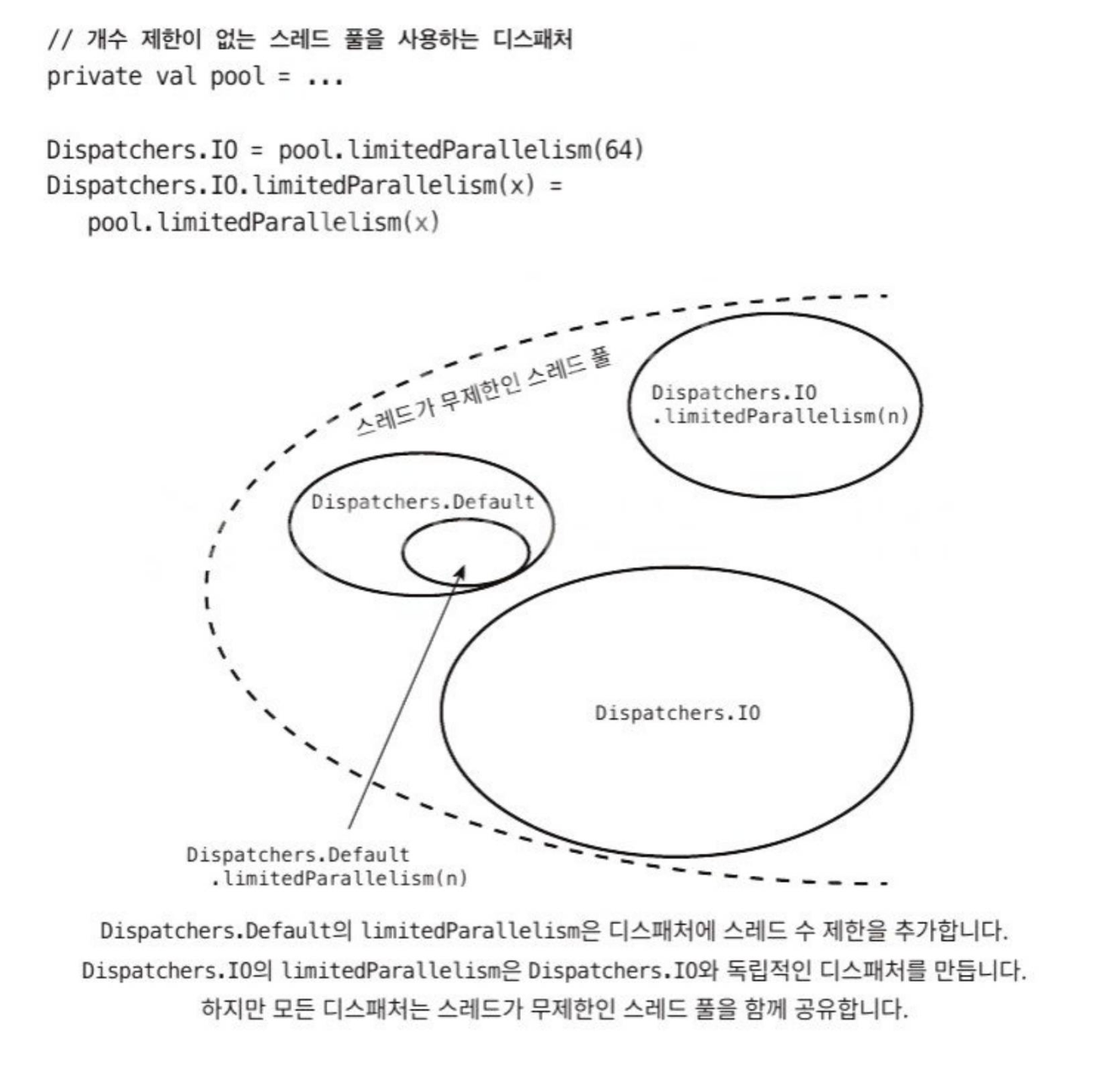
- Dipatchers.IO는 64개(또는 더 많은 코어가 있다면 해당 코어의 수)로 제한됨
- Dispatechres.Default와 Dispatchers.IO는 같은 스레드 풀을 공유함
커스텀 스레드 풀을 사용하는 IO 디스패처
-
limitedParallelism는 독립적인 스레드 풀을 가진 새로운 디스패처를 만듦- 스레드 수가 64개로 제한되지 않음
-
100개의 코루틴이 각각 스레드를 1초씩 블로킹하는 경우,
-
Dispatchers.IO에서 실행하면 2초가 걸림
-
limitedParallelism으로 100개의 스레드를 사용하는 Dispatchers.IO에서 실행하면 1초가 걸림
-
-
limitedParallelism을 잘 활용하는 방법- 스레드를 블로킹하는 경우가 잦은 클래스에서 자기만의 한도를 가진 커스텀 디스패처를 정의
- 사용 가능한 스레드를 기다리게 되는 상황이 발생한다면 커스텀 스레드 풀을 사용하는 것이 좋음
정해진 수의 스레드 풀을 가진 디스패처
- 직접 스레드풀을 관리하기 원할 때, 자바의 API를 사용할 수 있음
- Executors 클래스를 스레드의 수가 정해져 있는 스레드 풀로 구현할 수 있으며,
asCoroutineDispatcher를 사용하여 디스패처로 변형할 수 있음 - 대신 단점이 존재
ExecutorService.asCoroutineDispatcher()로 만들어진 디스패처는close함수로 닫혀야함- 이를 깜빡하면 스레드 누수를 일으킴
- 정해진 수의 스레드 풀을 만들면 스레드를 효율적으로 사용하지 않음
- 사용하지 않는 스레드가 다른 서비스와 공유되지 않고 살아있는 상태로 유지되기 때문
싱글스레드로 제한된 디스패처
- 다수의 스레드를 사용하는 모든 디스패처에서는 공유 상태로 인한 문제를 고려해야 함
// 10,000개의 코루틴이 i를 1씩 증가시켰지만, 실제로는 더 작은 값을 갖게 됨
var i = 0

suspend fun main(): Unit = coroutineScope {
	repeat(10_000) {
		launch(Dispatchers.IO) {
			i++
		}
	}
	delay(1000)
	println(i) // ~9930
}- 싱글스레드를 가진 디스패처를 사용하면 동기화를 위한 조치를 하지 않아도 됨
val dispatcher = Executors.newSingleThreadExecutor()
.asCoroutineDispatcher()- 하지만 디스패처가 스레드 하나를 액티브한 상태로 유지하기 때문에, 더 이상 사용되지 않을 때는 스레드를 반드시 닫아주어야 함
- 최근에는 Dispatchers.Default나 병렬 처리를 1로 제한한 Dispatchers.IO를 주로 사용함
var i = 0

suspend fun main(): Unit = coroutineScope {
	val dispatcher = Dispatchers.Default
		.limitedParallelism(1)

	repeat(10_000) {
		launch(dispatcher) {
			i++
		}
	}
	delay(1_000)
	println(i) // 10_000
}
대신 단 하나의 스레드만 가지고 있기 때문에 스레드가 블로킹되면 작업이 순차적으로 처리되는 단점이 있음
프로젝트 룸의 가상 스레드 사용하기
JVM 플랫폼은 “프로젝트 룸”을 사용하여 일반 스레드보다 가벼운 가상 스레드를 도입했음
각각의 코루틴이 1초 동안 블로킹되는 100,000 개의 코루틴을 시작하면,
- Dipatchers.Loom에서 수행시, 2초 정도 소요
- Dispatchers.IO + 스레드를 100,000개로 증가, 23초 정도 소요
아직 실제로 사용하기엔 어렵지만, Dispatchers.IO를 대체할 수 있는 경쟁자가 될 수 있음
제한받지 않는 디스패처
Dispatchers.Unconfined의 특징
- 스레드를 바꾸지 않음
- 디스패처가 시작되면 시작한 스레드에서 실행됨
- 재개되었을 때는 재개한 스레드에서 실행됨
suspend fun main(): Unit =
	withContext(newSingleThreadContext("Thread1")) {
		var continuation: Continuation<Unit>? = null

		launch(newSingleThreadContext("Thread2")) {
			delay(1000)
			continuation?.resume(Unit)
		}

		launch(Dispatchers.Unconfined) {
			println(Thread.currentThread().name) // Thread1

			suspendCancellableCoroutine<Unit> {
				continuation = it
			}

			println(Thread.currentThread().name) // Thread2

			delay(1000)

			println(Thread.currentThread().name)
			// kotlinx.coroutines.DefaultExecutor
			// (delay가 사용한 스레드)
		}
}- 제한받지 않는 디스패처(Unconfined Dispatcher) 는 단위 테스트 상황에서 유용
- 모든 작업이 하나의 스레드에서 실행되어 연산 순서를 쉽게 통제할 수 있음
- 그러나
kotlinx-coroutines-test의runTest를 사용하면 별도 설정 없이도 동일한 효과를 얻을 수 있음 - 성능 측면에서는 스레드 스위칭이 없어 비용이 저렴하지만,
- 실제 현업 환경에서 Unconfined 디스패처를 쓰는 것은 위험함
- 특히 Main 스레드에서 블로킹 호출이 실행되면 전체 애플리케이션이 멈추는 문제가 발생하기 때문
메인 디스패처로 즉시 옮기기
- 코루틴을 배정하는 데에는 비용이 듦
withContext를 통해 코루틴 디스패처를 변경하면, 중단 후 큐에서 재개되는 비용이 발생함- 이미 메인 디스패처에서 실행 중인 코루틴을 다시 메인 디스패처로 옮길 필요가 없다면, 쓸데없는 비용과 지연이 생길 수 있음
- 이를 방지하기 위해
Dispatchers.Main.immediate를 사용하면, 메인 스레드에서 즉시 실행되어 추가적인 배정 비용이나 지연을 피할 수 있음
컨티뉴에이션 인터셉터
ContinuationInterceptor라는 코루틴 컨텍스트는 코루틴이 중단되었을 때interceptContinuation메서드로 컨디뉴에이션 객체를 수정하고 포장함releasInterceptedContinuation메서드는 컨티뉴에이션이 종료되었을 때 호출됨
public interface ContinuationInterceptor :
	CoroutineContext.Element {
		companion object Key :
			CoroutineContext.Key<ContinuationInterceptor>

		fun <T> interceptContinuation(
			continuation: Continuation<T>
		): Continuation<T>

		fun releasInterceptedContinuation(
			continuation: Continuation<*>
		) { ... }
}- 디스패처는
interceptContinuation을 통해DispatchedContinuation을 래핑하여 컨티뉴에이션을 제어함
작업의 종류에 따른 각 디스패처의 성능 비교
100개의 독립적인 코루틴이 1초동안 중단하는 작업, 1초 동안 블로킹하는 작업, CPU 집약적인 연산, 메모리 집약적인 연산을 수행하는데 얼마나 시간이 걸리는지 비교 (단위: ms)
| 중단 | 블로킹 | CPU 집약적인 연산 | 메모리 집약적인 연산 | |
|---|---|---|---|---|
| 싱글스레드 | 1,002 | 100,003 | 39,103 | 94,358 |
| 디폴트 디스패처(스레드 8개) | 1,002 | 13,003 | 8,473 | 21,461 |
| IO 디스패처(스레드 64개) | 1,002 | 2,003 | 9,893 | 20,776 |
| 스레드 100개 | 1,002 | 1,003 | 16,379 | 21,004 |
- 요약
1. 단지 중단할 경우에는 사용하고 있는 스레드 수는 성능에 영향을 주지 않음
2. 블로킹할 경우에는 스레드 수가 많을수록 성능에 유리
3. CPU 집약적인 연산에서는 Dispatchers.Default가 가장 좋음
4. 메모리 집약적인 연산을 처리한다면 더 많은 스레드를 사용하는 것이 좀 더 나음 (차이는 크지 않음)
// 테스트 함수

suspend fun suspending(order: Order): Coffee {
	delay(1000)
	return Coffee(order)
}

fun blocking(order: Order): Coffee {
	Thread.sleep(1000)
	return Coffee(order)
}

fun cpu(order: Order): Coffee {
	var i = Int.MAX_VALUE
	while(i > 0) {
		i -= if (i % 2 == 0 ) 1 else 2
	}
	return Coffee(order.copy(customer = order.customer + i))
}

fun memory(order: Order): Coffee {
	val list = List(1_000) { it }
	val list2 = List(1_000) { list }
	val list3 = List(1_000) { list2 }
	return Coffee(
		order.copy(
			customer = order.customer + list3.hashCode()
		)
	)
}