1. Class Weight 활용 테스트
- Class의 중요도, 데이터량에 따라 가중치 부여
-> 가중치가 높은 Class의 Loss에 더 민감하게 반응하여 적은 데이터량을 커버 가능한지 확인
a ) YOLO 패키지 내 loss.py 파일 수정
- 선정된 Class들에만 적용한다는 전제 하에 loss.py 파일을 수정
- 작성된 Class Index에 직접 가중치를 곱하여 적용하는 방향으로 진행
YOLO 학습 방식 자체를 수정하는 것이기 때문에 굉장히 복잡하고 번거로움
b ) Monkey-Patch
Balance Classes During YOLO Training Using a Weighted Dataloader
- Monkey-Patch : 원래 소스코드를 변경하지 않고 실행 시 코드 기본 동작을 추가, 변경 또는 억제하는 기술이다. 쉽게 말해 어떤 기능을 위해 이미 있던 코드에 삽입하는 것이다.
-> Dataset이 train에 들어가기 전 Class의 갯수에 따라 Weights를 적용한다.
< YOLOWeightedDataset.py >
from ultralytics import YOLO
from ultralytics.data.dataset import YOLODataset
import ultralytics.data.build as build
import numpy as np
import matplotlib.pyplot as plt
import cv2


class YOLOWeightedDataset(YOLODataset):
    def __init__(self, *args, mode="train", **kwargs):
        """
        Initialize the WeightedDataset.

        Args:
            class_weights (list or numpy array): A list or array of weights corresponding to each class.
        """

        super(YOLOWeightedDataset, self).__init__(*args, **kwargs)

        self.train_mode = "train" in self.prefix

        # You can also specify weights manually instead
        self.count_instances()
        class_weights = np.sum(self.counts) / self.counts

        # Aggregation function
        self.agg_func = np.mean

        self.class_weights = np.array(class_weights)
        self.weights = self.calculate_weights()
        self.probabilities = self.calculate_probabilities()

    def count_instances(self):
        """
        Count the number of instances per class

        Returns:
            dict: A dict containing the counts for each class.
        """
        self.counts = [0 for i in range(len(self.data["names"]))]
        for label in self.labels:
            cls = label['cls'].reshape(-1).astype(int)
            for id in cls:
                self.counts[id] += 1

        self.counts = np.array(self.counts)
        self.counts = np.where(self.counts == 0, 1, self.counts)

    def calculate_weights(self):
        """
        Calculate the aggregated weight for each label based on class weights.

        Returns:
            list: A list of aggregated weights corresponding to each label.
        """
        weights = []
        for label in self.labels:
            cls = label['cls'].reshape(-1).astype(int)

            # Give a default weight to background class
            if cls.size == 0:
              weights.append(1)
              continue

            # Take mean of weights
            # You can change this weight aggregation function to aggregate weights differently
            weight = self.agg_func(self.class_weights[cls])
            weights.append(weight)
        return weights

    def calculate_probabilities(self):
        """
        Calculate and store the sampling probabilities based on the weights.

        Returns:
            list: A list of sampling probabilities corresponding to each label.
        """
        total_weight = sum(self.weights)
        probabilities = [w / total_weight for w in self.weights]
        return probabilities

    def __getitem__(self, index):
        """
        Return transformed label information based on the sampled index.
        """
        # Don't use for validation
        if not self.train_mode:
            return self.transforms(self.get_image_and_label(index))
        else:
            index = np.random.choice(len(self.labels), p=self.probabilities)
            return self.transforms(self.get_image_and_label(index))
< YOLO_Class_Weighted_train.py >
from ultralytics import YOLO
from ultralytics.data.dataset import YOLODataset
import ultralytics.data.build as build
from YOLOWeightedDataset import YOLOWeightedDataset

build.YOLODataset = YOLOWeightedDataset

model = YOLO("/home/elicer/yolov8m-seg.pt")

model.train(
    data="YOUR_data_yaml_PATH",
    epochs=10,
    imgsz=640,
    batch=16,
    workers=8,
    save=True,
    project="YOUR_RESULT_PATH",
    name="class_weighted_train",
    resume=False,
    lr0=0.005,
    #freeze=0
)- 정리하자면 data.yaml의 path 경로에 있는 Dataset가 YOLO 패키지 내 학습 코드로 진입 시 YOLOWeightedDataset.py의 Monkey-Patch로 인해 가중치가 적용된다.
2. 결과
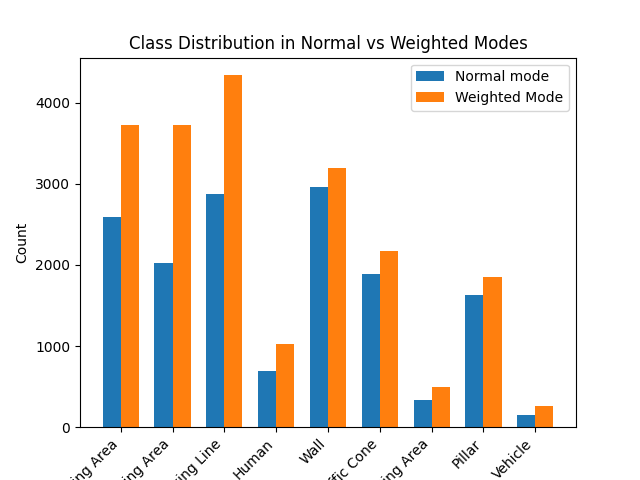
- 결과적으로 Class Weight가 적용되지 않음
원인
- YOLO 학습 알고리즘 내부적으로 Class Weight를 적용하는 부분이 존재함
- Monkey-Patch와의 충돌로 정상작동하지 않음
3. 해결 방안
- 본 프로젝트의 목표가 주차공간 검출이라는 점
- Driving Area / Parking Area 등의 영역은 소수 클래스라는 점
- YOLOv8-seg 모델은 영역보다는 객체의 segmentation 검출에 특화되어 있다는 점
소수이지만 중요도가 높은 Driving Area / Parking Area를 영역검출에 특화된 모델인 Segformer로 학습하여 YOLOv8-seg와 병합
객체검출 - YOLOv8-seg / 영역검출 - Segformer