도입 배경
프로젝트 마무리 후 회고를 진행하면서 QA 팀에서 QA 진행 시에 수정/변경 사항을 확실하게 파악할 수 있는 문서가 있으면 좋겠다는 의견을 주었다.
그리고 QA 기간 중에 수정/변경 사항을 하루에 모아서 배포를 진행해달라는 요청이 있었다.
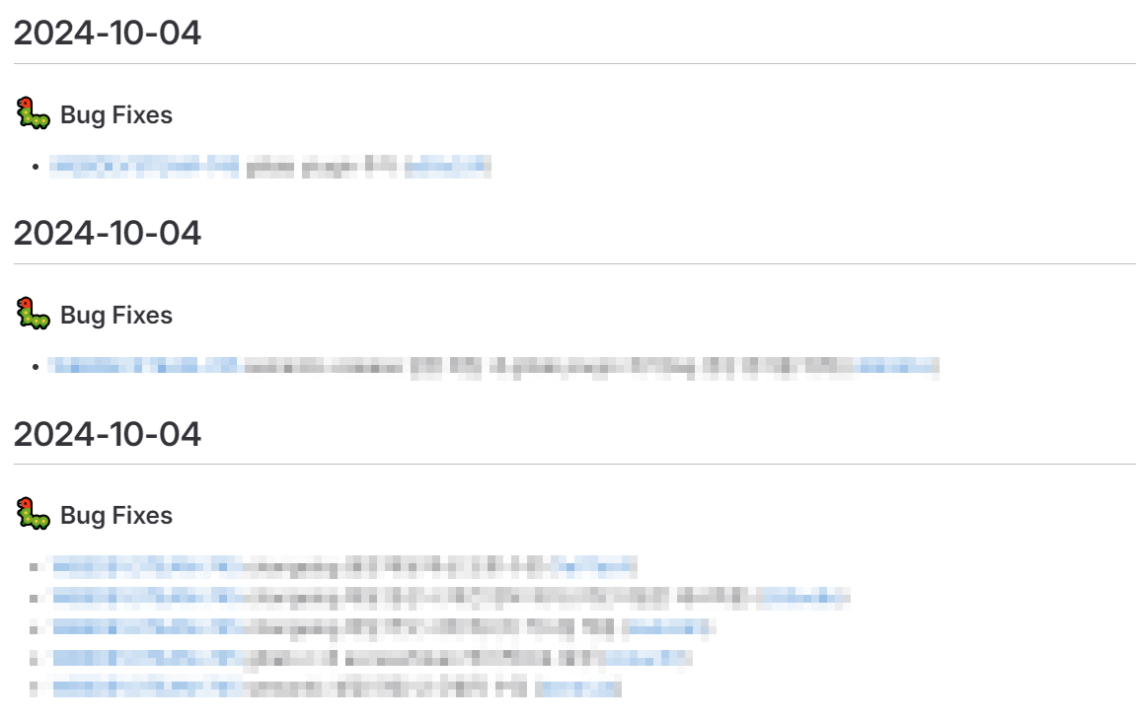
위 요청을 기반으로 보면 그날 배포된 커밋 내역을 각 타입별로 확인할 수 있는 문서가 자동으로 생성되면 좋겠다고 생각이 들었다.
이 문서를 QA팀에 전달하면 어떤 사항이 정확히 어떻게 변경되어 있는 지 파악할 수 있을 것이다.
이를 먼저 standard-version 도입을 고려했으나 공식 문서를 보니 deprecated 되었다고 해서 대체재로 semantic-release를 도입했다.
적용한 환경은 Gitlab이고 ci 환경에서 CHANGELOG.md 파일이 생성되도록 했다.
semantic-release에 대해
semantic-release는 소프트웨어 릴리스 자동화 도구로, Semantic Versioning(SemVer) 규칙에 따라 버전 관리와 릴리스 프로세스를 자동으로 처리해준다.
그러면 여기서 말하는 Semantic Versioning이 뭘까?
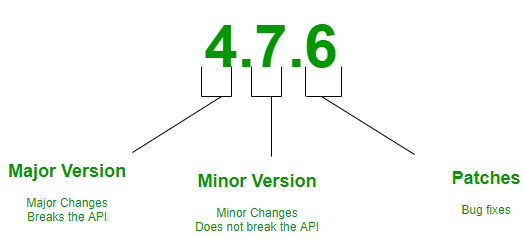
출처: https://www.geeksforgeeks.org/introduction-semantic-versioning/
Semantic Versioning (유의적 버전 관리)는 소프트웨어 버전 번호에 의미를 부여하여, 버전 번호만 보고도 소프트웨어의 변경 사항과 호환성을 쉽게 파악할 수 있게 하는 방식다. SemVer라고도 불리며, 3개의 숫자로 구성된 버전 체계를 사용한다 - MAJOR.MINOR.PATCH
-
MAJOR (주 버전): 호환되지 않는 변경 사항이 있을 때 증가(API에 호환되지 않는 변경 사항이 포함된 경우 사용) -
MINOR (부 버전): 기능이 추가되었지만 기존 기능과 호환될 때 증가 -
PATCH (패치 버전): 버그 수정이나, 기존 기능의 동작을 변경하지 않고 호환성을 유지하는 수정이 있을 때 증가 (소프트웨어의 동작에는 변화가 없고, 기존 기능의 안정성을 높이는 변경 사항)
설치
npm install --save-dev semantic-release
yarn add -D semantic-release
pnpm add -D semantic-release
위 모듈 설치 시에 아래의 플러그인이 자동으로 설치된다.
- @semantic-release/commit-analyzer - 커밋 메시지 분석 플러그인
- @semantic-release/release-notes-generator - 분석된 커밋 메시지 기반으로 릴리즈 노트를 생성하는 플러그인
- @semantic-release/npm - package.json에 버전을 수정하고 npm에 배포하게 해주는 플러그인
만약, Gitlab 내 release를 생성하고 싶다면 아래 모듈을 설치해야 한다.
npm install --save-dev @semantic-release/gitlab
yarn add -D @semantic-release/gitlab
pnpm add -D @semantic-release/gitlab
그리고 ChangeLog를 생성하고 커밋을 하기 위해 다음 모듈 설치가 필요하다.
- @semantic-release/git - 변경된 파일을 GIt에 커밋하고 푸시하는 역할 (CHANGELOG.md을 커밋, 푸시할 것이다.)
- @semantic-release/changelog - CHANGELOG.md를 생성해준다.
npm install --save-dev @semantic-release/git @semantic-release/changelog
yarn add -D @semantic-release/git @semantic-release/changelog
pnpm add -D @semantic-release/git @semantic-release/changelogconventionalcommits을 적용하기 위해 다음 모듈도 설치해준다.
npm install --save-dev conventional-changelog-conventionalcommits
yarn add -D conventional-changelog-conventionalcommits
pnpm add -D conventional-changelog-conventionalcommits
Configuration 생성/설정
semantic-release에 대한 설정은 다음과 같은 방법으로 적용할 수 있다. (참고)
-
.releaserc파일- 설정 파일을 YAML 또는 JSON 형식으로 작성할 수 있으며, 다음 확장자를 사용할 수 있음:
.yaml,.yml,.json,.js,.cjs,.mjs
- 설정 파일을 YAML 또는 JSON 형식으로 작성할 수 있으며, 다음 확장자를 사용할 수 있음:
-
release.config.(js|cjs|mjs)파일- JavaScript 파일로 설정을 정의할 수 있으며, 해당 파일은 객체를 export 해야 함.
- 사용 가능한 확장자:
.js,.cjs,.mjs
-
package.json의release키- 프로젝트의
package.json파일에release키를 추가하여 설정을 직접 포함할 수 있음.
- 프로젝트의
{
  "branches": ["release/*"], // 해당 브랜치에 push할 때 workflow 실행
  "plugins": [
    ["@semantic-release/commit-analyzer",
      {
        "preset": "conventionalcommits",
        "releaseRules": [
          { "type": "build", "release": false },
          { "type": "chore", "release": false },
          { "type": "ci", "release": false },
          { "type": "docs", "release": false },
          { "type": "feat", "release": "minor" },
          { "type": "fix", "release": "patch" },
          { "type": "perf", "release": "patch" },
          { "type": "refactor", "release": "patch" },
          { "type": "revert", "release": "patch" },
          { "type": "style", "release": "patch" },
          { "type": "test", "release": false }
        ]
      }
    ],
    ["@semantic-release/release-notes-generator",
      {
        "preset": "conventionalcommits", // conventional-changelog-conventionalcommits를 설치 후 적용
        "presetConfig" : {
          "types": [
            { "type": "build", "section":"Build System", "hidden": true},
            { "type": "feat", "section": "Features", "hidden": false },
            { "type": "fix", "section": "Bug Fixes", "hidden": false },
            { "type": "perf", "section": "Performance", "hidden": false },
            { "type": "refactor", "section": "Refactor", "hidden": false },
            { "type": "docs", "section": "Docs", "hidden": false },
            { "type": "style", "section": "Styles", "hidden": false },
            { "type": "revert", "section": "Reverts", "hidden": false },
            { "type": "ci", "section": "CI/CD", "hidden": false },
            { "type": "test", "section": "Tests", "hidden": true },
            { "type": "chore", "section": "Chores", "hidden": true }
          ]
        },
        "writerOpts": {
          "headerPartial": "# {{date}}" // 버전을 필요 없기 때문에 날짜값만 제목에 생성되도록 적용
        }
      }
    ],
    [
      "@semantic-release/changelog",
      {
        "changelogFile": "CHANGELOG.md" // 파일 생성
      }
    ],
    [
      "@semantic-release/git",
      {
        "assets": ["CHANGELOG.md"],
        "message" : "chore: Update CHANGELOG.md [skip ci]" // ChangeLog 변경 했을 때 입력된 커밋 메시지 사전 정의
      }
    ]
  ]
}
semantic-release 설정 파일 분석해보자.
1. branches: ["release/*"]
- 이 설정은
release/*패턴으로 시작하는 브랜치에 push가 발생할 때만semantic-release워크플로우가 실행되도록 지정한 것이다.
2. plugins: 플러그인 설정
이 섹션은 릴리즈 워크플로우에서 사용하는 플러그인들을 정의한 것이다.
a. @semantic-release/commit-analyzer
- 커밋 메시지를 분석하여 릴리즈의 종류를 결정하는 플러그인이다. 주로 커밋 메시지의 타입에 따라 버전 업그레이드 여부를 결정한다.
preset:conventionalcommits규칙을 따르는 것이다.- 이 규칙은 커밋 메시지를
feat,fix,chore등의 타입으로 명시하는 표준을 따른다.
- 이 규칙은 커밋 메시지를
releaseRules: 커밋 타입에 따라 릴리즈 여부를 결정하는 규칙이다.build,chore,ci,docs,test: 릴리즈를 생성하지 않음 (release: false).feat: minor 버전 업데이트 (새로운 기능 추가).fix,perf,refactor,revert,style: patch 버전 업데이트 (버그 수정 또는 성능 개선).
b. @semantic-release/release-notes-generator
- 릴리즈 노트를 생성하는 플러그인이다. 커밋 메시지를 바탕으로 릴리즈 노트를 자동으로 생성한다.
preset:conventionalcommits를 기반으로 릴리즈 노트를 생성한다.presetConfig: 커밋 메시지 타입을 섹션으로 나누어 관리한다.feat: "Features" 섹션에 추가되고, 숨겨지지 않는다.fix: "Bug Fixes" 섹션에 추가되고, 숨겨지지 않는다.chore,build,test등은 섹션에 포함되지만, 릴리즈 노트에서는 숨김 (hidden: true)이다.
writerOpts: 릴리즈 노트의 헤더에서 날짜만 표시되도록 설정한다. 버전 정보는 필요하지 않기 때문에 날짜만 제목에 사용된다.
c. @semantic-release/changelog
- CHANGELOG.md 파일을 자동으로 업데이트하는 플러그인이다.
changelogFile: 릴리즈 노트가 작성될 파일을 명시한다. 이 설정에서는CHANGELOG.md파일에 모든 릴리즈 노트가 기록된다.
d. @semantic-release/git
- Git 커밋 및 푸시 작업을 처리하는 플러그인이다.
assets: 변경된CHANGELOG.md파일을 Git에 푸시한다.message: Git에 커밋할 때 사용하는 메시지를 미리 정의해둔 것이다.chore: Update CHANGELOG.md [skip ci]: CI/CD 파이프라인을 다시 실행하지 않도록[skip ci]를 추가한 커밋 메시지이다.
그 후 gitlab-ci 파일 내에서 배포가 된 후 semantic-release를 실행하도록 스크립트를 추가했다.
deploy:
    stage: deploy
    variables:
      GIT_CLEAN_FLAGS: none
    script:
      - npm -g install pnpm
      - pnpm run change-npm-repo
      - pnpm deploy:$ZONE
      - apk add --no-cache git //alpine 이미지에서 git 설치를 위한 명령어
      - npx semantic-release
    parallel:
      matrix:
        - ZONE: [ 'alpha', 'cpdev', 'real' ]
    when: manual
    only:
      refs:
        - /^release\/.*$/
alpine docker 이미지에서의 git 설치 방법 참고: https://github.com/nodejs/docker-node/issues/586
Gitlab AccessToken 생성
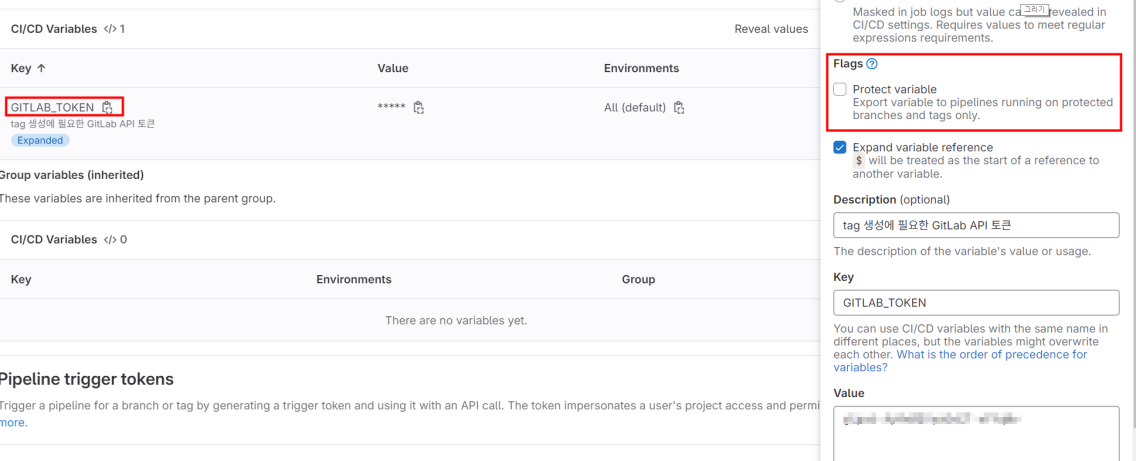
@semantic-release/git이 커밋을 하고 @semantic-release/gitlab이 release를 생성하기 위해서는 접근 권한이 필요하다.
1. Settings > Access Tokens 접근 후 생성

2. Settings > CI/CD > Variables > "GITLAB_TOKEN" 이름으로 Access Tokens 값 저장
- 등록 변수 이름은
GL_TOKEN또는GITLAB_TOKEN로 설정하면 된다.(참고)
결과 확인
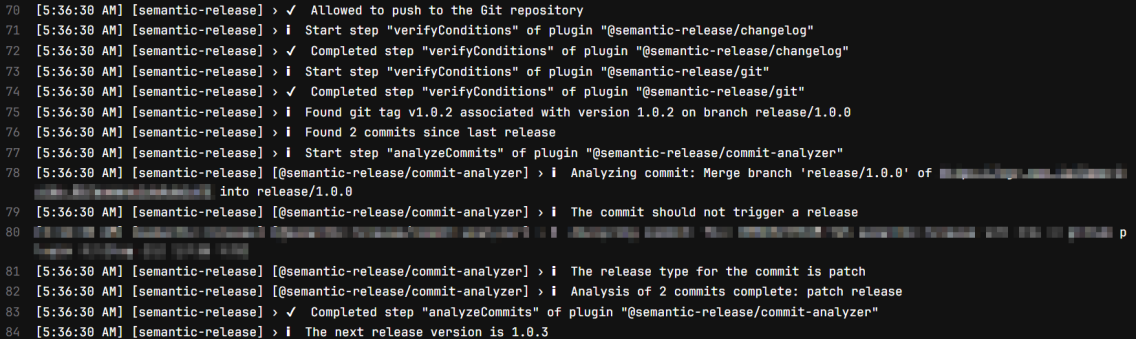
커밋 메시지 분석
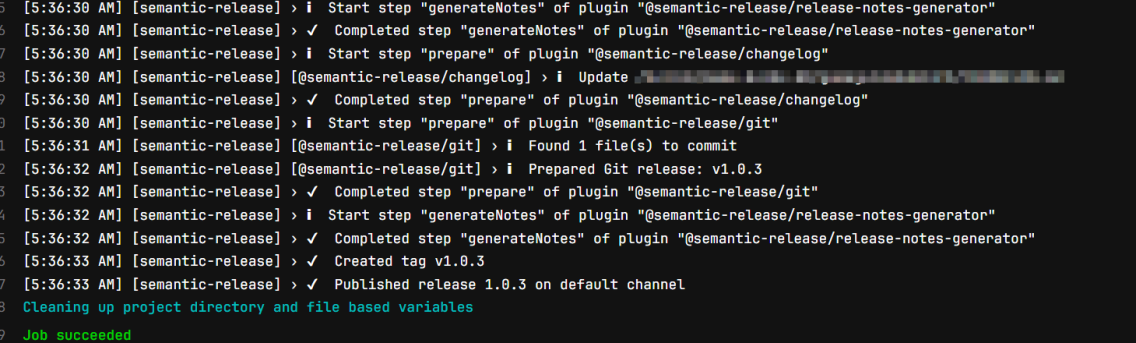
CHANGELOG.md 업데이트 후 커밋, release 노트 생성
생성된 CHANGELOG.md 파일 확인