목표
1. paymentwall에서 사용하는 API 조사 & 비교 (subscription 중심)
- Checkout API
- Direct API - Brick Direct API
- 사용할 API 선택
1. Checkout API
1-1. checkout API 구성
- 제품 상세 페이지
- 고객이 사용하기 원하는 결제 수단들
- 유저 인터페이스 (결제 페이지의 스타일)
1-2. 결제 플로우
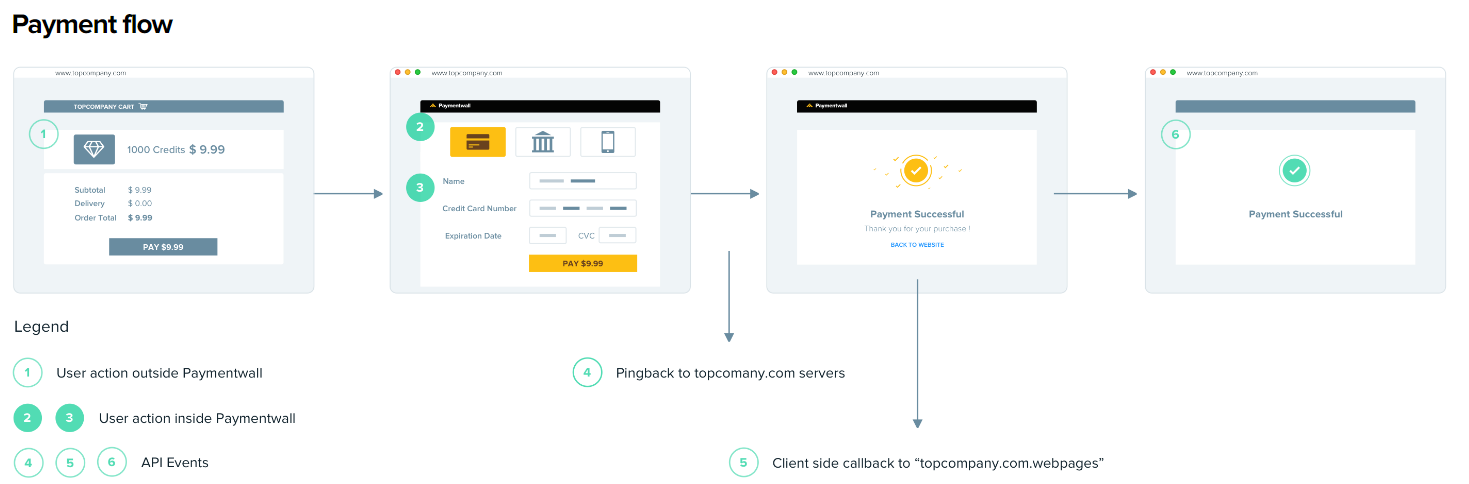
1) 상품 고르기
- payment page를 위한 리퀘스트에 상품 정보를 담아서 보냅니다.
2) 결제 수단 고르기
- 모든 결제 수단을 이용하고 싶다면 pament page 리퀘스트에 ps=all 을 할당할 수 있습니다.
- 유저의 IP에 따라서 결제 수단이 결정됩니다.
- 참고 링크 : https://docs.paymentwall.com/payment-method/credit-card
3) 결제페이지 보여주기
- payment page를 iframe에 넣습니다.
- 독립된 페이지로 redirect하여 보여줍니다.
- 고객은 payment page에서 결제 정보를 넣고 checkout을 진행할 수 있습니다.
4) Pingback
- 고객이 결제를 마치면 결제 안내를 보내줍니다.
- transaction id (reference id/ref 라고 불립니다)와 각 결제에 대한 최종 결제 상태가 보내집니다.
- type 속성은 결제상태의 변경에 따라 확인됩니다.(예: type=0 은 결제 성공입니다.)
- 당신의 서버는 Pingback을 처리하고 그에 따른 서비스 제공을 처리해야합니다.
- 동시에 transaction id(ref) 는 환불이나 입금취소의 경우를 대비하여 당신의 database에 저장되어야합니다.
5) Client-side callback
- Paymentwall은 고객이 결제를 하면 window.postMessage() 매카니즘을 사용하여 client-side callback 을 보냅니다.
- 참고 링크 : https://docs.paymentwall.com/reference/client-side-callback
6) 결제 성공 페이지로 이동시키기
- optional parameter로 success_url 를 보내세요.
1-3. Configuration
대쉬보드에서 당신의 프로젝트 환경을 설정하세요.
- Settings에서 Your API를 Checkout API로 선택하세요.
- Settings에서 Pingback url을 삽입하세요.
- Payment System에서 결제 수단 서비스 범위를 조절하세요.
- Widgets에서 선호하는 인터페이스를 생성하세요. (참고 링크 : https://docs.paymentwall.com/reference/widgets)
- Region, Offers, Products는 환경설정을 하지 않아도 됩니다.
1-4. Subscription (구독)
- 고객은 subscription schedule에 따라 지불하게 될 것입니다. product length를 1달로 설정한 경우에 고객은 다음 달의 동일한 날짜에 지불하게 될 것입니다. 예를 들어, 2월 1일에 결제했다면 다음 결제일은 3월 1일입니다.
- 공제 기간이 정확히 설정되어야하며, 구독 기간의 총 길이는 6개월을 넘겨서는 안됩니다.
1) 결제 페이지를 build
- payment link는 widget 오브젝트를 통해 만들어집니다.
- single payment method / all payment method의 차이는 ps 파라미터 값으로 정해집니다.
- 다른 파라미터에 대해 알고 싶다면 다음 링크를 참고하세요 : https://docs.paymentwall.com/apis#section-checkout-subscription
2) Handle pingback
- 고객이 결제할 때마다 pingback이 보내집니다.
- 서버사이드에서 Pingback을 처리하려면 다음과 같은 코드를 삽입해야 합니다.
import com.paymentwall.java.*;

Config.getInstance().setLocalApiType(Config.API_GOODS);
Config.getInstance().setPublicKey("YOUR_PROJECT_KEY");
Config.getInstance().setPrivateKey("YOUR_SECRET_KEY");

Pingback pingback = new Pingback(request.getParameterMap(), request.getRemoteAddr());
if (pingback.validate(true)) {
    String goods = pingback.getProductId();
    String userId = pingback.getUserId();
    if (pingback.isDeliverable()) {
        // deliver Product to user with userId
    } else if (pingback.isCancelable()) {
        // withdraw Product from user with userId
    }
    return "OK";
} else {
    return pingback.getErrorSummary();
}- 자체 parameter추가도 가능합니다. 참고링크 : https://docs.paymentwall.com/reference/pingback/custom-parameter
- 디폴트 포맷은 다음과 같습니다.
http://www.yourserver.com/pingback_path?uid=pwuser&goodsid=gold_membership&slength=3&speriod=day&type=0&ref=b1493048890&sign_version=2&sig=d94b23ba8585f29978706dd1b153ead9- pingback을 확인한 후 서버는 항상 전송 프로세스를 진행하고 응답 본문에서 OK로만 응답할 수 있습니다.
- 사용자가 자금이 부족하거나 다른 이유로 결제에 실패할 경우, Paymentwall은 2회 재시도(총 3회)하여 사용자에게 요금을 청구합니다.
- 모든 시도가 실패하면 구독이 중지됩니다. 그리고 일단 중단되면, 더 이상 사용자에게 다음 예정된 지불에 대한 요금을 청구하는 시도를 하지 않습니다.
- 이 경우 Paymentwall은 type=14 의 pingback을 전송합니다. 이는 해당 반복 청구 결제가 실패했음을 의미합니다.
3) Client-side action
- optional parameter로 success_url 를 보내거나 Client-side Callback 을 이용하세요.
4) Implement Delivery Confirmation API
- Delivery Confirmation API를 사용하면 구매한 항목이 사용자에게 성공적으로 배달되었음을 paymentwall에 알릴 수 있습니다. 이 정보는 분쟁 사례 및 환불 요청을 가장 빠르고 효율적으로 해결하는 데 도움이 됩니다.
- custrom HTTPS header "X-ApiKey"로 secret key를 전송합니다.
private void sendPost() {

    HttpPost post = new HttpPost("https://api.paymentwall.com/api/delivery");
    post.addHeader("X-ApiKey", “<PROJECT_SECRET_KEY>”);

    // add request parameter, form parameters
    List<NameValuePair> urlParameters = new ArrayList<NameValuePair>();
    urlParameters.add(new BasicNameValuePair("payment_id", "b199488072"));
    urlParameters.add(new BasicNameValuePair("merchant_reference_id", "w199488072"));
    urlParameters.add(new BasicNameValuePair("type", "digital"));
    urlParameters.add(new BasicNameValuePair("status", "order_placed"));
    urlParameters.add(new BasicNameValuePair("estimated_delivery_datetime", "2015/01/15 15:00:00 +0300"));
    urlParameters.add(new BasicNameValuePair("estimated_update_datetime", "2015/01/15 11:00:00 +0300"));
    urlParameters.add(new BasicNameValuePair("refundable", "true"));
    urlParameters.add(new BasicNameValuePair("details", "Item was delivered to the user account and via email"));
    urlParameters.add(new BasicNameValuePair("shipping_address[email]", "test@paymentwall.com"));
    urlParameters.add(new BasicNameValuePair("reason", "none"));
    urlParameters.add(new BasicNameValuePair("attachments[0]", "@/usr/local/www/content/proof/b63400368/1.png"));
    urlParameters.add(new BasicNameValuePair("attachments[1]", "@/usr/local/www/content/proof/b63400368/2.png"));

    try {
        post.setEntity(new UrlEncodedFormEntity(urlParameters));
        CloseableHttpClient httpClient = HttpClients.createDefault();
        CloseableHttpResponse response = httpClient.execute(post);
        System.out.println(EntityUtils.toString(response.getEntity()));
    }
    catch(IOException ex) {
        System.out.println(ex.getMessage());
    }

}
1-5. API reference
1) Endpoint
GET https://api.paymentwall.com/api/subscription2) Sample Request
Config.getInstance().setLocalApiType(Config.API_GOODS);
Config.getInstance().setPublicKey("YOUR_PROJECT_KEY");
Config.getInstance().setPrivateKey("YOUR_SECRET_KEY");

WidgetBuilder widgetBuilder = new WidgetBuilder("USER_ID", "p1");

widgetBuilder.setProduct(
    new ProductBuilder("YOUR_PRODUCT_ID") {
    {
        setAmount(0.99);
        setCurrencyCode("USD");
        setName("YOUR_PRODUCT_NAME");
        setProductType(Product.TYPE_SUBSCRIPTION);
        setPeriodType("month");
        setPeriodLength(3);
    }
}.build());

widgetBuilder.setExtraParams(new LinkedHashMap<String, String>(){
{
    put("email", "YOUR_CUSTOMER_EMAIL");
    put("history[registration_date]","REGISTRATION_DATE");
    put("ps","all"); // Replace it with specific payment system short code for single payment methods
}
});

Widget widget = widgetBuilder.build();

return widget.getUrl();
3) Parameters
- key(필수, string) : Merchant Area→ My Projects 에 있는 프로젝트 키
- uid(필수, string) : 고객 아이디 (최대 64자)
- widget(필수, string) : 위젯 코드. 프로젝트의 위젯 섹션에서 얻을 수 있습니다.
- email(필수, string) : 고객의 이메일. 결제가 성공하면 paymentwall이 자동으로 영수증을 이메일로 보내줍니다.
- history[registration_date](필수, string) : 등록 날짜의 Unix 타임스탬프. 길이 제한은 10입니다.
- amount(필수, double) : 제품의 양입니다. 최소 거래 한도는 USD 0.3 또는 그에 상응하는 다른 통화입니다. 소수점 이하 2자리가 필요합니다.
- currencyCode(필수, string) : 제품의 통화 코드입니다. ISO 4217.3 문자로 포맷합니다.
참고 : https://ko.wikipedia.org/wiki/ISO_4217 - ag_name(필수, string) : 제품 이름. 최대 길이는 256입니다.
- ag_external_id(필수, string) : 제품의 ID. Reference ID를 설정할 수도 있습니다. pingback을 통해 goodsid 매개 변수로 다시 전달됩니다. 최대 길이는 256입니다.
- ag_type(필수, string) : 제품의 결제 유형입니다. 구독의 경우 subscription으로 설정해야 합니다.
- ag_period_length(필수, string) : 구독 기간의 길이입니다.
- ag_period_type(필수, string) : 구독 기간의 유형입니다. day/week/month/year 유형으로 설정해야 합니다.
- ag_recurring(필수, integer) : 값은 1 또는 0. 제품이 반복되고 있는지 여부입니다. 제품이 trial이면 항상 1이어야 합니다. 기본적으로 정기 청구는 기간이 3일 이상 1년 미만인 제품에 대해서만 지원됩니다.
- ag_trial(integer) : 값은 1 또는 0(1은 trial)일 수 있습니다. trial이 활성화된 경우 * 가 포함된 파라미터가 필요합니다.
- post_trial_amount*(double) : trial 사용 기간 후 제품의 금액입니다. 소수점 이하 2자리를 요구합니다.
- post_trial_currencyCode*(string) : trial 사용 기간 후 제품의 통화 코드입니다. ISO 4217.3 문자로 포맷합니다.
- ag_post_trial_name*(string) : trial 사용 기간 이후의 제품 이름입니다. 최대 길이는 256입니다.
- ag_post_trial_external_id*(string) : trial 사용 기간 후 제품의 ID입니다. 최대 길이는 256입니다.
- ag_post_trial_period_type*(string) : trial 사용 기간 후 제품의 구독 기간 유형입니다. day/week/month/year 유형으로 설정해야 합니다.
- ag_post_trial_period_length*(integer) : trial 사용 기간 후 제품에 대한 가입 기간입니다.
- ps(필수, string) : 결제 페이지에 표시할 결제 방법을 결정합니다. 소문자여야 합니다. Paymentwall에서 제공하는 결제수단의 선택양식을 사용하고 싶다면 all로 설정하세요. 결제수단코드는 결제시스템 단축코드를 참고하세요.
- sign_version(필수, string) : 서명 버전입니다. 버전 2는 MD5를 사용하고 버전 3은 SHA256을 나타냅니다.
- sign(필수, string lowercase) : 위젯의 서명입니다. 자세한 내용은 signature calculation을 참조하십시오.
2. Direct API
2-1. Brick Direct
brick은 paymentwall이 제공하는 순수 신용카드 결제 솔루션입니다. 호스팅된 체크아웃 경험을 위한 신용카드 게이트웨이로서 Widget API와 Checkout API에 통합되었습니다.
1) Integration
1-1) payment form 생성
다음의 파라미터들을 얻기 위해 default form 을 사용 할 지, own form을 사용할 지 선택할 수 있습니다.
- Onetime token
접두사 o_로 시작하는 생성된 34비트 문자열(예: o_6da4e28d335c62700342fdd0a03a1d2).
5분 동안만 유효합니다. - Fingerprint
Brick.js 가 지불 위험을 위해 생성한 32비트 문자열 (예: slZbOOhPlyDQKoyYBKDJ7dpDslaCer).
이 두 파라미터를 백엔드로 전송해야 합니다.
a. 지불 세부 정보를 default form으로 토큰화하기
<!-- Brick Form -->
<script type="text/javascript" src="https://api.paymentwall.com/brick/build/brick-default.1.5.0.min.js"></script>

<!--  id를 사용하여 div 태그를 생성하고 별도의 script의 있는 'container'값에 id를 넣어 일치시켜주세요. -->
 <div id="payment-form-container"></div>

 <!-- 당신의 Brick project key를 'publick_key'에 넣어주세요.-->
   <script>
    var brick = new Brick({
      public_key: 'YOUR_PUBLIC_KEY', // please update it to Brick live key before launch your project
      amount: 9.99,
      currency: 'USD',
      container: 'payment-form-container',
      action: '/YOUR-CHARGE-ACTION',
      form: {
        merchant: 'Paymentwall',
        product: 'Gold Membership',
        pay_button: 'Pay',
        show_zip: true, // show zip code
        show_cardholder: true // show card holder name
      }
    });

    brick.showPaymentForm(function(data) {
      // handle success
    }, function(errors) {
      // handle errors
    });
  </script>
Brick objcect는 결제 세부 정보를 수집하고 fingerprint 생성 및 토큰화를 자동으로하도록 해줍니다.
b. 지불 세부 정보를 own form으로 토큰화하기
<!--html tags-->
  <form id="brick-creditcard-form" action="billing.php" method="POST">
    <input name="custom_parameter" type="hidden" value="custom_value"/>
    <div>
      <label>
        <span>Card number</span>
        <input data-brick="card-number" type="text" id="card-number"/>
      </label>
    </div>
    <div>
      <label>
        <span>Card expiration</span>
        <input data-brick="card-expiration-month" type="text" size="2" id="card-exp-month"/> /
        <input data-brick="card-expiration-year" type="text" size="4" id="card-exp-year"/>
      </label>
    </div>
    <div>
      <label>
        <span>Card CVV</span>
        <input data-brick="card-cvv" type="text" id="card-cvv"/>
      </label>
    </div>
    <button type="submit">Submit</button>
  </form>

  <!-- 토큰화를 구현하기 위한 Brick.js를 포함합니다. 이렇게 하면 신용카드 정보를 토큰화할 필요가 없습니다.
  https://api.paymentwall.com/brick/에서 직접 로드할 수 있습니다. -->
  <script type="text/javascript" src="https://api.paymentwall.com/brick/brick.1.4.js"></script>

  <!-- 다음 단계는 새 스크립트 태그를 생성하여 Brick object를 선언하고
  Dashboard에서 찾을 수 있는 Brick 키로 API 자격 증명을 설정하는 것입니다.
  jQuery를 사용합니다. -->
  <script>
    var $form = $('#brick-creditcard-form');
    var brick = new Brick({
      public_key: 't_365891948ea844de751301cbcc1897', // please update it to Brick live key before launch your project
      form: { formatter: true }
    }, 'custom');
  </script>

  <!-- 토큰화를 구현하고 당신의 서버에 정보를 보내려면 이 스크립트를 추가하여 지불 세부 정보를 수집해야 합니다. -->
  <script>
    $form.submit(function(e) {
    e.preventDefault();

    $form.find('button').prop('disabled', true); // prevent repeat click

    brick.tokenizeCard({ // Tokenize payment details
      card_number: $('#card-number').val(),
      card_expiration_month: $('#card-exp-month').val(),
      card_expiration_year: $('#card-exp-year').val(),
      card_cvv: $('#card-cvv').val()
    }, function(response) {
      if (response.type == 'Error') { // faile to create token
        // handle errors
      } else { // token created successfully
        $form.append($('<input type="hidden" name="brick_token"/>').val(response.token));
        $form.append($('<input type="hidden" name="brick_fingerprint"/>').val(Brick.getFingerprint()));
        $form.get(0).submit(); // submit token and fingerprint to your server
      }
    });

    return false;
  });
  </script>
1-2) Subscription
a. subscription request
백엔드에서 one-time token 및 fingerprint를 수집한 것으로 가정합니다. 파라미터 형식은 subscription API를 참조하세요.
JAVA
Config.getInstance().setPublicKey("YOUR_PUBLIC_KEY");
Config.getInstance().setPrivateKey("YOUR_PRIVATE_KEY");

LinkedHashMap<String, String> subscriptionmap = new LinkedHashMap<String, String>();

subscriptionmap.put("token", request.getParameter("brick_token"));
subscriptionmap.put("email", request.getParameter("email"));
subscriptionmap.put("currency", "USD");
subscriptionmap.put("amount", "9.99");
subscriptionmap.put("description", "YOUR-DESCRIPTION");
subscriptionmap.put("fingerprint", request.getParameter("brick_fingerprint"));
subscriptionmap.put("plan", "YOUR-PRODUCT-ID");
subscriptionmap.put("period", "week");
subscriptionmap.put("period_duration", "1");

Subscription subscription = new Subscription();
subscription = (Subscription) subscription.create(subscriptionmap);
b. trial period 설정
고객에게 trial 사용 기간을 제공하려면 제품에 trial 제품을 추가할 수 있습니다.
JAVA
Config.getInstance().setPublicKey("YOUR_PUBLIC_KEY");
Config.getInstance().setPrivateKey("YOUR_PRIVATE_KEY");

LinkedHashMap<String, String> subscriptionmap = new LinkedHashMap<String, String>();

subscriptionmap.put("token", request.getParameter("brick_token"));
subscriptionmap.put("email", request.getParameter("email"));
subscriptionmap.put("currency", "USD");
subscriptionmap.put("amount", "9.99");
subscriptionmap.put("description", "YOUR-DESCRIPTION");
subscriptionmap.put("fingerprint", request.getParameter("brick_fingerprint"));
subscriptionmap.put("plan", "YOUR-PRODUCT-ID");
subscriptionmap.put("period", "week");
subscriptionmap.put("period_duration", "1");

subscriptionmap.put("trial[amount]", "0.5");
subscriptionmap.put("trial[currency]", "USD");
subscriptionmap.put("trial[period]", "day");
subscriptionmap.put("trial[period_duration]", "3");
Subscription subscription = new Subscription();
subscription = (Subscription) subscription.create(subscriptionmap);
c. Subscription response object
subscription request가 성공적으로 수행되면 subscription의 세부 정보가 포함된 subscription response object를 받게 됩니다. subscription response attributes를 참고하세요.
각 subscription에는 subscription histroy의 결제를 나타내는 여러 개의 charge id가 있습니다. paymentwall 즉시 결제 알림, pingback은 subscription request가 이루어지면 즉시 전송됩니다. 당신의 배송은 pingback의 type 에 따라 수행되어야 합니다. 또한 자신의 매개 파라미터를 subscription request의 추가 파라미터로 정의할 수 있으며, 이 파라미터는 결제 요청의 투명한 전송을 위한 custom pingback 파라미터로 설정할 수 있습니다.
d. Subscription Schedule
사용자가 Subscription을 통해 처음 결제하면 Subscription이 만료될 때까지 반복 청구할 수 있습니다. Subscription Schedule에 따라 사용자에게 자동으로 요금을 부과합니다. 사용자가 청구될 때마다 새 pingback이 전송됩니다. 마지막 요금 청구가 발생하면 Paymentwall은 가입이 만료되었음을 의미하는 type=13 의 pingback을 전송합니다.
e. Subscription failure
사용자가 자금이 부족하거나 다른 이유로 결제에 실패할 경우, Paymentwall은 2회 재시도(총 3회)하여 사용자에게 요금을 청구합니다. Payment Status API는 Subscription의 활성 상태를 보고하고 date_next는 다음 시도 날짜를 포함합니다. 모든 시도가 실패하면 Paymentwall이 Subscription을 중지합니다. Subscription이 중지되면 다음 예약된 지불에 대해 사용자에게 요금을 청구하는 시도가 더 이상 처리되지 않습니다. 이 이벤트의 경우 Paymentwall은 type=14 의 pingback을 전송합니다. 이는 구독 결제가 실패했음을 의미합니다.
f. Subscription cancellation
아래 스크립트를 사용하거나 cancellation API를 사용하여 Subscription을 취소할 수도 있습니다.
JAVA
Subscription subscription = new Subscription("SUBSCRIPTION_ID");

subscription = (Subscription)(subscription.cancel());

return subscription.isActive();
1-3) 3D Secure
3D Secure(Visa 인증, MasterCard SecureCode)는 신용 카드 결제를 위한 추가 보안 단계로 사기를 방지하는 데 도움이 됩니다.
a. Enable 3D secure
Subscription request에서 secure=1을 추가 파라미터로 보내면 고객의 카드 발급 은행에서 제공하는 3D secure form으로 고객을 리디렉션할 수 있는 리디렉션 URL이 포함된 response가 옵니다. 3D secure 기능을 구현하려면 다음 조정을 수행해야 합니다.
- 고객에게 3D secure form을 표시하고 secure token을 수집합니다.
- Re-submit charge request를하여 3D secure로 결제를 완료합니다.
b. Collect secure token
결제가 3D secure 결제 단계에 등록되면, 결제자는 3D secure form으로 본인 확인이 필요하며, 이는 본인의 카드 비밀번호 또는 인증 코드가 포함된 SMS 메시지 등이 될 수 있습니다.
고객을 위한 3D secure form을 표시하는 것이 첫 번째 단계입니다. 그 후, 지불자가 두 번째 charge request에 필요한 3D 보안 단계를 완료하면 brick_secure_token과 brick_charge_id가 http request object에 포함됩니다.
결제 양식에 따라 구현 방법이 다릅니다.
default payment form을 사용하는 경우 이 부분은 default payment form 자체로 처리됩니다. 계속하려면 re-submit charge request를 참조하세요.
custom payment form을 선호하는 가맹점의 경우 다음 단계가 필요합니다.
- secure_redirect_url 과 secure_return_method 를 추가하세요.
request에 위의 두 가지 추가 파라미터를 추가해야 합니다.
secure_redirect_url은 3D 보안 단계를 완료한 후 고객이 리디렉션되는 URL입니다.
secure_return_method의 값을 url로 설정해야 html 형식이 아닌 리디렉션 URL을 얻을 수 있습니다.
JAVA
... // your other charge parameters
chargemap.put("secure_redirect_url", "YOUR-SECURE-REDIRECT-URL");
chargemap.put("secure_return_method", "url");
원래 request의 brick_fingerprint 및 brick_firck_url은 secure_finger_url에 포함되어 이후에 두 번째 request로 전달될 수 있어야 합니다. 다음은 샘플입니다.
secure_redirect_url: http://your-domain/your-secure-redirect-url?brick_token=ot_4ca5cbda3D4af3444759e4934dd25717&brick_fingerprint=satiO3yvBDuPMEZUJep4vKuqVav5VxAT3D secure를 활성화하면 리디렉션 URL이 포함된 response object를 얻을 수 있습니다. 아래는 샘플입니다.
{
  "success":0,
  "secure":{
    "redirect":"https:\/\/api.paymentwall.com\/api\/brick\/redirect\/3Ds\/fe989d17-5632-11e7-bfd3-002590852bf4\/44ea915ab53D78f96b3Dd485e7a5f8d2441572876f7a2eb88f5101cb197adcc9"
  }
}
이를 사용하여 고객을 3D secure page로 리디렉션할 수 있습니다. 계속하려면 다음 단계를 참조하십시오.
원래 request에 secure_return_method가 포함되어 있지 않은 경우에만 다음 추가 단계가 필요합니다. URL을 리디렉션하는 대신 3D Secure의 html 형식을 사용할 수 있습니다.
{
  "success":0,
  "secure":{
     "formHTML":"<div><form action=\"https:\/\/api.paymentwall.com\/api\/brick\/secure-test-bank-page?public_key=t_a93Db6bffafdda5c57ab48296fdbba\" method=\"POST\"><input type=\"hidden\" name=\"PaReq\" value=\"to_validate_this\"><input type=\"hidden\" name=\"MD\" value=\"t34451493976105_test\"><input type=\"hidden\" name=\"TermUrl\" value=\"https:\/\/api.paymentwall.com\/api\/brick\/secure-payment?public_key=a3Dff98c34722f0e130a68e6b4c9da56&secure_redirect_url=http%3A%2F%2Fpaymentwall.com%2Fbrick%2F3Dsecure%3Fbrick_token%3Dot_4ca5cbda3D4af3444759e4934dd25717%26brick_fingerprint%3DsatiO3yvBDuPMEZUJep4vKuqVav5VxAT\"><\/form><\/div>"
  }
}
formHTML 속성 값을 얻고 결제 페이지에 삽입하여 직접 제출하면 결과적으로 3D 보안 양식이 새 탭에 표시됩니다.
<script>
  document.getElementById("3Ds_form_container").getElementsByTagName("form")[0].submit();
  // 3Ds_form_container is the place where 3D secure form is embedded in
</script>
당신의 backend에서 상세 3D Secure를 처리하세요.
brick_secure_token 및 brick_charge_id는 지급인이 3D Secure 결제 단계를 확인할 때마다 POST를 통해 secure_redirect_url로 전송되므로 이제 다음 단계를 계속 진행할 수 있습니다. 서버에서 SameSite 쿠키 속성 을 구현하는 경우 Paymentwall은 POST를 통해 brick_secure_token을 전송합니다. secure_redirect_url에 대한 인증이 필요한 경우, Paymentwall에서 사용자를 보낼 때 쿠키가 무시될 수 있습니다. 이 경우에는 secure_redirect_url에 대한 인증을 요구하지 않는 것이 좋습니다.
c. Re-submit charge request
3D Secure이 설정된 결제에는 두 개 이하의 파라미터가 포함된 다른 request가 필요합니다.
- charge_id : 원래 request의 id입니다. request object에 brick_charge_id가 있습니다.
- secure_token : 3D Secure 목적으로 은행에서 발급한 Secure token이 반환되었습니다. request object에 brick_secure_token으로 있습니다.
두 가지 파라미터가 백엔드로 전달되면 두 번째 request에서 이 파라미터들을 직접 추가할 수 있습니다.
JAVA
LinkedHashMap<String,String> chargemap = new LinkedHashMap<String, String>();

... // your original charge request parameters

if (request.getParameter("brick_charge_id")!=null &&request.getParameter("brick_secure_token")!=null){
    chargemap.put("charge_id", request.getParameter("brick_charge_id"));
    chargemap.put("secure_token",request.getParameter("brick_secure_token"));
}
For EMV 3DS (3DS 2.0) you will need to send an additional param reference_id which is collected by Brick.js into original charge request
<?php

// ....

$cardInfo = [
    'token' => $_POST['brick_token'], // Collected by Brick.js when customer click pay
    'fingerprint' => $parameters['brick_fingerprint'], // Collected by Brick.js when customer click pay
    'email' => 'johndoe@test.com',
    'amount' => 9.99,
    'currency' => 'USD',
    'description' => 'Order #123',
    // ....
];

if (isset($_POST['brick_reference_id'])) {
    $cardInfo['reference_id'] = $_POST['brick_reference_id']; // Collected by Brick.js when customer click pay with 3DS 2.0 enabled
}
?>
1-4) Brick Pingback
Brick은 비동기식 결제 알림, pingback을 각 결제에 대한 추가 확인으로 보냅니다.
a. Handle Pingback
당신의 서버에서 다음 코드를 온라인 서버 인터페이스로 설정하여 Pingback과 상호 작용합니다.
JAVA
import com.paymentwall.java.*;

Config.getInstance().setLocalApiType(Config.API_GOODS);
Config.getInstance().setPublicKey("YOUR_PROJECT_KEY");
Config.getInstance().setPrivateKey("YOUR_SECRET_KEY");

Pingback pingback = new Pingback(request.getParameterMap(), request.getRemoteAddr());
if (pingback.validate(true)) {
    String goods = pingback.getProductId();
    String userId = pingback.getUserId();
    if (pingback.isDeliverable()) {
        // deliver Product to user with userId
    } else if (pingback.isCancelable()) {
        // withdraw Product from user with userId
    }
    return "OK";
} else {
    return pingback.getErrorSummary();
}
pingback 요청에는 일반적으로 제품 배달을 수행하는 데 필요한 모든 정보가 포함됩니다. 또한 Paymentwall은 일련의 reverse된 파라미터들을 특정 요구를 위한 custom pingback 파라미터로 제공하며, 파라미터 전송을 구현하기 위해 custom pingback 파라미터로 자체 파라미터를 추가할 수도 있습니다.
다음은 기본 형식의 샘플입니다.
http://www.yourserver.com/pingback_path?uid=pwuser&goodsid=gold_membership&slength=&speriod=&type=0&ref=b1493096790&sign_version=2&sig=d94b23ba8585f29978706dd1b153ead9Brick payment의 pingback types for risk review를 참조하세요.
pingback을 확인한 후 당신의 서버는 항상 배송 프로세스를 진행하고 response의 body에서 OK로만 응답할 수 있습니다.
2) Configuration
Brick이 올바르게 작동하도록 merchant dashboard에서 프로젝트를 구성합니다.
- Settings에서 Your API를 Checkout API로 선택합니다.
- 비동기 알림을 받으려면 Settings에서 Pingback URL을 입력하세요.
- 결제 페이지는 HTTPS를 통해 로드해야 합니다.
- 프로젝트 키와 함께 devsupport@paymentwall.com으로 이메일을 보내 프로젝트에 Brick Direct API를 사용할 수 있도록 하세요.
- Checkout API를 사용하는 동안 Region, Offers 및 Products 섹션을 구성할 필요가 없습니다. 실제 환경에서 Brick을 사용하기 전에 Payment System 섹션에서 신용카드 결제 방법을 활성화했는지 확인하세요.
3) API
Subscription
Private API Key는 이 API를 사용하여 custom HTTPS header X-ApiKey의 값으로 전송됩니다. server-to-server calls에만 사용할 수 있으며 최종 사용자에게 노출되어서는 안 됩니다. 만약 당신이 paymentwall의 API 라이브러리를 사용하고 있다면, 이것은 자동으로 될 것입니다.
parameters
- amount(필수, number) : 청구할 금액. 최소 거래 한도는 USD 0.3 또는 그에 상응하는 다른 통화입니다. 소수점 이하 2자리가 필요합니다.
- currency(필수, string) : 통화 코드. currency codes를 참조하세요.
- browser_ip(string) : 사용자의 IP 주소
- browser_domain(string) : 결제가 발생한 웹 사이트의 도메인
- description(필수, string) : 결제에 대한 설명
- email(필수, string) : 사용자의 email
- history[registration_date] : 트랜잭션 날짜의 Unix 타임스탬프. 길이 제한은 10입니다.
- fingerprint(필수, string) : 각 트랜잭션에 대해 Paymentwall에서 생성된 고유 fingerprint입니다. Brick.js를 사용하면 brick_fingerprint 파라미터가 백엔드로 직접 전송됩니다.
Brick.js를 사용하지 않으면 brick_fingerprint를 얻을 수 없습니다. 이 경우 fingerprint가 더 이상 필요하지 않으므로 대신 browser_ip 및 browser_domain을 사용해야 합니다. 예: Mobile SDK, onetime token API - token(필수, string) : one-time token 또는 permanent token의 값
- customer[firstname](필수, string) : 카드 소유자의 이름
- customer[lastname](필수, string) : 카드 소유자의 성
- lang(string) : 전자 메일 수신 확인 현지화를 위한 언어 코드, ISO alpha-2 형식, 지원되는 언어보기
- options[capture](string) : 즉시 지불을 캡처할지 여부. 기본값은 true입니다. 한 번에 캡처하지 않으려면 options[capture]=0을 전달할 수 있습니다.
- plan(필수, string) : 제품 ID를 식별하고 pingback에서 goodsid 파라미터로 다시 보냅니다.
- period(필수, string) : day/week/month/year
- period_duration(필수, number) : period 파라미터에 언급된 기간 수입니다. 기본적으로 반복되는 최소 기간은 3일입니다. 이 문제는 devsupport@paymentwall.com에 문의하여 조정할 수 있습니다.
- trial[amount](number) : Trial 금액. 무료 trial도 지원됩니다. 무료 trial을 사용하려면 devsupport@paymentwall.com으로 문의하세요.
- trial[currency](string) : trial 상품의 통화 코드
- trial[period](number) : Trial 반복 기간
- trial[period_duration](string) : Trial 기간. 기본적으로 최소 기간은 3일입니다. 이 문제는 devsupport@paymentwall.com에 문의하여 조정할 수 있습니다.
- uid(string) : merchant system의 사용자 id입니다. paymentwall에게 전달해주면 pingbacks에서 uid 파라미터를 다시 보내줍니다. 생략할 경우 Pingback에서 이메일이 uid 파라미터 값이 됩니다.
- custom(array) : request에서 판매자가 정의한 파라미터입니다. Pingback을 통해 이러한 값을 받으려면 custom pingback 파라미터에 name=custom과 value=OWN을 추가하세요.
- tokidoki(boolean) : 던닝 관리와 같은 더 많은 기능을 지원하는 tokidoki 반복 과금 엔진을 사용하려면 custom email reminders를 tokidoki=1로 전달하세요.
3. Checkout API VS Brick Direct API
1) intergration
a. 결제 수단
Checkout API는 ps 파라미터에 따라서 결제 수단을 설정 할 수 있고, 유저의 IP에 따라서 결제 수단이 결정됩니다. 반면 Brick Direct API는 순수 신용카드 결제 솔루션입니다.
b. 결제 페이지
Checkout API는 payment page를 iframe으로 구성하여 redirect하여 보여주고,
Brick Direct API는 html에 payment page 관련 div태그를 만들어 brick.js의 conatiner에 div id값을 넣어주어 생성합니다.
c. pingback
두 API 모두 사용자가 결제를 완료하면 paymentwall로부터 pingback을 받습니다.
자체 parameter추가도 가능합니다.
d. client-side
Checkout API는 window.postMessage() 매카니즘을 사용하여 client-side callback을 보내고 결제 성공 관련 동작을 수행하게 할 수 있습니다.
Brick Direct API는 brick.js를 이용하여 3D Secure을 완료하면 secure_redirect_url에 설정된 url로 redirect하여 결제 성공 관련 동작을 수행할 수 있습니다.
e. 보안
Brick Direct API는 3D Secure 관련 추가 작업이 필요합니다.
2) configuration
dashboard에서의 환경설정
- Your API는 둘 다 동일하게 Checkout API로 설정합니다.
- 둘 다 Pingback을 받으려면 Pingback URL을 설정해줘야합니다.
- Region, Offers 및 Products 섹션을 구성할 필요가 없습니다.
- Checkout API는 Widgets에서 원하는 인터페이스를 생성해줘야합니다.
3) subscription
- Checkout API는 Delivery Confirmation API를 사용하면 구매한 항목이 사용자에게 성공적으로 배달되었음을 paymentwall에 알릴 수 있습니다.
- Brick Direct API는 백엔드에서 brick.js를 통해 생성된 one-time token 및 fingerprint를 수집한 뒤 subscript request를 진행합니다.
- Checkout API와 Brick Direct API 둘 다 체험 기간을 세팅할 수 있습니다.
- 사용자가 자금이 부족하거나 다른 이유로 결제에 실패할 경우의 처리는 둘 다 동일합니다.
(처음 실패 후 2회 재시도, 모든 시도가 실패했을 때 subscription 정지) - subscription 취소 기능을 수행하기 위해서는, Checkout API는 cancellation API를 이용하거나 Dashboard에서 처리할 수 있으며, Brick Direct API는 cancellation API를 이용하거나 관련 JAVA코드를 이용하여 처리할 수 있습니다.
- Brick Direct API는 결제를 완료하기 위해 brick.js를 통한 one-time token과 fingerprint 수집, 3D Secure을 통한 secure token 수집이 필요합니다.
4) 장단점
Checkout API
장점
- paymentwall에서 제공하는 위젯을 사용하기 때문에 비교적 client 작업이 간단합니다.
- 사용자 IP에 따라 로컬라이징된 결제 수단을 이용하도록 할 수 있습니다.
- 3D secure같은 보안 관련 코딩을 하지 않아도 됩니다.
단점
- custom이 자유롭지 않습니다.
Brick Direct API
장점
- 자유롭게 결제폼을 custom할 수 있습니다.
단점
- 3D secure, client 관련 작업이 필요합니다.