QueryDSL 이란?
QueryDSL은 정적 타입을 이용해서 SQL과 같은 쿼리를 생성할 수 있도록 해주는 오픈소스 프레임워크이다. 쿼리를 문자열로 작성하는 것이 아닌, QueryDSL이 제공하는 Fluent API를 이용해 코드 작성의 형식으로 쿼리를 생성할 수 있게 해준다.
Gradle 설정
QueryDSL은 JPA 표준이 아니기 때문에 별도로 라이브러리를 추가해주어야 한다.
plugins {
  id "com.ewerk.gradle.plugins.querydsl" version "1.0.10"
}

dependencies {
  implementation 'com.querydsl:querydsl-jpa'
}

// Q 클래스 생성 경로 설정
def querydslSrcDir = 'src/main/generated'

querydsl {
  jpa = true
  querydslSourcesDir = querydslSrcDir
}

sourceSets {
  main.java.srcDir querydslSrcDir
}

configurations {
  querydsl.extendsFrom compileClasspath
}

compileQuerydsl {
  options.annotationProcessorPath = configurations.querydsl
}
빌드 설정이 끝나고 생각해보니 이렇게 QueryDSL을 사용하려면 별도 라이브러리도 추가해야 하니 번거로운데, 다른 쿼리를 지원하는 방법을 쓰는건 어떤가...\
실제로 사용하는 JPA에서 쿼리를 지원하는 방식은 크게 다음과 같이 정리된다.
- JPQL
- Criteria api
- Native Query
- QueryDSL
그럼에도 불구하고 QueryDSL이 쓰이는 장점들을 예시를 통해서 알아보자.
 @Entity
 @Getter @Setter
 @NoArgsConstructor(access = AccessLevel.PROTECTED)
 @ToString(of = {"id", "username", "age"})
 public class Member {
     @Id
     @GeneratedValue
     @Column(name = "member_id")
     private Long id;
     private String username;
     private int age;
     private String team;
     public Member(String username) {
         this.username = username;
     }
     public Member(String username, int age, String team) {
         this.username = username;
         this.age = age;
         this.team = team;
     }
 }
예시로 사용하고자 하는 Member Entity
QueryDSL로 쿼리를 작성할 때, QType을 이용해 쿼리를 Type-Safe 하게 작성할 수 있다.
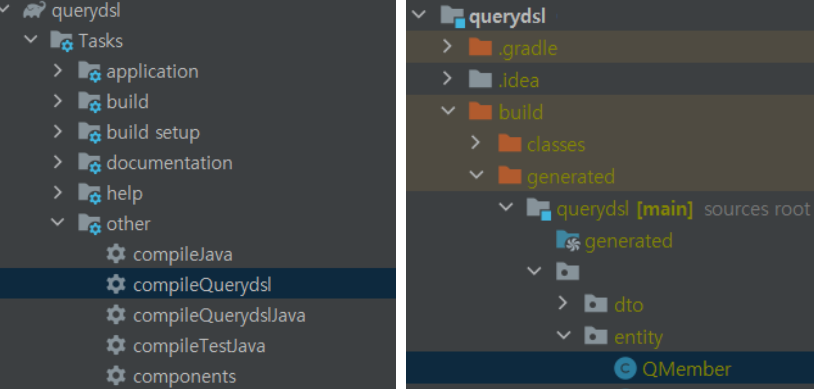
QType 파일을 만들기 위해 위와 같이 Gradle -> Tasks -> other -> complieQuerydsl 을 클릭해준다. 그러면 오른쪽 사진처럼 Q{Entity명}.java로 Qtype이 생성된다.
그리고 Repository에서 다음과 같이 QueryDSL을 이용해서 쿼리를 생성하고 실행할 수 있다.
import com.querydsl.jpa.impl.JPAQueryFactory;
import org.springframework.data.jpa.repository.support.QuerydslRepositorySupport;
import org.springframework.stereotype.Repository;

import javax.persistence.EntityManager;
import javax.persistence.PersistenceContext;

@Repository
public class ProjectRepositoryImpl extends QuerydslRepositorySupport implements ProjectRepositoryCustom {

    @PersistenceContext
    private EntityManager em;

    public ProjectRepositoryImpl() {
        super(Project.class);
    }

    @Override
    public List<Project> findByYearMonthAndWeek(Integer year, Integer month, Integer week) {
        JPAQueryFactory queryFactory = new JPAQueryFactory(em);
        QProject project = QProject.project;

        JPAQuery<Project> query = queryFactory.selectFrom(project);

        if (year != null) {
            query.where(project.createdDate.year().eq(year));
        }

        if (month != null) {
            query.where(project.createdDate.month().eq(month));
        }

        if (week != null) {
            query.where(project.createdDate.week().eq(week));
        }

        return query.fetch();
    }
}
이 예제에서는 'ProjectRepositoryImpl' 클래스에 'findByYearMonthAndWeek' 메서드를 정의하였다. 이 메소드는 year, month, week 매개변수를 이용하여 프로젝트를 조회한다. QueryDSL의 JPAQueryFactory와 QProject를 이용하여 쿼리를 생성하고 실행한다. 년, 월, 주차에 해당하는 필터 조건이 있다면 where 메소드를 이용하여 쿼리에 조건을 추가한다.