요약
신규 팀원 온보딩 자동화 시스템 구축의 첫 번째 단계로, Planning Mode로 전체 구조를 사전 설계하고 CLAUDE.md로 팀 헌법을 작성했다. GitHub, Google Calendar, Gmail, Slack MCP 연결까지 완료했다
개발 기록
환경 준비
cd ~/IdeaProjects
mkdir onboarding-automation
cd onboarding-automation
git init
mkdir -p .claude/agents .claude/skills .claude/commands src docs
Planning Mode 실행
claude
/plan 신규 팀원 온보딩 자동화 시스템을 구축하려고 해.
      CLAUDE.md 팀 헌법, Hooks 품질 게이트, Subagents 팀, MCP 연동을 포함한
      전체 구조를 단계별로 설계해줘.
Claude가 단계별 계획을 제시하면 검토 후 yes/modify 로 승인한다.
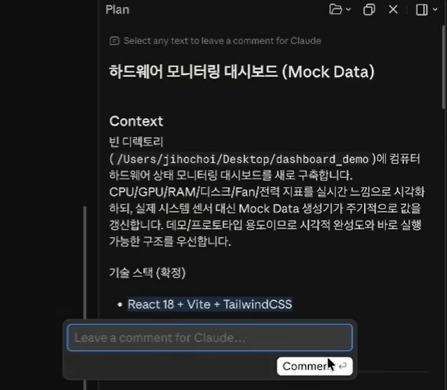
2.1.112 version 부터 plan 을 markdown 모드로 볼 수 있게 되었다!
수정 사항이 있는 부분은 코멘트를 달 수도 있다.
CLAUDE.md 작성
# 온보딩 자동화 프로젝트

## 프로젝트 개요
신규 팀원 온보딩을 자동화하는 시스템.
스택: Node.js, PostgreSQL, Docker

## 코딩 컨벤션
- 함수명: camelCase
- 파일명: kebab-case
- 들여쓰기: 2칸 공백
- 커밋 메시지: conventional commits

## PR 규칙
- main 브랜치 직접 커밋 금지
- PR 최소 1명 리뷰어 필수
- 커밋 전 npm test 실행 필수

## 온보딩 절차
1. 환경 설정 완료
2. 코드베이스 탐색
3. 첫 PR 제출
4. 미팅 일정 조율

## 에이전트 목록
- onboarding-guide: 온보딩 절차 안내
- code-mentor: 코드 질문 답변
- schedule-manager: 일정 조율 (Google Calendar MCP)
- email-notifier: 이메일 발송 (Gmail MCP)
- slack-notifier: Slack 알림 (Slack MCP)

## 주의사항
- API 키는 절대 코드에 하드코딩 금지
- .env 파일은 git에 커밋 금지
CLAUDE.local.md 작성 (git 제외)
# 로컬 환경 설정

## 개인 환경
- GitHub 계정: HY-WG
- 로컬 포트: 8080
- 로컬 DB: postgresql://localhost:5433

## API 키 위치
- .env 파일 참조
echo "CLAUDE.local.md" >> .gitignore
echo ".env" >> .gitignoreMCP 연결 완료
# GitHub (기존 연결 유지)
# Google Calendar
claude mcp add google-calendar -- npx -y @modelcontextprotocol/server-google-calendar

# Gmail
claude mcp add gmail -- npx -y @modelcontextprotocol/server-gmail

# Slack
claude mcp add slack -- npx -y @modelcontextprotocol/server-slack

# 연결 확인
claude mcp list
연결 결과:
- GitHub ✅
- Google Calendar ✅
- Gmail ✅
- Slack ✅
.env 파일 구성
GITHUB_TOKEN=ghp_xxx
SLACK_BOT_TOKEN=xoxb-xxx
SLACK_TEAM_ID=Txxxxxxx
MAIN_REPO_PATH=/c/Users/mung9/IdeaProjects/onboarding-automation
# Claude Code 실행 전 환경변수 로드
export $(cat .env | xargs)
claude참고자료
- claude-howto 레포:
02-memory/project-CLAUDE.md참고 - 공식 문서: https://code.claude.com/docs/en/memory
트러블슈팅
.env 파일 위치를 찾지 못한 경우
.env는 기존에 존재하는 파일이 아니라 직접 만들어야 함- 프로젝트 루트에 생성 후 반드시
.gitignore에 추가
회고
Planning Mode로 먼저 전체 구조를 설계하고 승인하는 과정이 실제 업무에서 대규모 리팩토링 전 사전 검토와 동일한 역할을 한다. CLAUDE.md는 강제력이 없는 가이드라인임을 기억하고, 실제 강제는 다음 단계인 Hooks에서 구현한다. Plan 검토 시 기능 포함 여부는 Claude에게, 권한/계정/컨벤션 내용은 사람이 직접 판단해야 한다.
plan을 docs/onboarding-plan.md 파일로 저장하여, 팀원 및 이후에 참고할 수 있도록 했다.
[Series] Claude Code in Practice — Onboarding Automation | Step 1: Team Constitution
Summary
The first step in building the new team member onboarding automation system. Used Planning Mode to design the overall structure upfront, wrote CLAUDE.md as the team constitution, and completed MCP connections for GitHub, Google Calendar, Gmail, and Slack (Linear excluded).
Development Log
Environment Setup
cd ~/IdeaProjects
mkdir onboarding-automation
cd onboarding-automation
git init
mkdir -p .claude/agents .claude/skills .claude/commands src docs
Planning Mode
claude
/plan I want to build a new team member onboarding automation system.
      Design the full structure step by step, including CLAUDE.md team constitution,
      Hooks quality gates, Subagents team, and MCP integrations.
Review the plan Claude provides, then approve with yes or modify.
CLAUDE.md Written
Key sections: project overview, coding conventions, PR rules, onboarding procedure, agent list, and security notes.
CLAUDE.local.md Written (git-excluded)
Personal environment specifics: local ports, DB URL, GitHub account. Added to .gitignore along with .env.
MCP Connections Completed
- GitHub ✅
- Google Calendar ✅
- Gmail ✅
- Slack ✅
- Linear ❌ (excluded from this practice)
.env Setup
GITHUB_TOKEN=ghp_xxx
SLACK_BOT_TOKEN=xoxb-xxx
SLACK_TEAM_ID=Txxxxxxx
MAIN_REPO_PATH=/c/Users/mung9/IdeaProjects/onboarding-automation
Load before launching Claude Code:
export $(cat .env | xargs)
claude
Troubleshooting
.env file not found
.env is not a pre-existing file — you must create it manually in the project root. Always add it to .gitignore immediately.
Linear API key missing
Linear is not part of this practice scenario. LINEAR_API_KEY can be safely omitted.
Retrospective
Using Planning Mode to design and approve the full structure upfront mirrors the role of pre-implementation review in real-world large-scale refactoring. Remember that CLAUDE.md is a guideline without enforcement power — real enforcement comes in the next step with Hooks. When reviewing a plan: ask Claude to check for functional logic issues, but verify permissions, accounts, and team conventions yourself.