스프링 웹 개발 기초
- 서버를 이용하지 않고 파일을 그대로 웹 브라우저에 내려주는 것
- 템플릿 엔진이란? Html을 그냥 주는 것이 아니라 서버에서 프로그래밍해서 Html을 동적으로 바꾼 후 주는 역할을 한다. 이를 하기 위해 MVC(Model, View, Controller)가 필요하다.
- API란? 서버에서 json이라는 데이터 포맷으로 클라이언트에게 데이터를 전달하는 방식
정적 컨텐츠
- 스프링 부트 정적 컨텐츠 기능
src -> main -> resources -> static에서 우클릭 -> 파일명: hello-static.html
<!DOCTYPE HTML>
<html>
<head>
    <title>Hello Static</title>
    <meta http-equiv="Content-Type" content="text/html; charset=UTF-8" />
</head>
<body>
정적 컨텐츠입니다.
</body>
</html>- 이후에 localhost:8080/hello-static.html로 이동하면 다음과 같은 웹브라우저로 이동 가능
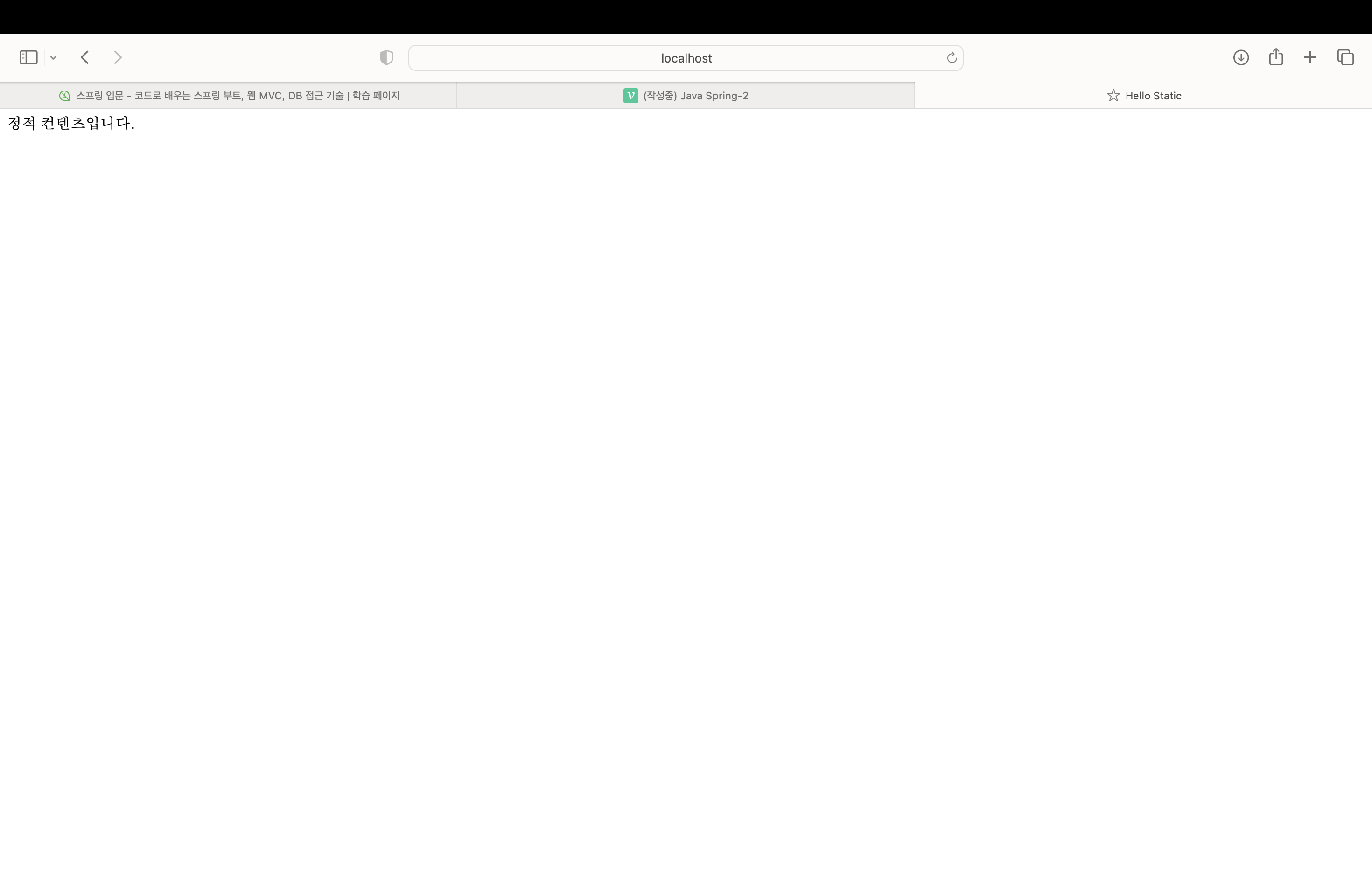
- 작동 원리(깊게 들어가면 더 많은 작업이 이루어지지만 우선 큰 그림에서 이해하기)
- 웹브라우저에서 localhost:8080/hello-static.html을 입력하면 내장 톰켓 서버가 요청을 받는다.
- 톰켓 서버에서 스프링에 hello-static.html을 넘겨줌
- 스프링에서는 가장 먼저 컨트롤러에 hello-static 관련 컨트롤러가 있는지 찾는다.(현재 기준으로 hello 컨트롤러는 있지만 hello-static 컨트롤러는 없는 상태)
- 매핑이 되는 컨트롤러가 없으므로 스프링 부트가 내부에서 resources: static/hello-static.html을 찾는다. 있으면 웹브라우저에 반환해준다.
MVC와 템플릿 엔진
- View는 화면에 관련된 일만 처리하고 Controller는 business logic과 서버 뒤에서의 일을 처리하고 Model은 화면에서 필요한 것들을 담아서 화면에 넘겨주는 역할
- 다음과 같이 컨트롤러 파일의 코드를 작성
package hello.hellospring.controller;

import org.springframework.stereotype.Controller;
import org.springframework.ui.Model;
import org.springframework.web.bind.annotation.GetMapping;
import org.springframework.web.bind.annotation.RequestParam;

@Controller
public class HelloController {
    @GetMapping("hello")
    public String hello(Model model) {
        model.addAttribute("data", "hello!!");
        return "hello";
    }

    @GetMapping("hello-mvc")
    public String helloMvc(@RequestParam("name") String name, Model model) {
        model.addAttribute("name", name);
        return "hello-template";
    }
}
- 다음과 같이 hello-template 코드를 작성
<html xmlns:th="http://www.thymeleaf.org">
<body>
<p th:text="'hello ' + ${name}">hello! empty</p>
<!--위의 코드에서 hello! empty는 단순하게 html 파일의 경로를 복사하여 실행하면 볼 수 있는 것이고
'hello ' + ${name}는 템플릿 엔진으로서 작동을 하면 볼 수 있는 것
따라서 hello! empty 위치에 있는 내용은 서버 없이 html의 내용만 볼 때 사용됨-->
</body>
</html>- 이제 localhost:8080/hello-mvc를 검색창에 치면 에러가 발생한다.
- 그 이유는 컨트롤러 파일 코드의 public String helloMvc(@RequestParam("name") String name, Model model) 이 부분에서 찾을 수가 있는데 "name"에 해당하는 parameter를 전달해야 한다.
- 따라서 검색창에 localhost:8080/hello-mvc?name=Spring! 이라고 하면 name에 Spring!이 전달되고 정상적으로 작동되는 것을 볼 수 있다.
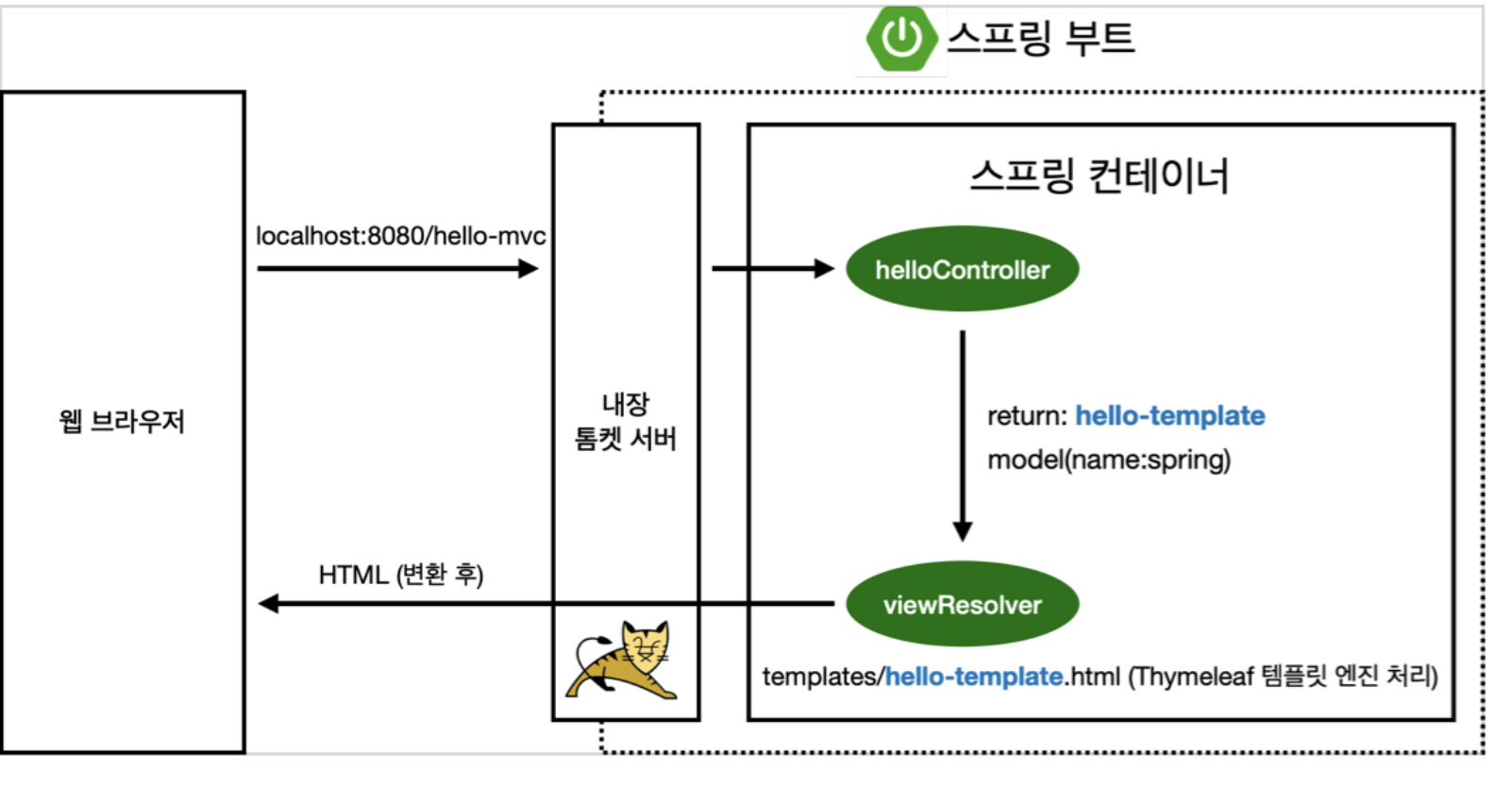
- 작동원리에 대해 알아보면,
- 웹 브라우저가 localhost:8080/hello-mvc를 띄우면 스프링 부트의 내장 톰켓 서버가 hello-mvc라는 것이 들어왔다는 사실을 스프링에 알려준다.
- helloController에 hello-mvc라는 것이 mapping이 되어있는지 확인 후 존재한다면 함수를 실행시킨다.
- 함수의 return 값 이름을 hello-template으로 설정하고 model에 key는 name이고 값은 Spring으로 넣었다.
- 이제 viewResolver가 뷰를 찾아주고 템플릿 엔진을 연결시켜준다. viewResolver가 앞선 return 이름과 같은 templates/hello-template이 존재하는지 확인 후 Thymeleaf 템플릿 엔진에게 처리해달라고 넘긴다. 그러면 템플릿 엔진이 렌더링을 하고 변환을 한 html을 웹 브라우저에게 넘기며 끝이 나게 된다.
- 정적일 때는 변환 과정이 없었지만 템플릿 엔진에서는 변환을 하는 과정이 존재한다.
API
- 기존에 사용하던 helloController 파일에 다음 코드를 추가한다.
    @GetMapping
    @ResponseBody//이 부분이 의미하는 것은 html의 body 태그가 아니라
    //http 통신 프로토콜이 head부와 body부가 있는데 이 body부에 아래의 return 값을 직접 넣어주겠다는 의미
    public String helloString(@RequestParam("name") String name) {
        return "hello" + name;//name 값을 Spring으로 하게 되면 hello Spring이 그대로 전달됨
    }//템플릿 엔진과의 차이점은 이 경우에 페이지의 소스를 봤을 때 html 코드가 전혀 없고 hello Spring이라는 데이터가
//그대로 전달됨을 알 수 있음- 다음의 코드를 흔히 Api 방식이라고 한다.
    @GetMapping("hello-api")
    @ResponseBody
    public Hello helloApi(@RequestParam("name") String name) {
        Hello hello = new Hello();
        hello.setName(name);
        return hello;
    }

    static class Hello {
        private String name;

        public String getName() {
            return name;
        }

        public void setName(String name) {
            this.name = name;
        }
        //command + n 눌러서 getter and setter 클릭하면 코드 자동완성해줌
}- 위의 코드를 작성하고 localhost:8080/hello-api?name=Spring!으로 이동하면
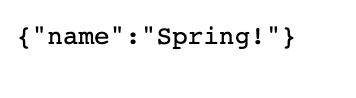
이런 형태의 화면이 보여진다. 이 방식을 json 방식이라고 한다.(key:value 형식으로 이루어짐) - @ResponseBody가 있을 때 작동원리
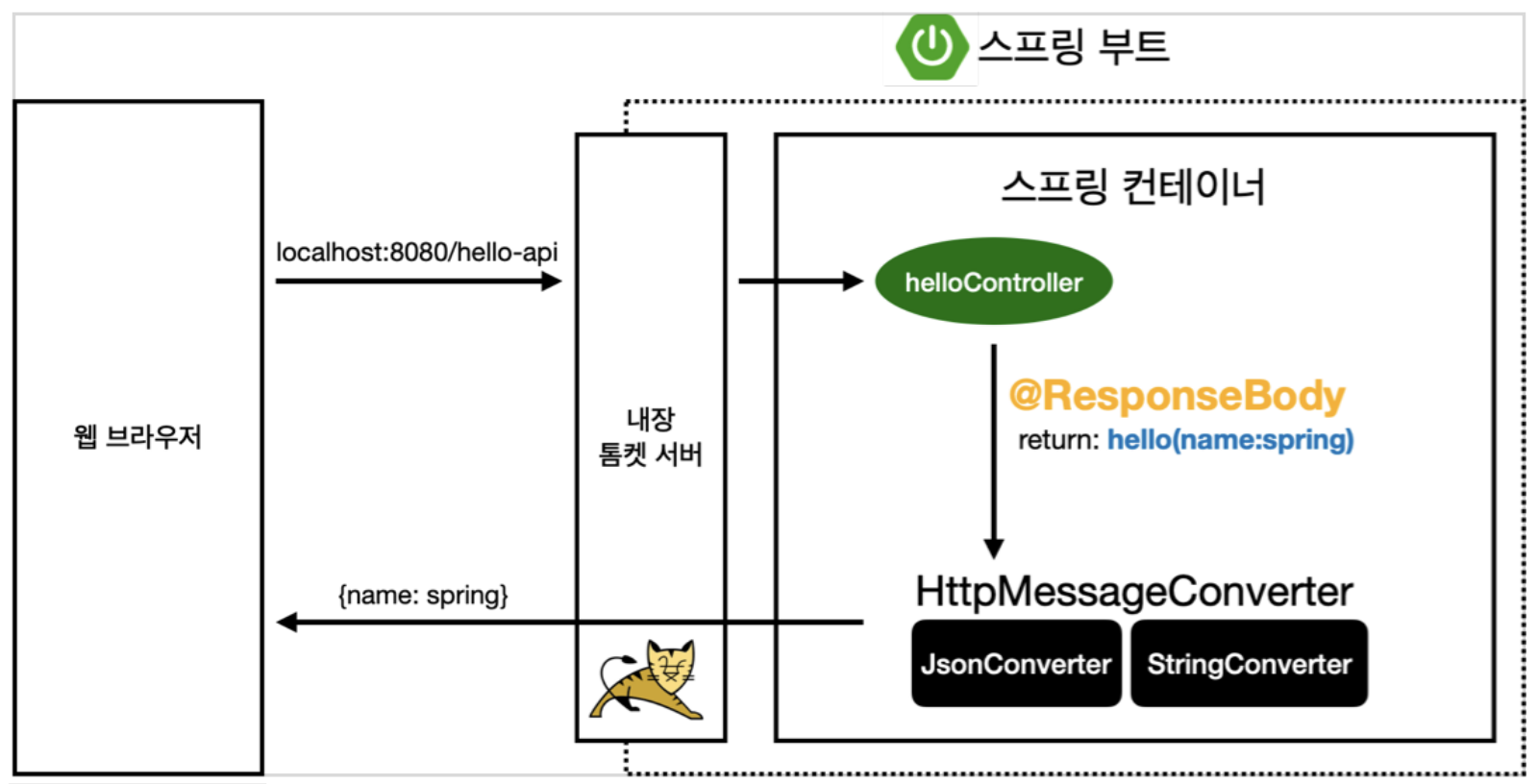
- 웹 브라우저에서 localhost:8080/hello-api을 주면 톰켓 서버가 스프링에 hello-api가 왔다고 알려줌
- 스프링은 hello-api가 mapping이 되어있는지 확인, 그런데 @ResponseBody가 있으면 템플릿 엔진을 사용할 때와 달리 http 응답에 데이터를 그대로 넘긴다. 만약 데이터가 문자열인 경우 그대로 응답에 전달하지만 객체인 경우 json 방식으로 데이터를 전환하여 http 응답에 전달한다.
- 템플릿 엔진을 사용할 때는 viewResolver에게 데이터를 전달했지만 @ResponseBody에서는 HttpMessageConverter에게 데이터를 전달. 데이터가 단순 문자이면 StringConverter가 동작, 객체인 경우 JsonConverter가 동작. 그 후 웹 브라우저에 반환한다.

안녕하세요.