sql 정리-1
코드로 보는 정리
create database product;//product라는 database를 하나 만듦
show databases;	//모든 데이터베이스를 보여줌
use product;	//product라는 데이터베이스를 사용
show tables;	//product에 들어있는 모든 table을 보여줌
create table product (
product_name varchar(20) not null,
cost int,
make_date varchar(20) not null,
company varchar(20) not null,
amount int
);
insert into product values("바나나", 1500, "2021-07-01", "델몬트", 17);
//product table에 바나나에 대한 정보를 삽입
select * from product.product;	//product 데이터베이스의 product table에 모든 요소를 보여줌
// * 연산자를 사용하면 모든 열을 선택한다는 의미
select product_name, cost from product.product;	//product table에서 이름과 가격만을 출력
select * from product.product where product_name = "바나나";	//product table에서 상품 이름이 "바나나"인 요소만 출력
delete from product where product_name = "바나나";//product table에서 상품 이름이 바나나인 행을 삭제
drop table product;//product table을 삭제
truncate product;//product table의 모든 행을 삭제
기본 용어
- attributes(columns), tuples(row)
기본 키 제약조건
create table person
  (person_id smallint unsigned,
  fname varchar(20),
  lname varchar(20),
  eye_color ENUM('BR', 'BL', 'GR'),
  birth_date date,
  street varchar(20),
  city varchar(20),
  state varchar(20),
  country varchar(20),
  postal_code varchar(20),
  constraint pk_person primary key (person_id)
);-
테이블을 정의할 때는 기본 키로 사용할 열을 데이터베이스 서버에 알려줘야 하므로 테이블에 제약조건(constraint)을 만들어 이 작업을 수행한다. 위의 코드에서는 기본키 제약조건을 사용했는데 person_id 열에 생성되며 pk_person이라는 이름이 지정된다. eye_color에 적용된 enum이 의미하는 것은 eye_color 열에 'BR' 또는 'BL'과 같이 특정 열에 대해 허용 가능한 값을 표시한 것이다. 이것을 체크 제약조건이라고 한다.
-
생성한 테이블에 대한 정보를 얻고 싶으면 다음 문장을 실행하면 된다.
desc person;- person table과 관련된 favorite_food table 만들기
create table favorite_food
(person_id smallint unsigned,
food varchar(20),
constraint pk_favorite_food primary key (person_id, food),
constraint fk_fav_food_person_id foreign key (person_id)
references person (person_id)
);-
한 사람이 좋아하는 음식이 두 가지 이상일 수 있으므로 테이블의 고유성을 보장하려면 person_id 열 이상의 것이 필요하다. 따라서 이 테이블에는 person_id와 food라는 두 개의 기본 키가 있다.
-
favorite_food 테이블에는 외래 키 제약조건이라는 또 다른 유형의 제약조건이 포함된다. 이렇게 하면 favorite_food 테이블에서 person_id 열의 값에 person 테이블에 있는 값만 포함되도록 제한된다. 예를 들어, 이 제약조건이 있는 상황에서 person 테이블에 person_id가 27인 행이 아직 없다면, favorite_food 테이블에도 person_id가 27인 사람이 피자를 좋아한다는 것을 추가할 수 없다.
데이터 삽입
-
테이블의 모든 열이 not null로 정의되어 있지 않는 한, 테이블의 모든 열에 데이터를 제공할 필요는 없다. 경우에 따라 초기 insert 문에 포함되지 않은 열에는 나중에 update 문을 통해 값을 지정할 수 있다.
-
숫자 키 데이터 생성
	alter table person modify person_id smallint unsigned auto_increment;
    //이 구문은 기본적으로 person 테이블의 person_id 열을 재정의한다.
    //이제 person 테이블에 데이터를 삽입할 때 person_id 열에 null 값을 제공하기만 하면 MySQL은 사용 가능한 다음 숫자로 열을 채운다.(기본적으로 1부터 시작)
insert 문
insert into person
(person_id, fname, lname, eye_color, birth_date)
values (null, 'William', 'Turner', 'BR', '1972-05-27');

insert into favorite_food (person_id, food) values(1, 'pizza');
insert into favorite_food (person_id, food) values(1, 'cookies');
insert into favorite_food (person_id, food) values(1, 'nachos');

select food from favorite_food where person_id = 1 order by food;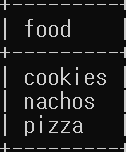
- order by 절을 사용하여 William이 가장 좋아하는 음식을 알파벳 순서로 검색한다.
insert into person (person_id, fname, lname, eye_color, birth_date, street, city, state, country, postal_code) values (null, 'Susan', 'Smith', 'BL', '1975-11-02', '23 Maple St.', 'Arlington', 'VA', 'USA', '20220');

select person_id, fname, lname, birth_date from person;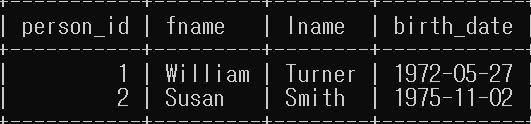
데이터 수정
- 테이블에 처음 윌리엄을 추가했을 때 insert 문에 주소 열에 대한 정보가 없었다. 다음 구문은 이러한 주소 열들의 값을 update 문을 통해 바꾸는 방법이다.
update person set street = '1225 Tremont St.', city = 'Boston', state = 'MA', country = 'USA', postal_code = '02138' where person_id = 1;- 위의 코드에서는 하나의 행만 수정하였는데 where 절을 적절히 사용하면 둘 이상의 행을 수정할 수 있다.
데이터 삭제
delete from person where person_id = 2;- update 문과 마찬가지로 where 절의 조건에 따라 둘 이상의 행을 삭제할 수 있다. where 절을 생략하면 모든 행이 삭제된다.
기본 날짜 형식 사용하지 않기(str_to_date 함수)
update person set birth_date = str_to_date('DEC-21-1980', '%b-%d-%Y') where person_id = 1;- %a: The short weekday name (Sun, Mon, ...)
- %b: The short month name (Jan, Feb, ...)
- %c: The numeric month (0...12)
- %d: The numeric day of month (00...31)
- %f: The number of microseconds (000000...999999)
- %H: The hour of the day (00...23)
- %h: The hour of the day (01...12)
- %i: The minutes within the hour (00...59)
- %j: The day of year (001...366)
- %M: The full month name (January...December)
- %m: The numeric month
- %p: AM or PM
- %s: The number of seconds (00...59)
- %W: The full weekday name (Sunday...Saturday)
- %w: The numeric day of the week (0 = Sunday...6 = Saturday)
- %Y: The four-digit year
쿼리 절
- select: 쿼리 결과에 포함할 열을 결정한다.
- from: 데이터를 검색할 테이블과, 테이블을 조인하는 방법을 식별한다.
- where: 불필요한 데이터를 걸러낸다.
- group by: 공통 열 값을 기준으로 행을 그룹화한다.
- having: 불필요한 그룹을 걸러낸다.
- order by: 하나 이상의 열을 기준으로 최종 결과의 행을 정렬한다.
열의 별칭 지정하기
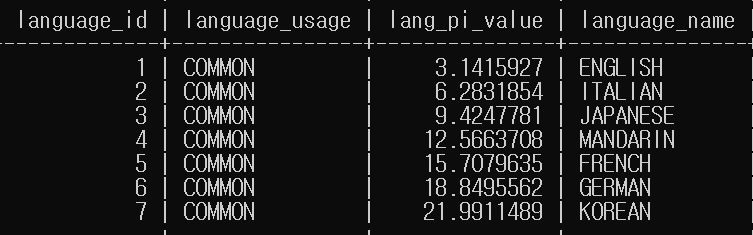
select language_id, 'COMMON' as language_usage, language_id * 3.1415927 as lang_pi_value, upper(name) as language_name from language;- 별칭을 사용하면 출력을 이해하기 쉽고, 자바나 파이썬에서 쿼리를 실행할 때 더 수월하다.
중복 제거
- 영화에 출연한 모든 배우의 ID를 검색하는 쿼리를 실행한다고 했을 때 중복을 허용하면 몇몇 배우들이 한 편 이상의 영화를 출연했기 때문에 동일한 배우 ID가 여러 번 표시된다. 이를 방지하기 위해 select 키워드 바로 뒤에 distinct 키워드를 추가하여 확인할 수 있다.
select distinct actor_id from film_actor order by actor_id;테이블 유형
- 영구 테이블: create table 문으로 생성
- 파생 테이블: 하위 쿼리에서 반환하고 메모리에 보관된 행
- 임시 테이블: 메모리에 저장된 휘발성 데이터
- 가상 테이블: create view 문으로 생성
파생 테이블
- 서브쿼리는 다른 쿼리에 포함된 쿼리이다. 서브쿼리는 괄호에 묶여 있으며 select 문의 여러 부분에서 찾을 수 있다. 그러나 from 절 내에서의 서브쿼리는 from 절에 명시된 다른 테이블과 상호작용할 수 있는 파생 테이블을 생성하는 역할을 한다.
select concat(cust.last_name, ', ', cust.first_name) as full_name from (select first_name, last_name, email from customer where first_name = 'JESSIE') as cust;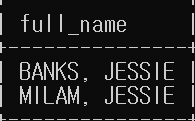
- 위의 코드에서 customer 테이블에 대한 서브쿼리는 3개의 열을 반환하고, 서브쿼리를 포함하는 쿼리는 이 3개의 열 중 2개를 참조한다. 서브쿼리는 별칭을 통해 참조되는데 이 경우에는 cust라고 지정했다. cust의 데이터는 쿼리 기간 동안 메모리에 보관된 후 삭제된다.
임시 테이블
- 모든 관계형 데이터베이스는 휘발성의 임시 테이블을 정의할 수 있다. 임시 테이블에 삽입된 데이터는 어느 시점(보통 트랜잭션이 끝날 때 또는 데이터베이스 세션이 닫힐 때)에 사라진다.
mysql> create temporary table actors_i(
    -> actor_id smallint(5),
    -> first_name varchar(45),
    -> last_name varchar(45)
    -> );

mysql> insert into actors_i select actor_id, first_name, last_name from actor where last_name like "J%";

mysql> select * from actors_i;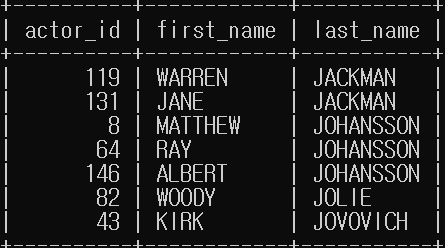
- actors_i 테이블은 일시적으로 메모리에 저장되며 세션이 종료되면 사라진다.
가상 테이블(뷰)
- 뷰는 데이터 딕셔너리에 저장된 쿼리이다. 테이블처럼 동작하지만 뷰에 저장된 데이터가 존재하지는 않는다. 이 때문에 가상 테이블이라고 부른다. 뷰에 대해 쿼리를 실행하면 쿼리가 뷰 정의와 합쳐져 실행할 최종 쿼리를 만든다.
mysql> create view cust_vw as select customer_id, first_name, last_name, active from customer;

mysql> select first_name, last_name from cust_vw where active = 0;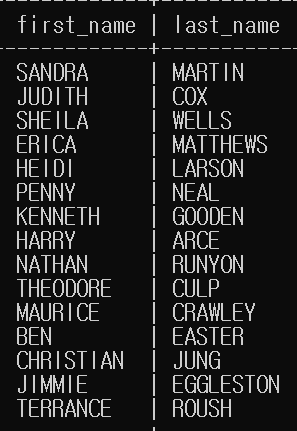
테이블 연결
mysql> select customer.first_name, customer.last_name, time(rental.rental_date) rental_time from customer inner join rental on customer.customer_id = rental.customer_id where date(rental.rental_date) = '2005-06-14';- 이전 쿼리는 customer 테이블의 열(first_name, last_name)과 rental 테이블의 열(rental_date) 데이터를 모두 표시하므로 두 테이블이 모두 from 절에 포함된다. 두 테이블을 연결(조인)하는 메커니즘은 customer 및 rental 테이블에 모두 저장된 customer_id이다. 따라서 데이터베이스 서버는 customer 테이블의 customer_id 값을 사용하여 rental 테이블에서 모든 고객의 대여 내역을 찾도록 지시한다. 두 테이블의 조인 조건은 from 절의 하위절에 있다. 이 경우 결합 조건은 on customer.customer_id = rental.customer_id이다. where 절은 조인의 일부가 아니며 rental 테이블에 16000개가 넘는 행이 있으므로 결과를 최대한 좁혀 필터링하기 위해 포함된다.
테이블 별칭 정의
mysql> select c.first_name, c.last_name, time(r.rental_date) as rental_time from customer as c inner join rental as r on c.customer_id = r.customer_id where date(r.rental_date) = '2005-06-14';- from 절을 자세히 보면 customer 테이블에 별칭 c가 할당되고 rental 테이블에 별칭 r이 할당되었다. 이러한 별칭은 조인 조건을 정의하는 on 절과, 결과셋에 포함할 열을 지정하는 select 절에서 사용된다.
where 절
- where 절은 결과셋에 출력되기를 원하지 않는 행을 필터링하는 메커니즘이다. 예를 들어, 영화 대여에 관심이 있고 그중에서도 특히 최소 일주일 동안 대여할 수 있는 G 등급의 영화에만 관심이 있다면 다음 쿼리는 이러한 기준을 충족하는 영화만 검색하는 where 절을 사용한다.
mysql> select title from film where rating = 'g' and rental_duration >= 7;- 이 where 절은 두 개의 필터조건이 포함되어있지만 필요에 따라 더 많은 조건을 포함할 수도 있다. 각각의 조건은 and, or 또는 not과 같은 연산자로 구분된다.
mysql> select title from film where (rating = 'G' and rental_duration >= 7) or (rating = 'PG-13' and rental_duration <= 3);group by 절과 having 절
- 때로는 데이터에서 결과를 검색하기 전에 데이터베이스 서버가 데이터를 정제하는 흐름을 찾아볼 수 있다. 이러한 메커니즘 중 하나는 데이터를 열 값 별로 그룹화하는 group by 절이다.
예를 들어, 40편 이상의 영화를 대여한 모든 고객을 찾는다고 가정하자. rental 테이블에서 16044개의 행을 모두 살펴보는 대신, 서버가 고객별로 모든 대여 내역을 그룹화하고 각 고객의 대여 횟수를 계산한 다음 대여 횟수가 40 이상인 고객만 반환하도록 지시하는 쿼리를 작성할 수 있다. 이때 group by를 사용하여 행 그룹을 생성하려면 where 절에서 원시 데이터를 필터링할 수 있는 having을 사용하는 방식으로 그룹화된 데이터를 정제할 수 있다.
mysql> select c.first_name, c.last_name, count(*) from customer as c inner join rental as r on c.customer_id = r.customer_id group by c.first_name, c.last_name having count(*) >= 40;order by 절
-
일반적으로 쿼리에서 반환된 결과셋의 행은 특정 순서대로 나열되지 않는다. 결과셋을 원하는 기준으로 정렬하려면 서버에서 order by 절을 사용하여 정렬하도록 지시해야 한다. order by 절은 원시 열 데이터 또는 열 데이터를 기반으로 표현식을 사용하여 결과셋을 정렬하는 메커니즘이다.
-
결과셋을 성을 기준으로 알파벳순 정렬되도록 하려면 order by 절에 last_name 열을 추가한다.
mysql> select c.first_name, c.last_name, time(r.rental_date) rental_time from customer as c inner join rental as r on c.customer_id = r.customer_id where date(r.rental_date) = '2005-06-14' order by c.last_name;-
이 예제에는 그런 사례가 없지만, 대규모 고객 목록에는 종종 같은 성을 가진 사람이 여럿 포함되므로 정렬 기준을 확장하여 사람의 이름도 포함할 수 있다. order by 절에서 last_name 열 뒤에 first_name 열을 추가하면 된다.
-
정렬은 기본적으로 오름차순으로 이루어지지만 내림차순 정렬을 사용하려면 order by 절 마지막에 desc 키워드를 추가해야 한다.
순서를 통한 정렬
- 다음의 order by 절은 select 절의 세 번째 요소(열)로 내림차순 정렬을 지정한다.
mysql> select c.first_name, c.last_name, time(r.rental_date) rental_time from customer as c inner join rental as r on c.customer_id = r.customer_id where date(r.rental_date) = '2005-06-14' order by 3 desc;