스와이프 제스처와 앵커
컴포즈에서 스와이프 모션은 컴포넌트를 한 앵커에서 다른 앵커로 옮긴다. 앵커는 스와이프 축을 따라 화면에 존재하는 고정된 위치를 의미한다. 두 앵커 사이의 한 지점은 임계점으로 선언된다.
스와이프 제스처 감지하기
swipeable() 모디파이어를 적용해 스와이프 제스처를 감지할 수 있다.
Box(
	modifier = Modifier
    	.swipeable(
        	state = <swipeable 상태>,
            anchors = <앵커들>,
            thresholds = {_, _ -> FractionalThreshold(<값>)},
            orientation = <수평(horizontal) 또는 수직(vertical)>
        )
)
swipeable() 모디파이어 호출 시 지정할 수 있는 주요 파라미터들은 다음과 같다.
- state: 재구성을 하는 동안 swipeable 상태를 저장하기 위해 이용하며 rememberSwipeableState() 함수를 호출해서 얻는다.
- anchors: 맵 선언으로 앵커 지점들과 상태들을 연결한다.
- orientation: 스와이프 제스처의 방향을 나타낸다.
- enabled: 스와이프 감지 활성화 여부를 나타낸다. 기본값은 true이다.
- reverseDirection: 기본값은 false이다. true로 설정하면 아래쪽 방향 스와이프가 위쪽 방향 스와이프, 오른쪽 방향 스와이프는 왼쪽 방향 스와이프처럼 동작한다.
- threshold: 앵커 사이의 임계점들의 위치를 지정한다. 람다로 선언되며 이 람다는 앵커 사이의 거리를 백분율로 지정하면 FractionalThreshold를 호출하고, 거리를 고정 위치로 지정하면 FixedThreshold를 호출한다.
- resistance: 스와이프 모션이 앵커 맵의 첫 번째 또는 마지막 앵커를 넘었을 때 적용할 저항을 정의한다. null로 설정하면 스와이프틑 경계를 넘어 늘어날 수 없다.
- velocityThreshold: 스와이프 속도가 다음 상태로 이동하기 위해 넘어야 하는 단위 속도를 정의한다.
앵커 맵 선언하기
스와이프 앵커는 맵 객체로 선언되며 앵커 위치와 상태의 짝을 포함한다. 앵커들은 소수점 위치 픽셀값을 이용해 선언하며 x,y축의 위치를 나타낸다. 앵커의 사용 예시는 다음과 같다. 각 앵커 지점에 도달하면 텍스트 컴포넌트에 표시되는 텍스트가 변경될 수 있다.
val swipeableState = rememberSwipeableState("On")
val anchors = mapOf(Of to "On", 150f to "Off", 300f to "Locked")
위의 코드는 스와이프가 150px, 300px 위치의 앵커에 도달하면 swipeableState의 현재 값을 "Off"와 "Locked"로 각각 설정한다. 현재 상탯값을 표시하도록 Text 컴포저블을 다음과 같이 수정할 수 있다.
Text(swipeableState.currentValue)임계점 선언하기
임계점은 람다로 선언되며, 람다가 호출될 때 상탯값들을 전달하고 ThresholdConfig 값을 반환해야 한다. ThresholdConfig 인스턴스는 FractionalThreshold() 또는 FixedThreshold() 함수를 호출해서 만들 수 있다. 다음은 두 앵커에서 50% 지점에 임계점을 선언하는 코드이다.
{_, _ -> FractionalThreshold(0.5f)}다음은 두 앵커 사이의 거리를 따라 임계점을 20dp 고정 포인트로 설정한 코드이다.
{_, _ -> FixedThreshold(20.dp)}스와이프를 따라 컴포넌트 이동하기
기본적으로 여러 제스처 모디파이어는 컴포넌트를 자동으로 이동시키지 않는다. 제스처 감지와 더불어 컴포넌트의 이동을 위해서는 offset() 모디파이어를 통해 swipeable 상태의 오프셋값을 이용해야 한다. 예를 들어, Text 뷰를 스와이프 제스처에 따라 수평으로 이동해야 한다면, 다음과 같은 코드로 수행할 수 있다.
Text(swipeableState.currentValue,
	modifier = Modifier
    	.offset {
        	IntOffset(swipeableState.offset.value.roundToInt(), 0)
        }
)
위의 코드를 실행하면 Text 컴포넌트가 스와이프 모션에 맞춰 이동한다.
SwipeDemo
swipeable 상태 및 앵커 설정하기
MainScreen의 코드를 다음과 같이 작성한다.
@OptIn(ExperimentalMaterialApi::class)
@Composable
fun MainScreen() {
    val parentBoxWidth = 320.dp
    val childBoxSides = 30.dp

    val swipeableState = rememberSwipeableState(initialValue = "L")
    val widthPx = with(LocalDensity.current) {
        (parentBoxWidth - childBoxSides).toPx()
    }

    val anchors = mapOf(0f to "L", widthPx / 2 to "C", widthPx to "R")
}
위의 코드에서 parentBoxWidth 값은 이후의 컴포넌트 계층 안의 최상위 수준 Box의 폭을 나타낸다. 이 컴포넌트에는 swipeable() 모디파이어를 적용한다. 부모 박스는 하나의 자식 박스를 포함하며, 자식 박스의 가장자리 길이는 childBoxSides 선언을 통해 정의한다. 마지막으로 스와이프 가능한 영역의 픽셀 단위 폭은 앱이 실행되는 디스플레이의 밀돗값을 이용해 계산한 뒤, 부모 박스의 폭에서 자식 박스의 폭을 뺀다.
자식 박스의 폭을 뺀 것은 자식 박스가 앵커 지점을 기준으로 가운데 배치되며, 첫 번재 앵커와 마지막 앵커에 자식 박스 폭의 절반을 적용해서 공간을 확보함을 의미한다.
마지막으로 앵커 지점을 스와이프할 수 있는 영역의 시작 점, 중간 점, 끝 점으로 설정한다.
부모 박스 디자인하기
@OptIn(ExperimentalMaterialApi::class)
@Composable
fun MainScreen() {
    val parentBoxWidth = 320.dp
    val childBoxSides = 30.dp

    val swipeableState = rememberSwipeableState(initialValue = "L")
    val widthPx = with(LocalDensity.current) {
        (parentBoxWidth - childBoxSides).toPx()
    }

    val anchors = mapOf(0f to "L", widthPx / 2 to "C", widthPx to "R")

    Box(
        modifier = Modifier
            .padding(20.dp)
            .width(parentBoxWidth)
            .height(childBoxSides)
            .swipeable(
                state = swipeableState,
                anchors = anchors,
                thresholds = {_, _ -> FractionalThreshold(0.5f)},
                orientation = Orientation.Horizontal
            )
    ) {
        Box(Modifier.fillMaxWidth().height(5.dp)
            .background(Color.DarkGray).align(Alignment.CenterStart))
        Box(Modifier.size(10.dp).background(Color.DarkGray,
            shape = CircleShape).align(Alignment.CenterStart))
        Box(Modifier.size(10.dp).background(Color.DarkGray,
            shape = CircleShape).align(Alignment.Center))
        Box(Modifier.size(10.dp).background(Color.DarkGray,
            shape = CircleShape).align(Alignment.CenterEnd))
    }
}
위의 코드를 작성하면 미리 보기 패널에 다음과 같이 표시된다.
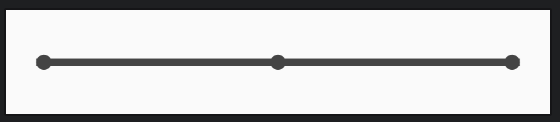
부모 박스를 구현했으므로 다음은 자식 박스를 구현한다.
@OptIn(ExperimentalMaterialApi::class)
@Composable
fun MainScreen() {
    val parentBoxWidth = 320.dp
    val childBoxSides = 30.dp

    val swipeableState = rememberSwipeableState(initialValue = "L")
    val widthPx = with(LocalDensity.current) {
        (parentBoxWidth - childBoxSides).toPx()
    }

    val anchors = mapOf(0f to "L", widthPx / 2 to "C", widthPx to "R")

    Box(
        modifier = Modifier
            .padding(20.dp)
            .width(parentBoxWidth)
            .height(childBoxSides)
            .swipeable(
                state = swipeableState,
                anchors = anchors,
                thresholds = {_, _ -> FractionalThreshold(0.5f)},
                orientation = Orientation.Horizontal
            )
    ) {
        Box(Modifier.fillMaxWidth().height(5.dp)
            .background(Color.DarkGray).align(Alignment.CenterStart))
        Box(Modifier.size(10.dp).background(Color.DarkGray,
            shape = CircleShape).align(Alignment.CenterStart))
        Box(Modifier.size(10.dp).background(Color.DarkGray,
            shape = CircleShape).align(Alignment.Center))
        Box(Modifier.size(10.dp).background(Color.DarkGray,
            shape = CircleShape).align(Alignment.CenterEnd))

		//자식 박스
        Box(Modifier
            .offset { IntOffset(swipeableState.offset.value.roundToInt(), 0) }
            .size(childBoxSides)
            .background(Color.Blue),
            contentAlignment = Alignment.Center
        ) {
            Text(
                swipeableState.currentValue,
                color = Color.White,
                fontSize = 22.sp
            )
        }
    }
}
offset 모디파이어는 자식 Box에 적용되어 수평 위치를 제어한다. swipeableState에 저장된 현재 오프셋값을 이용해 x축을 따라 Box의 위치를 제어할 수 있다.
프로젝트 테스트하기
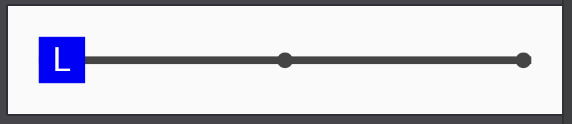
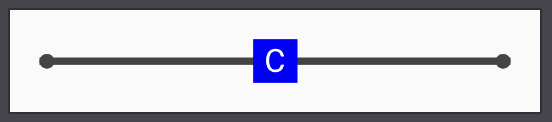
부모 박스 내에서 클릭 후 스와이프 동작을 수행하면 자식 박스가 움직이는 것을 확인할 수 있다. 자식 박스가 처음 두 앵커의 중간 지점에 도달하기 전에 스와이프를 멈추면 시작 위치로 돌아간다. 그러나 중간 지점을 넘어가면 박스는 두번째 앵커까지 이동하고 박스의 텍스트는 L에서 C로 바뀐다.