Column 기반 리스트 만들기
@Composable
fun MyList() {
    ColumnList()
}

@Composable
fun ColumnList() {
    Column {
        repeat(500) {
            Text("List Item $it",
                style = MaterialTheme.typography.titleMedium,
                modifier = Modifier.padding(5.dp)
            )
        }
    }
}

@Preview(showBackground = true, showSystemUi = true)
@Composable
fun previewList() {
    MyApplicationTheme {
        MyList()
    }
}- 위의 코드를 실행 시 미리보기에 다음과 같은 화면이 표시된다.
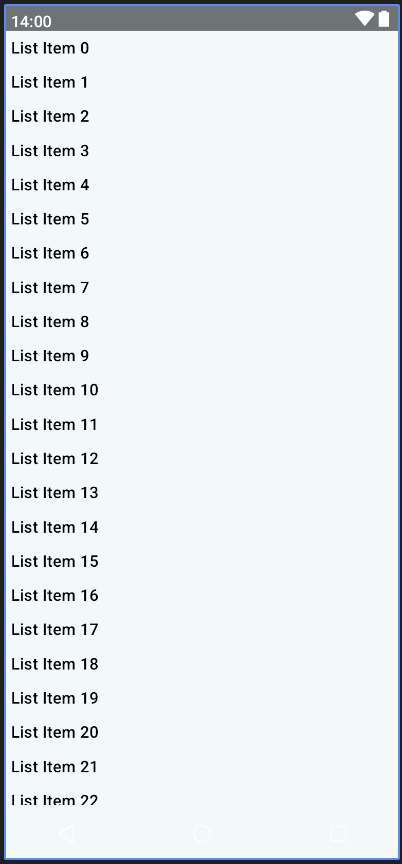
- 현재 해당 미리보기에서는 스크롤이 지원되지 않는다. 스크롤을 지원하기 위해서는 Column의 수직 스크롤을 활성화해야 한다.
리스트 스크롤 활성화하기
@Composable
fun ColumnList() {
    val scrollState = rememberScrollState()

    Column(Modifier.verticalScroll(scrollState)) {
        repeat(500) {
            Text("List Item $it",
                style = MaterialTheme.typography.titleMedium,
                modifier = Modifier.padding(5.dp)
            )
        }
    }
}- scrollState 인스턴스를 생성 후 Column의 모디파이어를 사용해 스크롤을 활성화할 수 있다.
- 이후 미리보기 패널에서 인터랙티브 미리 보기를 새로고침 하면 스크롤이 동작하는 것을 확인할 수 있다.
수동 스크롤
이번에 구현할 것은 버튼 클릭으로 리스트의 처음과 마지막으로 이동하는 것이다. 이 기능은 코틀린 함수이므로 코루틴 스코프 내에서 스크롤 동작을 초기화해야 한다.
@Composable
fun ColumnList() {
    val scrollState = rememberScrollState()
    val coroutineScope = rememberCoroutineScope()

    Column {
        Row() {
            Button(onClick = {
                coroutineScope.launch {
                    scrollState.animateScrollTo(0)
                }
            },
                modifier = Modifier.weight(0.5f)
                    .padding(2.dp)) {
                Text("Top")
            }

            Button(onClick = {
                coroutineScope.launch {
                    scrollState.animateScrollTo(scrollState.maxValue)
                }
            }, modifier = Modifier.weight(0.5f)
                .padding(2.dp)) {
                Text("Bottom")
            }
        }

        Column(Modifier.verticalScroll(scrollState)) {
            repeat(500) {
                Text(
                    "List Item $it",
                    style = MaterialTheme.typography.titleMedium,
                    modifier = Modifier.padding(5.dp)
                )
            }
        }
    }
}- coroutineScope 인스턴스를 생성하고 버튼을 클릭했을 때 코루틴 스코프 내에서 스크롤 동작이 일어날 수 있도록 설정한다.
Row 리스트 예시
@Composable
fun RowList() {
    val scrollState = rememberScrollState()

    Row(Modifier.horizontalScroll(scrollState)) {
        repeat(50) {
            Text("List Item $it",
                style = MaterialTheme.typography.titleMedium,
                modifier = Modifier.padding(5.dp))
        }
    }
}- 미리보기를 통해 수평 스크롤이 동작하는 것을 확인할 수 있다.

안녕하세요.