
1. Tool Calling Agent
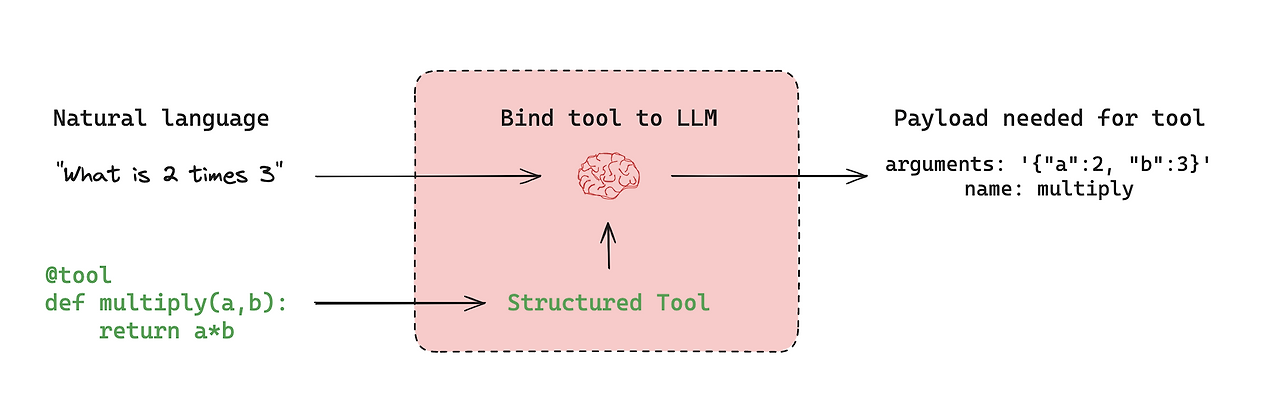
- 자신이 가진 지식만 사용하는 것이 아니라, 외부 도구(API, 데이터베이스, 코드 실행기 등)를 호출해 문제를 해결하는 에이전트.
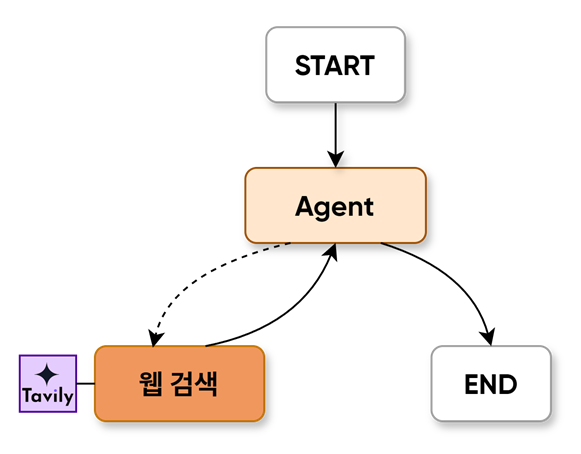
- 사용자의 질문을 이해한 뒤 필요한 경우 적절한 툴을 선택하고, 입력값을 구성해 호출하며, 반환된 결과를 다시 가공해 최종 답변을 만든다.
- 필요할 때 계산기, 검색엔진, 데이터 조회 도구 같은 도구를 직접 쓸 수 있는 AI
2. 웹 검색을 하는 챗봇
2-1. Tavily
Tavily
웹을 실시간으로 검색해 AI가 최신·정확한 정보를 답변할 수 있도록 돕는 AI용 검색·브라우징 API 플랫폼.
!pip install tavily-pythonimport getpass
import os
def _set_env(var: str):
if not os.environ.get(var):
os.environ[var] = getpass.getpass(f"{var}: ")
_set_env("OPENAI_API_KEY")
_set_env("TAVILY_API_KEY")from tavily import TavilyClient
tavily_client = TavilyClient()# max_results=3 → 검색 결과의 최대 개수를 지정합니다. 3이므로, 검색 결과를 최대 3개까지 가져옵니다.
# topic="news" → 뉴스 기사 위주로 검색
# days=10 → 최근 10일 이내의 자료만 검색
response = tavily_client.search("What is AI Agent?", max_results=3) # , topic="news", days = 10
response{'query': 'What is AI Agent?',
'follow_up_questions': None,
'answer': None,
'images': [],
'results': [{'url': 'https://aws.amazon.com/what-is/ai-agents/',
'title': 'What are AI Agents? - Artificial Intelligence - AWS',
'content': "# What are AI Agents? What are AI Agents? ## What are AI Agents? An artificial intelligence (AI) agent is a software program that can interact with its environment, collect data, and use that data to perform self-directed tasks that meet predetermined goals. Humans set goals, but an AI agent independently chooses the best actions it needs to perform to achieve those goals. AI agents interact with their environment by collecting data through sensors or digital inputs. The AI agent applies the data to make an informed decision. AI agents can improve your business operations and your customers' experiences. AI agents require information to execute tasks they have planned successfully. With sufficient data, the AI agent methodically implements the task at hand.",
'score': 0.94989765,
'raw_content': None},
{'url': 'https://github.com/resources/articles/ai/what-are-ai-agents',
'title': 'What are AI agents? - GitHub',
'content': 'Feb 6, 2025·AI agents are autonomous software tools that perform tasks, make decisions, and interact with their environment intelligently and rationally.',
'score': 0.9317675,
'raw_content': None},
{'url': 'https://www.salesforce.com/agentforce/ai-agents/',
'title': 'AI Agents: Definition, Types, Examples | Salesforce US',
'content': '# What Are AI Agents? AI agents are a type of artificial intelligence (AI) system that can understand and respond to customer inquiries without human intervention. AI agents are a type of artificial intelligence (AI) system that can understand and respond to customer inquiries without human intervention. The adoption of AI agents offers numerous benefits, transforming how businesses interact with their customers and manage their service operations. AI agents offer numerous benefits, including improved productivity, reduced costs, enhanced decision-making, and a better customer experience. Use this information to make continuous improvements to your AI agents, ensuring they remain effective and relevant. Drawing from unified customer data, an agentic AI can surface relevant insights for your human agents, tailoring financial recommendations to each customer’s needs and goals.',
'score': 0.93161833,
'raw_content': None}],
'response_time': 0.8,
'request_id': '27ab7b26-4725-4c3f-bec6-9a2a046a2f5a'}response['results'][{'url': 'https://aws.amazon.com/what-is/ai-agents/',
'title': 'What are AI Agents? - Artificial Intelligence - AWS',
'content': "# What are AI Agents? What are AI Agents? ## What are AI Agents? An artificial intelligence (AI) agent is a software program that can interact with its environment, collect data, and use that data to perform self-directed tasks that meet predetermined goals. Humans set goals, but an AI agent independently chooses the best actions it needs to perform to achieve those goals. AI agents interact with their environment by collecting data through sensors or digital inputs. The AI agent applies the data to make an informed decision. AI agents can improve your business operations and your customers' experiences. AI agents require information to execute tasks they have planned successfully. With sufficient data, the AI agent methodically implements the task at hand.",
'score': 0.94989765,
'raw_content': None},
{'url': 'https://github.com/resources/articles/ai/what-are-ai-agents',
'title': 'What are AI agents? - GitHub',
'content': 'Feb 6, 2025·AI agents are autonomous software tools that perform tasks, make decisions, and interact with their environment intelligently and rationally.',
'score': 0.9317675,
'raw_content': None},
{'url': 'https://www.salesforce.com/agentforce/ai-agents/',
'title': 'AI Agents: Definition, Types, Examples | Salesforce US',
'content': '# What Are AI Agents? AI agents are a type of artificial intelligence (AI) system that can understand and respond to customer inquiries without human intervention. AI agents are a type of artificial intelligence (AI) system that can understand and respond to customer inquiries without human intervention. The adoption of AI agents offers numerous benefits, transforming how businesses interact with their customers and manage their service operations. AI agents offer numerous benefits, including improved productivity, reduced costs, enhanced decision-making, and a better customer experience. Use this information to make continuous improvements to your AI agents, ensuring they remain effective and relevant. Drawing from unified customer data, an agentic AI can surface relevant insights for your human agents, tailoring financial recommendations to each customer’s needs and goals.',
'score': 0.93161833,
'raw_content': None}]# get_search_context: 보통 문자열(string) 형태이며, 여러 개의 검색 결과에서 중요한 내용만 추려서 한 덩어리의 텍스트로 제공합니다.
context = tavily_client.get_search_context(query="What is AI Agent?")
context[{"url": "https://aws.amazon.com/what-is/ai-agents/", "content": "# What are AI Agents? What are AI Agents? ## What are AI Agents? An artificial intelligence (AI) agent is a software program that can interact with its environment, collect data, and use that data to perform self-directed tasks that meet predetermined goals. Humans set goals, but an AI agent independently chooses the best actions it needs to perform to achieve those goals. AI agents interact with their environment by collecting data through sensors or digital inputs. The AI agent applies the data to make an informed decision. AI agents can improve your business operations and your customers' experiences. AI agents require information to execute tasks they have planned successfully. With sufficient data, the AI agent methodically implements the task at hand."}, {"url": "https://github.com/resources/articles/ai/what-are-ai-agents", "content": "Feb 6, 2025\u00b7AI agents are autonomous software tools that perform tasks, make decisions, and interact with their environment intelligently and rationally."}, {"url": "https://www.salesforce.com/agentforce/ai-agents/", "content": "# What Are AI Agents? AI agents are a type of artificial intelligence (AI) system that can understand and respond to customer inquiries without human intervention. AI agents are a type of artificial intelligence (AI) system that can understand and respond to customer inquiries without human intervention. The adoption of AI agents offers numerous benefits, transforming how businesses interact with their customers and manage their service operations. AI agents offer numerous benefits, including improved productivity, reduced costs, enhanced decision-making, and a better customer experience. Use this information to make continuous improvements to your AI agents, ensuring they remain effective and relevant. Drawing from unified customer data, an agentic AI can surface relevant insights for your human agents, tailoring financial recommendations to each customer\u2019s needs and goals."}, {"url": "https://www.ibm.com/think/topics/ai-agents", "content": "An artificial intelligence (AI) agent refers to a system or program that is capable of autonomously performing tasks on behalf of a user or another system.Agents vs. AI Assistants\u00b7What are Components of AI...\u00b7What Is Agentic AI?"}, {"url": "https://cloud.google.com/discover/what-are-ai-agents", "content": "AI agents are software systems that use AI to pursue goals and complete tasks on behalf of users. They show reasoning, planning, and memory."}]# qna_search: Tavily가 반환한 최종 답변. 보통 문자열(string) 형태이며, 한두 문장 정도로 정리된 응답을 제공합니다.
answer = tavily_client.qna_search(query="What is AI Agent?")
answerAn AI agent is an autonomous software program that performs tasks and makes decisions based on data. It can automate complex workflows and interact with its environment. AI agents use machine learning to improve over time.2-2. TavilySearch
- max_results (optional, int): 검색 결과 반환 수
- topic (optional, str): 검색 카테고리 / "general"(Default), "news", "finance"
- include_answer (optional, bool): 쿼리에 대한 답변 포함 여부
- include_raw_content (optional, bool): 결과 HTML 포함 여부
- include_images (optional, bool): 쿼리 관련 이미지 목록 포함 여부
- include_image_descriptions (optional, bool): 각 이미지에 대한 설명 텍스트 포함 여부
- search_depth (optional, str): 검색 깊이 / "basic"(Default),"advanced"
- time_range (optional, str): 필터링 날짜 범위 - "day", "week", "month", "year"
- include_domains (optional, List[str]): 구체적으로 포함할 도메인 목록
- exclude_domains (optional, List[str]): 구체적으로 제외할 도메인 목록
!pip install langchain_tavily# .invoke()는 LangChain Tool 호출 형식으로 입력을 받을 수 있습니다.
# 단순 문자열을 넣는 대신, JSON(딕셔너리) 구조로 툴 호출 이벤트(tool call event)처럼 전달하는 방식입니다.
from langchain_tavily import TavilySearch
tool = TavilySearch(max_results=3)
tool.invoke("What's a 'node' in LangGraph?"){'query': "What's a 'node' in LangGraph?",
'follow_up_questions': None,
'answer': None,
'images': [],
'results': [{'url': 'https://www.ibm.com/think/topics/langgraph',
'title': 'What is LangGraph? - IBM',
'content': 'LangGraph, created by LangChain, is an open source AI agent framework designed to build, deploy and manage complex generative AI agent workflows. At its core, LangGraph uses the power of graph-based architectures to model and manage the intricate relationships between various components of an AI agent workflow. LangGraph illuminates the processes within an AI workflow, allowing full transparency of the agent’s state. By combining these technologies with a set of APIs and tools, LangGraph provides users with a versatile platform for developing AI solutions and workflows including chatbots, state graphs and other agent-based systems. **Nodes**: In LangGraph, nodes represent individual components or agents within an AI workflow. LangGraph uses enhanced decision-making by modeling complex relationships between nodes, which means it uses AI agents to analyze their past actions and feedback.',
'score': 0.9159971,
'raw_content': None},
{'url': 'https://www.datacamp.com/tutorial/langgraph-tutorial',
'title': 'LangGraph Tutorial: What Is LangGraph and How to Use It?',
'content': 'LangGraph is a library within the LangChain ecosystem that provides a framework for defining, coordinating, and executing multiple LLM agents (or chains) in a structured and efficient manner. LangGraph provides a framework for defining, coordinating, and executing multiple LLM agents (or chains) in a structured manner. The core concepts of LangGraph include: graph structure, state management, and coordination. In LangGraph, each node represents an LLM agent, and the edges are the communication channels between these agents. Whether you need a chatbot that can handle various types of user requests or a multi-agent system that performs complex tasks, LangGraph provides the tools to build exactly what you need. LangGraph allows you to create custom node types to implement complex agent logic.',
'score': 0.8259413,
'raw_content': None},
{'url': 'https://medium.com/@kbdhunga/beginners-guide-to-langgraph-understanding-state-nodes-and-edges-part-1-897e6114fa48',
'title': "Beginner's Guide to LangGraph: Understanding State, Nodes, and ...",
'content': 'Jul 27, 2024·Nodes: Nodes are the fundamental building blocks of a graph. Each node represents a specific function or operation that processes the current',
'score': 0.8098936,
'raw_content': None}],
'response_time': 0.71,
'request_id': '535913bf-aeae-45c7-9182-298cd17d880b'}invoke_with_toolcall = tool.invoke({"args": {'query': "What's a 'node' in LangGraph?"}, "type": "tool_call", "id": "foo", "name": "tavily_search"})
invoke_with_toolcallToolMessage(content='{"query": "What\'s a \'node\' in LangGraph?", "follow_up_questions": null, "answer": null, "images": [], "results": [{"url": "https://www.ibm.com/think/topics/langgraph", "title": "What is LangGraph? - IBM", "content": "LangGraph, created by LangChain, is an open source AI agent framework designed to build, deploy and manage complex generative AI agent workflows. At its core, LangGraph uses the power of graph-based architectures to model and manage the intricate relationships between various components of an AI agent workflow. LangGraph illuminates the processes within an AI workflow, allowing full transparency of the agent’s state. By combining these technologies with a set of APIs and tools, LangGraph provides users with a versatile platform for developing AI solutions and workflows including chatbots, state graphs and other agent-based systems. **Nodes**: In LangGraph, nodes represent individual components or agents within an AI workflow. LangGraph uses enhanced decision-making by modeling complex relationships between nodes, which means it uses AI agents to analyze their past actions and feedback.", "score": 0.9159971, "raw_content": null}, {"url": "https://www.datacamp.com/tutorial/langgraph-tutorial", "title": "LangGraph Tutorial: What Is LangGraph and How to Use It?", "content": "LangGraph is a library within the LangChain ecosystem that provides a framework for defining, coordinating, and executing multiple LLM agents (or chains) in a structured and efficient manner. LangGraph provides a framework for defining, coordinating, and executing multiple LLM agents (or chains) in a structured manner. The core concepts of LangGraph include: graph structure, state management, and coordination. In LangGraph, each node represents an LLM agent, and the edges are the communication channels between these agents. Whether you need a chatbot that can handle various types of user requests or a multi-agent system that performs complex tasks, LangGraph provides the tools to build exactly what you need. LangGraph allows you to create custom node types to implement complex agent logic.", "score": 0.8259413, "raw_content": null}, {"url": "https://medium.com/@kbdhunga/beginners-guide-to-langgraph-understanding-state-nodes-and-edges-part-1-897e6114fa48", "title": "Beginner\'s Guide to LangGraph: Understanding State, Nodes, and ...", "content": "Jul 27, 2024·Nodes: Nodes are the fundamental building blocks of a graph. Each node represents a specific function or operation that processes the current", "score": 0.8098936, "raw_content": null}], "response_time": 1.41, "request_id": "1c94855f-20fc-42d9-b986-3077cc1aeb10"}', name='tavily_search', tool_call_id='foo')invoke_with_toolcall.content{"query": "What's a 'node' in LangGraph?", "follow_up_questions": null, "answer": null, "images": [], "results": [{"url": "https://www.ibm.com/think/topics/langgraph", "title": "What is LangGraph? - IBM", "content": "LangGraph, created by LangChain, is an open source AI agent framework designed to build, deploy and manage complex generative AI agent workflows. At its core, LangGraph uses the power of graph-based architectures to model and manage the intricate relationships between various components of an AI agent workflow. LangGraph illuminates the processes within an AI workflow, allowing full transparency of the agent’s state. By combining these technologies with a set of APIs and tools, LangGraph provides users with a versatile platform for developing AI solutions and workflows including chatbots, state graphs and other agent-based systems. **Nodes**: In LangGraph, nodes represent individual components or agents within an AI workflow. LangGraph uses enhanced decision-making by modeling complex relationships between nodes, which means it uses AI agents to analyze their past actions and feedback.", "score": 0.9159971, "raw_content": null}, {"url": "https://www.datacamp.com/tutorial/langgraph-tutorial", "title": "LangGraph Tutorial: What Is LangGraph and How to Use It?", "content": "LangGraph is a library within the LangChain ecosystem that provides a framework for defining, coordinating, and executing multiple LLM agents (or chains) in a structured and efficient manner. LangGraph provides a framework for defining, coordinating, and executing multiple LLM agents (or chains) in a structured manner. The core concepts of LangGraph include: graph structure, state management, and coordination. In LangGraph, each node represents an LLM agent, and the edges are the communication channels between these agents. Whether you need a chatbot that can handle various types of user requests or a multi-agent system that performs complex tasks, LangGraph provides the tools to build exactly what you need. LangGraph allows you to create custom node types to implement complex agent logic.", "score": 0.8259413, "raw_content": null}, {"url": "https://medium.com/@kbdhunga/beginners-guide-to-langgraph-understanding-state-nodes-and-edges-part-1-897e6114fa48", "title": "Beginner's Guide to LangGraph: Understanding State, Nodes, and ...", "content": "Jul 27, 2024·Nodes: Nodes are the fundamental building blocks of a graph. Each node represents a specific function or operation that processes the current", "score": 0.8098936, "raw_content": null}], "response_time": 1.41, "request_id": "1c94855f-20fc-42d9-b986-3077cc1aeb10"}!pip install langchain_communityfrom langchain_community.tools.tavily_search import TavilySearchResults
tool = TavilySearchResults(max_results=2)
tool.invoke("What's a 'node' in LangGraph?")/tmp/ipython-input-1835957720.py:3: LangChainDeprecationWarning: The class `TavilySearchResults` was deprecated in LangChain 0.3.25 and will be removed in 1.0. An updated version of the class exists in the :class:`~langchain-tavily package and should be used instead. To use it run `pip install -U :class:`~langchain-tavily` and import as `from :class:`~langchain_tavily import TavilySearch``.
tool = TavilySearchResults(max_results=2)
[{'title': 'What is LangGraph?',
'url': 'https://www.ibm.com/think/topics/langgraph',
'content': 'Nodes: In LangGraph, nodes represent individual components or agents within an AI workflow. Nodes can be thought of as “actors” that interact with each other in a specific way. For example, to add nodes for tool calling, one can use the ToolNode. Another example, the next node, refers to the node that will be executed following the current one.',
'score': 0.9257218},
{'title': 'LangGraph Tutorial with Practical Example',
'url': 'https://www.gettingstarted.ai/langgraph-tutorial-with-example/',
'content': 'Nodes are defined as Python functions that can perform a set of actions. For example, a node can integrate with a large language model, process information, call an external API, or any other task.\n\nA LangGraph node takes the state of the graph as a parameter and returns an updated state after it is executed.\n\nHere\'s an example of a basic node, a Python function:\n\n```\nfrom langchain_openai import ChatOpenAI\n\n...\n\nllm = ChatOpenAI(model_name="gpt-4o")',
'score': 0.898277}]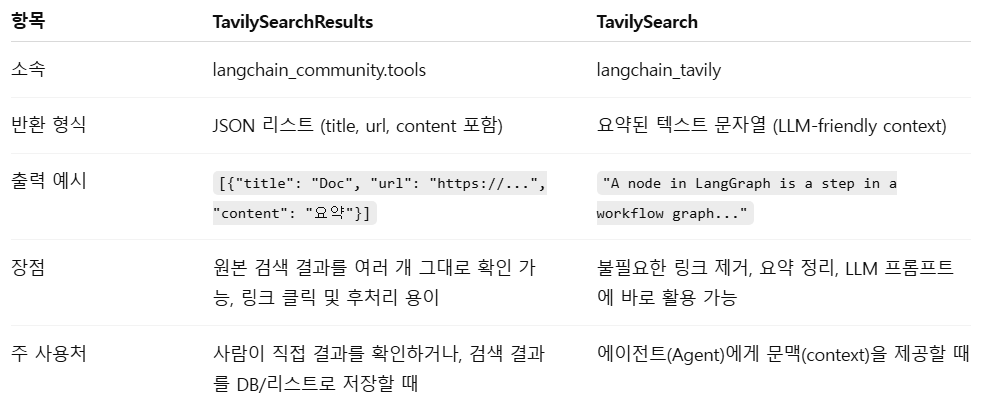
invoke_with_toolcall = tool.invoke({"args": {'query': "What's a 'node' in LangGraph?"}, "type": "tool_call", "id": "foo", "name": "tavily"})
invoke_with_toolcall
ToolMessage(content='[{"title": "What is LangGraph?", "url": "https://www.ibm.com/think/topics/langgraph", "content": "Nodes: In LangGraph, nodes represent individual components or agents within an AI workflow. Nodes can be thought of as “actors” that interact with each other in a specific way. For example, to add nodes for tool calling, one can use the ToolNode. Another example, the next node, refers to the node that will be executed following the current one.", "score": 0.9257218}, {"title": "LangGraph Tutorial with Practical Example", "url": "https://www.gettingstarted.ai/langgraph-tutorial-with-example/", "content": "Nodes are defined as Python functions that can perform a set of actions. For example, a node can integrate with a large language model, process information, call an external API, or any other task.\\n\\nA LangGraph node takes the state of the graph as a parameter and returns an updated state after it is executed.\\n\\nHere\'s an example of a basic node, a Python function:\\n\\n```\\nfrom langchain_openai import ChatOpenAI\\n\\n...\\n\\nllm = ChatOpenAI(model_name=\\"gpt-4o\\")", "score": 0.898277}]', name='tavily_search_results_json', tool_call_id='foo', artifact={'query': "What's a 'node' in LangGraph?", 'follow_up_questions': None, 'answer': None, 'images': [], 'results': [{'url': 'https://www.ibm.com/think/topics/langgraph', 'title': 'What is LangGraph?', 'content': 'Nodes: In LangGraph, nodes represent individual components or agents within an AI workflow. Nodes can be thought of as “actors” that interact with each other in a specific way. For example, to add nodes for tool calling, one can use the ToolNode. Another example, the next node, refers to the node that will be executed following the current one.', 'score': 0.9257218, 'raw_content': None}, {'url': 'https://www.gettingstarted.ai/langgraph-tutorial-with-example/', 'title': 'LangGraph Tutorial with Practical Example', 'content': 'Nodes are defined as Python functions that can perform a set of actions. For example, a node can integrate with a large language model, process information, call an external API, or any other task.\n\nA LangGraph node takes the state of the graph as a parameter and returns an updated state after it is executed.\n\nHere\'s an example of a basic node, a Python function:\n\n```\nfrom langchain_openai import ChatOpenAI\n\n...\n\nllm = ChatOpenAI(model_name="gpt-4o")', 'score': 0.898277, 'raw_content': None}], 'response_time': 1.64, 'request_id': '4be5e621-63af-4f5e-9bd2-922802c1a5a2'})# results에 들어 있는 정보
invoke_with_toolcall.content[{"title": "What is LangGraph?", "url": "https://www.ibm.com/think/topics/langgraph", "content": "Nodes: In LangGraph, nodes represent individual components or agents within an AI workflow. Nodes can be thought of as “actors” that interact with each other in a specific way. For example, to add nodes for tool calling, one can use the ToolNode. Another example, the next node, refers to the node that will be executed following the current one.", "score": 0.9257218}, {"title": "LangGraph Tutorial with Practical Example", "url": "https://www.gettingstarted.ai/langgraph-tutorial-with-example/", "content": "Nodes are defined as Python functions that can perform a set of actions. For example, a node can integrate with a large language model, process information, call an external API, or any other task.\n\nA LangGraph node takes the state of the graph as a parameter and returns an updated state after it is executed.\n\nHere's an example of a basic node, a Python function:\n\n```\nfrom langchain_openai import ChatOpenAI\n\n...\n\nllm = ChatOpenAI(model_name=\"gpt-4o\")", "score": 0.898277}]# 모델의 모든 실행결과
invoke_with_toolcall.artifact{'query': "What's a 'node' in LangGraph?",
'follow_up_questions': None,
'answer': None,
'images': [],
'results': [{'url': 'https://www.ibm.com/think/topics/langgraph',
'title': 'What is LangGraph?',
'content': 'Nodes: In LangGraph, nodes represent individual components or agents within an AI workflow. Nodes can be thought of as “actors” that interact with each other in a specific way. For example, to add nodes for tool calling, one can use the ToolNode. Another example, the next node, refers to the node that will be executed following the current one.',
'score': 0.9257218,
'raw_content': None},
{'url': 'https://www.gettingstarted.ai/langgraph-tutorial-with-example/',
'title': 'LangGraph Tutorial with Practical Example',
'content': 'Nodes are defined as Python functions that can perform a set of actions. For example, a node can integrate with a large language model, process information, call an external API, or any other task.\n\nA LangGraph node takes the state of the graph as a parameter and returns an updated state after it is executed.\n\nHere\'s an example of a basic node, a Python function:\n\n```\nfrom langchain_openai import ChatOpenAI\n\n...\n\nllm = ChatOpenAI(model_name="gpt-4o")',
'score': 0.898277,
'raw_content': None}],
'response_time': 1.64,
'request_id': '4be5e621-63af-4f5e-9bd2-922802c1a5a2'}2-3. 도구 바인딩
from langchain_core.tools import tool

@tool
def add(a: int, b: int) -> int:
    """Adds a and b

    Arg:
        a: first int
        b: second int
    """
    return a + b

@tool
def multiply(a: int, b: int) -> int:
    """Multiplies a and b

    Arg:
        a: first int
        b: second int
    """
    return a * b

tools = [add, multiply]
!pip install langchain_openaifrom langchain_openai import ChatOpenAI
llm = ChatOpenAI(model="gpt-4o") # model="gpt-4o"
llm_with_tools = llm.bind_tools(tools)query = "What is 3 * 12? Also, what is 11 + 49?"
llm_with_tools.invoke(query).tool_calls[{'name': 'multiply',
'args': {'a': 3, 'b': 12},
'id': 'call_Svb2FCCiTVbLVNls1pTc2vad',
'type': 'tool_call'},
{'name': 'add',
'args': {'a': 11, 'b': 49},
'id': 'call_FkB8n3UvweQQOFk0Wu7TXoIC',
'type': 'tool_call'}]query = "What is 12 % 2?"
llm_with_tools.invoke(query).tool_calls[]llm_with_tools = llm.bind_tools(tools,
tool_choice={"type": "function", "function": {"name": "multiply"}}
)
resp = llm_with_tools.invoke("What is 3 * 12? Use tool.")
print(resp.tool_calls) # 이제 비어있지 않음[{'name': 'multiply', 'args': {'a': 3, 'b': 12}, 'id': 'call_nW4h39mUelypnFX4gIZxXB5G', 'type': 'tool_call'}]from langchain_openai import ChatOpenAI
tool = TavilySearch(max_results=2)
tools = [tool]
llm = ChatOpenAI(model="gpt-5-nano")
llm_with_tools = llm.bind_tools(tools) # TavilySearch(tools) 을 호출할 수 있도록 함llm_with_tools.invoke("안녕")AIMessage(content='안녕하세요! 무엇을 도와드릴까요? 궁금한 점이 있으면 편하게 물어보세요. 한국어/영어 중 어떤 언어로 도와드릴지도 알려주시면 됩니다.', additional_kwargs={'refusal': None}, response_metadata={'token_usage': {'completion_tokens': 375, 'prompt_tokens': 1351, 'total_tokens': 1726, 'completion_tokens_details': {'accepted_prediction_tokens': 0, 'audio_tokens': 0, 'reasoning_tokens': 320, 'rejected_prediction_tokens': 0}, 'prompt_tokens_details': {'audio_tokens': 0, 'cached_tokens': 0}}, 'model_name': 'gpt-5-nano-2025-08-07', 'system_fingerprint': None, 'id': 'chatcmpl-CE3yCeKczFTZXWLxVkoLCUcwSYGOI', 'service_tier': 'default', 'finish_reason': 'stop', 'logprobs': None}, id='run--22b81d15-8dd7-415e-853f-e94509e1370a-0', usage_metadata={'input_tokens': 1351, 'output_tokens': 375, 'total_tokens': 1726, 'input_token_details': {'audio': 0, 'cache_read': 0}, 'output_token_details': {'audio': 0, 'reasoning': 320}})llm_with_tools.invoke("What is Langgraph?")AIMessage(content='', additional_kwargs={'tool_calls': [{'id': 'call_sMzGNFMMtAi7F1sT3Goxa42b', 'function': {'arguments': '{"query":"Langgraph"}', 'name': 'tavily_search'}, 'type': 'function'}], 'refusal': None}, response_metadata={'token_usage': {'completion_tokens': 218, 'prompt_tokens': 1354, 'total_tokens': 1572, 'completion_tokens_details': {'accepted_prediction_tokens': 0, 'audio_tokens': 0, 'reasoning_tokens': 192, 'rejected_prediction_tokens': 0}, 'prompt_tokens_details': {'audio_tokens': 0, 'cached_tokens': 1152}}, 'model_name': 'gpt-5-nano-2025-08-07', 'system_fingerprint': None, 'id': 'chatcmpl-CE3yn2shA3YOAMuryNve4XyDaG2LQ', 'service_tier': 'default', 'finish_reason': 'tool_calls', 'logprobs': None}, id='run--998aecf5-81d9-4cb2-9c55-0ed1600e5ec0-0', tool_calls=[{'name': 'tavily_search', 'args': {'query': 'Langgraph'}, 'id': 'call_sMzGNFMMtAi7F1sT3Goxa42b', 'type': 'tool_call'}], usage_metadata={'input_tokens': 1354, 'output_tokens': 218, 'total_tokens': 1572, 'input_token_details': {'audio': 0, 'cache_read': 1152}, 'output_token_details': {'audio': 0, 'reasoning': 192}})llm_with_tools.invoke("What is Langgraph?").tool_calls[{'name': 'tavily_search',
'args': {'query': 'Langgraph'},
'id': 'call_D7HnHvmIK9cATj7VoTiej1pU',
'type': 'tool_call'}]!pip install langgraphfrom typing import Annotated
from typing_extensions import TypedDict
from langgraph.graph import StateGraph, START, END
from langgraph.graph.message import add_messagesclass State(TypedDict):
messages: Annotated[list, add_messages]graph_builder = StateGraph(State)def chatbot(state: State):
return {"messages": [llm_with_tools.invoke(state["messages"])]} # 일반적인 질문에 대한 일반 답변 or tool_callsgraph_builder.add_node("chatbot", chatbot)<langgraph.graph.state.StateGraph at 0x7a3017f37950>2-4. ToolNode
ToolNode는 LangGraph에서 도구 호출을 실제로 실행해 주는 노드이다.
LLM이 생성한 AIMessage.tool_calls를 읽어 각 호출의 도구 이름과 인자를 매칭해 실행하고, 결과를 ToolMessage로 반환하여 그래프의 상태(대화 기록)에 추가한다.
보통 “LLM 노드 → ToolNode → LLM 노드” 형태의 루프에서 사용되며, tools_condition 같은 조건부 엣지와 함께 붙여 LLM이 도구를 요청할 때만 ToolNode가 동작하게 한다.
ToolNode는 LLM의 툴 호출 계획을 실제 코드 실행으로 연결하는 브리지로, 도구 레지스트리(이름→함수/툴)만 넘겨주면 호출·에러 처리·결과 전달까지 표준화된 방식으로 처리해준다.
import json
from langchain_core.messages import ToolMessage
from langgraph.prebuilt import ToolNode

class BasicToolNode:
    def __init__(self, tools: list) -> None:
        self.tools_by_name = {tool.name: tool for tool in tools} # ["tavily_search" : TavilySearch()]

    def __call__(self, inputs: dict):
        if messages := inputs.get("messages", []):
            message = messages[-1] # 마지막 message
        else:
            raise ValueError("No message found in input")

        outputs = []
        for tool_call in message.tool_calls: # 메시지에서 호출된 도구를 불러옴
            tool_result = self.tools_by_name[tool_call["name"]].invoke( # Tool 호출 실행
                tool_call["args"]
            )
            outputs.append( # Tool 호출 결과(ToolMessage) 추가
                ToolMessage(
                    content=json.dumps(tool_result),
                    name=tool_call["name"],
                    tool_call_id=tool_call["id"],
                )
            )
        return {"messages": outputs}

tool_node = BasicToolNode(tools=[tool])
# tool_node = ToolNode(tools=[tool])
graph_builder.add_node("tools", tool_node)
def route_tools(
state: State,
):
if isinstance(state, list):
ai_message = state[-1]
elif messages := state.get("messages", []):
ai_message = messages[-1]
else:
raise ValueError(f"No messages found in input state to tool_edge: {state}")
if hasattr(ai_message, "tool_calls") and len(ai_message.tool_calls) > 0:
return "tools"
return ENDgraph_builder.add_conditional_edges(
"chatbot",
route_tools,
{"tools": "tools", END: END},
)<langgraph.graph.state.StateGraph at 0x7a3017f37950># 엣지 연결
graph_builder.add_edge("tools", "chatbot") # 도구가 호출될 때마다 챗봇으로 돌아가 다음 단계를 결정
graph_builder.add_edge(START, "chatbot")
graph = graph_builder.compile()
graph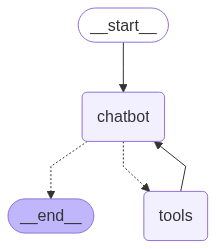
def stream_graph_updates(user_input: str):
    for event in graph.stream({"messages": [{"role": "user", "content": user_input}]}): # graph 노드 호출 결과 받아옴
        for value in event.values():
            print("Assistant:", value["messages"][-1].content) # AI 답변 출력
while True:
try:
user_input = input("User: ")
if user_input.lower() in ["quit", "exit", "q"]:
print("Goodbye!")
break
stream_graph_updates(user_input)
except:
user_input = "What do you know about LangGraph?"
print("User: " + user_input)
stream_graph_updates(user_input)
breakUser: 안녕
Assistant: 안녕하세요! 무엇을 도와드릴까요? 궁금한 점이 있거나 정보가 필요하시면 말씀해 주세요. 예를 들면 요리 레시피, 공부 도움, 번역, 코딩 팁, 일상 대화 연습 등 다양하게 도와드릴 수 있어요. 어떤 주제로 이야기를 나눠볼까요?
User: 랭그래프가 뭐야?
Assistant: 맥락에 따라 뜻이 달라질 수 있는데요. 혹시 어떤 맥락에서 보신 용어인지 알려주실 수 있을까요? 아래 두 가지가 가장 가능성이 높은데, 맞춰 설명해 드리겠습니다.
- 랭크 그래프(Rank graph): 항목들의 순위 관계를 시각화한 그래프. 노드는 항목, 간선은 순위 관계나 차이를 나타내며, 순위 데이터를 분석할 때 사용합니다.
- 링 그래프(Ring graph) 또는 링 네트워크: 원형으로 연결된 그래프를 말합니다. “랭그래프”가 아니라 “링 그래프”일 가능성도 있어요.
혹시 예문이나 들으신 맥락(논문, 프로그램 이름, 데이터 시각화 도구 등)을 알려주실 수 있나요? 그에 맞춰 자세한 설명과 예시를 드리겠습니다.
User: What is Langgraph?
Assistant:
Assistant: {"query": "Langgraph", "follow_up_questions": null, "answer": null, "images": [], "results": [{"url": "https://www.ibm.com/think/topics/langgraph", "title": "What is LangGraph? - IBM", "content": "LangGraph, created by LangChain, is an open source AI agent framework designed to build, deploy and manage complex generative AI agent workflows. At its core, LangGraph uses the power of graph-based architectures to model and manage the intricate relationships between various components of an AI agent workflow. LangGraph illuminates the processes within an AI workflow, allowing full transparency of the agent\u2019s state. By combining these technologies with a set of APIs and tools, LangGraph provides users with a versatile platform for developing AI solutions and workflows including chatbots, state graphs and other agent-based systems. **Nodes**: In LangGraph, nodes represent individual components or agents within an AI workflow. LangGraph uses enhanced decision-making by modeling complex relationships between nodes, which means it uses AI agents to analyze their past actions and feedback.", "score": 0.92359936, "raw_content": null}, {"url": "https://langchain-ai.github.io/langgraphjs/", "title": "LangGraph.js", "content": "LangGraph \u2014 used by Replit, Uber, LinkedIn, GitLab and more \u2014 is a low-level orchestration framework for building controllable agents", "score": 0.8863518, "raw_content": null}], "response_time": 1.29, "request_id": "b53fa31b-7c77-432c-8732-c78630b02bfd"}
Assistant: LangGraph is an open-source framework for building, deploying, and managing complex generative-AI agent workflows. It uses a graph-based architecture where nodes represent individual components or agents in a workflow, and edges define how they interact. This approach makes the state and decisions of an AI agent more transparent and easier to model, reason about, and scale.
Key points:
- Origin and purpose: Created within the LangChain ecosystem to orchestrate and coordinate multi-agent workflows.
- Graph-based: Models the relationships and dependencies between components (nodes) to manage the overall agent process.
- Node-level thinking: Each node can represent tools, memory, planners, or other agents, allowing for sophisticated, interconnected behaviors.
- Transparency: The graph and agent state are visible, aiding debugging and understanding of how decisions are made.
- LangGraph.js: A low-level JavaScript (JS) orchestration library in the LangGraph family used by companies like Replit, Uber, LinkedIn, and GitLab to build controllable agents.
If you’d like, I can pull together a quick primer on how to get started with LangGraph (or LangGraph.js), including typical architecture patterns and a simple example.
User: q
Goodbye!2-5. create_react_agent
create_react_agent는 LangChain에서 ReAct 패턴(Reason+Act)을 따르는 에이전트를 손쉽게 구성하는 팩토리로, LLM과 사용할 도구 목록, 그리고 적절한 프롬프트를 결합해 “생각→도구 호출→관찰→최종 답변”의 반복 루프를 수행하는 Agent 객체를 만들어준다.
이 에이전트는 질문을 해석해 필요한 도구를 선택하고 인자를 구성해 호출한 뒤, 결과를 반영해 다음 행동을 결정하며, 보통 AgentExecutor와 함께 실행하여 다단계 추론과 복수의 툴 호출을 자동으로 오케스트레이션한다.
핵심은 프롬프트(지침), LLM, 툴 레지스트리(이름→함수/API), 출력 파서를 표준화해 붙여주는 것이며, OpenAI 스타일의 툴콜을 포함한 다양한 LLM과 호환되어 실용적인 “생각하며 도구를 쓰는” 에이전트를 빠르게 구성할 수 있게 해주는 점이다.
from langgraph.prebuilt import create_react_agent
from langchain_openai import ChatOpenAI

tool = TavilySearch(max_results=2)
tools = [tool]

llm = ChatOpenAI(model="gpt-5-nano")
agent = create_react_agent(llm, tools)
response = agent.invoke({"messages": [{"role": "user", "content": "What is LangGraph?"}]})response{'messages': [HumanMessage(content='What is LangGraph?', additional_kwargs={}, response_metadata={}, id='a8b87147-3acb-48e3-9dea-63140f44f134'),
AIMessage(content='', additional_kwargs={'tool_calls': [{'id': 'call_B7iXhYPPtG8kraiIU3sdJzTb', 'function': {'arguments': '{"query":"LangGraph"}', 'name': 'tavily_search'}, 'type': 'function'}], 'refusal': None}, response_metadata={'token_usage': {'completion_tokens': 218, 'prompt_tokens': 1354, 'total_tokens': 1572, 'completion_tokens_details': {'accepted_prediction_tokens': 0, 'audio_tokens': 0, 'reasoning_tokens': 192, 'rejected_prediction_tokens': 0}, 'prompt_tokens_details': {'audio_tokens': 0, 'cached_tokens': 1152}}, 'model_name': 'gpt-5-nano-2025-08-07', 'system_fingerprint': None, 'id': 'chatcmpl-CE4FpVBY3ndhZlZLkzzXXbc9wogb7', 'service_tier': 'default', 'finish_reason': 'tool_calls', 'logprobs': None}, id='run--b600d986-41f4-405d-8134-59b6a5e47bc1-0', tool_calls=[{'name': 'tavily_search', 'args': {'query': 'LangGraph'}, 'id': 'call_B7iXhYPPtG8kraiIU3sdJzTb', 'type': 'tool_call'}], usage_metadata={'input_tokens': 1354, 'output_tokens': 218, 'total_tokens': 1572, 'input_token_details': {'audio': 0, 'cache_read': 1152}, 'output_token_details': {'audio': 0, 'reasoning': 192}}),
ToolMessage(content='{"query": "LangGraph", "follow_up_questions": null, "answer": null, "images": [], "results": [{"url": "https://www.ibm.com/think/topics/langgraph", "title": "What is LangGraph? - IBM", "content": "LangGraph, created by LangChain, is an open source AI agent framework designed to build, deploy and manage complex generative AI agent workflows. At its core, LangGraph uses the power of graph-based architectures to model and manage the intricate relationships between various components of an AI agent workflow. LangGraph illuminates the processes within an AI workflow, allowing full transparency of the agent’s state. By combining these technologies with a set of APIs and tools, LangGraph provides users with a versatile platform for developing AI solutions and workflows including chatbots, state graphs and other agent-based systems. **Nodes**: In LangGraph, nodes represent individual components or agents within an AI workflow. LangGraph uses enhanced decision-making by modeling complex relationships between nodes, which means it uses AI agents to analyze their past actions and feedback.", "score": 0.93666285, "raw_content": null}, {"url": "https://langchain-ai.github.io/langgraphjs/", "title": "LangGraph.js", "content": "LangGraph — used by Replit, Uber, LinkedIn, GitLab and more — is a low-level orchestration framework for building controllable agents", "score": 0.8925721, "raw_content": null}], "response_time": 0.89, "request_id": "5d36620f-a705-4673-9811-eea4ca6e974a"}', name='tavily_search', id='50140ea4-262e-4cbf-90bd-65190b9187f4', tool_call_id='call_B7iXhYPPtG8kraiIU3sdJzTb'),
AIMessage(content='LangGraph is an open-source framework for building and orchestrating AI agent workflows using a graph-based model. In LangGraph, each node in the graph represents a component or agent, and the edges define how data and control flow between them. The idea is to decompose complex AI tasks into modular parts (agents/tools) and manage their interactions transparently, so you can see and influence the agent’s state and decisions as the workflow runs.\n\nKey points\n- Graph-based orchestration: models relationships and dependencies between components of an AI workflow.\n- Nodes represent components: agents, tools, memory stores, planners, etc.\n- Transparency: designed to make the agent’s state and decision-making more observable.\n- Use cases: building chatbots, multi-step agent workflows, state graphs, and other agent-based systems.\n\nWhat you should know about variants\n- LangGraph (LangChain ecosystem): Often described as an open-source AI agent framework for building, deploying, and managing complex generative AI agent workflows.\n- LangGraph.js: A low-level JavaScript/TypeScript orchestration library for building controllable agents; used in production by companies like Replit, Uber, LinkedIn, and GitLab.\n\nIf you’d like, I can pull in more practical details (e.g., a simple layout of a LangGraph graph, typical nodes, or a quick setup example) or compare LangGraph to other agent orchestration tools.', additional_kwargs={'refusal': None}, response_metadata={'token_usage': {'completion_tokens': 1510, 'prompt_tokens': 1732, 'total_tokens': 3242, 'completion_tokens_details': {'accepted_prediction_tokens': 0, 'audio_tokens': 0, 'reasoning_tokens': 1216, 'rejected_prediction_tokens': 0}, 'prompt_tokens_details': {'audio_tokens': 0, 'cached_tokens': 1152}}, 'model_name': 'gpt-5-nano-2025-08-07', 'system_fingerprint': None, 'id': 'chatcmpl-CE4FuTCo7vgwzGuVYSkxUNo78ctL7', 'service_tier': 'default', 'finish_reason': 'stop', 'logprobs': None}, id='run--3795b22a-ea4d-4760-8ad4-b7493a4fdb0d-0', usage_metadata={'input_tokens': 1732, 'output_tokens': 1510, 'total_tokens': 3242, 'input_token_details': {'audio': 0, 'cache_read': 1152}, 'output_token_details': {'audio': 0, 'reasoning': 1216}})]}3. 원하는 형태로 출력하는 챗봇
from pydantic import BaseModel, Fieldclass MovieResponse(BaseModel):
title: str = Field(description='영화 제목')
director: str = Field(description='감독 이름')
genre: str = Field(description='장르')
release_year: int = Field(description='개봉 연도')model = ChatOpenAI(model="gpt-5-nano")
model_with_structured_output = model.with_structured_output(MovieResponse)
model_with_structured_output.invoke('메멘토 영화에 대해 설명해주세요')MovieResponse(title='Memento', director='Christopher Nolan', genre='스릴러, 느와르, 심리 스릴러', release_year=2000)from typing import Unionclass MovieResponse(BaseModel):
title: str = Field(description='영화 제목')
director: str = Field(description='감독 이름')
genre: str = Field(description='장르')
release_year: int = Field(description='개봉 연도')
class ConversationalResponse(BaseModel):
response: str = Field(description='사용자의 질문에 대해 친절하게 대화하듯 답변하는 문장')
class FinalResponse(BaseModel):
final_output: Union[MovieResponse, ConversationalResponse]structured_llm = model.with_structured_output(FinalResponse)
structured_llm.invoke('메멘토 영화에 대해 설명해주세요')FinalResponse(final_output=ConversationalResponse(response='메멘토(Memento)는 크리스토퍼 놀란 감독의 2000년작으로, 단기 기억 상실증을 가진 주인공 레너드 셸비가 아내를 살해한 범인을 찾기 위해 기억의 흔적을 남기는 이야기를 다룹니다. 레너드는 사고로 인해 새로운 기억을 형성하지 못하기 때문에 사진, 폴라로이드 사진, 타투에 남긴 메모를 통해 사건의 단서를 기록하고 기억을 이어가려 합니다.\n\n구성 방식이 이 영화의 가장 큰 특징이에요. 이야기는 두 개의 얽힌 축으로 전개됩니다. 컬러 화면의 장면들은 사건의 흐름을 역순으로 보여주고, 흑백 화면의 장면은 연대 순으로 진행됩니다. 이 두 축이 서로 뒤섞여 관객은 점차 진실을 추론하게 됩니다. 레너드는 ‘존 G’라는 인물이 아내를 죽인 범인이라고 믿고 그를 쫓지만, 기억의 왜곡과 조작으로 인해 진실이 점점 흐려집니다.\n\n등장인물 중 주요 인물은 다음과 같아요. 레너드 셸비: 기억을 잃은 채로 자신이 망가진 기억을 보완하려 애쓰는 남자. 테디: 레너드를 돕는 듯 보이지만 그의 진짜 정체성이나 동기는 의문을 남깁니다. 나탈리: 레너드를 이용하려 들고 그를 조종하는 인물로 작용하기도 합니다. 영화 전개를 통해 이들 사이의 관계가 점점 불안정하고 신뢰하기 어렵다는 점이 드러납니다.\n\n주제와 반전 포인트도 핵심이에요. 메멘토는 진실의 주관성, 기억의 신뢰성, 그리고 복수의 윤리성에 관한 질문을 던집니다. 기억이 기억으로 남는 정보의 출처를 스스로 편집하고 재구성하게 만들며, 결국 관객도 ‘무엇이 진짜인가’라는 의문에 빠지게 합니다. 영화의 엔딩은 레너드가 스스로를 위한 새로운 ‘진실’을 찍어 남기고, 그 진실을 믿고 또 다른 복수의 순환으로 들어가 버리는 듯한 여운을 남깁니다. 이는 기억이 어떻게 자아를 정의하고 행동을 이끄는지에 대한 심오한 성찰로 이어집니다.\n\n감상 포인트로는 다음을 주목하면 좋습니다. 1) 비선형 구조와 그 효과: 역순으로 흘러가는 컬러 영상과 연대기 흑백 영상이 어떻게 하나의 이야기로 합쳐지는지. 2) 기억 장치: 타투, 메모, 폴라로이드가 이야기의 진실성에 어떤 영향을 주는지. 3) 주제 해석: 복수의 욕망이 주인공을 어떻게 규정하는지, 진실은 항상 기억 속의 서술에 의해 좌지우지되는지에 대한 논의. 4) 연출적 기법: 어두운 네오 누아르 느낌, 촬영과 편집 리듬이 긴장감을 어떻게 만들어내는지.\n\n관심이 있으시다면 줄거리 요약, 등장인물 분석, 감독의 연출 기법, 또는 이 영화에 영향을 받은 작품들에 대해서도 자세히 설명드릴게요. 어떤 부분부터 더 알고 싶으신가요?'))structured_llm.invoke('오늘 점심은 뭐먹지?')FinalResponse(final_output=ConversationalResponse(response='오늘 점심으로 몇 가지 아이디어 드려요. 시간과 재료에 맞춰 골라보세요.\n\n- 5~10분\n - 계란덮밥: 밥 위에 반숙 계란 올리고 파와 간장 살짝 뿌리기\n - 토스트 샌드위치: 달걀/참치마요 넣은 간단 샌드위치\n- 10~15분\n - 김치볶음밥: 밥+김치+약간의 야채/햄이나 참치 토핑\n - 오야꼬동(또는 닭고기 덮밥): 닭고기와 달걀로 간단한 덮밥\n- 15~20분\n - 비빔밥: 남은 채소와 밥에 고추장 비벼 달걀 추가\n - 닭가슴살 샐러드 혹은 연어 샐러드\n- 간단한 국/찌개 + 밥\n - 미역국, 된장국 등과 밥 한 그릇\n\n원하시면 현재 재료나 예산, 선호하는 맛(맵기, 비건, 특정 재료 여부)을 알려주시면 더 구체적인 레시피나 맞춤 메뉴를 제안해 드릴게요. 혹시 근처 맛집에서 배달 시켜 먹고 싶나요? 위치나 예산을 알려주면 추천도 해드려요.'))from langgraph.graph import MessagesState
from typing import Literal
from langchain_core.tools import toolclass State(MessagesState):
final_response: MovieResponse@tool
def get_movieinfo(movie: Literal['메멘토', '인터스텔라']):
"""아래 설명은 영화에 대한 내용이야. 참고해줘"""
if movie == "메멘토":
return "메멘토는 단기 기억 상실증을 가진 주인공이 아내 살해 사건의 진실을 찾기 위해 메모와 문신에 의존해 사건을 추적하는 독특한 구조의 스릴러 영화입니다."
elif movie == "인터스텔라":
return "인터스텔라는 인류의 미래를 구하기 위해 우주로 떠난 탐사대가 사랑과 시간, 과학의 한계를 넘어서며 펼치는 감동적인 SF 영화입니다."
else:
raise AssertionError('알수없는 영화')tools = [get_movieinfo]
model_with_tool = model.bind_tools(tools)def call_model(state: State):
response = model_with_tool.invoke(state["messages"])
return {'messages': [response]}from langchain_core.messages import HumanMessagemodel = ChatOpenAI(model="gpt-5-nano")
model_with_structured_output = model.with_structured_output(MovieResponse)def respond(state: State):
# [-1]: AIMessage, [-2]: ToolMessage
response = model_with_structured_output.invoke(
[HumanMessage(content=state['messages'][-2].content)]
)
return {'final_response': response}def should_continue(state: State):
messages = state['messages']
last_message = messages[-1]
if not last_message.tool_calls:
return "respond"
else:
return "continue"from langgraph.graph import StateGraph, END
from langgraph.prebuilt import ToolNodegraph_builder = StateGraph(State)
graph_builder.add_node("agent", call_model)
graph_builder.add_node("respond", respond)
graph_builder.add_node("tools", ToolNode(tools))
graph_builder.set_entry_point("agent")
graph_builder.add_conditional_edges(
"agent",
should_continue,
{
"continue": "tools",
"respond": "respond"
})
graph_builder.add_edge("tools", "agent")
graph_builder.add_edge("respond", END)
graph = graph_builder.compile()
graph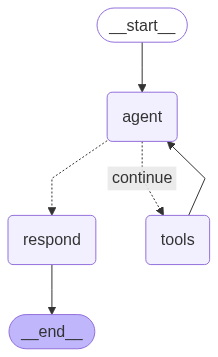
answer = graph.invoke(input={"messages": [("human", "메멘토 영화에 대해 알려주세요")]})[
    "final_response"
]
answer
MovieResponse(title='Memento', director='크리스토퍼 놀란', genre='스릴러, 미스터리', release_year=2000)answer = graph.invoke(input={"messages": [("human", "영화 인터스텔라에 대해 알려주세요")]})[
"final_response"
]
answerMovieResponse(title='인터스텔라', director='크리스토퍼 놀란', genre='SF, 드라마', release_year=2014)answer = graph.invoke(input={"messages": [("human", "영화 인터스텔라에 대해 알려주세요")]})
answer{'messages': [HumanMessage(content='영화 인터스텔라에 대해 알려주세요', additional_kwargs={}, response_metadata={}, id='b8d12f32-9971-42e5-b397-ec40afc4c6d1'),
AIMessage(content='', additional_kwargs={'tool_calls': [{'id': 'call_lwxJjDxM8DkWjeh5Rj4p4BF6', 'function': {'arguments': '{"movie":"인터스텔라"}', 'name': 'get_movieinfo'}, 'type': 'function'}], 'refusal': None}, response_metadata={'token_usage': {'completion_tokens': 347, 'prompt_tokens': 154, 'total_tokens': 501, 'completion_tokens_details': {'accepted_prediction_tokens': 0, 'audio_tokens': 0, 'reasoning_tokens': 320, 'rejected_prediction_tokens': 0}, 'prompt_tokens_details': {'audio_tokens': 0, 'cached_tokens': 0}}, 'model_name': 'gpt-5-nano-2025-08-07', 'system_fingerprint': None, 'id': 'chatcmpl-CE58IurKlAYMpNM9xsFEtpHseVbiW', 'service_tier': 'default', 'finish_reason': 'tool_calls', 'logprobs': None}, id='run--6b2de496-f58c-46cc-87c9-98f9c9e77cb0-0', tool_calls=[{'name': 'get_movieinfo', 'args': {'movie': '인터스텔라'}, 'id': 'call_lwxJjDxM8DkWjeh5Rj4p4BF6', 'type': 'tool_call'}], usage_metadata={'input_tokens': 154, 'output_tokens': 347, 'total_tokens': 501, 'input_token_details': {'audio': 0, 'cache_read': 0}, 'output_token_details': {'audio': 0, 'reasoning': 320}}),
ToolMessage(content='인터스텔라는 인류의 미래를 구하기 위해 우주로 떠난 탐사대가 사랑과 시간, 과학의 한계를 넘어서며 펼치는 감동적인 SF 영화입니다.', name='get_movieinfo', id='d3c883a6-a5cc-4584-b1cd-87ae10cad6e3', tool_call_id='call_lwxJjDxM8DkWjeh5Rj4p4BF6'),
AIMessage(content='Interstellar에 대해 알아두면 좋을 핵심 정보를 정리해 드립니다.\n\n1) 기본 정보\n- 감독/제작: 크리스토퍼 놀란 감독의 2014년 작품\n- 장르: SF 드라마\n- 주연: 매튜 맥커너히, 앤 해서웨이, 제시카 차스테인, 마이클 케인 등\n- 음악: 한스 짐머가 작곡\n- 촬영/시각 효과: 로케이션과 대규모 시각 효과로 유명\n- 러닝타임: 약 169분\n- 배급: 미국 등에서 개봉\n\n2) 간단한 줄거리(스포일러 비포)\n- 지구가 환경 재난으로 황폐해지는 미래, 가족을 지키려는 전직 파일럿 쿠퍼가 우주 탐사에 합류해 인류의 생존지를 찾아 나섭니다. 우주에 흩어진 탐사대는 시간과 중력의 한계를 넘나들며 다양한 행성을 모색하고, 사랑과 희생이 어떻게 과학적 미션과 맞물리는지 보여줍니다.\n\n3) 주요 등장인물 및 제작진\n- 쿠퍼: 매튜 맥커너히가 연기하는 전직 파일럿이자 탐사대 리더\n- 로켄스/브랜드/브랜드의 팀: 앤 해서웨이 등\n- 과학 자문: Kip Thorne 박사 (과학 구현 자문)\n- 음악/감정선: 한스 짐머의 음악이 영화의 분위기를 주도합니다\n\n4) 핵심 주제와 과학 요소\n- 주제: 가족에 대한 사랑, 시간의 상대성, 생존 본능, 인류의 미래에 대한 선택\n- 과학 요소: 블랙홀 Gargantua의 시간 왜곡, 웜홀 개념, 시간 dilation의 시각적/감정적 구현, 티esseract를 통한 시간의 상호작용 등\n- 실험적 고증: Kip Thorne의 자문으로 물리학적 아이디어를 화면에 구현하려고 시도했습니다. 다만 영화은 극적 서사에 초점을 둔 허구적 해석도 포함합니다.\n\n5) 음악·미학, 수상 내역\n- 음악: 한스 짐머의 오케스트레이션이 긴장감과 감정선을 크게 이끕니다.\n- 시각 효과: 대형 시퀀스와 우주 공간의 비주얼이 돋보이며, 2015년 아카데미 시상식의 시각 효과 부문에서 수상했습니다.\n- 수상/노미네이션: 시각 효과 부문 수상, 음악 등 여러 부문 후보에 오르는 등 큰 호평을 받았습니다.\n\n6) 관람 포인트\n- 긴 러닝타임에 걸쳐 점진적으로 다가오는 인물 간의 관계와 감정선을 주의 깊게 보세요.\n- 시간과 중력의 개념이 어떻게 비유적으로 다뤄지는지, 음악과 화면 구성이 어떻게 연결되는지 주목하면 더 깊은 체험이 됩니다.\n- 과학적 요소를 즐기는 사람이라면 Kip Thorne의 자문으로 구현된 장면들을 특히 유심히 보세요.\n\n필요하시면 아래 정보를 더 자세히 드릴 수 있어요.\n- 줄거리의 스포일러 포함 요약\n- 배우별 인물 해설\n- 영화 속 특정 장면 분석\n- Interstellar와 관련한 추가 추천작/비교 작품\n\n원하시는 방향을 알려주시면 그에 맞춰 더 자세히 정리해 드리겠습니다.', additional_kwargs={'refusal': None}, response_metadata={'token_usage': {'completion_tokens': 2595, 'prompt_tokens': 229, 'total_tokens': 2824, 'completion_tokens_details': {'accepted_prediction_tokens': 0, 'audio_tokens': 0, 'reasoning_tokens': 1792, 'rejected_prediction_tokens': 0}, 'prompt_tokens_details': {'audio_tokens': 0, 'cached_tokens': 0}}, 'model_name': 'gpt-5-nano-2025-08-07', 'system_fingerprint': None, 'id': 'chatcmpl-CE58LwIheYJqa87Nj9be51jZnsidB', 'service_tier': 'default', 'finish_reason': 'stop', 'logprobs': None}, id='run--36dc05a9-d7e0-4932-82b5-13a4accf9174-0', usage_metadata={'input_tokens': 229, 'output_tokens': 2595, 'total_tokens': 2824, 'input_token_details': {'audio': 0, 'cache_read': 0}, 'output_token_details': {'audio': 0, 'reasoning': 1792}})],
'final_response': MovieResponse(title='인터스텔라', director='크리스토퍼 놀런', genre='SF, 드라마', release_year=2014)}