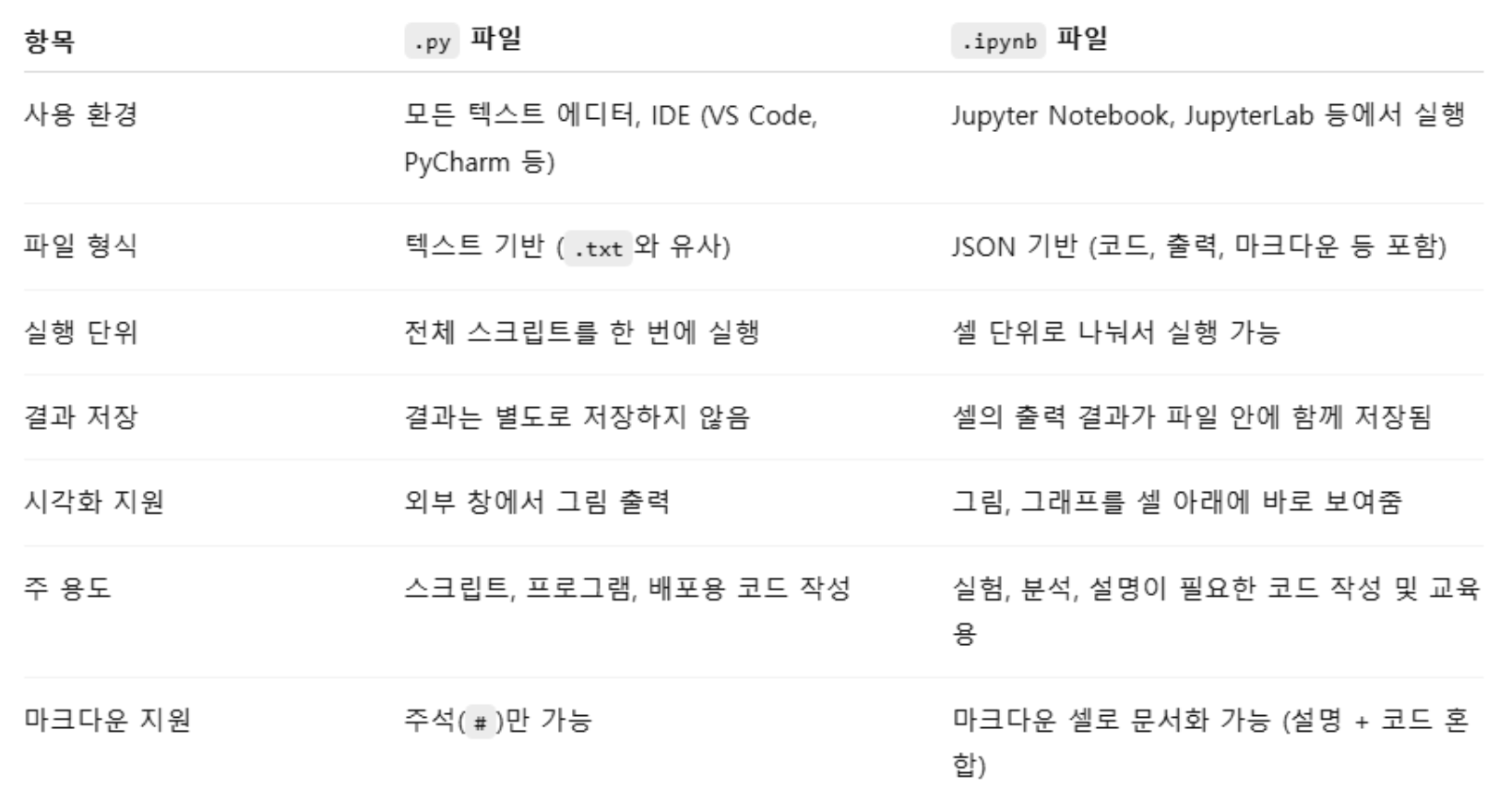
파이썬에서는 .ipynb 파일과 .py 파일 모두 파이썬 코드를 작성할 수 있지만, 사용 목적과 형식이 다르다.
1. 모듈
- 파이썬에서 모듈을 만들려면 .py 확장자를 가진 파일에 코드를 작성하면 된다.
- 모듈은 변수, 클래스 등도 포함할 수 있으며, 다른 스크립트에서 import 구문을 사용하여 가져올 수 있다.
vscode 확장 -> python 설치
바탕화면, 내 문서에 파일들 저장하지 말 것
(반드시 C드라이브에 저장... 경로문제 때문. 한글로 인식하게 됨.)
vscode에서 파이썬 실행 키 등록하기!
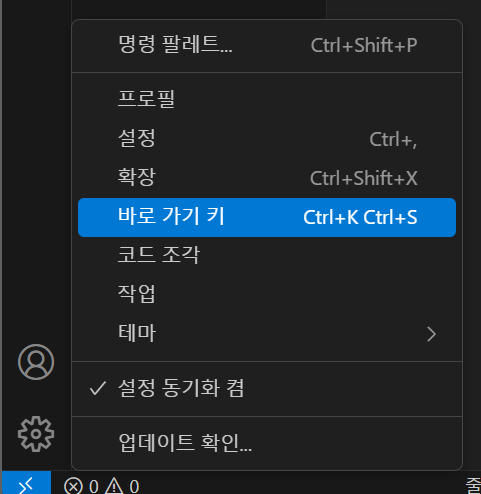
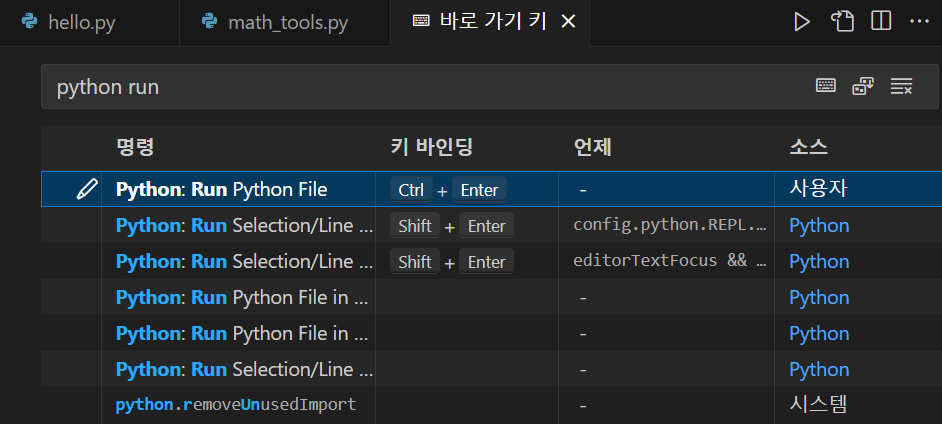
Python:Run Python File 의 키 바인딩을 Ctrl + Enter 로 등록한다.
그러면 Ctrl + Enter 로 실행할 수 있게 된다.
math_tools.py
# 변수
PI = 3.141592653589793

# 함수
def add(a, b):
    return a + b

def subtract(a, b):
    return a - b

# 클래스
class Circle:
    def __init__(self, radius):
        self.radius = radius

    def area(self):
        return PI * self.radius * self.radius
모듈을 가져오려면, 가져오는 스크립트와 모듈이 동일한 디렉터리에 있어야 한다.
아니면, 모듈을 시스템 경로에 추가하거나, PYTHONPATH 환경 변수를 설정해야 한다.
모듈의 이름은 파이썬의 키워드와 충돌하면 안 된다.
ex) import.py 라는 모듈을 만들면 import 키워드와 충돌하기 때문에 잘못된 이름.
이후, 구글 코랩에서 다음 코드 실행.
import math_toolsprint(math_tools.PI)3.141592653589793print(math_tools.add(5,3))
print(math_tools.subtract(5, 3))8
2circle = math_tools.Circle(5)
print(circle.area())78.53981633974483from math_tools import PI, Circleprint(PI)3.141592653589793circle = Circle(5)
print(circle.area())78.53981633974483import math_tools as mt
# 모듈 내의 변수 사용
print(mt.PI) # 3.141592653589793
# 모듈 내의 함수 사용
print(mt.add(5, 3)) # 8
print(mt.subtract(5, 3)) # 2
# 모듈 내의 클래스 사용
circle = mt.Circle(5)
print(circle.area())3.141592653589793
8
2
78.539816339744832. 구글 드라이브 사용하기
구글 드라이브 마운트 하는 법!
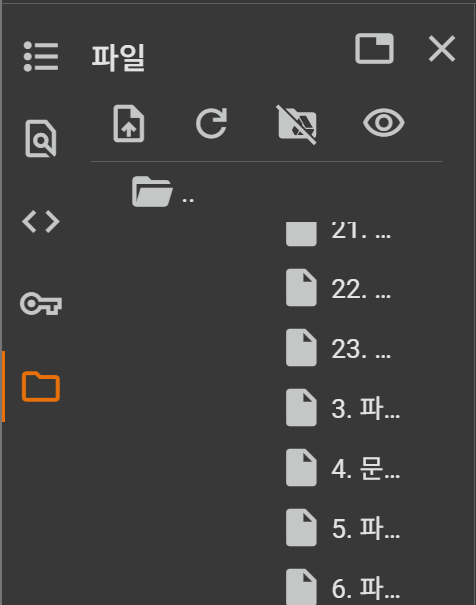
이 아이콘 클릭!

그러면 drive 폴더가 뜬다. drive 폴더 안에 찾고자 하는 파일 경로를 찾을 수 있다.
path = '/content/drive/MyDrive/AI활용 소프트웨어 개발/9. 파이썬 문법/module'

import sys
sys.path.append(path)sys.path['/content',
'/env/python',
'/usr/lib/python311.zip',
'/usr/lib/python3.11',
'/usr/lib/python3.11/lib-dynload',
'',
'/usr/local/lib/python3.11/dist-packages',
'/usr/lib/python3/dist-packages',
'/usr/local/lib/python3.11/dist-packages/IPython/extensions',
'/usr/local/lib/python3.11/dist-packages/setuptools/_vendor',
'/root/.ipython',
'/content/drive/MyDrive/AI활용 소프트웨어 개발/9. 파이썬 문법/module']__name__ 속성 사용하기
파이썬에서 name은 모듈(파일)이 어떻게 실행되고 있는지를 나타내는 특별한 변수이다.
▶ 두 가지 경우로 나뉜다.
1. 해당 파일이 직접 실행된 경우
__name__ == "__main__"- 다른 파일에서 import된 경우
__name__ == "모듈 이름"__name__ == "__main__"은 파이썬에서 "이 파일이 메인인지 아닌지 구분하기 위한 안전장치" 이다.
인터프리터는 이걸 판단해서 코드를 실행한다.
3. 패키지
모듈들을 포함하고 있는 디렉터리이다. (모듈: 파이썬 코드를 담고 있는 파일.)
여러 모듈을 논리적으로 그룹화하려는 경우 패키지를 사용한다.
패키지를 사용하면 관련된 기능들을 함께 묶어서 코드를 더욱 체계적으로 관리할 수 있다.
my_package/
│
├── __init__.py
│
├── module_a.py
│
└── sub_package/
    │
    ├── __init__.py
    └── module_b.py
패키지는 기본적으로 디렉터리와 그 안의 .py 파일들로 구성된다.
패키지를 구성하는 디렉터리 내에는 init.py라는 특별한 파일이 있어야 한다.
이 파일은 해당 디렉터리가 파이썬 패키지임을 나타낸다.
init.py는 비워둘 수도 있고, 패키지 초기화 코드를 포함할 수도 있다.
또한 패키지 안에 다른 패키지(하위 패키지)를 포함할 수 있다.
이를 통해 복잡한 프로젝트의 코드를 여러 레벨의 디렉터리로 계층적으로 구성할 수 있다.
from my_package import module_a
from my_package.sub_package import module_b
vscode에 shapes 폴더를 만들고 그 안에 각각 .py 파일로 저장했다.
shapes/
│
├── __init__.py
├── circle.py
└── rectangle.py
__init__.py
# shapes/__init__.py
# from shapes import circle, rectangle
# from stapes import *
# __all__ = ["circle"] 이렇게 하면 from stapes import * 이렇게 해도 circle만 불러오게 됨.

__all__ = ["circle", "rectangle"]
circle.py
PI = 3.141592653589793

def area(radius):
    return PI * radius * radius

def circumference(radius):
    return 2 * PI * radius
rectangle.py
def area(width, height):
    return width * height

def perimeter(width, height):
    return 2 * (width + height)
구글 코랩에서 다음 코드 실행.
from shapes import circle, rectangleprint(circle.area(5))
print(circle.circumference(5))
print(rectangle.area(4, 6))
print(rectangle.perimeter(4, 6))78.53981633974483
31.41592653589793
24
20from shapes.circle import area as circle_area
from shapes.rectangle import area as rectangle_area
print(circle_area(5))
print(rectangle_area(4, 6))78.53981633974483
24여기서 밑에 코드처럼 쓰지 않고 as circle_area라고 쓴 이유!
from shapes.circle import area
from shapes.rectangle import area
이렇게 쓰면
Python은 둘 다 같은 이름 area로 현재 모듈에 가져와서 등록한다.
즉, area라는 이름 하나만 현재 네임스페이스에 존재하게 된다.
첫 번째 줄에서 circle.area가 area라는 이름으로 들어오고
두 번째 줄에서 rectangle.area가 또 area로 들어오면
결국 뒤의 것이 앞의 걸 덮어써버린다.
예시로 확인
from shapes.circle import area
from shapes.rectangle import area

print(area())  # ???
결과는 rectangle area
(왜냐면 shapes.rectangle.area가 마지막에 area로 덮어씌워졌기 때문)
따라서 이름이 겹치지 않도록 as를 써준다!
