파이썬에서 파일 입출력은 다양한 용도로 사용된다.
텍스트 파일, 바이너리 파일, CSV 파일, JSON 파일 등을 읽고 쓸 수 있다.
1. 파일 열기
파일을 열려면 open 함수를 사용한다.
f = open("파일명", "모드")

파일명: 열고자 하는 파일의 이름이나 경로
모드: 파일을 어떻게 열 것인지를 지정

r: 읽기 모드 (기본값)
w: 쓰기 모드 (파일이 있으면 덮어쓰기)
a: 추가 모드 (파일의 끝에 내용을 추가)
b: 바이너리 모드 (텍스트가 아닌 바이너리 데이터를 읽고/쓸 때 사용)
+: 읽기와 쓰기 모드
2. 파일 쓰기
write(): 문자열을 파일에 쓴다.
writelines(): 문자열 리스트를 파일에 쓴다.
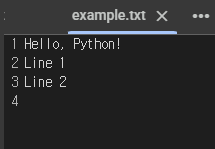
f = open('example.txt', 'w')
f.write('Hello, Python!\n')
f.writelines(['Line 1\n', 'Line 2\n'])
f.close()

# close 메서드를 사용해 파일을 닫습니다. 파일을 닫지 않으면 데이터 손실이 발생할 수 있습니다.
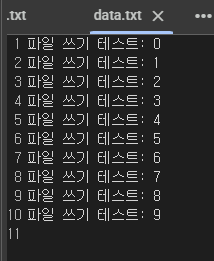
file = open('data.txt', 'wt')
for i in range(10):
file.write('파일 쓰기 테스트: ' + str(i) + '\n')
file.close()
print('data.txt 파일에 쓰기 완료!')data.txt 파일에 쓰기 완료!파일 경로
파일의 위치를 나타내는 문자열.
이 경로를 통해 파이썬은 파일을 찾아서 해당 파일을 읽거나 쓸 수 있다.
파일 경로는 크게 상대 경로와 절대 경로 두 가지로 구분된다.
상대 경로 (Relative Path)
현재 작업 디렉토리에 대한 파일의 위치.
- "data.txt": 현재 디렉토리의 data.txt 파일
- "./data.txt": 현재 디렉토리의 data.txt 파일
- "subfolder/data.txt": 현재 디렉토리의 하위 폴더 subfolder 안의 data.txt 파일
- "../siblingfolder/data.txt": 현재 디렉토리와 동일한 위치의 다른 폴더 siblingfolder 안의 data.txt 파일
절대 경로 (Absolute Path)
파일 시스템의 루트부터의 전체 경로.
- 예 (Windows): "C:\\Users\\UserName\\Documents\\data.txt"
- 예 (Linux/Mac): "/home/username/Documents/data.txt"
3. with 문
자원(리소스)을 열고 자동으로 정리(닫기)까지 해주는 문법.
파일 입출력, 데이터베이스 연결, 락(lock) 사용 등 열고 닫아야 하는 작업에 주로 사용된다.
예) 파일을 열 때 open()을 사용하고, close()로 닫는다.
중간에 에러가 나면 close()가 실행되지 않는다. 이때 with 문을 사용하면, 자동으로 닫아준다.
with 열기_함수 as 변수:
    # 이 안에서 자원을 사용
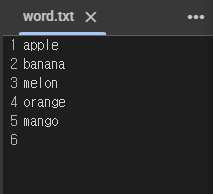
with open('./data/word.txt', 'w') as f:
while True:
data = input('단어를 입력하세요: ')
if data.lower() == 'quit':
break
f.write(data + '\n')단어를 입력하세요: apple
단어를 입력하세요: banana
단어를 입력하세요: orange
단어를 입력하세요: melon
단어를 입력하세요: mango
단어를 입력하세요: quitwith 문은 __enter()와 __exit() 메서드를 가진 객체와 함께 사용된다. → 컨텍스트 매니저(context manager)
class MyContext:
    def __enter__(self):
        print("시작합니다!")
        return "리소스"

    def __exit__(self, exc_type, exc_value, traceback):
        print("끝났습니다!")

with MyContext() as resource:
    print(f"{resource}를 사용 중입니다")
시작합니다!
리소스를 사용 중입니다
끝났습니다!4. 파일 읽기
read(): 파일의 모든 내용을 문자열로 반환
readline(): 파일의 한 줄을 문자열로 반환
readlines(): 파일의 모든 줄을 리스트로 반환
f = open('example.txt', 'r')
content = f.read()
print(content)
f.close()
Hello, Python!
Line 1
Line 2file = open('./data/word.txt', 'rt')
data = file.read()
print('word.txt 파일 전체 데이터 읽기 완료')
print(data)
file.close()word.txt 파일 전체 데이터 읽기 완료
apple
banana
orange
melon
mangofile = open('./data/word.txt', 'rt')
data = file.read(10) # 10글자 가지고 옴.
print('word.txt 파일 일부 데이터 읽기 완료')
print(data)
file.close()word.txt 파일 일부 데이터 읽기 완료
김사과
오렌지
바나file = open('./data/word.txt', 'rt')
while True:
data = file.read(10)
if not data:
break
print(data, end='')김사과
오렌지
바나나
apple
banana
orange
melon
mangowith open('./data/word.txt', 'r') as f:
lines = []
while True:
line = f.readline()
if not line:
break
if len(line.strip()) != 0:
print(line, end='')
lines.append(line.strip())
print(lines)김사과
오렌지
바나나
apple
banana
orange
melon
mango
['김사과', '오렌지', '바나나', 'apple', 'banana', 'orange', 'melon', 'mango']with open('./data/word.txt', 'r') as f:
lines = f.readlines()
print(lines)
for i in lines:
print(i, end='')['김사과\n', '오렌지\n', '바나나\n', 'apple\n', 'banana\n', 'orange\n', 'melon\n', 'mango\n']
김사과
오렌지
바나나
apple
banana
orange
melon
mango5. 예외 처리와 함께 사용하기
파일 입출력 중에는 여러 가지 오류가 발생할 수 있다.
→ try-except 블록을 사용해 오류를 처리할 수 있다.
try:
    with open("nofile.txt", "r") as f:
        content = f.read()
        print(content)
except FileNotFoundError:
    print("파일이 존재하지 않습니다.")
파일이 존재하지 않습니다.파일은 왼쪽 메뉴에서 확인할 수 있다.
... 폴더를 클릭하면 그 안에 content에서 생성된 파일들을 확인할 수 있다.
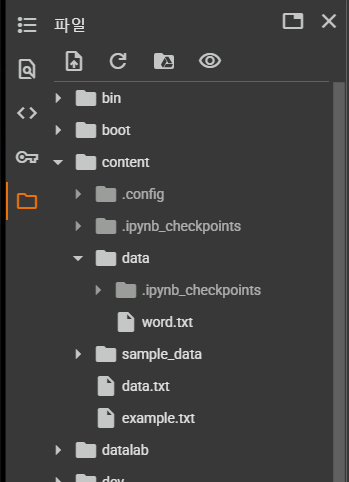
파일들을 클릭하면 오른쪽에서 파일 내용을 확인할 수 있다.