// Store : made of multiple of slices

// Actions : what it should do to the state
const increment = { type : "INCREMENT" }; // [pseudo code]
const decrement = { type : "DECREMENT" }; // [pseudo code]

// Reducers : reducer will never directly make an update to the redux store !!
store 설정
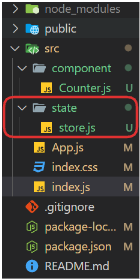
//store.js

// create the store
import { configureStore } from "@reduxjs/toolkit";

export const store = configureStore({
  reducer : {}
});

/*
현재 reducer은 비어있는데 곧 채워줄꺼임
/*
Provider 설정
//index.js
import React from 'react';
import ReactDOM from 'react-dom/client';
import App from './App';
import './index.css';
import { Provider } from 'react-redux';
import { store } from './state/store';


const root = ReactDOM.createRoot(document.getElementById('root'));
root.render(
    <Provider store={store}>
      <App />
    </Provider>
);

/*
  <Provider>는 Redux Store를 React 애플리케이션 전체에 공급하기 위해서 설정하는 것
*/
CounterSlice 설정
/*
  this file contain everything that we need anything that
  is related to our counterslice. our actions, our reducers,
  our state they're all going to go in this file.

  이 파일은 CounterSlice에 들어갈 actions, reducers, state와 연관 있음
 */

import { createSlice } from "@reduxjs/toolkit";

const initialState = {
  value: 0,
};

const counterSlice = createSlice({
  name : "counter",
  initialState,
  reducers : {} //reducer 없음
})


export default counterSlice.reducer;
이렇게 작성하고 store.js에 import counterReducer from './counter/counterSlice'; 하기
// store.js
import { configureStore } from "@reduxjs/toolkit";
import counterReducer from "./counter/counterSlice";

export const store = configureStore({
  reducer : {
    counter : counterReducer,
  }
});
counterSlice reducer 작성
import { createSlice } from "@reduxjs/toolkit";

const initialState = {
  value: 0,
};

const counterSlice = createSlice({
  name : "counter",
  initialState,
  reducers : {
    increment: (state /*actcion : option */) => {
      state.value += 1;
    },
    decrement : (state) => {
      state.value -= 1;
    },
  },
});

export const { increment, decrement } = counterSlice.actions; //action 설정

export default counterSlice.reducer;


/*
	RTK를 이용해서 createSlice를 사용하면 코드를 줄일 수 있음
    createSlice가 우리모르게 State를 immutable하게 만들어주고,
    State를 복제, 변경, 뭐 많은 일을 해준다 함.
*/
Counter.js
import React from 'react'
import { useDispatch, useSelector } from 'react-redux';
import { decrement, increment } from '../state/counter/counterSlice';

function Counter() {
  // hooks
  const count = useSelector((state) => state.counter.value)
  const dispatch = useDispatch();

  return (
    <div>
      {count}
      <div>
        <button onClick={() => dispatch(increment())}>increment</button>
        <button onClick={() => dispatch(decrement())}>decrement</button>
      </div>
    </div>
  )
}

export default Counter;-
useSelector- store의 상태를 가져오기 위한 hook
- store의 특정 state값에 접근, 이를 react 컴포넌트 내에서 사용할 수 있게 해줌
-
disPatch- store에 action을 전달하기 위한 hook
dispatch함수를 가져와서, 컴포넌트 내에서 action을 실행할 수 있음
App.js
import Counter from "./component/Counter";

function App() {
  return (
    <div>
      <h1>Redux Counter Tutorial</h1>
      <Counter />
    </div>
  );
}

export default App;
Improvise, Adapt, Overcome