시작하며
프로젝트 진행하며 WebSocke을 이용한 실시간 알림 기능을 만들어보고 싶었다.
찾아보니 생각보다 간단한? 기능인것 같아서 다행이지만 진행하면서 얼마나 삽질할지..
시나리오
- B가 A가 등록한 플레이리스트에 좋아요 또는 댓글을 남긴다.
- 그러면 A에게 실시간 알림으로 B가 어느 글에 좋아요를 눌렀습니다. 알림을 보낸다.
말은 간단하지만 직접 해보며 진행할 예정이다.
세팅
build.gradle
implementation 'org.springframework.boot:spring-boot-starter-websocket'
websocket 의존성 주입을한다.
@Configuration
@EnableWebSocketMessageBroker
public class WebSocketConfig implements WebSocketMessageBrokerConfigurer {

    @Override
    public void configureMessageBroker(MessageBrokerRegistry config) {
        config.enableSimpleBroker("/topic");  // 클라이언트가 구독하는 목적지 prefix
        config.setApplicationDestinationPrefixes("/app");  // 클라이언트가 메시지를 보낼 때 사용하는 prefix
    }

    @Override
    public void registerStompEndpoints(StompEndpointRegistry registry) {
        registry.addEndpoint("/ws").withSockJS();  // SockJS 폴백을 사용한 STOMP 엔드포인트
    }

    @Override
    public boolean configureMessageConverters(List<MessageConverter> messageConverters) {
        MappingJackson2MessageConverter converter = new MappingJackson2MessageConverter();
        ObjectMapper objectMapper = new ObjectMapper();
        objectMapper.registerModule(new JavaTimeModule());
        converter.setObjectMapper(objectMapper);
        messageConverters.add(converter);
        return false;
    }
}
WebSocket 엔드포인트 등록:
/ws 엔드포인트를 통해 클라이언트가 WebSocket 연결을 맺을 수 있습니다. 이 엔드포인트는 SockJS 폴백을 지원합니다.
메시지 브로커 구성:
클라이언트는 /topic 경로로 메시지를 구독할 수 있습니다. 예를 들어, 클라이언트가 /topic/notifications를 구독하면, 서버에서 이 경로로 발행된 메시지를 받을 수 있습니다.
클라이언트는 /app 경로로 메시지를 보낼 수 있습니다. 서버 측에서 이 경로로 들어오는 메시지를 처리할 메서드는 @MessageMapping 어노테이션을 사용하여 정의합니다.
메시지 변환기 설정:
메시지를 JSON 형식으로 변환하기 위해 MappingJackson2MessageConverter를 사용합니다. 이를 통해 객체를 JSON으로 직렬화하고, JSON을 객체로 역직렬화할 수 있습니다.
로직
실시간 알림 로직은 댓글/좋아요를 했을 때 플레이리스트를 등록한 사람에게 알림이 가는 로직이다.
- 댓글/좋아요 등록
- 플레이리스트 등록한 사람에게 알림 전송
그래서 기존의 댓글과 좋아요를 저장 후 알림을 전송하기 위해 기존의 CommentService 파일에 로직을 추가한다.
public void saveComment(CommentRequest commentRequest, String playlistId, User loginUser) {
        // PlaylistService를 사용하여 Playlist 엔터티 가져오기
        Playlist playlist = playlistService.findById(Long.valueOf(playlistId));

        // Comments 엔터티 빌더를 사용하여 생성
        Comments comment = Comments.builder()
                .comments(commentRequest.getComment())
                .user(loginUser)
                .playlist(playlist)
                .build();

        commentRepository.save(comment);

        Notification notification = Notification.builder()
                .userId(loginUser.getId()) // 게시글 작성자 ID
                .username(loginUser.getUsername())
                .message(loginUser.getUsername() + "님이 '" + playlist.getTitle() + "' 플레이리스트에 댓글을 달았습니다: " + commentRequest.getComment())
                .type("comment")
                .read(false)
                .timestamp(LocalDateTime.now())
                .build();

        notificationService.saveNotification(notification);

        // 실시간 알림 전송
        String destination = "/topic/notifications/" + loginUser.getUsername();
        messagingTemplate.convertAndSend(destination, notification);
    }
기존의 댓글 등록 로직 이후
1. Notification 엔터티를 빌더 패턴을 사용하여 생성합니다.
2. loginUser의 ID와 사용자명을 각각 userId와 username 필드에 설정합니다.
3. 알림 메시지를 생성하여 message 필드에 설정합니다. ( 화면에 보일 message 설정 )
4. 알림의 타입을 "comment"로 설정합니다. 좋아요는 "like"로 설정!
5. 알림이 읽히지 않은 상태(false)로 설정합니다.
6. 알림 생성 시점을 timestamp 필드에 설정합니다.
7. notificationService의 saveNotification 메서드를 통해 DB에 저장합니다.
8. 실시간 알림을 전송할 대상 경로를 설정합니다. 여기서는 /topic/notifications/ 경로 뒤에 loginUser의 사용자명을 붙여 알림을 보낼 경로를 결정합니다.
9. messagingTemplate를 사용하여 설정한 경로로 notification 객체를 전송합니다.
이러면 백엔드 로직은 끝이나고 이제 화면에 표현해야한다.
main.html
<script src="https://cdn.jsdelivr.net/sockjs/1/sockjs.min.js"></script>
<script src="https://cdnjs.cloudflare.com/ajax/libs/stomp.js/2.3.3/stomp.min.js"></script>
<script th:inline="javascript">
        var userId = /*[[${userId}]]*/ 'dummyUserId'; // Thymeleaf 변수를 JavaScript 변수로 설정
</script>
실시간 통신을 위한 라이브러리 Sockjs와 stomp.js 를 추가한다.
추가적으로 js에서 변수를 동작해야하기 때문에 Thymeleaf 의 변수를 JavaScript 변수로 설정한다. ( 그래야 js 파일에서 인식을 해서 정상적으로 기능이 작동한다. )
Notification.js
$(document).ready(function() {
    // 웹소켓 연결 설정
    const socket = new SockJS('/ws');
    const stompClient = Stomp.over(socket);

    stompClient.connect({}, function(frame) {
        // 사용자 ID에 따라 알림을 구독
        const userId = window.userId;

        stompClient.subscribe('/topic/notifications/' + userId, function(notification) {
            console.log("Notification received:", notification);
            const parsedNotification = JSON.parse(notification.body);
            const message = `${parsedNotification.username}님이 '${parsedNotification.message}'`;
            showNotification(parsedNotification);
        });
    });

    function showNotification(notification) {
        const notificationContent = $('#notificationContent');
        const timeAgo = new Date(notification.timestamp).toLocaleString();
        const message = `${notification.message}`;

        const notificationItem = `
            <div class="notification-item">
                <img src="/static/images/${notification.type === 'comment' ? 'comment_icon.png' : 'red_heart.png'}" alt="profile">
                <span>${message}</span>
                <span class="time">${timeAgo}</span>
            </div>
        `;

        notificationContent.prepend(notificationItem);
    }
});
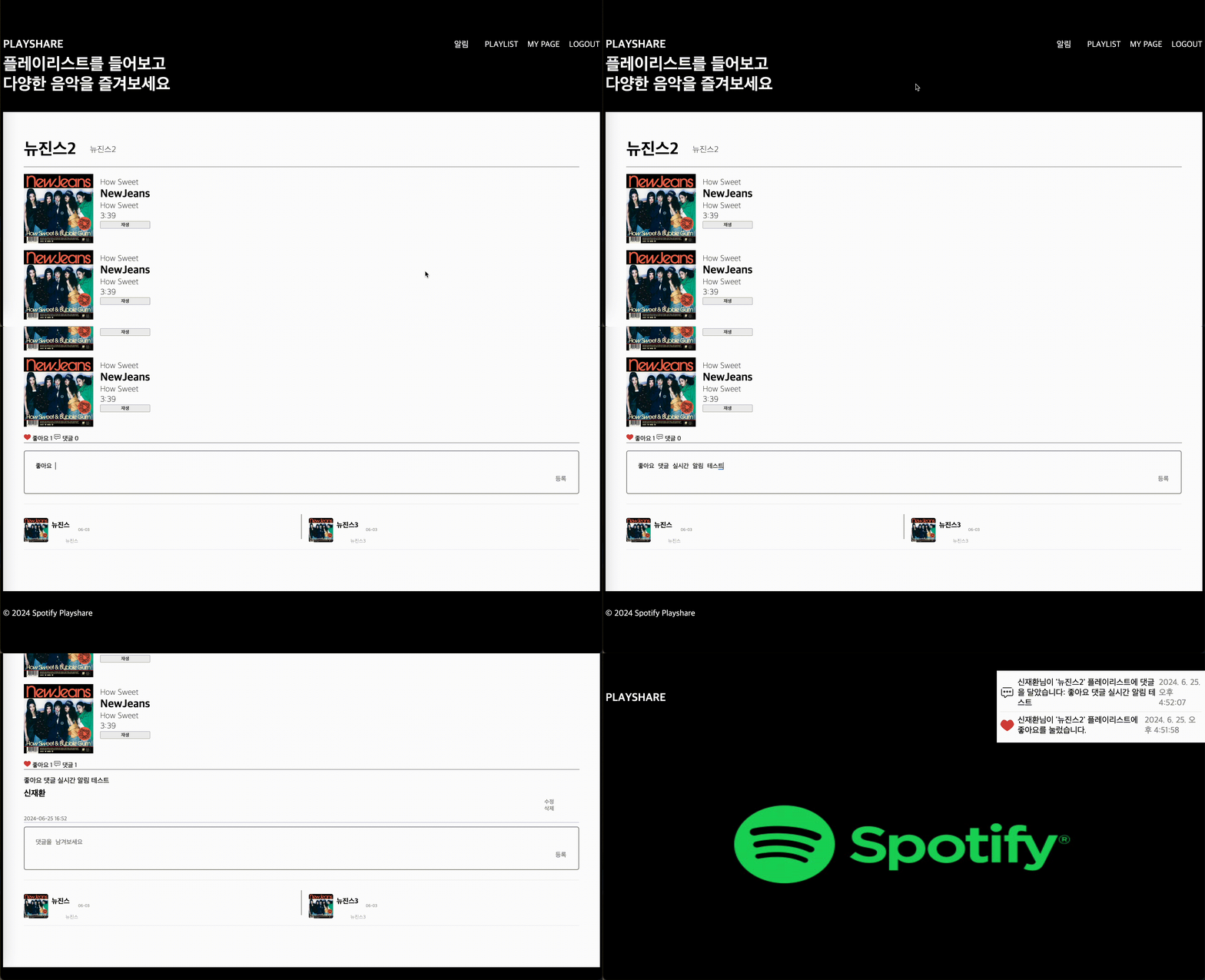
이렇게 하면 알림이 전송됐을 경우 기존의 div class = "notification-item"의 화면이 알림의 내용이 보여지면서 사용자에게 보여지게 된다.
구현 영상
마치며
실시간 알림 기능을 구현하면서 좀 간단해 보였지만 진행하면서 게시판의 댓글을 불러올 때 left join을 사용해서 불러오는데 댓글이 중복해서 불러오는 오류가 생겨서 그 과정을 또 해결하고 백엔드단에선 Message가 정상적으로 출력이되는데 화면단에 보여지지 않아서 좀 애를 먹었지만 그래도 빠르게 기능을 완성해서 다행이다.
새로운 기능을 추가할 때 이런저런 과정의 어려움을 겪지만 기능을 완성을 하면 너무 뿌듯하다!