
Airflow란
- Apache Airflow is a platform created by the community to programmatically author, schedule and monitor workflows. - Apache Airflow official
- 복잡한 작업 흐름을 코드로 작성하고 스케줄링하고 모니터링할 수 있게 해주는 플랫폼
- ETL/데이터 파이프라인 작업을 자동화하고 시각화할 수 있는 워크플로우 오케스트레이션 도구
- ELT(Data Extract, Load, Transform), 머신러닝 등의 업무 자동화에 있어 유용한 도구
Airflow 개요
- Python 기반으로 워크플로우 설정 가능
- Airflow를 통해 딱 하나의 .py 파일로 워크플로우 작성 가능 - DAG(Directed Acyclic Graph: 방향성 비순환 그래프) 구조로 작업 흐름을 정의
- 이미지와 같이 방향성이 있으면서 순환하지 않는 구조를 DAG구조라고 한다.
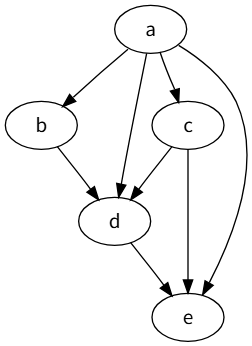 출처: 위키피디아
 - 워크플로우를 설정해두면 Web UI를 통한 모니터링 및 실행이 가능
Airflow 개념
- 다양한 컴포넌트와 용어로 구성되어있음
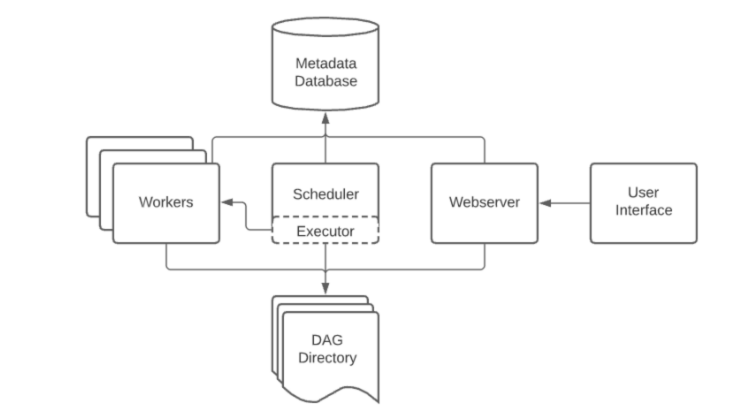
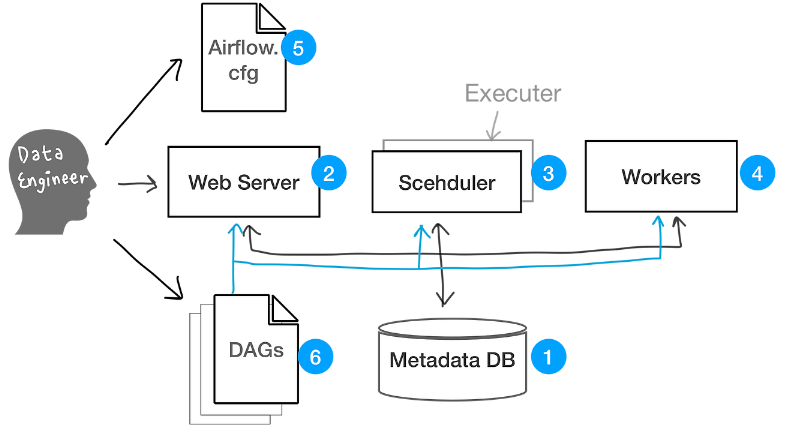
1. Metadata DB
-
작업 및 파이프라인의 메타데이터 저장소
-
task status(ex. queued, scheduled, running, success, failed, etc)가 저장됨
-
Airflow 첫 다운로드시 SQLite가 설치되는데, 이를 사용하기 위해서는 mySQL or Postgres를 연결해야함
2. Web Server
- Web UI 제공 + 실행 중인 작업을 한 눈에 볼 수 있는 View 기능 제공
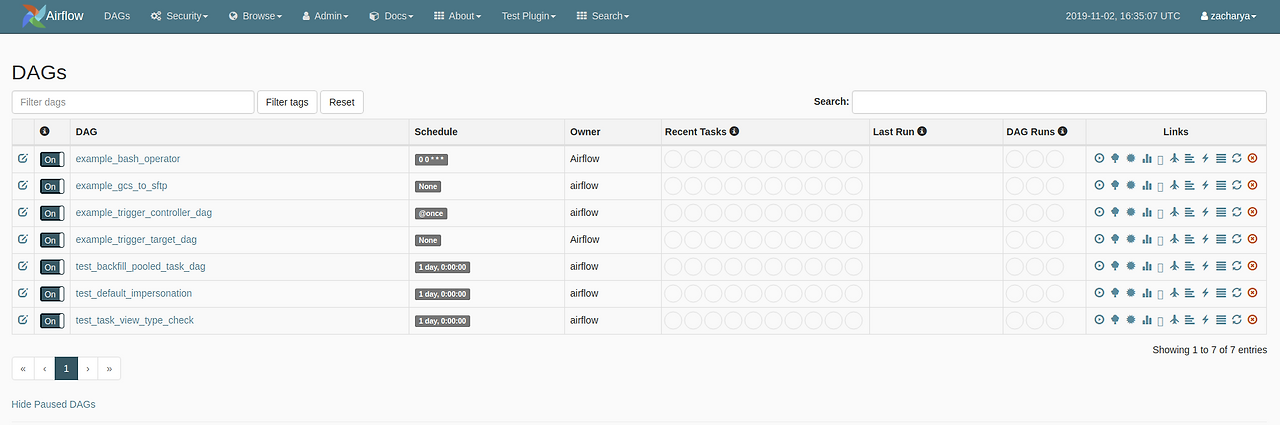 - 기본 뷰 구성
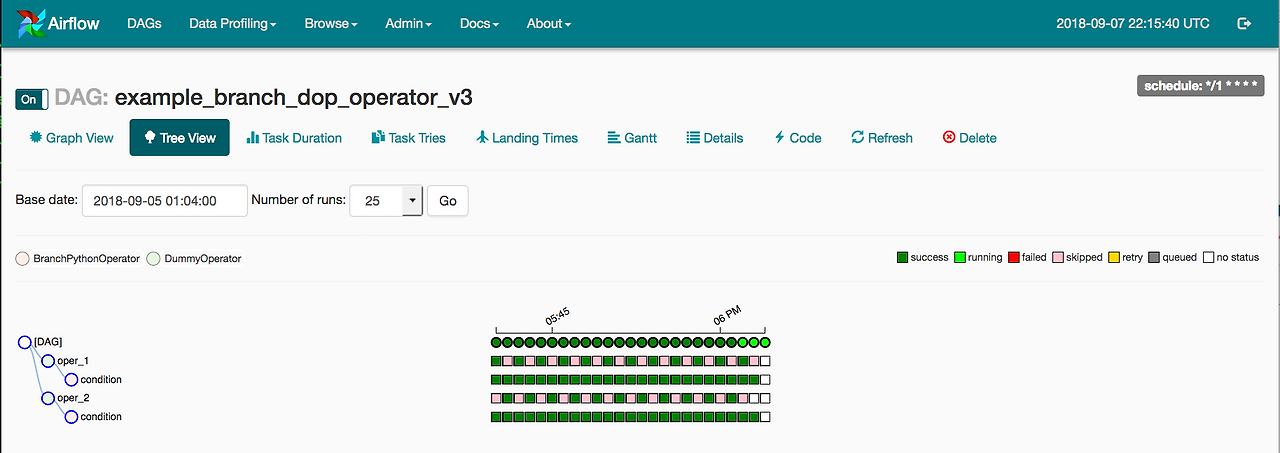 - 트리 뷰
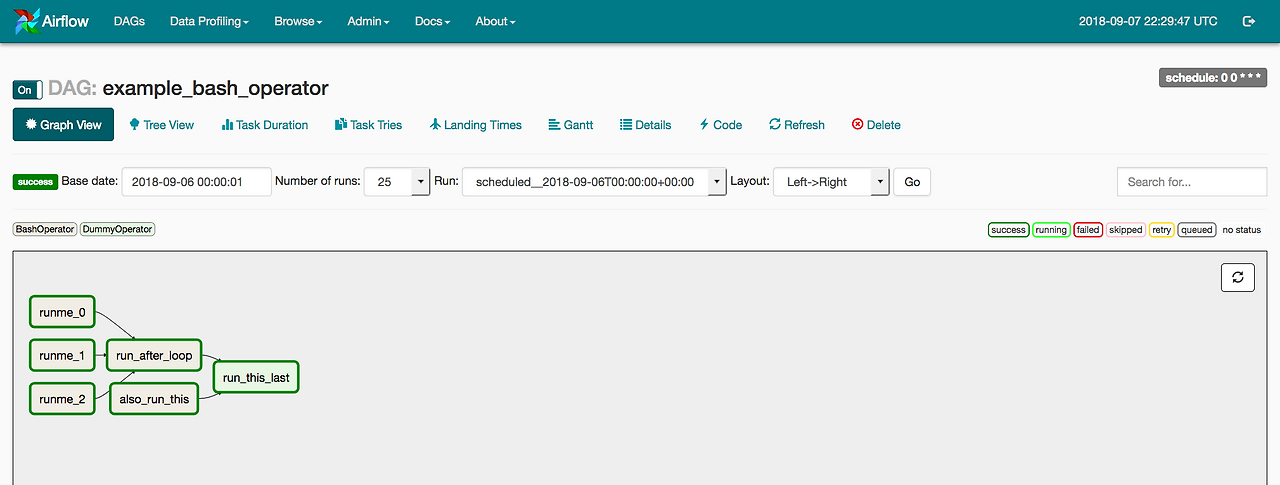 - 그래프 뷰
3. Scheduler
-
Airflow 구성요소의 핵심
-
일 다했어? 그럼 이거 시작해! 하는 역할 (DAG 파일을 모니터링 하고, 실행 시점이 되면 실행 큐(Executor)로 보내는 역할
- Executor: Scheduler와 함께 동작하는 구성요소. status가 queued인 task를 확인하며 실제 어떤 리소스가 투입되어 실행될 것인지 결정. 흔히 Local Executor, Celery Executor, Kubernetes Executor등이 있음
-
모든 작업과 DAG를 모니터링하다가 Metadatabase 내 모든 작업의 status를 모니터링
-
특정 작업의 dependency가 만족되면 이를 실행시킬 뿐만 아니라, 모든 작업의 실행 순서 또한 결정
- 즉, 쉽게 풀어쓰면? Airflow는 작업간의 의존 관계를 DAG로 정의한다.
- 즉, Task A가 끝나야 Task B를 실행할 수 있다는 관계 설정 가능.
task_a >> tast_b로 정의한다면 Airflow는 이 의존성(dependency)이 충족되었는지 확인하고 다음을 실행
4. Worker
-
Scheduler와 짝을 이루는 실제 task를 수행하는 구성요소
-
Scheduler가 task를 실행하라고 지시하면 Worker가 실제로 파이썬 코드, Spark Job, SQL등을 실행
[Scheduler] -> (실행 명령) -> [Worker] -> (작업 처리: Python, SQL, Spark 등) -
필요에 따라 scale-out 되어 병렬 작업이나 동시에 여러 task를 진행할 수 있음
-
Executor 및 airflow.cfg에 의해 작업 환경 구성이 완성됨
5. Airflow.cfg
- 전반적인 Airflow configuration을 담당하는 파일
- 대표적으로는 DAG 파일을 어느 위치에 놓을 건지, log는 어디 저장할 건지, 어떤 Executor를 쓸지, DB 연결을 어떻게 할지, 로그는 어디에 저장할지 등의 설정을 할 수 있음
6. DAGs
- '이런 일을 해줘'하고 컴퓨터에 내리는 명령 모음 python 파일
# datetime 모듈에서 timedelta 클래스를 import하여 시간 간격을 설정하는 데 사용
from datetime import timedelta

# Airflow의 DAG 클래스를 import (DAG: Directed Acyclic Graph)
from airflow import DAG

# BashOperator: Bash 명령어를 실행하는 Airflow Operator
from airflow.operators.bash import BashOperator

# days_ago 함수는 DAG의 시작일을 현재 날짜로부터 며칠 전으로 설정할 때 사용
from airflow.utils.dates import days_ago

# 기본 인자 설정: DAG 내 모든 Task에 공통 적용될 기본값
default_args = {
    'owner': 'airflow',                       # DAG 소유자 이름
    'retries': 1,                             # Task 실패 시 재시도 횟수
    'retry_delay': timedelta(minutes=5),     # 재시도 사이의 대기 시간
}

# DAG 정의: 'tutorial'이라는 ID를 가진 DAG 인스턴스 생성
with DAG(
    'tutorial',                               # DAG의 고유 ID
    default_args=default_args,               # 위에서 정의한 기본 인자 적용
    description='A simple tutorial DAG',     # DAG 설명
    schedule_interval=timedelta(days=1),     # DAG 실행 주기: 하루마다 실행
    start_date=days_ago(2),                  # DAG의 시작일: 현재로부터 2일 전
    tags=['example'],                        # DAG를 분류하기 위한 태그
) as dag:                                     # with 문을 통해 dag 변수에 DAG 인스턴스를 바인딩

    # 첫 번째 Task 정의: 현재 날짜를 출력하는 Bash 명령 실행
    t1 = BashOperator(
        task_id='print_date',                # Task의 고유 ID
        bash_command='date',                # 실행할 Bash 명령어
    )

    # 두 번째 Task 정의: 5초 동안 대기하는 Bash 명령 실행
    t2 = BashOperator(
        task_id='sleep',                     # Task의 고유 ID
        depends_on_past=False,              # 이전 실행 결과에 의존하지 않음
        bash_command='sleep 5',             # 실행할 Bash 명령어 (5초 대기)
        retries=3,                          # Task 실패 시 최대 3회 재시도
    )

    # Task 간 의존성 정의: t1 → t2 순서로 실행됨
    t1 >> t2

## 출처: KT cloud T-story - Trigger: 비동기 Operator를 지원하는 프로세스
Airflow 핵심 용어
1. DAG
- Directed Acyclic Graph의 약자
- 여러 Task의 흐름을 정의하는 워크플로우 단위
- 하나의 스케줄 단위로도 사용됨
2. Task
- DAG 내에 포함된 각각의 작업 노드
- 예: 데이터 추출, 변환, 적재 등 하나하나의 작업 단위
3. Upstream / Downstream
- 작업 순서 관계 표현
- A → B 구조에서 A는 B의 Upstream, B는 A의 Downstream
4. start_date
- DAG 실행 시작 기준 날짜
- 과거 날짜일 경우 backfill(과거 데이터 자동 처리) 발생
- 원치 않으면
catchup=False설정
5. end_date
- DAG 실행 종료 기준 날짜
6. schedule_interval
- DAG가 주기적으로 실행되는 간격 설정
- 예:
@daily,timedelta(days=1),crontab('0 8 * * *')
7. Trigger DAG
- 스케줄과 상관없이 즉시 DAG 실행 명령
8. Clear
- 특정 Task와 그 downstream 작업들을 초기화(clear) 후 재실행
- 실패 작업 재실행 시 유용
9. Retry
- 실패한 Task를 설정한 횟수와 간격으로 자동 재시도
- 모두 실패하면 최종 fail 처리

에어플로우에 대해 잘 읽고 갑니다. 전혀 몰랐는데 꽤나 유용한 도구같아서 더 배워보고싶어졌어요! 감사합니다.