📖 행성 정보 불러오기 트러블슈팅
useFetchTourDetail 커스텀훅을 만들고, 메인에 그대로 가져오기만 하면 되는 건데.. supabase 테이블에서 이미지, 행성 이름을 가져오는 건 성공했는데 왜인지 가격은 tourPrice가 false일 때 뱉어내는 텍스트를 보여주고 있습니다.
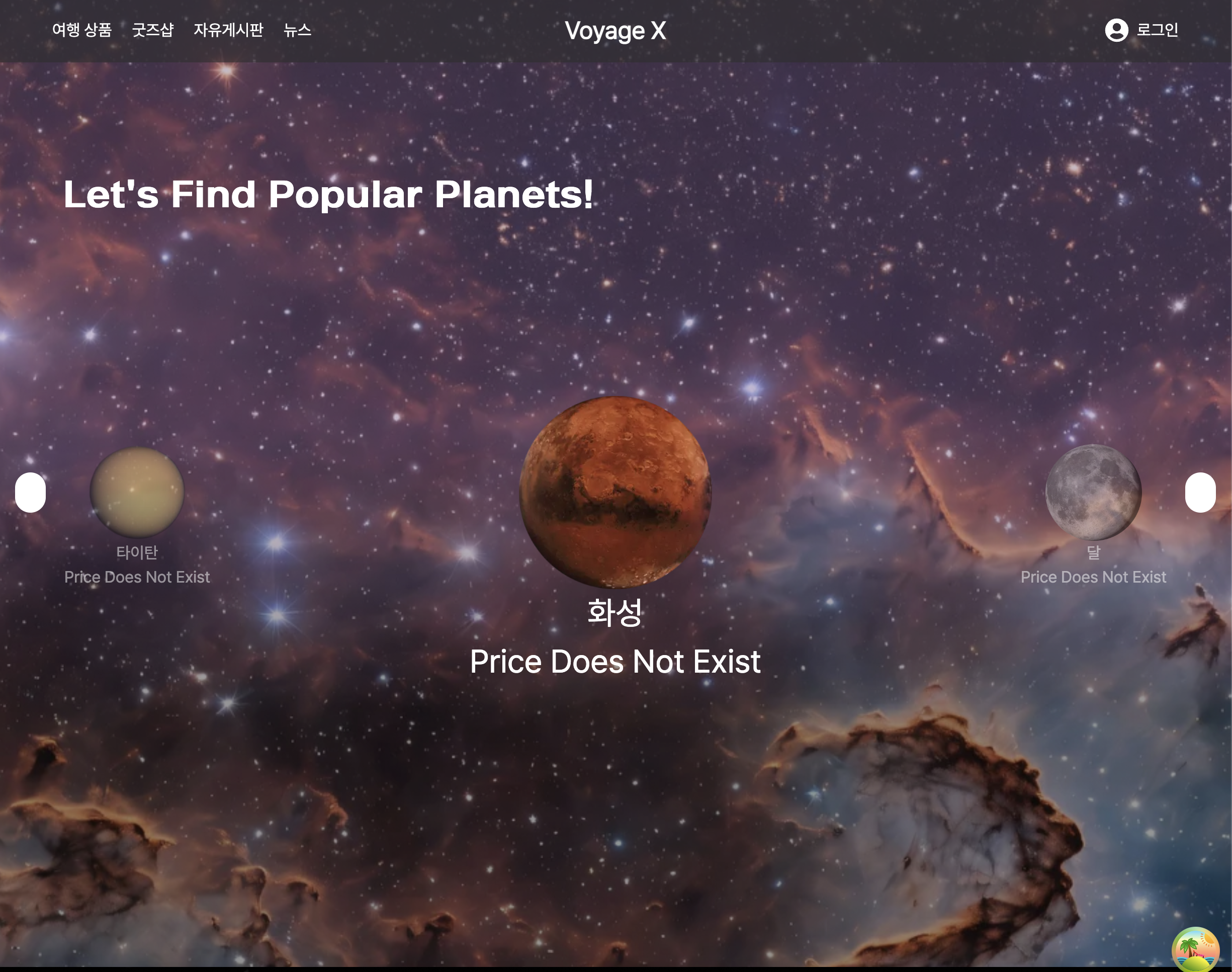
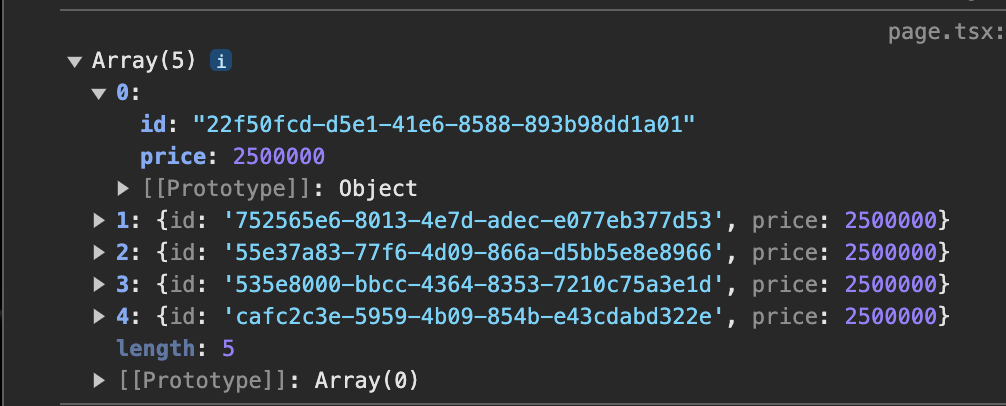
콘솔창엔 tourPrices 배열이 제대로 찍히는 걸로 보아 데이터는 잘 불러와지는 거 같은데 섹션에 가격이 표시되지 않는 이유가 뭐가 있을지 찾아봤는데
-
tourPrices.find()가 제대로 동작하는 건 맞는지, planet.id 값과 tourPrices 배열 id 값이 일치하는지
-
tourPrice 값이 텍스트로 잘 변환이 되는지
이 점을 인지한 후에 디버깅을 위한 console.log 코드를 여러번 재차 찍어봤는데 콘솔을 보고 planet.id가 tourPrices의 id와 일치하지 않는다는 점을 발견했습니다.
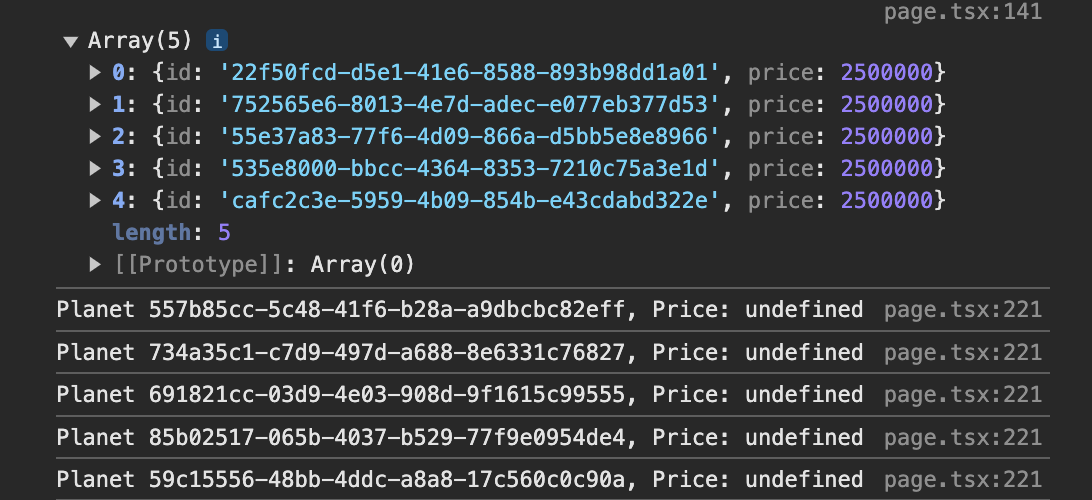
이를 참고하여 useFetchTourDetail 커스텀훅 컴포넌트 및 (main)/page.tsx 컴포넌트를 수정했습니다.
이와 같은 문제가 일어난 부분은
const { data: tourData, error: tourError } = await supabase
          .from('tours')
          .select('planet_id, price');
코드에서 .select()를 이용해 해당 'tours' 테이블에서 planet_id 를 가져와야 하는데 그냥 id 를 가져오는 바람에.. 이런 실수 ㅠㅜㅜ 하면 안 되는데..
useFetchTourDetail.tsx
import { createClient } from '@/supabase/client';
import { useEffect, useState } from 'react'

type Planet = {
  id: string;
  name: string;
  description: string;
  planet_img: string;
  english_name: string | null;
  title: string | null;
  price?: number;
}

type TourPrice = {
  id: string;
  price: number;
}

const useFetchTourDetail = () => {
  const [planets, setPlanets] = useState<Planet[]>([]);
  const [tourPrices, setTourPrices] = useState<TourPrice[]>([]);
  const [loading, setLoading] = useState<boolean>(true);
  const [error, setError] = useState<string | null>(null);

  useEffect(() => {
    const fetchDetails = async () => {
      try {
        const supabase = createClient();

        const { data: planetData, error: planetError } = await supabase
          .from('planets')
          .select('*');

        if (planetError) {
          setError(planetError.message);
          return;
        } else {
          setPlanets(planetData || []);
        }

        const { data: tourData, error: tourError } = await supabase
          .from('tours')
          .select('planet_id, price');

        if (tourError) {
          setError(tourError.message);
          return;
        }

        // planets와 tourPrices 데이터를 병합
        const enrichedPlanets = (planetData || []).map((planet) => {
          const priceObj = (tourData || []).find((price) => price.planet_id === planet.id);
          return { ...planet, price: priceObj?.price};
        });

        setPlanets(enrichedPlanets);

      } catch (error) {
        setError((error as Error).message);
      } finally {
        setLoading(false);
      }
    };

    fetchDetails();
  }, []);

  return { planets, loading, error };
}

export default useFetchTourDetail;
(main)/page.tsx
'use client';
import gsap from 'gsap';
import { ScrollTrigger } from 'gsap/ScrollTrigger';
import React, { useEffect, useRef, useState } from 'react';
import Image from 'next/image';
import useFetchGoods from '@/hooks/useFetchGoods';
import Link from 'next/link';
import Footer from '@/components/common/Footer';
import useFetchTourDetail from '@/hooks/useFetchTourDetail';

gsap.registerPlugin(ScrollTrigger);

type Planet = {
  id: string;
  name: string;
  description: string;
  planet_img: string;
  english_name: string | null;
  title: string | null;
  price?: number; // 추가된 속성
};

const MainPage = () => {
  const sectionsRef = useRef<(HTMLDivElement | null)[]>([]);
  const planetsRef = useRef<(HTMLDivElement | null)[]>([]);
  const videoRef = useRef<HTMLVideoElement | null>(null);
  const textRefs = useRef<(HTMLDivElement | null)[]>([]);
  const [videoLoaded, setVideoLoaded] = useState<boolean>(false);
  const [currentSlide, setCurrentSlide] = useState<number>(0);

  const { goods, loading, error } = useFetchGoods();
  const { planets, loading: planetsLoading, error: planetsError } = useFetchTourDetail();

  const visiblePlanetsCount = 3; // 처음에 보일 행성 수

  const handleNextSlide = () => {
    setCurrentSlide((prev) => (prev + 1) % planets.length);
  };

  const handlePrevSlide = () => {
    setCurrentSlide((prev) => (prev - 1 + planets.length) % planets.length);
  };

  // 비디오 로드 확인
  useEffect(() => {
    if (videoRef.current) {
      const videoElement = videoRef.current;
      const checkVideoLoaded = () => {
        if (videoElement.readyState >= 3) {
          setVideoLoaded(true);
        }
      };
      checkVideoLoaded();
    }
  }, []);

  // 비디오 로드 후 섹션에 ScrollTrigger로 설정
  useEffect(() => {
    if (videoLoaded) {
      sectionsRef.current.forEach((section, index) => {
        if (section) {
          ScrollTrigger.create({
            trigger: section,
            start: 'top top',
            pin: true,
            pinSpacing: false,
            scrub: true,
          });

          // 각 섹션의 텍스트가 점점 투명해지는 애니메이션
          if (textRefs.current[index]) {
            gsap.fromTo(
              textRefs.current[index],
              { opacity: 1, y: 0 },
              {
                opacity: 0,
                y: -50,
                scrollTrigger: {
                  trigger: section,
                  start: 'top+=100% center', // 텍스트가 사라지기 시작하는 지점 조정
                  end: 'bottom top', // 텍스트가 완전히 사라지는 지점 조정
                  scrub: true,
                  onUpdate: (self) => {
                    if (self.progress < 0.1) {
                      gsap.to(textRefs.current[index], { opacity: 1, y: 0 });
                    }
                  },
                },
              },
            );
          }
        }
      });
      ScrollTrigger.refresh();
    }
  }, [videoLoaded]);

  // 슬라이드 행성 애니메이션
  useEffect(() => {
    const animatePlanets = () => {
      const radius = 500; // 고리 반경
      const angleStep = (2 * Math.PI) / planets.length; // 각 행성 사이의 각도

      planetsRef.current.forEach((planetElement, index) => {
        if (planetElement) {
          const adjustedIndex =
            (index + (planets.length - Math.floor(visiblePlanetsCount / 2))) %
            planets.length;
          const angle = (adjustedIndex - currentSlide) * angleStep; // 각 행성의 위치 계산
          const xPos = radius * Math.sin(angle); // x 좌표
          const yPos = 0; // y 좌표
          const zPos = radius * Math.cos(angle); // z 좌표
          const isVisible =
            (index >= currentSlide &&
              index < currentSlide + visiblePlanetsCount) || //
            // visiblePlanetsCount 개수만큼 행성이 보이도록 조건식
            (index < currentSlide &&
              index + planets.length < currentSlide + visiblePlanetsCount);
          const isActive =
            index ===
            (currentSlide + Math.floor(visiblePlanetsCount / 2)) %
              planets.length;
          const scale = isActive ? 2 : 1;
          const zIndex = isActive ? 10 : 0;
          const opacity = isVisible ? (isActive ? 1 : 0.5) : 0;

          gsap.to(planetElement, {
            x: xPos,
            y: yPos,
            z: zPos,
            scale: scale,
            zIndex: zIndex,
            opacity: opacity,
            duration: 1,
            ease: 'power2.inOut',
          });

          // 디버깅을 위한 로그 추가
          const planet = planets[adjustedIndex]; // planets 배열의 요소 가져오기
          const tourPrice: number | undefined = planet.price;
          console.log(`Planet ${planet.id} - Price: ${tourPrice}`);
        }
      });
    };

    if (videoLoaded && planets.length > 0) {
      animatePlanets();
    }
  }, [currentSlide, videoLoaded, planets]);

  console.log('Planets:', planets);

  return (
    <div className='w-full'>
      <section
        ref={(el) => {
          sectionsRef.current[0] = el as HTMLDivElement;
        }}
        className='section h-screen flex items-center justify-center relative'
      >
        <video
          ref={videoRef}
          className='absolute top-0 left-0 w-full h-full object-cover z-0'
          src='/videos/우주.mp4'
          autoPlay
          loop
          muted
        />
        <div
          ref={(el) => {
            textRefs.current[0] = el as HTMLDivElement;
          }}
          className='absolute z-10 text-center top-48 sm:w-auto sm:text-left sm:left-48 md:left-40 lg:left-52 xl:left-64'
        >
          <h1 className='text-gradient text-6xl font-bold font-yangpyeong'>
            Voyage X
          </h1>
          <p className='text-white p-4 text-3xl'>
            상상을 현실로, 우주에서의 만남
          </p>
          <p className='text-white p-4'>
            우주 여행의 문을 여는 창구, Voyage X입니다.
            <br />
            상상으로 꿈꾸던 우주 여행을 현실로 만들어 드립니다.
          </p>
        </div>
      </section>

      <section
        ref={(el) => {
          sectionsRef.current[1] = el as HTMLDivElement;
        }}
        className='section h-screen flex flex-col items-center justify-center relative bg-center bg-cover bg-no-repeat'
        style={{ backgroundImage: 'url(/images/section2.png)' }}
      >
        <div
          ref={(el) => {
            textRefs.current[1] = el;
          }}
          className='absolute top-32 left-4 sm:top-44 sm:left-16 text-white font-yangpyeong text-2xl sm:text-4xl font-bold fade-text'
        >
          Let's Find Popular Planets!
        </div>
        <div className='scroll-container h-full w-full relative flex items-center justify-center'>
          <button
            onClick={handlePrevSlide}
            className='absolute left-2 sm:left-4 z-10 p-2 bg-white rounded-full'
          >
            ←
          </button>
          <div className='slider-container relative flex items-center justify-center'>
            {planets.map((planet, index) => {
              const isVisible =
                (index >= currentSlide &&
                  index < currentSlide + visiblePlanetsCount) ||
                (index < currentSlide &&
                  index + planets.length < currentSlide + visiblePlanetsCount);

              const adjustedIndex =
                (index +
                  (planets.length - Math.floor(visiblePlanetsCount / 2))) %
                planets.length;

              const isActive =
                adjustedIndex ===
                (currentSlide + Math.floor(visiblePlanetsCount / 2)) %
                  planets.length;

              return (
                <div
                  key={index}
                  ref={(el) => {
                    planetsRef.current[index] = el as HTMLDivElement;
                  }}
                  data-id={planet.id}
                  className={`absolute w-20 h-20 sm:w-24 sm:h-24 transform-gpu transition-opacity duration-500 ${
                    isVisible ? 'opacity-100' : 'opacity-0'
                  }`}
                  style={{
                    transform: `translate3d(${
                      150 *
                      Math.sin(
                        ((adjustedIndex - currentSlide) * (2 * Math.PI)) /
                          planets.length,
                      )
                    }px, 0, ${
                      150 *
                      Math.cos(
                        ((adjustedIndex - currentSlide) * (2 * Math.PI)) /
                          planets.length,
                      )
                    }px) scale(${isActive ? 1.5 : 1})`,
                    zIndex: isActive ? 10 : 0,
                    opacity: isVisible ? (isActive ? 1 : 0.5) : 0,
                  }}
                >
                  <Image
                    src={planet.planet_img}
                    alt={`Planet ${index + 1}`}
                    layout='fill'
                    objectFit='contain'
                  />
                  <div
                    className='text-center absolute bottom-0 left-1/2 transform -translate-x-1/2 translate-y-full w-max'
                  >
                    <p>{planet.name}</p>
                    <p>{planet.price ? `₩${planet.price.toLocaleString()}` : 'Price Does Not Exist'}</p>
                  </div>
                </div>
              );
            })}
          </div>
          <button
            onClick={handleNextSlide}
            className='absolute right-2 sm:right-4 z-10 p-2 bg-white rounded-full'
          >
            →
          </button>
        </div>
      </section>

      <section
        ref={(el) => {
          sectionsRef.current[2] = el as HTMLDivElement;
        }}
        className='section section-bg h-screen flex flex-col items-center justify-center'
      >
        <h1 className='text-4xl font-bold mb-8 absolute top-44 left-12'>
          Goods Item
        </h1>
        <Link href='/shop'>
          <p className='absolute top-44 right-24 underline'>More+</p>
        </Link>
        {error && <p className='text-red-500'>{error}</p>}
        {loading ? (
          <p>Loading...</p>
        ) : (
          <div className='grid grid-cols-3 gap-4'>
            {goods.map((item) => (
              <div key={item.id} className='p-4 rounded shadow'>
                <Image
                  src={item.goods_img}
                  alt={item.goods_name}
                  width={300}
                  height={300}
                  className='object-cover bg-white-600'
                />
                <h2 className='text-xl font-semibold mt-4'>
                  {item.goods_name}
                </h2>
                <p className='text-sm'>{item.goods_price}원</p>
              </div>
            ))}
          </div>
        )}
      </section>

      <section
        ref={(el) => {
          sectionsRef.current[3] = el as HTMLDivElement;
        }}
        className='section section-bg h-screen flex items-center justify-center'
      >
        <h1>4번째 섹션입니다</h1>
      </section>

      <section
        ref={(el) => {
          sectionsRef.current[4] = el as HTMLDivElement;
        }}
        className='section h-screen flex items-center justify-center'
        style={{
          backgroundImage: "url('/images/section5-bg.png')",
          backgroundSize: 'cover',
          backgroundRepeat: 'no-repeat',
          backgroundPosition: 'center',
          backgroundAttachment: 'fixed',
        }}
      >
        <h1>5번째 섹션입니다</h1>
      </section>
      <Footer />
    </div>
  );
};

export default MainPage;
개발자가 되고 싶어~~~
와 대박 이거 뭐예요 휘진님 폼 미쳣다;;;