[1] JavaScript와 프론트엔드 개발

[2] 변수, 상수, 자료형 그리고 메모리
1) 변수
수학에서의 변수 = (상황에 따라) 변하는 값
컴공에서의 변수 = 직접 메모리에 할당한 값
명령을 내리기 위한 키워드, 예약어 中 변수를 사용하기 위한 예약어는 var, let
var 권장X > 호이스팅때문에 권장xx
let은 ES6 이후 사용 가능.
let variable = 123
(키워드) (변수명) (값)
변수는 언제든지 값을 바꿀 수 있고, 이 값을 이용하기 위해서는 변수의 이름을 사용하면 됨
2) 상수
변하지 않은 수. (const)
const variable = 126
(키워드) (상수명) (값)
3) 자료형
Number 타입
- 숫자 타입. 숫자와 관련된 모든 것은 number 타입에 속함
- integer, float, nan, inf
- nan은 숫자가 아니지만 숫자 타입에 속함
- inf : 무한
String타입
- 문자열
- '', "", ``

Boolean 타입
- true / false
Object 타입
- 여러 값을 지닐 수 있는 타입

Array 타입
- 여러 값을 가지고 있는 타입.
- object 타입과는 다르게 키를 가지고 있진 않고, 인덱스를 통해 값을 찾을 수 있음
Function 타입
- 함수
undefined 와 null의 차이
- undefined : 변수/상수가 선언되었지만, 아무런 값도 대입되지 않음
- null : 해당 변수가 비어있음을 사용자가 의도적으로 나타낼 때 사용
[3] 메모리 심화
가상머신
- Heap - 참조 타입(동적으로 변경..)
- Call Stack - 원시 타입
[4] 표현식과 연산자
1) 표현식이란?
자바스크립트는 표현식(Expression)과 문장(Statements)로 이루어져 있다.
Expression 표현식
: 어떠한 결과 값으로 평가되는 식
-> 숫자, 문자열, 논리값 같은 원시 값을 포함하여, 변수, 상수, 함수 호출 등으로 조합할 수 있음
2) 연산자의 종류
할당 연산자
- 오른쪽 표현식을 왼쪽 피연산자 값에 할당하는 연산자
- 등호(=)를 사용하며, 다른 연산자와 같이 사용하여 복합 할당 연산자로 이용 가능
let x;
x= 10;

x += 5;
x -= 5;
x *= 10;
x /= 10;
x %= 3;
x <<= 4;
x >>= 2;
비교 연산자
- 좌측 피연산자와 우측 피연산자를 비교하는 연산자
- true나 flase를 반환
const x = 10;
const y = 12;

x == y;
x != y;
x === y;
x !== y;
x > y;
x >= y;
x < y;
x <= y;


"10" == 10 //true
"10" === 10 //false
산술 연산자
- 덧셈, 뺄셈, 곱셈, 나눗셈을 하는 연산자
- Number을 반환
const x = 10;
const y = 12;

x + y;
x - y;
x * y;
x / y;

console.log(x / y);
비트 연산자
- 비트를 직접 조작하는 연산자
const x = 10;
const y = 12;

x & y;	//AND - 8
x | y;	//OR - 14
x ^ y;	//XOR - 6

~x;	//NOT --11
x << 1;
x >> 1;
논리 연산자
- Boolean을 통해 참과 거짓을 검증하는 연산자
const x = true;
const y = false;

x && y;	//AND - false
x || y;	//OR - true
!x;	//NOT - false
삼항 연산자
- 조건에 따라 값을 선택하는 연산자
조건 ? 참 : 거짓의 형태를 지님
const x = 10;
const y = 12;

x > y ? 100 : 200;	//200
관계 연산자
- 객체에 속성이 있는지 확인하기 위한 연산자
const x = {
	name: "Lee Sun-Hyoup",
	email: "kitter@naver.com",
};

"name" in x; //true
"gender" in x; //false
typeof
- 피연산자의 타입을 반환하는 연산자
- 문자열로 반환됨
const x = 10;
const y = "String";
const z = false;

typeof x;	// number
typeof y;	// string
typeof z;	// boolean
[5] 흐름 제어
1) Control Flow
control Flow
- 흐름을 제어하는 방법 중 하나
- 조건이나 반복을 통해 상태를 제어하는 것
2) 조건문
: 조건이 맞을 때만 실행되는 문장(Statements) 문법
if
- 괄호 안 조건식이 참인 경우 실행되는 문법
- else if, else도 같이 사용할 수 있음
const a = 10;
const b = 20;

if (a < b) {
	//참이기 때문에 실행됨
} else {
	//무시됨
}

if (a > b) {
	//거짓이기 때문에 무시됨
} else if (a === b) {
	//마찬가지로 무시됨
} else {
	//실행됨
}
-> false 뿐만아니라 undefinded, null, 0, Nan, ''(empty string)도 거짓이 될 수 있으므로 주의
switch
- 괄호 안 값에 따라 분기되는 문법
- case, default와 함께 사용
const grade = "B";
switch (grade) {
    case "A":
        console.log("A grade");
        break;
    case "B":
        console.log("B grade");
        break;
    case "C":
        console.log("C grade");
        break;
    case "D":
        console.log("D grade");
        break;
    case "F":
        console.log("F grade");
        break;
    default:
        console.log("Unknown");
}
3) 반복문
: 반복적인 작업을 지시하는 문법
for
- 가장 기초적인 반복문으로 초기문, 조건문, 증감문으로 이루어져 잇음
- 조건문의 결과가 거짓이 되면 반복이 종료됨
for (let i = 0; i< 10; i++) {
    console.log(i);
}
while
- 괄호 안 조건이 거짓이 될 때까지 반복
let x = 0;
while (x < 10) {
    x += 1;
    console.log(x);
}
do - while
- while문과 다르게 먼저 진입 후 로직을 실행한 다음 조건을 검사함
let x = 0;

do {
    console.log("Fire");
} while (x > 10)
[6] 배열과 객체
배열
- 연관된 데이터를 연속적인 형태로 저장하는 복합타입 배열에 포함된 원소는 순서대로 번호(index)가 붙음
객체
- 여러 값을 키-값 형태로 결합시킨 복합 타입
1) 배열
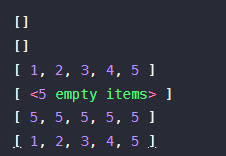
const arr1 = new Array();
const arr2 = [];
const arr3 = [1, 2, 3, 4, 5];
const arr4 = new Array(5);
const arr5 = new Array(5).fill(5);  //fill 함수는 입력받은 파라미터 값으로 모든 요소를 초기화함
const arr6 = Array.from(Array(5), function(v, k) {
  return k + 1;
});
배열의 길이
const arr = [1, 2, 3, 4, 5];

console.log(arr.length);   //.length는 배열의 길이
arr.length = 3;
console.log(arr);
arr.length = 10;
console.log(arr);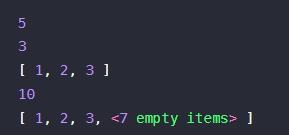
const arr = [1, 2, 3, 4, 5];

console.log(arr.join(', '));  //, 단위로 문자열로 합침
console.log(arr.reverse());  //모든 요소가 거꾸로 뒤집어짐
console.log(arr);  //원래 있던 배열에도 영향이 가기 때문에 주의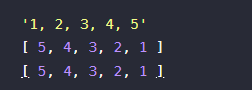
const arr1 = [1, 2, 3, 4, 5, 6];
const arr2 = [7, 8, 9, 10];

console.log(arr1.concat(arr2));  //두 배열이 합쳐짐
const arr = [1, 2, 3, 4, 5, 6];

arr.push(7);  //끝에 요소 추가
console.log(arr);
arr.push(7, 8, 9);
console.log(arr);
arr.pop();
arr.pop();
console.log(arr.pop());
console.log(arr);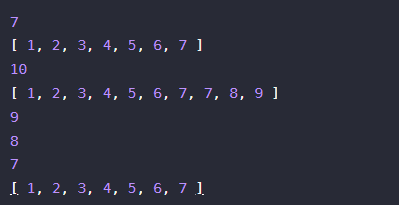
const arr = [1, 2, 3, 4, 5, 6];

arr.shift();  //첫번째 요소를 제거
arr.shift();
console.log(arr);
arr.unshift(10);  //맨 앞에 요소 추가
console.log(arr);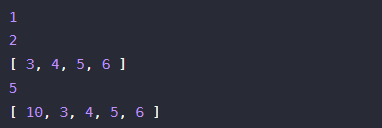
const arr = [1, 2, 3, 4, 5, 6];

console.log(arr.slice(2, 4));  //중간의 요소 자름
console.log(arr);   //원래 배열은 변하지 않음

arr.splice(2, 2);
console.log(arr);  //배열이 중간의 요소를 자르면서 변함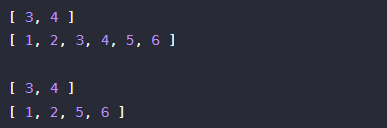
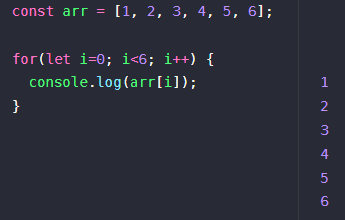
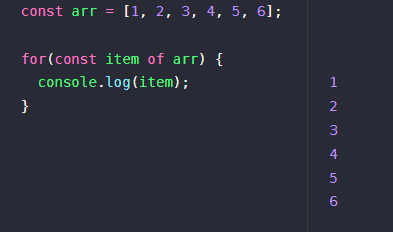
for과 for..of
const arr = [1, 2, 3, 4, 5, 6];

console.log(typeof arr);  //객체
arr['key'] = "value";
console.log(arr);
console.log(arr.length);  //배열의 길이는 내부적으로 관리되어 객체처럼 사용되어도 달라지지 않음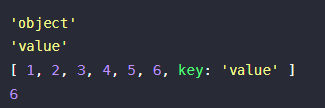
2) 객체
const obj1 = new Object();
const obj2 = {};
const obj3 = {name: "이선협", company: "Cobalt. Inc."};

console.log(obj1);
console.log(obj2);
console.log(obj3);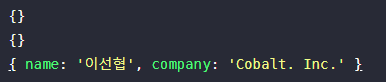
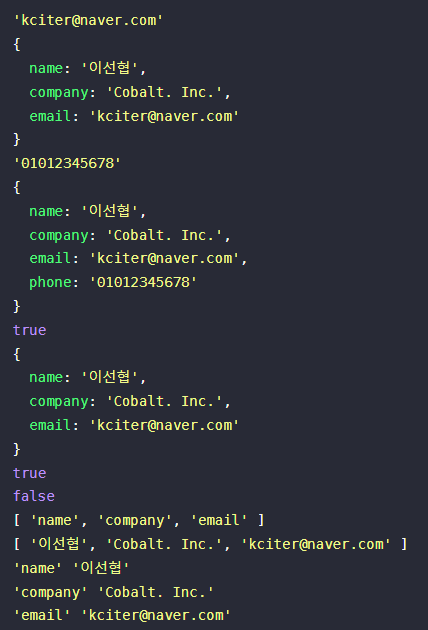
const obj = {name: "이선협", company: "Cobalt. Inc."};

//추가
obj['email'] = "kciter@naver.com";
console.log(obj);

obj.phone = '01012345678'
console.log(obj);

//삭제
delete obj.phone;
console.log(obj);

//키가 있는지 없는지 확인
console.log("email" in obj);
console.log("phone" in obj);

//키
console.log(Object.keys(obj));

//값
console.log(Object.values(obj));

//for...in로 순회
for(const key in obj) {
  console.log(key, obj[key]);
}
[7] 스코프와 클로저
스코프
- 유효 범위라고도 부르며 변수가 어느 범위까지 참조되는 지를 뜻함
const a = 5;  //전역 스코프
{
  const b = 3;  //지역 스코프
  console.log(a, b);
}
console.log(a, b);  //error!
- var을 사용하면 개발자가 예상하지 못한 오류가 생길 수 있음
const a = 5;
{
  //호이스팅되어 변수 선언이 상단으로 올라가버림.
  const a = 10;
  console.log(a);
}
console.log(a);
클로저
- 함수가 선언된 환경의 스코프를 기억하여 함수가 스코프 밖에서 실행될 때에도 기억한 스코프에 접근할 수 있게 만드는 문법
function makeGreeting(name) {
  const greeting = "Hello, ";

  return function() {
    console.log(greeting + name);
  };
}

const world = makeGreeting("World!");
const sunhyoup = makeGreeting("Sun-Hyoup");

//그런데 실행 시점에 greeting이 살아있음!
world();
sunhyoup();
은닉화
- 클로저를 이요하여 내부 변수와 함수를 숨길 수 있음
function Counter() {
  let privateCounter = 0;
  function changeBy(val) {
    privateCounter += val;
  }
  return {
    increment: function() {
      changeBy(1);
    },
    decrement: function() {
      changeBy(-1);
    },
    value: function () {
      return privateCounter;
    },
  };
}

const counter = Counter();

console.log(counter.value());
counter.increment();
counter.increment();
console.log(counter.value());
counter.decrement();
console.log(counter.value());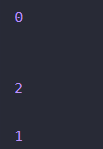
-> 클로저를 잘 알아야 하는 이유는 유용하게 사용하기 보단 알기 힘든 버그를 수정하기 위해서이다.