02-1 가상 DOM 이해하기
- 리액트 프레임워크 구성 기본 3요소 :
가상 DOM(virtual DOM), JSX(JavaScript XML), 컴포넌트(Component)
src/index.tsx
import React from 'react';
import ReactDOM from 'react-dom/client';
import './index.css';
import App from './App';
import reportWebVitals from './reportWebVitals';

const root = ReactDOM.createRoot(
  document.getElementById('root') as HTMLElement
);
root.render(
  <React.StrictMode>
    <App />
  </React.StrictMode>
);

// If you want to start measuring performance in your app, pass a function
// to log results (for example: reportWebVitals(console.log))
// or send to an analytics endpoint. Learn more: https://bit.ly/CRA-vitals
reportWebVitals();
React.StrictMode : 코드가 잘못되었는지 판단하여 적절한 오류 메세지를 보여주는 컴포넌트
reportWebVitals : 앱의 성능을 측정하는 기능
react와 react-dom패키지
react : 리액트 앱이 동작하는 환경과 무관하게 공통으로 사용하는 기능을 제공하는 패키지
renderer : react-dom/client, react-dom/server, react-native
앱이 동작하는 환경(플랫폼)에 종속적인 기능을 제공하는 데 특화된 패키지
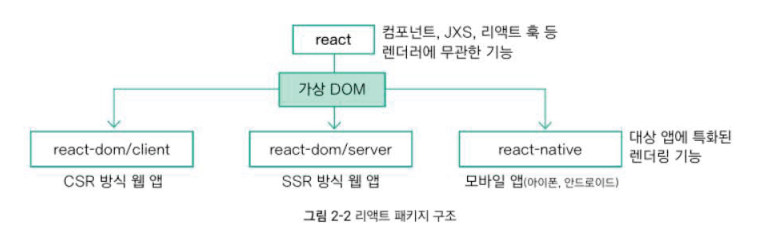
CSR(Client-side rendering) 방식 : react와 react-dom/client패키지 조합
SSR(Server-side rendering) 방식 : react와 react-dom/server 조합
모바일 앱 : readct와 react-native 조합
react와 renderer 패키지 경계에는 가상 DOM이라는 메커니즘이 자리잡음
XML 마크업 언어
마크업 언어(markup language) : 오래전부터 사람들은 쉽게 작성할 수 있고 컴퓨터도 그 의미를 쉽게 파악할 수 있는 특수한 형태의 텍스트
문서(document) : 마크업 언어로 작성한 텍스트가 담긴 파일이나 인터넷 망을 통해 전송되는 스트림(stream)
XML이나 HTML문서는 여러 가지 요소(element)로 구성됨
문서 객체 모델이란?
document object model, DOM
웹 브라우저는 HTML형식의 문자열을 분석(parsing) → 자바스크립트 객체 조합으로 변경 → 자신의 특징에 맞는 인터페이스 구현
웹 브라우저의 자바스크립트 엔진 : **window** 이름의 전역변수 기본으로 제공
**window** : 웹 브라우저의 특정 웹페이지를 의미하는 객체
Window 타입 객체로서 브라우저 객체 모델(browser object model, BOM)
document 객체
window객체는 document 속성 객체로 HTML문서 기능을 사용할 수 있게 해줌
HTML문서의 html요소는 오직 1개만 존재 해야 함.
→ window.document(혹은 document)는 html요소를 의미함
document.head와 document.body객체
HTML문서의 html요소는 head와 body태그를 1개씩만 가지고 있어야 함.
document객체는 head요소인 head 속성 객체와 body요소인 body 속성 객체를 제공함.
document.createElement 메서드
인터페이스란 ? 객체가 제공해야할 여러 기능을 구체적으로 정의한 규약(specification)
let element = document.createElement(tagName[, options]);

let newDiv = document.createElement("div");
HTMLElement 인터페이스
모든 종류의 HTML요소가 구현하는 인터페이스
HTML요소명Element : 위의 newDiv 객체의 타입은 HTMLDivElement
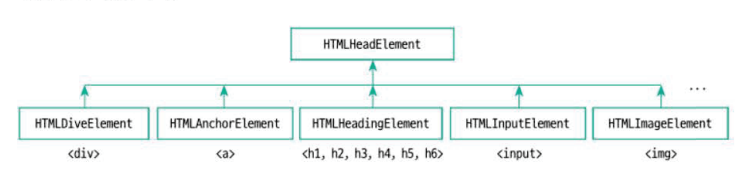
HTMLElement의 부모 요소 상속 구조
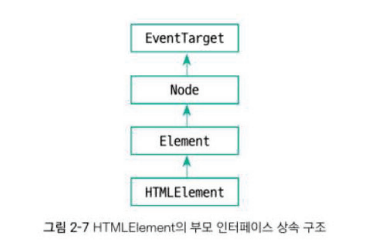
HTMLElement의 부모 인터페이스인 Node는 appendChild 메서드를 제공
let aChild = element.appendChild(aChild);createElement : HTML DOM 요소 객체 생성해주는 역할
appendChild : 생성된 DOM 객체를 웹 브라우저 화면에 출력해주는 역할 → 렌더링(rendering)
호출을 거쳐 부모/자식관계로 얽힌 거대한 트리구조(DOM 트리) 생성
let p = document.createElement("p") // <p> 요소 생성
// <p> 요소를 <body> 마지막 자식 요소로 추가
document.body.appendChild(p) // 렌더링
자바스크립트만 사용하는 프론트엔드 개발(물리 DOM)
src/index.tsx
import React from 'react'

let pPhtsicalDOM = document.createElement('p')
pPhysicalDOM.innerText = 'Hello physical DOM world!'
document.body.apppendChild(**pPhysicalDOM**)
pPhysicalDOM : 리액트와 상관없는 그냥 DOM객체 (물리 DOM) physical DOM
리액트를 사용하는 프론트엔드 개발(가상 DOM)
const p = React.createElement('p', null, 'hello world!')createElement의 첫 번째 매개변수 type은 **FunctionComponent<P>**, ComponentClass<P>, string 중 하나
2번째 매개변수는 선택 매개변수(optional argument)
src/index.tsx
import React from 'react';
import ReactDOM from 'react-dom/client';

const pVirtualDOM = React.createElement('p',null, 'hello virtual DOM world!')
const root = ReactDOM.createRoot(document.getElementById('root') as HTMLElement)

root.render(pVirtualDOM)
root.render 메서드
<물리 DOM버전>
document.body.apppendChild(**pPhysicalDOM**)pPhysicalDOM객체를 DOM 트리에 추가해주며, **pPhysicalDOM**객체가 화면에 나타남.
이를 가상 DOM 버전에 적용하면, 가상 DOM트리에 추가되지 ❌
—> root.render함수 이용 : 가상 DOM을 물리 DOM으로 전환해줌
document.getElementById 메서드
let rootDiv = document.getElementByid('root')getElementByid : 이미 생성된 특정 물리 DOM객체를 찾아주는 역할
src/index.tsx
import React from 'react';
import ReactDOM from 'react-dom/client';

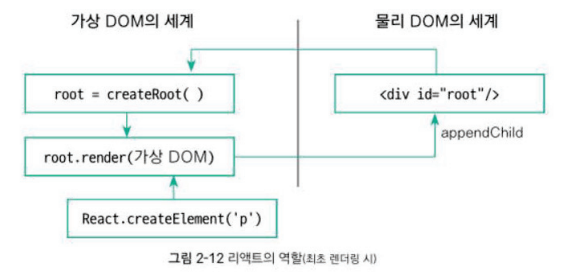
const root = ReactDOM.createRoot(document.getElementById('root') as HTMLElement)
const pVirutalDOM = React.createElement('p', null, 'Hello virtual DOM world!')

root.render(pVirtualDOM)
React.createElement : HTML요소를 가상 DOM트리구조로 구현
render 메서드 : 가상 DOM 트리 → 물리 DOM트리로 변환
왜 이렇게 굳이 복잡하게 가상 DOM, 물리 DOM으로 나뉠까 ?
최초 렌더링 이후 가상 DOM트리 구조에 변화가 생겨 이 변화를 사용자에게 알리려고 다시 렌더링하는 상황
createElement와 appendChild의 문제가 아닌 특정 HTML요소의 DOM객체를 찾아 속성 값을 변경하는 문제
💡 document.getElementById(”아이디”) 로 찾아 DOM객체 얻은 뒤 속성 변경하면 되지 않을까 ?
→ HTML의 태그에 항상 id를 명시해줘야 함
서로 중복되지 않게 아이디 값을 만드는 것도 쉽지 않음
따라서 가상 DOM이용