00. 환경
springdoc-openapi 1.6.11
spring boot 2.7.17
Java
01. Swagger
Swagger는 API(Application Programming Interface)의 설계, 빌드, 문서화, 그리고 사용에 도움을 주는 오픈소스 프레임워크입니다.
RESTful 웹서비스를 설계, 빌드 및 문서화하는 데 사용되며, 자동화된 문서를 제공하여 사용자가 API를 더 쉽게 이해하고 사용할 수 있게 합니다.
Spring을 사용하고 있다면 2가지 라이브러리를 이용해서 활용할 수 있다.
- SpringFox
- SpringDoc
SpringFox의 경우, 2020년에 마지막 업데이트를 하고 추가적인 갱신이 되고 있지 않다. 또한 Spring boot 3.x.x를 사용한다면 버전 상의 문제로 사용이 어려울 수 있다.
SpringDoc의 경우, 비교적 최신까지 업데이트가 원할하며, 공개된 버그도 더 작은것으로 보인다.
또한 SpringDoc의 경우 WebFlux를 통한 비동기 방식의 개발을 지원한다.
공식 : https://springdoc.org/
02. 설정
Gradle
dependencies{
    ...

	implementation 'org.springdoc:springdoc-openapi-ui:1.6.11'

    ...
}
yaml
# swagger
springdoc:
  api-docs:
    path: /api-docs # API 문서 생성 경로
    groups:
      enabled: true
  swagger-ui:
    path: /index.html # Swagger-ui 경로
    enabled: true
    groups-order: asc
    tags-sorter: alpha
    operations-sorter: alpha
    display-request-duration: true
    doc-expansion: none
  cache:
    disabled: true
  override-with-generic-response: false
  model-and-view-allowed: true
  default-consumes-media-type: application/json
  default-produces-media-type: application/json
상세한 내용은 공식 링크 확인(https://springdoc.org/#properties)
그 무엇보다 정확하고 자세하다.
SwaggerConfig.java
@Configuration
public class SwaggerConfig {
	@Bean
	public OpenAPI openAPI() {
		return new OpenAPI()
			.components(new Components())
			.info(apiInfo());
	}

	private Info apiInfo() {
		return new Info()
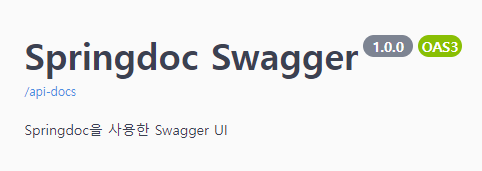
			.title("Springdoc Swagger")
			.description("Springdoc을 사용한 Swagger UI")
			.version("1.0.0");
	}
}
SwaggerConfig.java의 apiInfo에서 작성한 Info 클래스의
제목, 설명, 버전 정보가 들어가있다.
03. Annotation
대표적인 Annotation을 알아보자
@OpenAPIDefinition
전체 API에 대한 정보를 지정하는 데 사용.
info 속성을 사용하여 API의 제목, 버전 및 설명 등을 설정할 수 있다.
@OpenAPIDefinition(info = @Info(title = "My API", version = "v1", description = "My API Description"))
public class Application {
    ...
}
@OpenAPIDefinition
전체 API에 대한 정보를 지정하는 데 사용.
info 속성을 사용하여 API의 제목, 버전 및 설명 등을 설정할 수 있다.
@OpenAPIDefinition(info = @Info(title = "My API", version = "v1", description = "My API Description"))
public class Application {
    ...
}
@Tag
특정 클래스나 메서드를 문서에서 그룹화하거나 분류하기 위해 사용
@Tag(name = "User", description = "User related operations")
@RestController
public class UserController {
    ...
}
@Operation
특정 API 작업(즉, 요청 메서드)에 대한 설명을 제공
summary와 description 속성을 사용하여 작업에 대한 간단한 요약 및 자세한 설명 기재
@Operation(summary = "Get users", description = "Get a list of all users")
@GetMapping("/users")
public List<User> getUsers() {
    ...
}
@Parameter
메서드의 매개변수를 문서화하는 데 사용
name과 description 속성을 사용하여 매개변수의 이름과 설명을 제공
required 속성을 사용하여 해당 매개변수가 필수인지 여부를 지정 가능
@GetMapping("/users/{id}")
public User getUser(@Parameter(description = "ID of the user to be obtained") @PathVariable Long id) {
    ...
}
@ApiResponse
특정 HTTP 응답 코드에 대한 설명을 제공
responseCode와 description 속성을 사용하여 응답 코드와 설명 기재
@ApiResponse(responseCode = "200", description = "User found")
@ApiResponse(responseCode = "404", description = "User not found")
@GetMapping("/users/{id}")
public User getUser(@PathVariable Long id) {
    ...
}
@Hidden
특정 api를 노출하고 싶지 않을 때 지정하여 숨길 수 있음.
@Hidden
@GetMapping("/test")
public ResponseEntity<ProductResponseDto> testProduct() {
	return ResponseEntity.ok().build();
}
예시
@Slf4j
@RestController
@RequestMapping("/product")
@Tag(name = "Product", description = "상품 관련 API")
public class ProductController {
	private final ProductService productService;

	@Autowired
	public ProductController(ProductService productService) {
		this.productService = productService;
	}

	@Operation(summary = "상품 목록 조회", description = "페이지 당 상품 목록과 상품 개수 설정 가능")
	@GetMapping("/list")
	public ResponseEntity<List<ProductResponseDto>> findAllProducts(
		Pageable pageable
	) {
		return ResponseEntity.ok(productService.findAllProducts(pageable));
	}

	@Operation(summary = "특정 상품 목록 조회", description = "특정 상품의 ID로 조회")
	@Parameter(name = "productId", description = "특정 상품 번호")
	@GetMapping("/{productId}")
	public ResponseEntity<ProductResponseDto> findProduct(
		@PathVariable int productId
	) {
		return ResponseEntity.ok(productService.findProduct(productId));
	}

	@Hidden
	@GetMapping("/test")
	public ResponseEntity<ProductResponseDto> testProduct() {
		return ResponseEntity.ok().build();
	}
}