History API
History API란?
- history 글로벌 오브젝트를 이용
- 브라우저의 세션 히스토리에 대한 접근과 조작 기능을 제공
세션 히스토리란?
- 브라우저를 사용할 때 뒤로가기와 앞으로가기 버튼이 있습니다.
- 이것을 우클릭하면 이전에 방문했던 기록들이 나옵니다.
- 이게 세션 히스토리입니다.
History API로 할 수 있는 것들
- history.length: 세션 히스토리에 들어있는 요소들의 개수 확인
- history.back(): 뒤로 가기
- history.forward(): 앞으로 가기
- history.go(숫자): 입력한 수 만큼 이동하기
- 0을 넣으면 현재 페이지에서 새로고침
- 음수를 넣으면 뒤로
- 양수를 넣으면 앞으로
- history.pushState(state, unsed, url)

- pushState를 통해 분홍색 state를 넣는다면 현재 페이지 다음 state를 지우고 새롭게 추가한 state를 현재 페이지 앞에 넣습니다.
// pushState로 /sparrow/1234로 가게되면
history.pushState({ color: 'brown' }, '', '/sparrow/1234')

// 실제로 주소창이 /sparrow/1234로 변경되고
history.state // { color: 'brown'} 출력- history.replaceState(state, unused, url)
- state: 직렬화가 가능한 무언가
- unused: 사용하진 않지만 무조건 있어야 함 => 빈 문자열 권장
- url: 현재 url과 오리진(프로토콜,호스트명,포트번호)이 같은 절대 또는 상대 경로 주소창은 바뀌지만 실제 페이지 이동 X
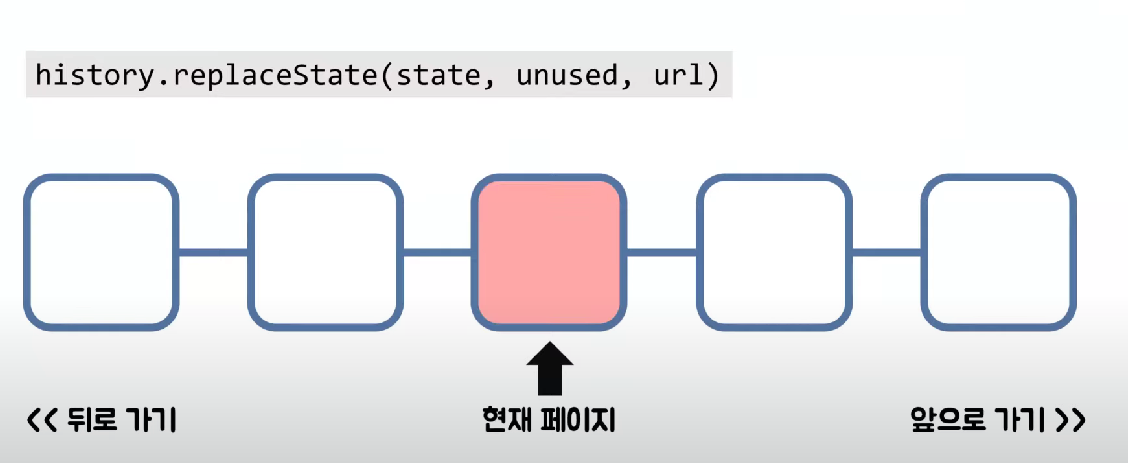
- replaceState는 현재 페이지를 갈아끼웁니다.
PopStateEvent
- 사용자의 세션 기록 탐색으로 인해 같은 문서 내에서 히스토리 엔트리가 바뀔 때마다 발생
window.addEventListener('popstate', (event) => {
	console.log(event.state)
})
SPA
Single Page Applecation?
- 하나의 HTML
- 맨 처음에 모든 자원을 가져옴
- 서버와의 통신 최소화
- 페이지 이동 시 바뀌는 부분만 렌더링
- 컴포넌트로 나누어 개발하기에 유리
- 좋은 사용자 경험
- 검색 엔진 최적화가 어려움
URL Routing?
- URL: 자료가 '어디에' 존재하는지 나타내는 일종의 주소
- Routing
- 네트워크에서 경로를 고르는 과정
- 자료에 '어떻게' 접근할 것인지를 정하는 것
- URL Routing: URL을 특정 route로 매핑하는 과정
SPA에서 URL Routing이 필요한 이유
- URL Routing이 없다면?
- 실제 저장되어 있는 페이지는 하나
- 여러 페이지를 돌아다닌 것 같지만 방문 기록이 없음
- 뒤로 가기, 앞으로 가기 사용 불가
- 본인이 보고 있는 페이지의 접근 방법을 알기 어려움
- SPA도 하나의 웹 페이지이기 때문에 기존의 웹 페이지에서 제공해주는 사용자 경험을 제공해야한다.
History API를 이용한 URL Routing
VanillaJS
// 어떤 정보가 주어졌을 때 특정한 페이지를 렌더링
const route = (page) => {
	if(page === 12){
    	someDivElement.textContent = '12쪽입니다.';
    }
}

// 주소 바꾸기
someButton.addEventListener('click', () => {
	history.pushState({ page: 12 }, '', '/page/12');
  	route(12)
})

// 저장된 state를 이용해 라우팅
window.addEventListener('popstate', (event) => {
	route(event.state.page);
})
Vue
- router/packages/router/src/history/html5.ts
- function useHistoryStateNavigation()
history[replace ? 'replaceState', 'pushState'](state, '', url)React
export function createBrowserRouter(
	routes: RouteObject[],
  	opts?: DOMRouterOpts
): RemixRouter {
	return createRouter({
    	basename: opts?.basename,
      	future: opts?.future,
      	hisotry: createBrowserHistory({ window, opts?.window }),
      	hydrationData: opts?.hydrationData || parseHydrationData(),
      	routes,
      	detectErrorBoundary,
    }).initialize();
}
export function createBrowserHistory(
options: BrowserHistoryOptions = {}
): BrowserHistory {
function createBrowserLocation(
window: Window,
globalHistory: Window["history"]
) {
let { pathname, search, hash } = window.location;
return createLocation(
"",
{ pathname, search, hash },
(globalHistory.state && globalHistory.state.usr) || null,
(globalHistory.state && globalHistory.state.key) || "defualt",
)
}
}// createBrowserHistory의 return 값
return getUrlBasedHistory(
createBrowserLocation,
createBrowserHref,
null,
options
)function getUrlBasedHistory(
getLocation: (window: Window, globalHistory: Window["history"]) => Location,
createHref: (window: Window, to: To) => string,
vaildateLocation: ((location: Location, to: To) => void) | null,
options: UrlHistoryOptions = {}
): UrlHistory {// getUrlBasedHistory에 메서드로 push가 있음
function push(to: To, state?: any) {
...
try{
globalHistory.pushState(historyState, "", url);
} catch (error){
...
}- 이렇게 함수를 계속 타고타고 들어가다보면 History API를 사용해서 라우팅을 구현하는 것을 확인할 수 있습니다
마무리
이번 글에서는 History API에 대해서 다뤘습니다. History API는 useCustomBack이라는 커스툼 훅을 개발하는 과정에서 다뤄본적이 있는데요. popstate 이벤트가 발생했을 때 브라우저의 동작을 막고 특정 함수를 실행하는 기능이었습니다. 이렇게 다시 공부해보니까 새롭네요. SPA의 라우팅을 History API를 통해서 구현했다는 부분과 해당 기능을 확인하기 위해서 라이브러리를 분석하는 부분이 너무 좋았습니다.
Reference

흑우 모르는 흑우 없제~