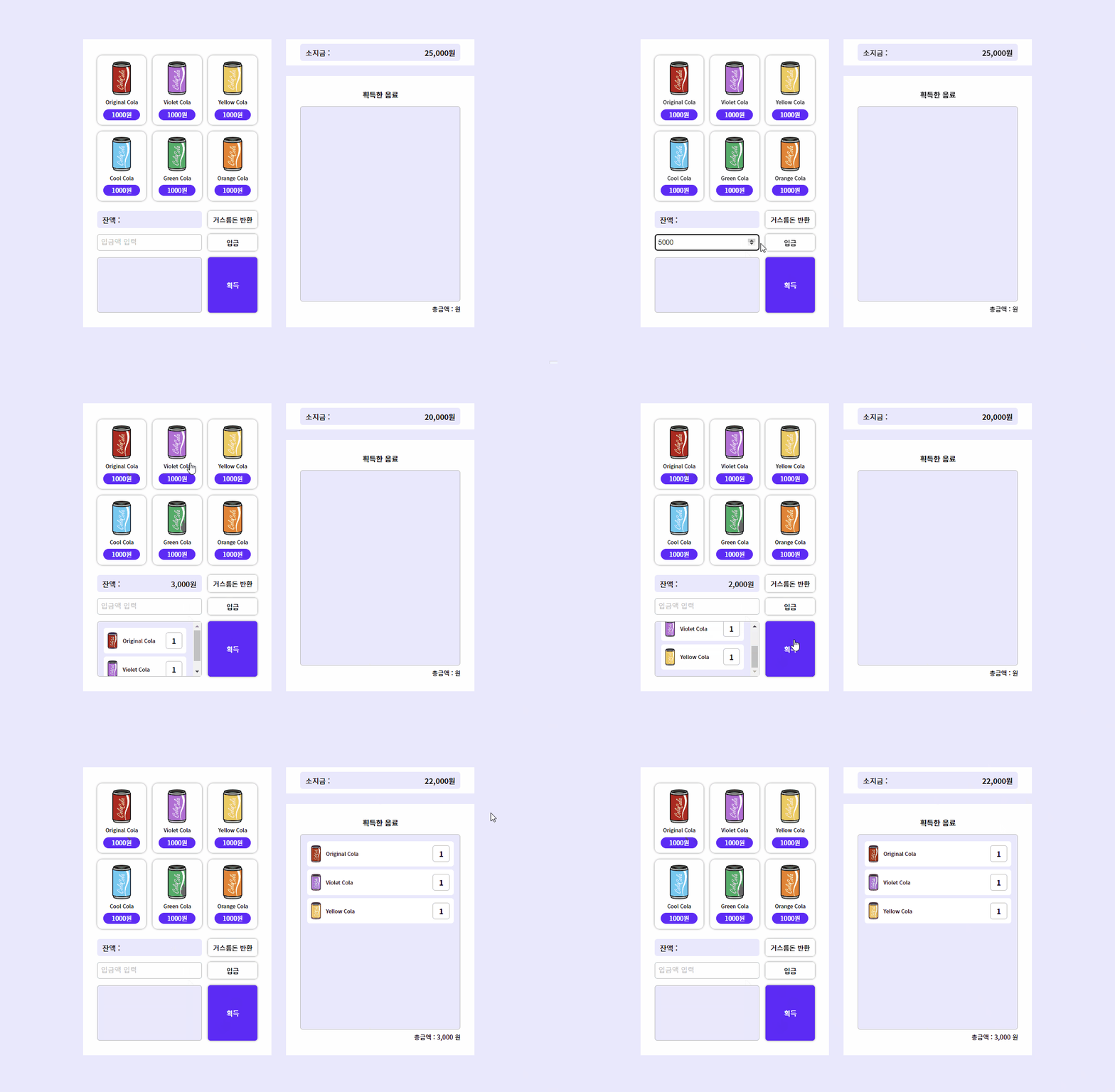
🥤 콜라 자판기 만들기 (Vending-Machine)
🔈 핵심 기능
- 입금 버튼 기능
- 거스름돈 반환 버튼 기능
- 자판기 장바구니 채우기 기능
- 획득 버튼 기능
- 나의 장바구니 콜라 생성
🔈 폴더 구조
🥤 cola-cola
├─ 📦 img
│  └─ 🖼️ cola-cool.png
│  └─ 🖼️ cola-green.png
│  └─ 🖼️ cola-logo.png
│  └─ 🖼️ cola-orange.png
│  └─ 🖼️ cola-original.png
│  └─ 🖼️ cola-violet.png
│  └─ 🖼️ cola-yellow.png
│  └─ 🖼️ soldout.png
├─ 📦 js
│  ├─ 📂 classes
│  │  └─ 📜 colaGenerator.js
│  │  └─ 📜 VendingMachineEvents.js
├  ├─ 📜 index.js
├─ 📃 index.html
├─ 🪧 items.json
├─ 🎨 style.css
🪧 콜라 종류 정보 (items.json)
[
  {
    "name": "Original Cola", // 콜라 이름
    "cost": 1000, // 콜라 가격
    "img": "cola-original.png", // 콜라 이미지 파일 이름
    "count": 5 // 콜라 개수
  },
  {
    "name": "Violet Cola",
    "cost": 1000,
    "img": "cola-violet.png",
    "count": 5
  },
  {
    "name": "Yellow Cola",
    "cost": 1000,
    "img": "cola-yellow.png",
    "count": 5
  },
  {
    "name": "Cool Cola",
    "cost": 1000,
    "img": "cola-cool.png",
    "count": 5
  },
  {
    "name": "Green Cola",
    "cost": 1000,
    "img": "cola-green.png",
    "count": 5
  },
  {
    "name": "Orange Cola",
    "cost": 1000,
    "img": "cola-orange.png",
    "count": 5
  }
]
📜 index.js
import ColaGenerator from './classes/colaGenerator.js';
import VendingMachineEvents from './classes/vendingMachineEvents.js';

const colaGenerator = new ColaGenerator();
const vendingMachineEvents = new VendingMachineEvents();

// 탑레벨 await : 최상위 모듈에서 실행되는 await
await colaGenerator.setup();
vendingMachineEvents.bindEvent();
코드 설명
- 콜라 버튼 생성하는
ColaGenerator클래스와 자판기에서 발생하는 이벤트를 처리하는VendingMachineEvents클래스를 가져온다.
new ColaGenerator()와new VendingMachineEvents()클래스의 인스턴스를 생성해 변수에 할당한다.
colaGenerator인스턴스의setup()메서드를await를 통해 비동기적으로 실행한 후,vendingMachineEvents인스턴스의bindEvent()메서드를 호출하여 자판기의 이벤트를 처리한다. 그러면 콜라 버튼이 생성되고 자판기 이벤트가 활성화된다.
=> 클래스를 만들고 인스턴스를 생성한 후에
index.js에서 임포트하고,index.html에 모듈로 연결하는 이유는 코드의 구조를 모듈화하여 관리하기 위해서다!모듈화를 통해 코드를 작은 단위로 나누고 각 단위별로 독립적으로 동작하게 만들어 코드의 가독성과 유지보수성을 높일 수 있다!
모듈화 이점
- 코드의 재사용성, 2. 코드의 가독성, 3. 유지보수 용이성, 4. 코드의 구조화, 5. 충돌 방지
📜 콜라 버튼 생성 클래스 (ColaGenerator)
class ColaGenerator {
  constructor() {
    this.itemList = document.querySelector('.section1 .cola-list');
  }

  async setup() {
    const response = await this.loadData();
    this.colaFactory(response);
  }

  async loadData() {
    try {
      const response = await fetch('./items.json');

      if (response.ok) {
        return response.json();
      } else {
        throw new Error(response.status);
      }
    } catch (error) {
      console.log(error);
    }
  }

  colaFactory(data) {
    const docFrag = document.createDocumentFragment();
    data.forEach((el) => {
      const item = document.createElement('li');
      const itemTemplate = `
          <button class="btn-cola" type="button" data-item="${el.name}" data-count="${el.count}" data-price="${el.cost}" data-img="${el.img}">
              <img class="cola-img" src="./img/${el.img}" alt="">
              <span class="cola-name">${el.name}</span>
              <strong class="cola-price">${el.cost}원</strong>
          </button>
          `;

      item.innerHTML = itemTemplate;
      docFrag.append(item);
    });
    this.itemList.append(docFrag);
  }
}

export default ColaGenerator;
ColaGenerator
constructor()는 클래스의 생성자 함수며, HTML에서.section1클래스 안에 있는.cola-list클래스를 가진 요소를 찾아this.itemList에 저장한다.
setup()은 비동기 함수로 초기 설정을 위해loadData()와colaFactory()를 차례로 실행한다.
loadData()는 비동기 함수로fetch('./items.json')를 사용해items.json파일을 가져온다.
- 서버 응답이 성공하면
response.json()을 호출해 JSON 데이터를 반환한다.
실패하면 오류를 발생시켜 콘솔 창에 오류를 출력한다.
colaFactory(data)는data매개변수를 통해 콜라에 대한 데이터 배열을 전달받는다.
이 함수는data배열을 기반으로 콜라 버튼들을 동적으로 생성한다.
docFrag는 DOM 조작을 최적화하기 위해 임시로 사용되는DocumentFragment를 생성한다. 이후 버튼들을 해당DocumentFragment에 추가하고, 한 번에 실제 DOM에 적용한다.
data.forEach((el) => { })는data배열을 순회하면서 각 콜라에 대한 버튼을 생성한다.<li>요소를 생성하고 콜라 버튼들을 감싸는 컨테이너 역할을 한다.
itemEmplate는el객체의 정보를 활용해 버튼의 내용을 동적으로 생성한다.
item.innerHTML = itemTemplate위에서 생성한 템플릿(itemTemplate)을 새로운<li>요소(item)의 내부 HTML로 설정한다. 그리고 앞서 생성한DocumentFragment에 추가한다.
this.itemList.append(docFrag)는 모든 콜라 버튼을 생성한DocumentFragment를
.section1과.cola-list클래스를 가진 요소(this.itemList)에 추가해 DOM에 적용한다.
📜 자판기 이벤트 처리 클래스 (VendingMachineEvents)
1. DOM에서 필요한 요소들 선택해 클래스의 프로퍼티로 할당하기
constructor() {
  const vMachine = document.querySelector('.section1');
  this.balance = vMachine.querySelector('.bg-box p');
  this.itemList = vMachine.querySelector('.cola-list');
  this.inputCostEl = vMachine.querySelector('#input-money');
  this.btnPut = vMachine.querySelector('#input-money+.btn');
  this.btnReturn = vMachine.querySelector('.bg-box+.btn');
  this.btnGet = vMachine.querySelector('.btn-get');
  this.stagedList = vMachine.querySelector('.get-list');

  const myinfo = document.querySelector('.section2');
  this.myMoney = myinfo.querySelector('.bg-box strong');

  const getInfo = document.querySelector('.section3');
  this.getList = getInfo.querySelector('.get-list');
  this.txtTotal = getInfo.querySelector('.total-price');
}

stagedItemGenerator() { 5번 기능... }

bindEvent() { 1~4번 기능... } // 여러가지 이벤트 핸들러 기능을 수행하는 함수
constructor( ) 함수
constructor()는 클래스의 생성자 함수다.
VendingMachineEvents클래스의 인스턴스를 생성할 때 자동으로 호출된다.
vMachine는 클래스 내에서 자판기 영역을 나타내는 DOM 요소를 선택한다.
-this.balance: 잔액을 나타내는 DOM 요소를 선택해 프로퍼티로 할당
-this.itemList: 음료수 목록을 나타내는 DOM 요소를 선택해 프로퍼티로 할당
-this.inputCostEl: 입금액을 입력하는 input 요소를 선택해 프로퍼티로 할당
-this.btnPut: 입금 버튼을 선택해 프로퍼티로 할당
-this.btnReturn: 반환 버튼을 선택해 프로퍼티로 할당
-this.btnGet: 획득 버튼을 선택해 프로퍼티로 할당
-this.stagedList: 획득한 음료수 목록을 나타내는 DOM 요소를 선택해 프로퍼티로 할당
myInfo는 클래스 내에서 내 정보 영역을 나타내는 DOM 요소를 선택한다.
-this.myMoney: 소지금을 나타내는 DOM 요소를 선택해 프로퍼티로 할당
getInfo는 클래스 내에서 획득 정보 영역을 나타내는 DOM 요소를 선택한다.
-this.getList: 획득한 음료수 목록을 나타내는 DOM 요소를 선택해 프로퍼티로 할당
-this.txtTotal: 총 금액을 나타내는 DOM 요소를 선택해 프로퍼티로 할당
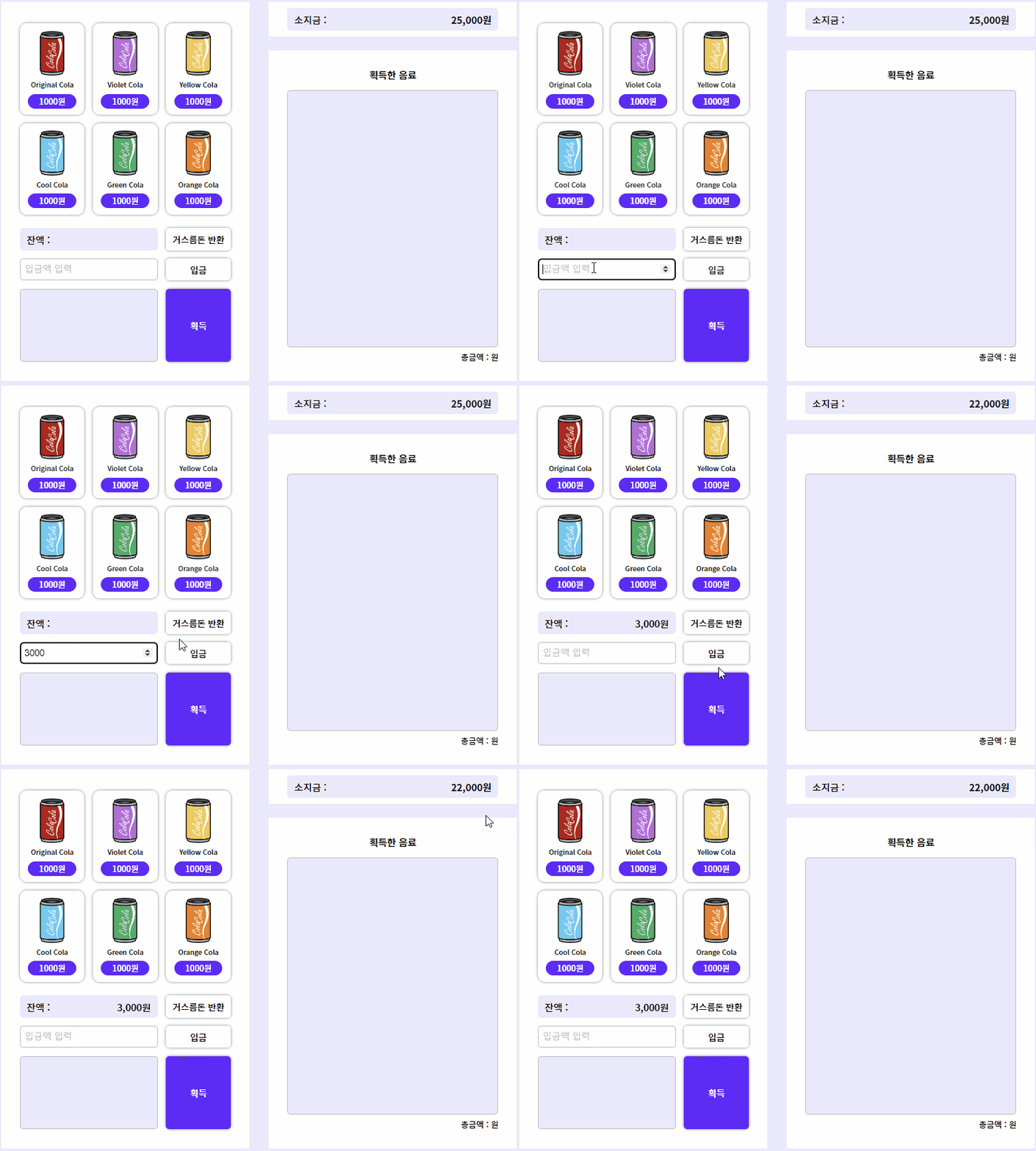
2. 입금 버튼 기능
- 입금 버튼을 누르면
1) 소지금 === 소지금 - 입금액
2) 잔액 === 기존 잔액 + 입금액
3) 입금액이 소지금보다 많으면 경고창 출력
4) 입금액이 정상적으로 입금되면 입금창은 초기화
this.btnPut.addEventListener('click', () => {
  const inputCost = parseInt(this.inputCostEl.value); // 입력값
  const myMoneyVal = parseInt(this.myMoney.textContent.replaceAll(',', '')); // 소지금
  const balanceVal = parseInt(this.balance.textContent.replaceAll(',', '')); // 잔액

  if (inputCost) {
    // 입금액이 소지금 보다 적거나 같다면
    if (inputCost <= myMoneyVal && inputCost > 0) {
      this.myMoney.textContent = new Intl.NumberFormat().format(myMoneyVal - inputCost) + '원';
      this.balance.textContent =
        new Intl.NumberFormat().format((balanceVal ? balanceVal : 0) + inputCost) + '원';
      // 입금액이 소지금보다 많다면
    } else {
      alert('소지금이 부족합니다.');
    }
    // 입금액 초기화
    this.inputCostEl.value = '';
  }
});
입금 버튼 기능 이벤트 핸들러
this.btnPut입금 버튼을 클릭했을 때 발생하는 이벤트다.
inputCostEl에 입력된 입금액을 가져온다.
myMoney와balance는 각각 소지금과 자판기의 잔액을 나타내는 DOM 요소다.
입력된 입금액이 0보다 크고, 소지금 이하의 값일 경우에만 입금이 가능하다.
- 입금이 성공하면 소지금은 입금액만큼 차감되고, 자판기 금액은 입금액만큼 증가한다.
- 입금 버튼을 눌렀을 때 입력값을 초기화한다.
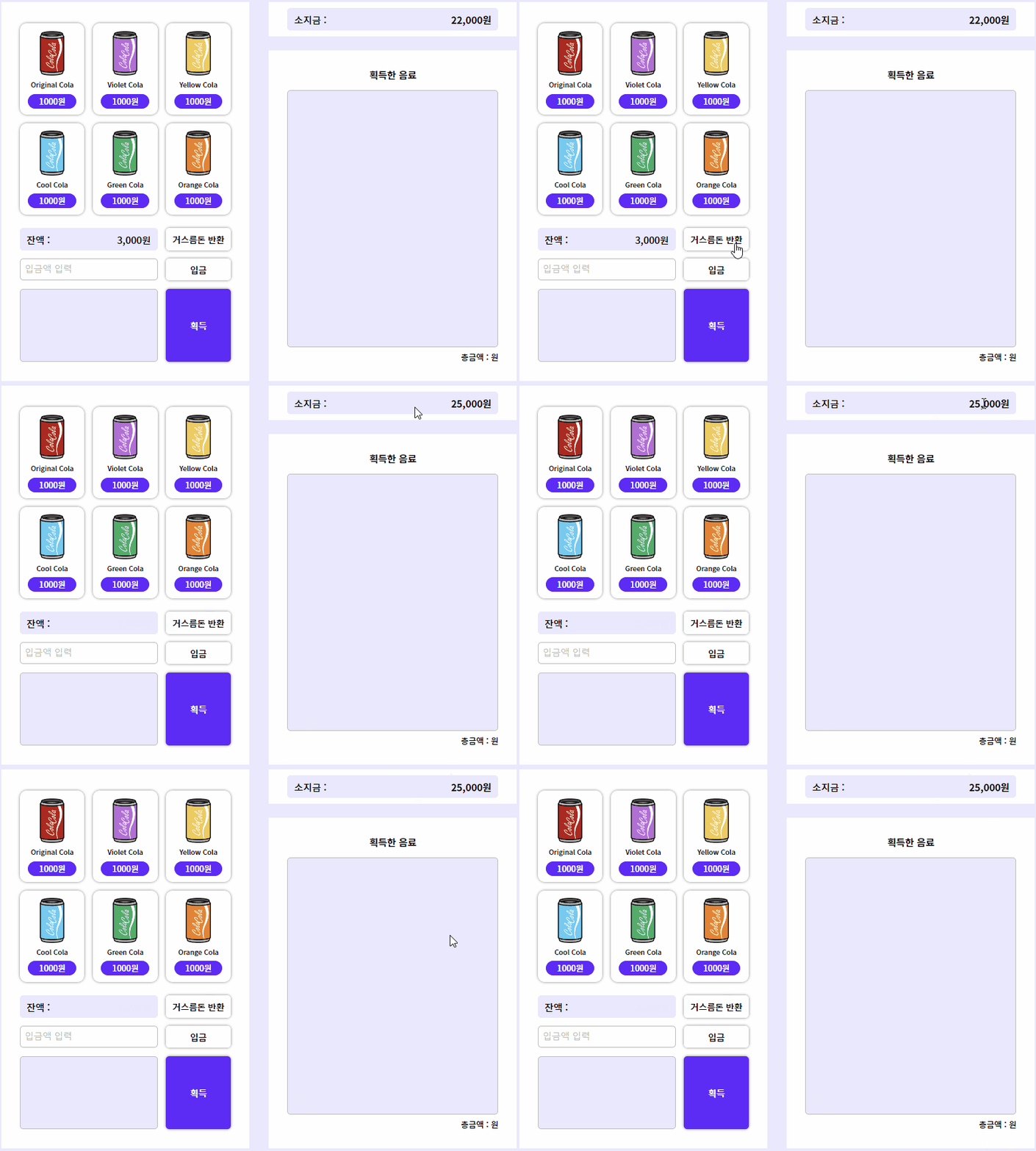
3. 거스름돈 반환 버튼 기능
- 거스름돈 반환 버튼을 누르면
1) 소지금 === 잔액 + 소지금
2) 잔액창이 초기화
this.btnReturn.addEventListener('click', () => {
  const balanceVal = parseInt(this.balance.textContent.replaceAll(',', '')); // 잔액
  const myMoneyVal = parseInt(this.myMoney.textContent.replaceAll(',', '')); // 소지금

  if (balanceVal) {
    this.myMoney.textContent = new Intl.NumberFormat().format(balanceVal + myMoneyVal) + '원';
    this.balance.textContent = null;
  }
});
거스름돈 반환 버튼 기능 이벤트 핸들러
this.btnReturn거스름돈 반환 버튼을 클릭했을 때 발생하는 이벤트다.
balanceVal은 자판기의 잔액을 가져오고,myMoneyVal은 소지금을 가져온다.
- 만약 잔액이 존재하는 경우(자판기 잔액이 0 이상)에만
소지금(this.myMoney)에 자판기 잔액을 추가하고, 자판기 잔액이 소지금으로 반환된다.
Intl.NumberFormat()함수를 사용해 숫자를 통화 형식으로 변환한다.
- 자판기 잔액을 초기화하고, 거스름돈 반환 버튼을 클릭하면 자판기의 잔액은 0이 되고,
다시 돈을 입금할 때 잔액이 증가한다.
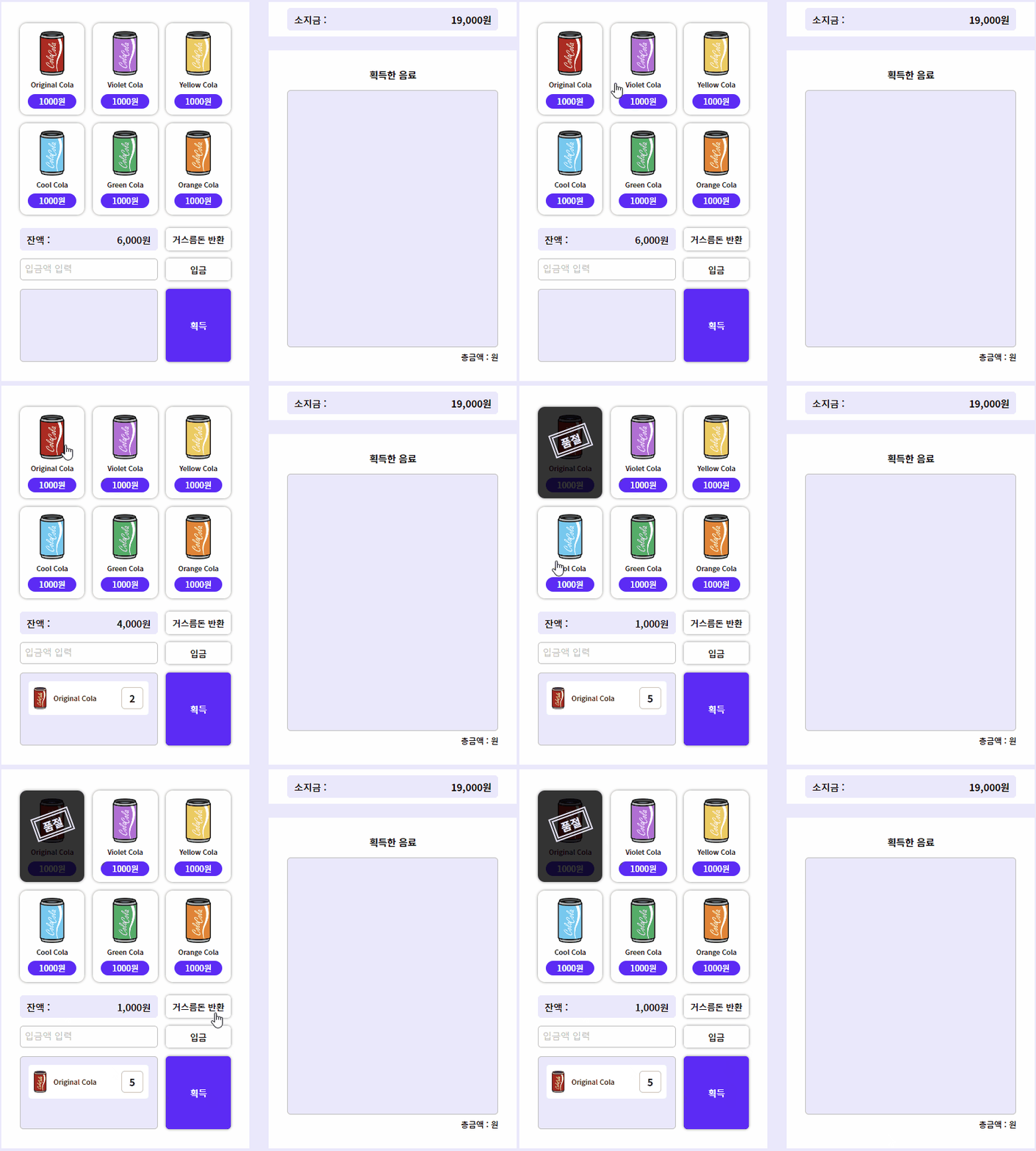
4. 자판기 장바구니 채우기 기능
- 자판 콜라 버튼을 누르면
1) 아이템을 누르면 잔액 === 잔액 - 아이템 가격
2) 아이템 가격이 잔액보다 크다면 경고메세지 띄움
3) 아이템이 장바구니에 들어감
4) 아이템의 count가 -1이 되고, 아이템의 카운트가 0이되면 품절 표시
this.btnsCola = document.querySelectorAll('.section1 .btn-cola');

this.btnsCola.forEach((item) => {
  item.addEventListener('click', (event) => {
    // 이벤트 핸들러 내용
  });
});
자판기 장바구니 채우기 기능 이벤트 핸들러
this.btnCola콜라 버튼을 클릭했을 때 발생하는 이벤트다.
- 각각 콜라 버튼에 클릭 이벤트를 등록하고, 콜라 버튼을 클릭하면 장바구니에 콜라가 추가되고, 해당 콜라 버튼의 개수가 차감되면 품절 처리된다.
const balanceVal = parseInt(this.balance.textContent.replaceAll(',', ''));
const targetEl = event.currentTarget;
const targetElPrice = parseInt(targetEl.dataset.price);
const stagedListitem = this.stagedList.querySelectorAll('li');
let isStaged = false; // 이미 장바구니에 있는가?
이벤트 핸들러 내용
balanceVal는 자판기 잔액을 가져온다.
targetEl은 현재 클릭한 콜라 버튼이며,
targetElPrice는 클릭한 콜라 버튼의 가격을 가져온다.
stagedListitem는 장바구니에 있는 모든 콜라 아이템들을 선택한다.
isStaged는 장바구니에 이미 동일한 콜라가 있는지 나타낸다.
 if (balanceVal >= targetElPrice) {
   this.balance.textContent =
     new Intl.NumberFormat().format(balanceVal - targetElPrice) + '원';

   for (const item of stagedListitem) {
     // 클릭한 콜라의 이름과 장바구니에 있던 콜라의 이름이 같은지 비교!
     if (targetEl.dataset.item === item.dataset.item) {
       // 이미 장바구니에 콜라가 있다면 카운트 +1
       item.querySelector('strong').firstChild.textContent =
         parseInt(item.querySelector('strong').firstChild.textContent) + 1;

       isStaged = true;
       break;
     }
   }

   // isStaged가 false인 경우, 장바구니에 새로운 콜라를 생성
   if (!isStaged) {
     //장바구니 콜라 생성 함수 호출
     this.stagedItemGenerator(event.currentTarget);
   }

   // 자판기 콜라 개수 차감
   targetEl.dataset.count--;

   if (!parseInt(targetEl.dataset.count)) {
     targetEl.insertAdjacentHTML(
       'beforeEnd',
       `
       <strong class= "soldout">
       <span>품절</span>
       </strong>
       `
     );

     targetEl.disabled = 'disabled';
   }
 } else {
   alert('입금한 금액이 부족합니다.');
 }
});
});
이벤트 핸들러 내용
if (balanceVal >= targetElPrice) { }잔액이 콜라의 가격보다 크거나 같으면 아래의 동작을 실행한다.
- 잔액을 콜라의 가격만큼 차감하고,
Intl.NumberFormat()함수를 사용해 숫자를 통화 형식으로 변환한다.
for (const item of stagedListitem) { }는 장바구니에 이미 동일한 콜라가 있는지 확인한다.
- 만약 이미 동일한 콜라가 장바구니에 있을 경우,
해당 아이템의 개수를 +1 증가시키고,isStaged를true로 설정한다.
if (!isStaged) { }만약isStaged가false인 경우,
장바구니에 새로운 콜라를 추가하는 함수인stagedItemGenerator(targetEl)를 호출한다.
targetEl.dataset.count--;콜라 버튼의 개수를 하나 차감한다.
if (!parseInt(targetEl.dataset.count)) { }만약 콜라 버튼의 개수가 0인 경우(품절),
버튼을 비활성화 처리하고, 품절을 표시한다.
else { }그게 아니라 잔액이 콜라의 가격보다 작을 경우,
잔액이 부족하다는 경고창을 띄운다.
5. 획득 버튼 기능
- 획득 버튼을 누르면
1) 장바구니에 있는 음료수 목록이 획득한 음료 목록으로 이동
2) 획득한 음료의 모든 금액을 합하여 총 금액을 업데이트
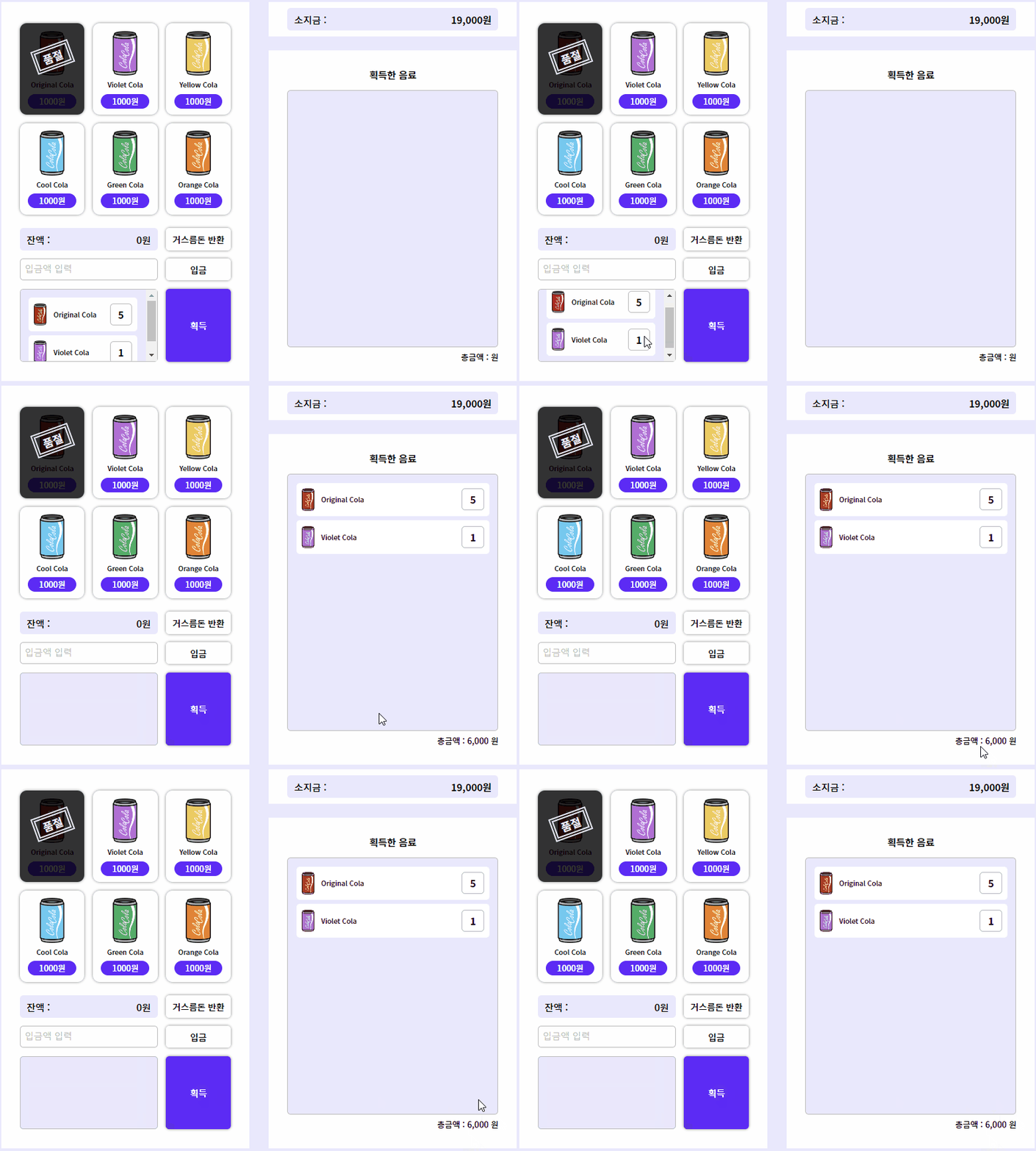
this.btnGet.addEventListener('click', () => {
  // const itemStagedList = this.stagedList.children;
  // const itemGetList = this.getList.children;
  const itemStagedList = this.stagedList.querySelectorAll('li');
  const itemGetList = this.getList.querySelectorAll('li');
  let totalPrice = 0;
획득 버튼 기능 이벤트 핸들러
this.btnGet획득 버튼을 클릭했을 때 발생하는 이벤트이다.
itemStagedList는 장바구니(this.stagedList)에 있는 모든 아이템들을 선택한다.
itemGetList는 획득 목록(this.getList)에 있는 모든 아이템들을 선택한다.
  for (const itemStaged of itemStagedList) {
    let isGet = false; // 이미 획득했는가?
    for (const itemGet of itemGetList) {
      console.log(itemStaged.querySelector('strong'));
      // 장바구니의 콜라가 이미 획득한 목록에 있다면
      if (itemStaged.dataset.item === itemGet.dataset.item) {
        // 이미 장바구니에 콜라가 있다면 카운트 +1
        itemGet.querySelector('strong').firstChild.textContent =
          parseInt(itemGet.querySelector('strong').firstChild.textContent) +
          parseInt(itemStaged.querySelector('strong').firstChild.textContent);

        isGet = true;
        break;
      }
    }

    if (!isGet) {
      this.getList.append(itemStaged);
    }
  }
이벤트 핸들러 내용
for (const itemGet of itemGetList) { }는 획득 목록에 있는 각 아이템을 반복한다.
if (itemStaged.dataset.item === itemGet.dataset.item) { }만약 장바구니의 아이템과 획득 목록의 아이템이 같은 종류인 경우, 이미 획득 목록에 있는 아이템의 개수를 증가시킨다.
isGet = true해당 아이템이 획득 목록에 이미 있으니까true로 설정하고,
break는 중복된 아이템이 확인되면, 반복을 중단하고 다음 아이템을 확인한다.
if (!isGet) { }만약 중복된 아이템이 없다면, 해당 아이템을 획득 목록에 추가한다.
- 획득 목록
(this.getList)에 장바구니의 해당 아이템(itemStaged)을 추가한다.
  // 장바구니 목록 초기화
  this.stagedList.innerHTML = null;

  // 획득한 음료 리스트를 순회하면서 총금액을 계산
  this.getList.querySelectorAll('li').forEach((itemGet) => {
    totalPrice +=
      parseInt(itemGet.dataset.price) *
      parseInt(itemGet.querySelector('strong').firstChild.textContent);
  });
  this.txtTotal.textContent = `총금액 : ${new Intl.NumberFormat().format(totalPrice)} 원`;
});
}
}
이벤트 핸들러 내용
- 획득 버튼을 클릭하면, 장바구니 목록
(stagedList)이 모두 비워진다.
- 획득 목록의 모든 아이템들을 순회하면서 총금액을 계산한다.
- 총금액을 화면에 업데이트하고,
Intl.NumberFormat()함수를 사용해 숫자를 통화 형식을 변환한다.
6. 장바구니 콜라 생성
stagedItemGenerator(target) {
  const stagedItem = document.createElement('li'); // 새로운 <li> 요소를 생성
  stagedItem.dataset.item = target.dataset.item; // 콜라 이름을 <li> 요소의 dataset.item 속성에 설정
  stagedItem.dataset.price = target.dataset.price; // 콜라 가격을 <li> 요소의 dataset.price 속성에 설정

  // 콜라 아이템을 <li> 요소 안에 HTML로 구성
  stagedItem.innerHTML = `
    <img src="./img/${target.dataset.img}" alt="">
        ${target.dataset.item}
    <strong>1
        <span class="a11y-hidden">개</span>
    </strong>
  `;

  this.stagedList.append(stagedItem); // 구성된 <li> 요소를 장바구니 목록(this.stagedList)에 추가
}
stagedItemGenerator( ) 함수
- 여기서
target은 콜라 버튼 요소를 가리키는 매개변수이며,
이 메서드를 호출할 때, 특정 콜라 버튼이 인자로 넘어와서 해당 버튼에 대한 정보를 이용해 새로운 장바구니에 아이템을 생성한다.
stagedItem은 새로운<li>요소를 생성하는데, 장바구니에 추가될 콜라를 나타낸다.
stagedItem.dataset.item = target.dataset.item과
stagedItem.dataset.price = target.dataset.price는
콜라 버튼의dataset.item과dataset.price의 속성 값을 가져와서
<li>요소의dataset.item과dataset.price의 속성으로 설정한다.
그러면 콜라의 이름과 가격이 장바구니 아이템의 데이터로 저장된다.
stagedItem.innerHTML은 콜라 아이템이<li>요소 안에 어떻게 표시될지 내부 HTML을 구성한다.
this.stagedList.append(stagedItem)은 구성된<li>요소(stageItem)를 장바구니 목록(this.stagedList)에 추가한다. 그러면 새로운 콜라 아이템이 장바구니에 추가된다.
📜 자판기 이벤트 처리 전체 코드
class VendingMachineEvents {
  constructor() {
    const vMachine = document.querySelector('.section1');
    this.balance = vMachine.querySelector('.bg-box p');
    this.itemList = vMachine.querySelector('.cola-list');
    this.inputCostEl = vMachine.querySelector('#input-money');
    this.btnPut = vMachine.querySelector('#input-money+.btn');
    this.btnReturn = vMachine.querySelector('.bg-box+.btn');
    this.btnGet = vMachine.querySelector('.btn-get');
    this.stagedList = vMachine.querySelector('.get-list');

    const myinfo = document.querySelector('.section2');
    this.myMoney = myinfo.querySelector('.bg-box strong');

    const getInfo = document.querySelector('.section3');
    this.getList = getInfo.querySelector('.get-list');
    this.txtTotal = getInfo.querySelector('.total-price');
  }

  // * 6. 장바구니 콜라 생성 함수
  stagedItemGenerator(target) {
    const stagedItem = document.createElement('li'); // 새로운 <li> 요소를 생성
    stagedItem.dataset.item = target.dataset.item; // 콜라 이름을 <li> 요소의 dataset.item 속성에 설정
    stagedItem.dataset.price = target.dataset.price; // 콜라 가격을 <li> 요소의 dataset.price 속성에 설정

    // 콜라 아이템을 <li> 요소 안에 HTML로 구성
    stagedItem.innerHTML = `
      <img src="./img/${target.dataset.img}" alt="">
          ${target.dataset.item}
      <strong>1
          <span class="a11y-hidden">개</span>
      </strong>
    `;

    this.stagedList.append(stagedItem); // 구성된 <li> 요소를 장바구니 목록(this.stagedList)에 추가
  }

  bindEvent() {
    /**
     * * 1. 입금 버튼 기능
     * 입금 버튼을 누르면
     * 1) 소지금 === 소지금 - 입금액
     * 2) 잔액 === 기존 잔액 + 입금액
     * 3) 입금액이 소지금보다 많으면 경고창 출력
     * 4) 입금액이 정상적으로 입금되면 입금창은 초기화
     */
    this.btnPut.addEventListener('click', () => {
      const inputCost = parseInt(this.inputCostEl.value); // 입력값
      const myMoneyVal = parseInt(this.myMoney.textContent.replaceAll(',', '')); // 소지금
      const balanceVal = parseInt(this.balance.textContent.replaceAll(',', '')); // 잔액

      if (inputCost) {
        // 입금액이 소지금 보다 적거나 같다면
        if (inputCost <= myMoneyVal && inputCost > 0) {
          this.myMoney.textContent = new Intl.NumberFormat().format(myMoneyVal - inputCost) + '원';
          this.balance.textContent =
            new Intl.NumberFormat().format((balanceVal ? balanceVal : 0) + inputCost) + '원';
          // 입금액이 소지금보다 많다면
        } else {
          alert('소지금이 부족합니다.');
        }
        // 입금액 초기화
        this.inputCostEl.value = '';
      }
    });

    /**
     * * 2. 거스름돈 반환 버튼
     * 1) 반환버튼을 누르면 소지금 === 잔액 + 소지금
     * 2) 반환버튼을 누르면 잔액창이 초기화
     */
    this.btnReturn.addEventListener('click', () => {
      const balanceVal = parseInt(this.balance.textContent.replaceAll(',', '')); // 잔액
      const myMoneyVal = parseInt(this.myMoney.textContent.replaceAll(',', '')); // 소지금

      if (balanceVal) {
        this.myMoney.textContent = new Intl.NumberFormat().format(balanceVal + myMoneyVal) + '원';
        this.balance.textContent = null;
      }
    });

    /**
     * * 3. 자판기 장바구니 채우기
     * 1) 아이템을 누르면 잔액 === 잔액 - 아이템 가격
     * 2) 아이템 가격이 잔액보다 크다면 경고메세지 띄움
     * 3) 아이템이 장바구니에 들어감
     * 4) 아이템의 count가 -1이 되고, 아이템의 카운트가 0이되면 품절 표시
     */
    this.btnsCola = document.querySelectorAll('.section1 .btn-cola');

    this.btnsCola.forEach((item) => {
      item.addEventListener('click', (event) => {
        const balanceVal = parseInt(this.balance.textContent.replaceAll(',', ''));
        const targetEl = event.currentTarget;
        const targetElPrice = parseInt(targetEl.dataset.price);
        const stagedListitem = this.stagedList.querySelectorAll('li');
        let isStaged = false; // 이미 장바구니에 있는가?

        if (balanceVal >= targetElPrice) {
          this.balance.textContent =
            new Intl.NumberFormat().format(balanceVal - targetElPrice) + '원';

          for (const item of stagedListitem) {
            // 클릭한 콜라의 이름과 장바구니에 있던 콜라의 이름이 같은지 비교!
            if (targetEl.dataset.item === item.dataset.item) {
              // 이미 장바구니에 콜라가 있다면 카운트 +1
              item.querySelector('strong').firstChild.textContent =
                parseInt(item.querySelector('strong').firstChild.textContent) + 1;

              isStaged = true;
              break;
            }
          }

          // isStaged가 false인 경우, 장바구니에 새로운 콜라를 생성
          if (!isStaged) {
            //장바구니 콜라 생성 함수 호출
            this.stagedItemGenerator(event.currentTarget);
          }

          // 자판기 콜라 개수 차감
          targetEl.dataset.count--;

          if (!parseInt(targetEl.dataset.count)) {
            targetEl.insertAdjacentHTML(
              'beforeEnd',
              `
                          <strong class= "soldout">
                              <span>품절</span>
                          </strong>
                          `
            );

            targetEl.disabled = 'disabled';
          }
        } else {
          alert('입금한 금액이 부족합니다.');
        }
      });
    });

    /**
     * * 4. 획득 버튼 기능
     * 1) 장바구니에 있는 음료수 목록이 획득한 음료 목록으로 이동
     * 2) 획득한 음료의 모든 금액을 합하여 총 금액을 업데이트
     */

    this.btnGet.addEventListener('click', () => {
      // const itemStagedList = this.stagedList.children;
      // const itemGetList = this.getList.children;
      const itemStagedList = this.stagedList.querySelectorAll('li');
      const itemGetList = this.getList.querySelectorAll('li');
      let totalPrice = 0;

      for (const itemStaged of itemStagedList) {
        let isGet = false; // 이미 획득했는가?
        for (const itemGet of itemGetList) {
          console.log(itemStaged.querySelector('strong'));
          // 장바구니의 콜라가 이미 획득한 목록에 있다면
          if (itemStaged.dataset.item === itemGet.dataset.item) {
            // 이미 장바구니에 콜라가 있다면 카운트 +1
            itemGet.querySelector('strong').firstChild.textContent =
              parseInt(itemGet.querySelector('strong').firstChild.textContent) +
              parseInt(itemStaged.querySelector('strong').firstChild.textContent);

            isGet = true;
            break;
          }
        }

        if (!isGet) {
          this.getList.append(itemStaged);
        }
      }

      // 장바구니 목록 초기화
      this.stagedList.innerHTML = null;

      // 획득한 음료 리스트를 순회하면서 총금액을 계산
      this.getList.querySelectorAll('li').forEach((itemGet) => {
        totalPrice +=
          parseInt(itemGet.dataset.price) *
          parseInt(itemGet.querySelector('strong').firstChild.textContent);
      });
      this.txtTotal.textContent = `총금액 : ${new Intl.NumberFormat().format(totalPrice)} 원`;
    });
  }
}

export default VendingMachineEvents;
📃 index.html
<!DOCTYPE html>
<html lang="ko-KR">
  <head>
    <meta charset="UTF-8" />
    <meta http-equiv="X-UA-Compatible" content="IE=edge" />
    <meta name="viewport" content="width=device-width, initial-scale=1.0" />
    <title>cola-cola</title>
    <link rel="stylesheet" href="./style.css" />
    <link rel="preconnect" href="https://fonts.googleapis.com" />
    <link rel="preconnect" href="https://fonts.gstatic.com" crossorigin />
    <link
      href="https://fonts.googleapis.com/css2?family=Noto+Sans+KR:wght@500;700&display=swap"
      rel="stylesheet"
    />
  </head>

  <body>
    <h1><img src="./img/cola-logo.png" alt="cola cola" /></h1>

    <main>
      <!-- section 1 -->
      <section class="section1">
        <h2 class="a11y-hidden">판매 음료</h2>
        <ul class="cola-list">
          <!-- <li>
            <button disabled class="btn-cola" type="button">
              <img class="cola-img" src="./img/cola-violet.png" alt="" />
              <span class="cola-name">Violet_Cola</span>
              <strong class="cola-price">1000원</strong>
              <strong class="soldout">
                <span>품절</span>
              </strong>
            </button>
          </li> -->
        </ul>
        <div class="container">
          <div class="bg-box">
            <h2 class="title">잔액</h2>
            <p></p>
          </div>
          <button class="btn" type="button">거스름돈 반환</button>

          <label for="input-money" class="a11y-hidden">금액 투입(단위:원)</label>
          <input id="input-money" min="1000" step="1000" type="number" placeholder="입금액 입력" />
          <button class="btn" type="button">입금</button>

          <h2 class="a11y-hidden">장바구니</h2>
          <ul class="get-list">
            <!-- <li>
              <img src="./img/cola-original.png" alt="" />
              Original_Cola
              <strong
                >1
                <span class="a11y-hidden">개</span>
              </strong>
            </li>
            <li>
              <img src="./img/cola-green.png" alt="" />
              Green_Cola
              <strong
                >2
                <span class="a11y-hidden">개</span>
              </strong>
            </li> -->
          </ul>
          <button class="btn-get" type="button">획득</button>
        </div>
      </section>

      <!-- section 2 -->
      <section class="section2">
        <div class="bg-box">
          <h2 class="title">소지금</h2>
          <p><strong>25,000원</strong></p>
        </div>
      </section>

      <!-- section 3 -->
      <section class="section3">
        <h2 class="get-title">획득한 음료</h2>
        <ul class="get-list">
          <!-- <li>
            <img src="./img/cola-original.png" alt="" />
            Original_Cola
            <strong
              >1
              <span class="a11y-hidden">개</span>
            </strong>
          </li>
          <li>
            <img src="./img/cola-green.png" alt="" />
            Green_Cola
            <strong
              >2
              <span class="a11y-hidden">개</span>
            </strong>
          </li>
          <li>
            <img src="./img/cola-orange.png" alt="" />
            Orange_Cola
            <strong
              >1
              <span class="a11y-hidden">개</span>
            </strong>
          </li>
          <li>
            <img src="./img/cola-violet.png" alt="" />
            Violet_Cola
            <strong
              >5
              <span class="a11y-hidden">개</span>
            </strong>
          </li> -->
        </ul>
        <p class="total-price">총금액 : 원</p>
      </section>
    </main>

    <script type="module" src="js/index.js"></script>
  </body>
</html>
🎨 style.css
/* reset */
body,
h1,
h2,
p,
ul,
button {
  padding: 0;
  margin: 0;
}

ul,
li {
  list-style: none;
}

button {
  border: 0;
  background: none;
  font: inherit;
  color: inherit;
}
button:not(:disabled) {
  cursor: pointer;
}

/* 접근성을 위한 숨김처리 */
.a11y-hidden {
  clip: rect(1px, 1px, 1px, 1px);
  clip-path: inset(50%);
  width: 1px;
  height: 1px;
  margin: -1px;
  overflow: hidden;
  padding: 0;
  position: absolute;
}

/* layout */
body {
  font-family: 'Noto Sans KR', sans-serif;
}
/* h1 */
h1 {
  text-align: center;
}
h1 img {
  width: 386px;
  max-width: calc(100% - (97px * 2));
}
section {
  background: #fff;
}

/* pc */
@media (min-width: 748px) {
  body {
    background: #eae8fe;
  }

  main {
    width: 748px;
    margin: auto;
    display: grid;
    grid-template-columns: 1fr 1fr;
    grid-template-rows: 50px auto;
    grid-template-areas:
      'section1 section2'
      'section1 section3';
    gap: 20px 28px;
  }

  .section1 {
    grid-area: section1;
  }

  .section2 {
    grid-area: section2;
  }

  .section3 {
    grid-area: section3;
  }
  h1 {
    margin-bottom: 68px;
  }
}
/* mobile */
@media (max-width: 747px) {
  h1 {
    margin-bottom: 18px;
  }
}

.section1 {
  padding: 31px 27px 28px;
}
/* 판매 음료 */
.cola-list {
  display: grid;
  grid-template-columns: repeat(3, 1fr);
  gap: 12px;
}
.btn-cola {
  box-shadow: 0px 0px 4px rgba(0, 0, 0, 0.5);
  border-radius: 10px;
  padding: 11px 12px 9px;
  position: relative;
  width: 100%;
}
.btn-cola.active {
  box-shadow: 0 0 0 3px #6327fe;
}
.cola-img,
.cola-name,
.cola-price {
  display: block;
}
.cola-img {
  width: 36px;
  margin: auto;
}
.cola-name {
  font-size: 9px;
  margin: 6px 0;
}
.cola-price {
  font-size: 12px;
  font-weight: 500;
  background: #6327fe;
  color: #fff;
  padding: 2px 0;
  border-radius: 20px;
}

.soldout {
  background: rgba(0, 0, 0, 0.8);
  position: absolute;
  top: 0;
  left: 0;
  width: 100%;
  height: 100%;
  border-radius: 10px;
}
.soldout span {
  display: inline-block;
  color: #eae8fe;
  border: 6px double #eae8fe;
  padding: 0 8px;
  transform: rotate(-20deg) translate(-10px, 30px);
}

/* 잔액 및 장바구니 */
.container {
  display: grid;
  grid-template-columns: auto calc((100% - 24px) / 3);
  grid-template-rows: 32px 32px 106px;
  gap: 12px;
  margin-top: 20px;
}
.bg-box {
  background: #eae8fe;
  border-radius: 5px;
  display: flex;
  justify-content: space-between;
  align-items: center;
  padding: 6px 10px;
}
.bg-box .title,
.bg-box p {
  font-size: 14px;
  font-weight: 500;
}
.bg-box .title::after {
  content: ' :';
}

/* section2 */
.section2 {
  padding: 9px 27px;
}

.btn,
.btn-get {
  box-shadow: 0px 0px 4px rgba(0, 0, 0, 0.5);
  border-radius: 5px;
  font-size: 13px;
}
.btn-get {
  background: #6327fe;
  color: #fff;
}
#input-money {
  border: 1px solid #bdbdbd;
  border-radius: 5px;
  padding: 0 6px;
  font-size: 13px;
}
#input-money::placeholder {
  color: #bdbdbd;
}

.get-list {
  background: #eae8fe;
  border-radius: 5px;
  border: 1px solid #bdbdbd;
  overflow-y: auto;
  padding: 12px;
}
.get-list li {
  background: #fff;
  border-radius: 5px;
  padding: 8px;
  font-size: 9px;
  display: flex;
  align-items: center;
  gap: 10px;
}
.get-list li:first-child ~ li {
  margin-top: 6px;
}
.get-list li img {
  width: 18px;
}
.get-list li strong {
  font-size: 14px;
  border: 1px solid #bdbdbd;
  border-radius: 5px;
  width: 30px;
  height: 30px;
  line-height: 30px;
  text-align: center;
  margin-left: auto;
  /* margin: auto 0 auto auto; */
}

.section3 {
  padding: 25px 27px 26px;
}

.get-title {
  font-size: 14px;
  text-align: center;
  margin-bottom: 13px;
}
.total-price {
  font-size: 12px;
  text-align: right;
  margin-top: 6px;
}
.section3 {
  display: flex;
  flex-direction: column;
}
.section3 .get-list {
  flex-grow: 1;
}
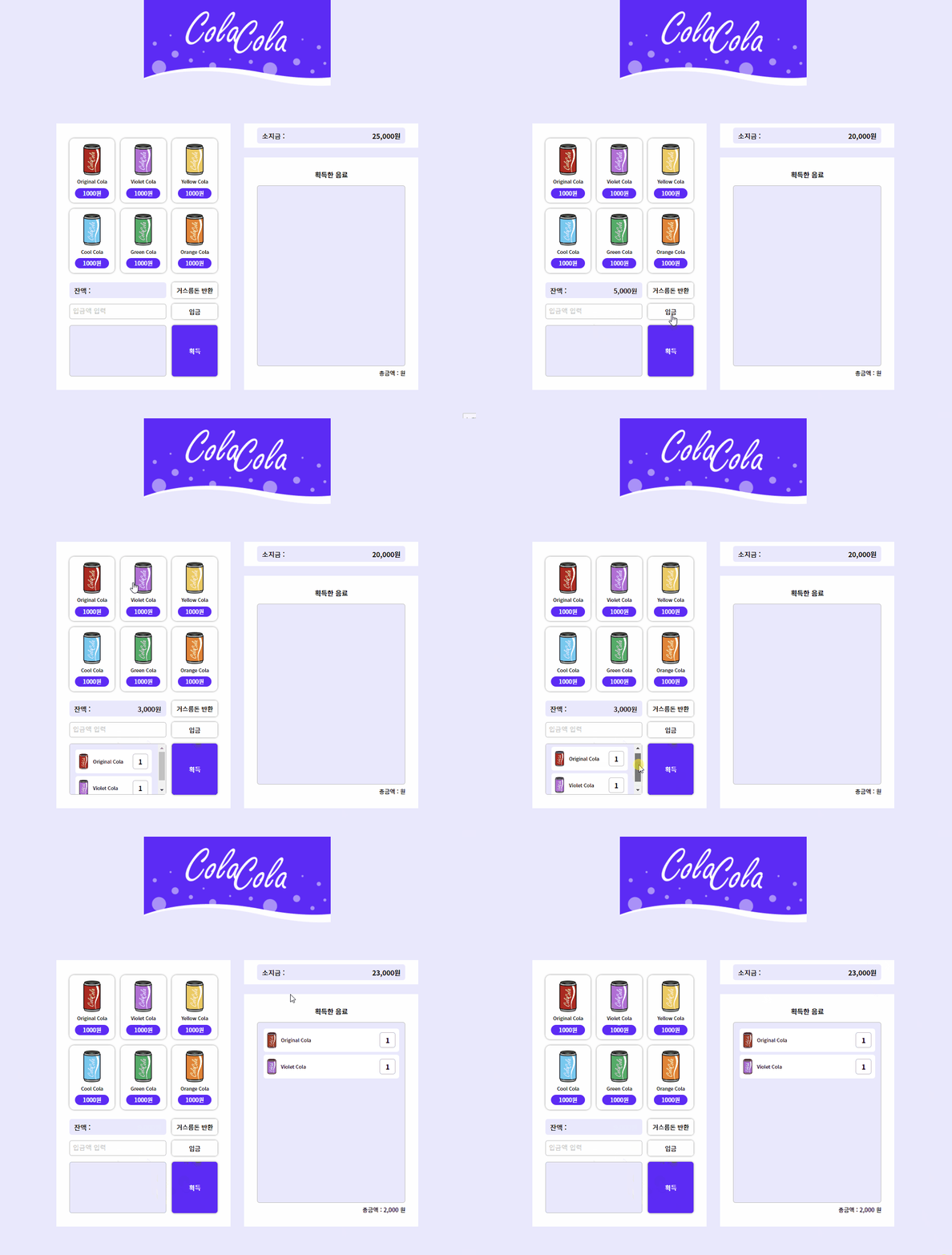
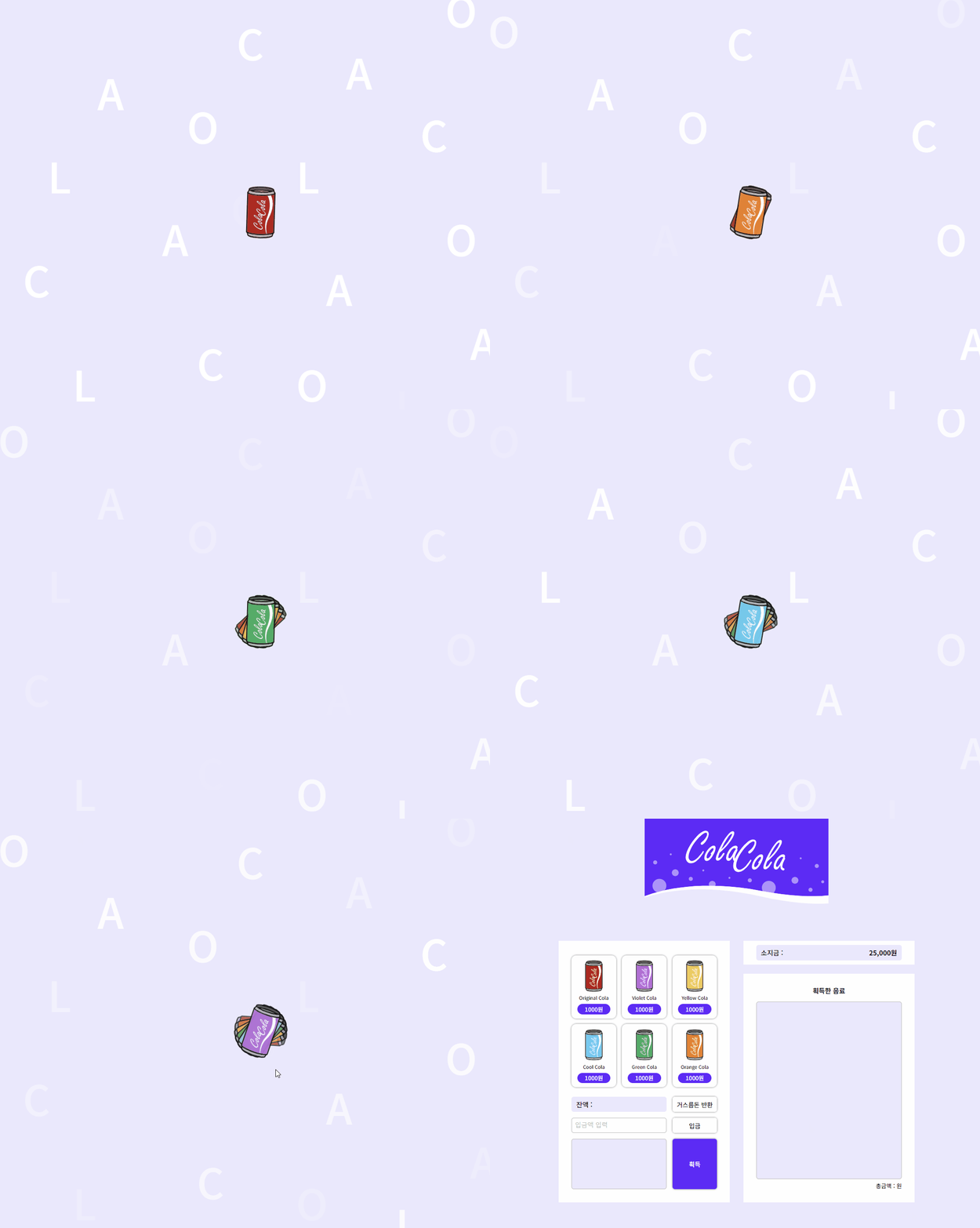
🔈 cola-cola PC 버전
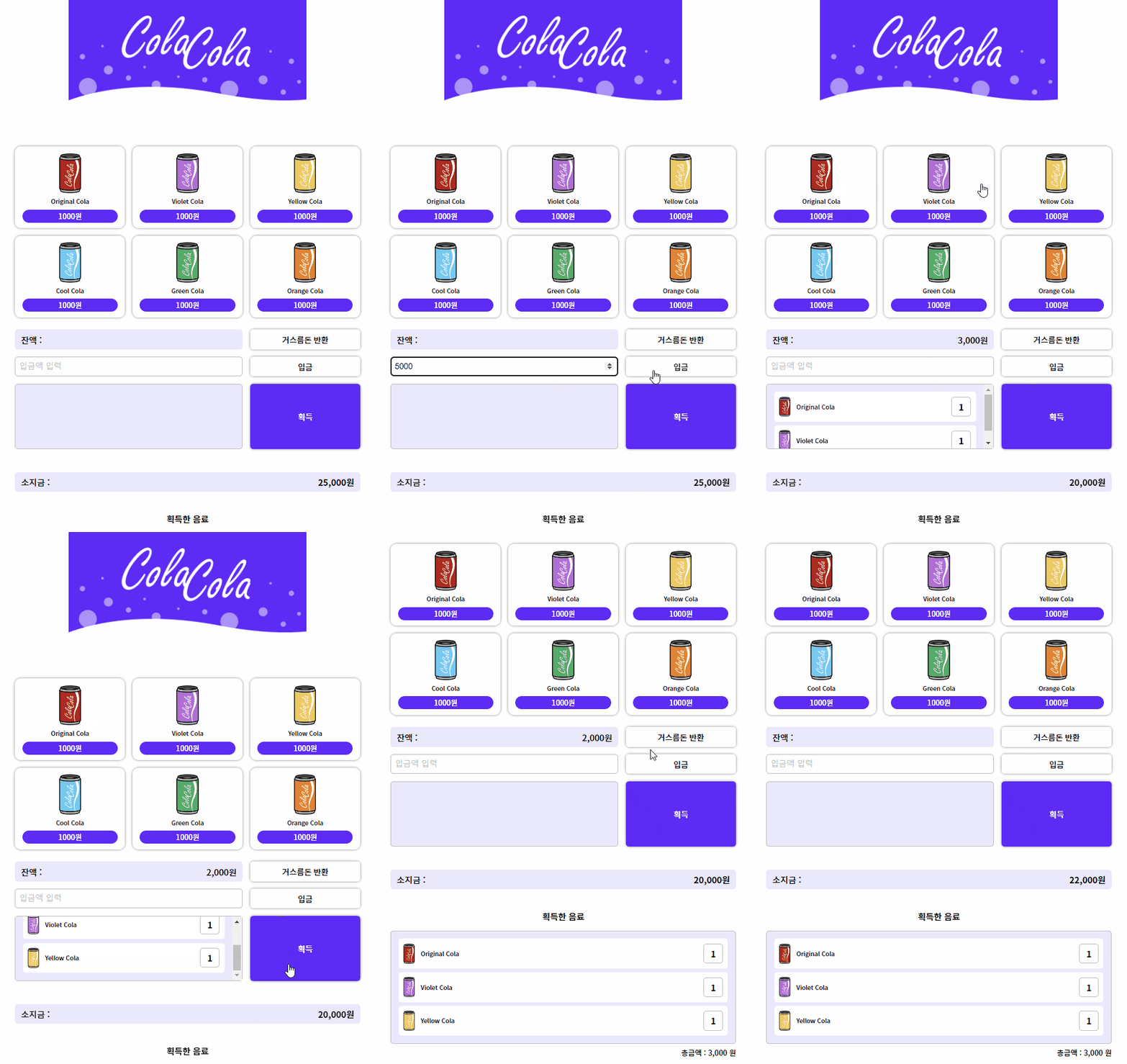
🔈 cola-cola Mobile 버전
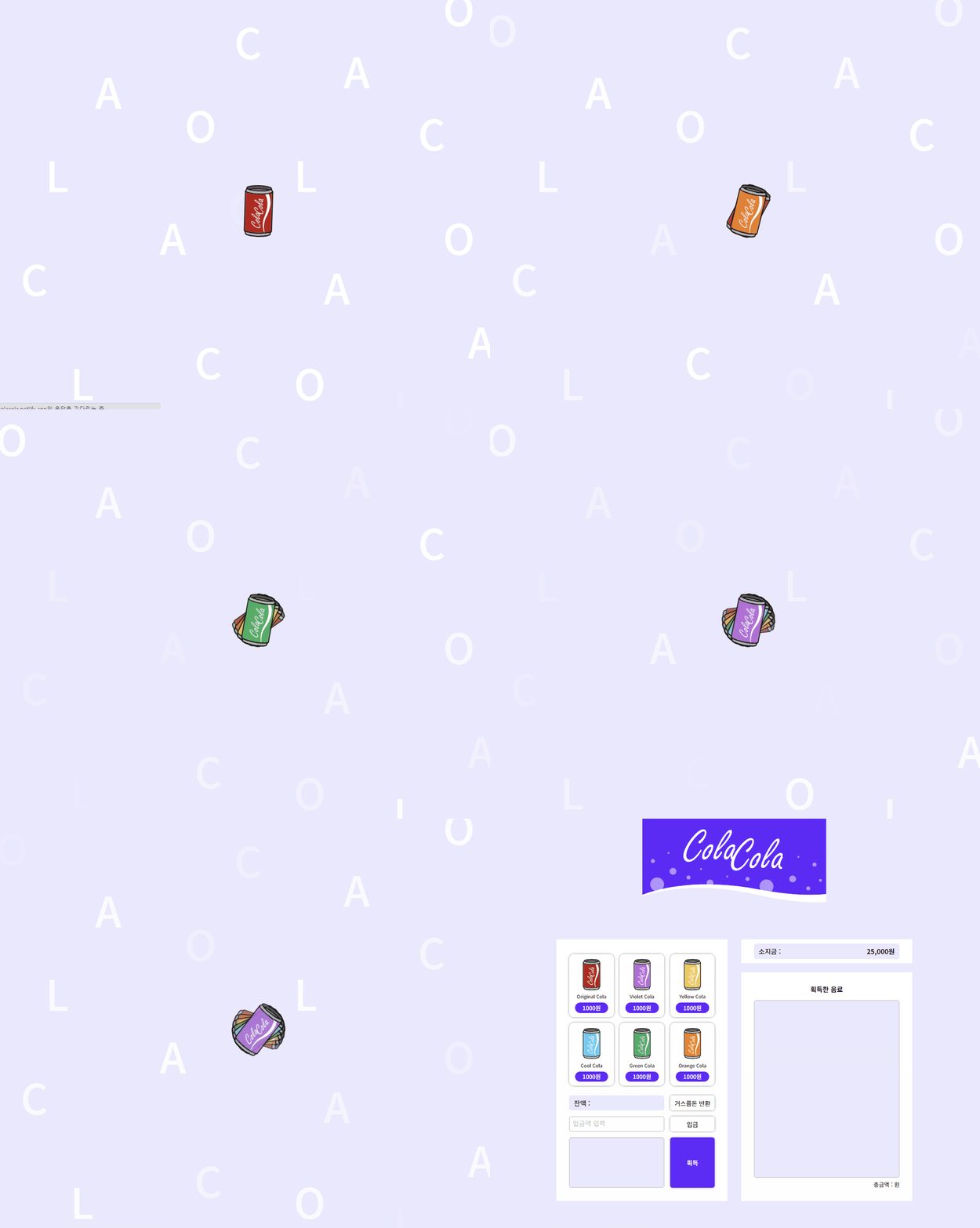
➕ 추가 사항
1. Splash 화면 추가
2. 문제 발생
문제
스플래시 화면이 끝나고 바로 6개의 콜라가 생성되지 않고 버벅거린다.
Why? 왜?
-
일단 이것저것 찾아보니, 비동기 작업으로 인해
await colaGenerator.setup()코드는 비동기 함수인setup()을 호출하고 이 작업이 완료될 때까지 콜라가 생성되지 않는다. -
그리고
colaGenerator.setup()내에서 DOM 요소를 생성하고 조작하는 작업도 시간이 걸릴 수 있을 것 같다. -
결정적으로
setTimeout함수를 사용해 3초 후에hideSplash()와 콜라 생성 코드를 실행하기 때문에 이것도await나 비동기 처리가 없어서 스플래시 화면을 숨기려고setTimeout을 사용해도 다른 코드는 이미 비동기적으로 계속 실행되기 때문에 화면이 빨리 사라져서 콜라 생성에 문제가 된 것 같다.
문제 코드
// index.js

import ColaGenerator from './classes/colaGenerator.js';
import VendingMachineEvents from './classes/vendingMachineEvents.js';

const colaGenerator = new ColaGenerator();
const vendingMachineEvents = new VendingMachineEvents();

// 스플래시 화면 나타내기
const showSplash = () => {
  const splashScreen = document.querySelector('.splash-screen');
  splashScreen.style.display = 'block';
};

// 스플래시 화면 숨기기
const hideSplash = () => {
  const splashScreen = document.querySelector('.splash-screen');
  splashScreen.style.display = 'none';
};

// 탑레벨 await : 최상위 모듈에서 실행되는 await
const startApp = async () => {
  // 스플래시 화면 나타내기
  showSplash();

  // 스플래시 화면 숨기기
  setTimeout(async () => {
    hideSplash();

    // ColaGenerator 초기화
    await colaGenerator.setup();

    // VendingMachineEvents 이벤트 바인딩 및 앱 초기화
    vendingMachineEvents.bindEvent();
  }, 3000);
};

// 앱 초기화
startApp();
3. 해결 과정
How? 어떻게?
await를 사용해 명시적으로 3초 동안 대기하도록 한다. 이렇게 하면 코드가 스플래시 화면을 표시한 후 3초 동안 대기하고, 그 후에 스플래시 화면을 숨기고 다음 작업을 진행한다.
// index.js
import ColaGenerator from './classes/colaGenerator.js';
import VendingMachineEvents from './classes/vendingMachineEvents.js';

const colaGenerator = new ColaGenerator();
const vendingMachineEvents = new VendingMachineEvents();

// 스플래시 화면 나타내기
const showSplash = () => {
  const splashScreen = document.querySelector('.splash-screen');
  splashScreen.style.display = 'block';
};

// 스플래시 화면 숨기기
const hideSplash = () => {
  const splashScreen = document.querySelector('.splash-screen');
  splashScreen.style.display = 'none';
};

// 탑레벨 await : 최상위 모듈에서 실행되는 await
const startApp = async () => {
  try {
    // 스플래시 화면 나타내기
    showSplash();

    // 3초 동안 스플래시 화면 유지
    await new Promise((resolve) => setTimeout(resolve, 3000));

    // ColaGenerator 초기화
    await colaGenerator.setup();

    // VendingMachineEvents 이벤트 바인딩 및 앱 초기화
    vendingMachineEvents.bindEvent();
  } catch {
    console.error(error);
  } finally {
    // 스플래시 화면 숨기기
    hideSplash();
  }
};

// 앱 초기화
startApp();
4. 결과
결과를 보면 이제 버벅거리는 현상없이 바로 콜라가 생성되고 있다!! 👍🏻😀

할 수 있다고 믿는 사람은 결국 그렇게 된다 😄😊