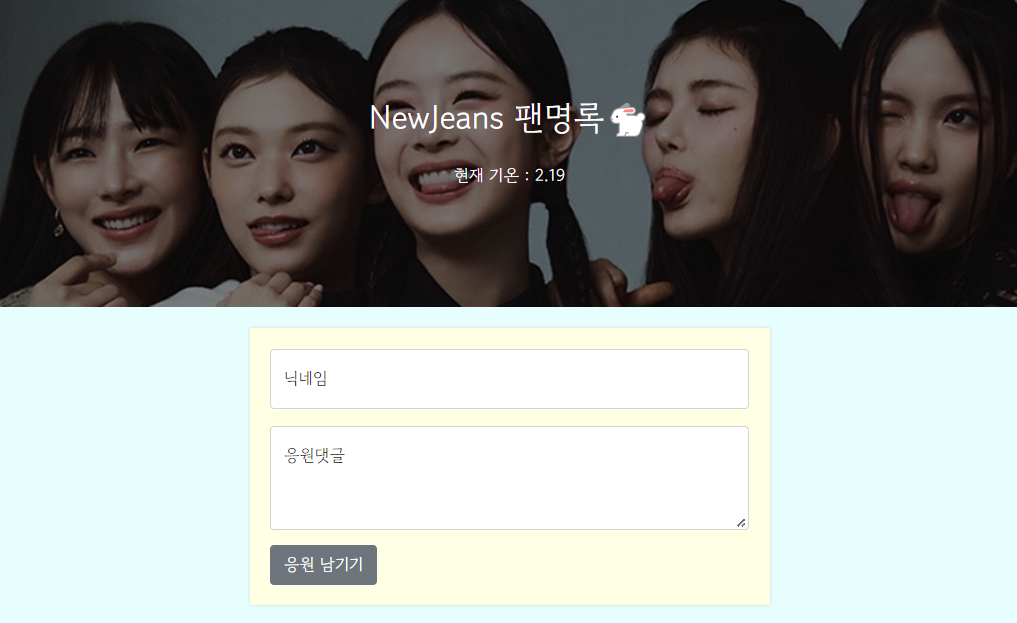
📢 시작 한마디
왠지 2주차 수업은 더 생생하게 머릿속에 남아있다.
오늘은 1주차에 완성한 팬명록에 날씨 정보를 넣어주고 CSS를 좀 더 만져 볼 생각이다!!
✅ 2주차 진행 및 완료 사항
- Javascript 문법에 익숙해지기
- jQuery로 간단한 HTML 조작 가능
- Ajax로 서버 API(약속)에 데이터를 주고, 결과를 받기
- 2주차 숙제 : 팬명록 날씨 정보 추가하기
✅ homework
📍 팬명록 날씨 정보 추가
-
웹 개발 2주차 내용 복습
-
로딩이 완료되면, 날씨 API를 이용해 날씨를 표시
1) 날씨 API
http://spartacodingclub.shop/sparta_api/weather/seoul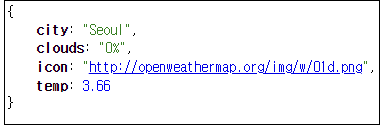
2) 현재 기온
p태그로 만들어서 온도 부분만span태그로id 값주기
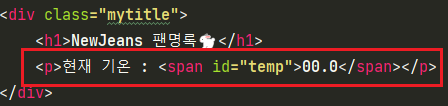
3) 먼저 로딩 후 호출하기!
→javascript 로딩 후 실행검색$(document).ready(function(){ alert('다 로딩됐다!') });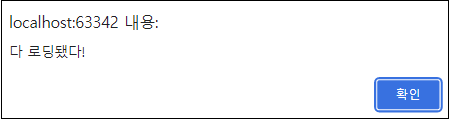
4)
alert()대신$.ajax()넣기
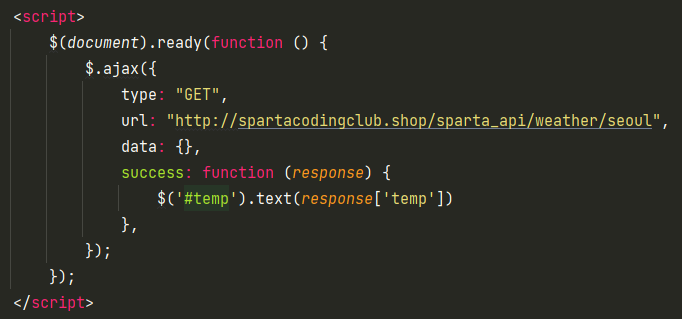

- 완성 코드
<!doctype html>
<html lang="en">

<head>
    <meta charset="utf-8">
    <meta name="viewport" content="width=device-width, initial-scale=1, shrink-to-fit=no">

    <link href="https://cdn.jsdelivr.net/npm/bootstrap@5.0.2/dist/css/bootstrap.min.css" rel="stylesheet"
          integrity="sha384-EVSTQN3/azprG1Anm3QDgpJLIm9Nao0Yz1ztcQTwFspd3yD65VohhpuuCOmLASjC" crossorigin="anonymous">
    <script src="https://ajax.googleapis.com/ajax/libs/jquery/3.5.1/jquery.min.js"></script>
    <script src="https://cdn.jsdelivr.net/npm/bootstrap@5.0.2/dist/js/bootstrap.bundle.min.js"
            integrity="sha384-MrcW6ZMFYlzcLA8Nl+NtUVF0sA7MsXsP1UyJoMp4YLEuNSfAP+JcXn/tWtIaxVXM"
            crossorigin="anonymous"></script>

    <title>팬명록</title>

    <link href="https://fonts.googleapis.com/css2?family=Gowun+Dodum&display=swap" rel="stylesheet">
    <style>
        * {
            font-family: 'Gowun Dodum', sans-serif;
        }

        body {
            background-color: lightcyan;
        }

        .mytitle {
            width: 100%;
            height: 300px;

            color: white;

            background-image: linear-gradient(0deg, rgba(0, 0, 0, 0.5), rgba(0, 0, 0, 0.5)), url('https://search.pstatic.net/common/?src=http%3A%2F%2Fblogfiles.naver.net%2FMjAyMjEwMTJfMjU5%2FMDAxNjY1NTA1MTUwNDI5.l57z0PaI6ypMd3STNeDcZVSWD6mnEVGevZ2RP3kOpsYg.YccOJ0N8OJ8EbOPxdXjSNSeY2ciDNlZ13Ufi5IoP1xkg.JPEG.sorry4beingperfect%2FIMG_7610.JPG&type=sc960_832');
            background-position: center top;
            background-repeat: no-repeat;
            background-size: cover;

            display: flex;
            flex-direction: column;
            align-items: center;
            justify-content: center;
        }

        .mytitle > h1 {
            font-size: 32px;
            margin-bottom: 25px;
        }

        .mypost {
            max-width: 500px;
            width: 95%;
            margin: 20px auto 20px auto;

            background-color: lightyellow;

            box-shadow: 0px 0px 3px 0px lightgrey;
            padding: 20px;
        }

        .mypost > button {
            margin-top: 15px;
        }

        .mycards {
            max-width: 500px;
            width: 95%;
            margin: auto;
        }

        .mycards > .card {
            margin-top: 10px;
            margin-bottom: 10px;
        }
    </style>
    <script>
        $(document).ready(function () {
            $.ajax({
                type: "GET",
                url: "http://spartacodingclub.shop/sparta_api/weather/seoul",
                data: {},
                success: function (response) {
                    $('#temp').text(response['temp'])
                },
            });
        });
    </script>

</head>

<body>
<div class="mytitle">
    <h1>NewJeans 팬명록🐇</h1>
    <p>현재 기온 : <span id="temp">00.0</span></p>
</div>

<div class="mypost">
    <div class="form-floating mb-3">
        <input type="email" class="form-control" id="floatingInput" placeholder="name@example.com">
        <label for="floatingInput">닉네임</label>
    </div>
    <div class="form-floating">
        <textarea class="form-control" placeholder="Leave a comment here" id="floatingTextarea2"
                  style="height: 100px"></textarea>
        <label for="floatingTextarea2">응원댓글</label>
    </div>
    <button type="button" class="btn btn-secondary">응원 남기기</button>
</div>
<div class="mycards">
    <div class="card">
        <div class="card-body">
            <blockquote class="blockquote mb-0">
                <p>새로운 앨범 수록곡 너무 좋아요!</p>
                <footer class="blockquote-footer">버니즈 1</footer>
            </blockquote>
        </div>
    </div>
    <div class="card">
        <div class="card-body">
            <blockquote class="blockquote mb-0">
                <p>새로운 앨범 수록곡 너무 좋아요!</p>
                <footer class="blockquote-footer">버니즈 1</footer>
            </blockquote>
        </div>
    </div>
    <div class="card">
        <div class="card-body">
            <blockquote class="blockquote mb-0">
                <p>새로운 앨범 수록곡 너무 좋아요!</p>
                <footer class="blockquote-footer">버니즈 1</footer>
            </blockquote>
        </div>
    </div>
</div>
</body>
</html>
할 수 있다고 믿는 사람은 결국 그렇게 된다 😄😊