
DAY 22 : 새로운 계정 생성, 로그인, 목록 갱신 기능
DAY 23 : chatGPT, 배포
계정 생성, 로그인
: user의 정보를 전달할 때 사용되는 방식은 크게 쿠키, 세션, 토큰 이렇게 3가지이다. (서버가 클라이언트 인증을 확인할 때 user를 통으로 전달하는 것이 아니라는 이야기!) 여기서는 json web token방식을 사용하였다.
- 계정 생성 : post 요청
- 로그인 : get 요청 Log In
const onSubmitLogIn = async (e) => {
    try {
      e.preventDefault();
      const response = await axios.get(
        `${process.env.REACT_APP_BACKEND_URL}/user/${account}`
      );
      setUser(response.data.user);
    } catch (error) {
      console.error(error);
      alert("로그인을 실패하였습니다.");
    }
  };
➕ skip과 take를 이용하여 특정 부분 데이터 출력 및 갱신 기능 가능
ex) skip:2 ,take: 3이면, 2개 목록을 건너뛰고 3번째부터 3개 항목 출력
➕ Pscale DB삭제하고 다시 연결하려면
pscale database create to-do-list --region ap-northeast
npx prisma init
pscale connect to-do-list
npx prisma db push
chatGPT 연결
- chatGPT APIkey 발급
- API사용 코드 작성
- .env파일에 API키 입력
const response = await axios.post(
        "https://api.openai.com/v1/chat/completions",
        {
          model: "gpt-3.5-turbo",
          messages: [{ role: "user", content }],
        },
        {
          headers: {
            "Content-Type": "application/json",
            Authorization: `Bearer ${process.env.REACT_APP_OPENAI_KEY}`,
          },
        }
      );
setResult(response.data.choices[0].message.content);
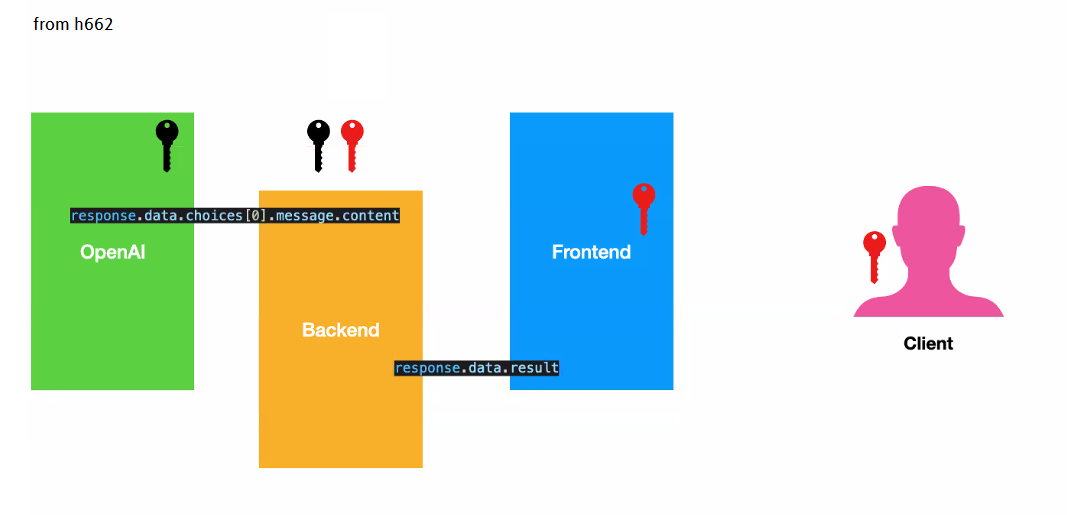
: 프론트엔드만으로도 gpt사용이 가능하다. 그러나 사용자 키가 노출된다.
따라서 백엔드랑 연결하여 API키 노출을 예방할 수 있다.
backend/frontend 배포
backend : fly.io
설치 (window기준 : powershell에서 실행)
: https://fly.io/ 에서 가입하고 카드 연결
1.iwr https://fly.io/install.ps1 -useb | iex
2.flyctl version: 버전확인
3.flyctl auth login
4.cd backend 파일 위치->flyctl launch-> enter,enter,나라지정,N,N
5.fly deploy: docker가 설치됨
: 배포 후 링크를 들어가서 확인
: 배포 주소로 postman에서 post요청 해보기
: 정상작동한다면 frontend 배포시 url사용
frontend : vercel
- github에 frontend code 올리기
- Vercel에서
Add New>Project> 해당 githubimport- .env파일의 내용 Environment Variables에 적어주기
REACT_APP_BACKEND_URL에는 fly.io에서 배포한 링크 적어주기- deploy