■ 오라클 관리 수업 복습
1장: 오라클 아키텍쳐 (5문제) --------> 오라클 구조 암기(A4지 3~4장)
2장: 오라클 소프트웨어 설치 (1문제) ----> 기본기
3장: dbca 를 이용해서 db 생성 (1문제) ----> 기본기
4장: 오라클 인스턴스 관리 (파라미터 파일) (3문제) -->오라클 설정 변경할 일
5장: ASM 인스턴스 관리 (3문제)
6장: 오라클 네트워크 관리 ---> 일하러 나가서 첫날 셋팅해야할 일
7장: 테이블 스페이스 관리 (3문제) ---> DBA 가 일상적으로 하는일
8장: 오라클 유져 관리와 권한 관리
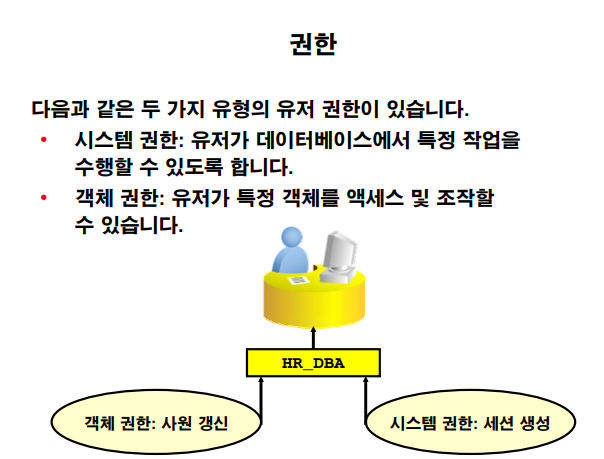
어제 한 것 시스템권한 객체 권한 두가지가 있다 를 함.
유져들에게 권한을 줄 때는 꼭 필요한 권한만 부여해야한다
-
시스템 권한 유져가 db 에서 특정 작업을 수행할 수 있게 해주는 권한
-
객체 권한
총괄 dba 가... 설명 해주시다가 못적음 ....
오늘 다시한번 실습 시스템 권한 실습하기 할 것임
실습1. 시스템 권한 실습하기
실습 순서 si dba 가 하는 일
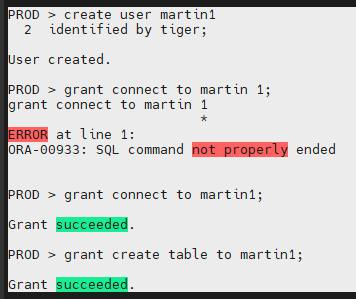
- martin 1 이라는 유져를 생성합니다.
PROD > create user martin1
identified by tiger;
- martin1 유져에게 접속할 수 있는 권한을 부여합니다.
PROD > grant connect to martin1;
Grant succeeded.
- martin1 유져에게 테이블을 생성할 수 있는 권한을 부여합니다.
PROD > grant create table to martin1;
Grant succeeded.
※ create table : 시스템 권한
- martin1 유져로 접속 해서 테이블을 생성하고
PROD > connect martin1/tiger
Connected.
PROD > create table emp10
2 ( empno number(10),
3 ename varchar2(10) );
-
martin1 유져에게 만든 테이블에 데이터를 insert
insert into emp10 values(1111,'aaa');
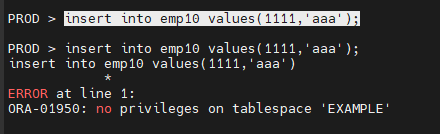
권한이 없어서 오류가 남.
ERROR at line 1:
ORA-01950: no privileges on tablespace 'EXAMPLE'
문제1. martin2 라는 유져를 생성하고 테이블을 생성할 수 있는 권한을 부여하고 martin2 로 접속해서 테이블을 생성하시오
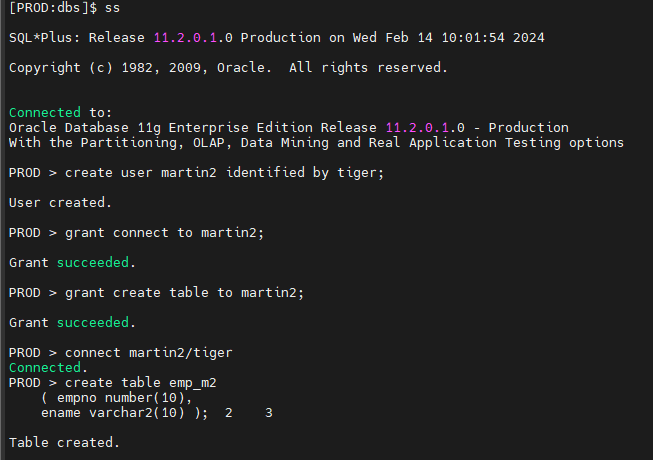
martin1 에서 exit; 후 ss 로 sys 유져로 접속한 다음
실행한다.
create user martin2 identified by tiger
grant connect to martin2;
grant create table to martin2;
connect martin2/tiger
create table emp_m2
( empno number(10),
ename varchar2(10) );
생성한 테이블 이름 : emp_m2
문제2. 테이블에 데이터를 입력할 때 나는 다음의 오류를 해결하시오
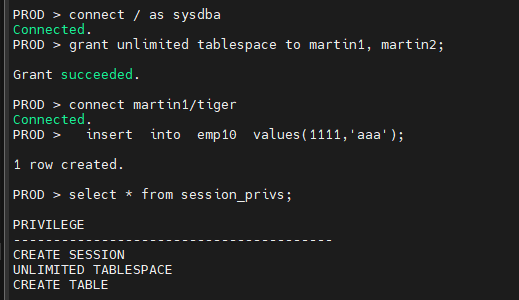
insert into emp10 values(1111,'aaa');
실습2. 객체 권한 부여하기
- scott 계정에서 martin1 계정에게 scott 의 emp 테이블을 select 할 수 있는 권한을 부여합니다.
connect scott/tiger
grant select on emp to martin1;
- martin1 계정에서 scott 의 emp 테이블을 select 해 봅니다.
connect martin1/tiger
select * from emp; < ---- 에러발생
select * from scott.emp; <----- 잘 수행됨
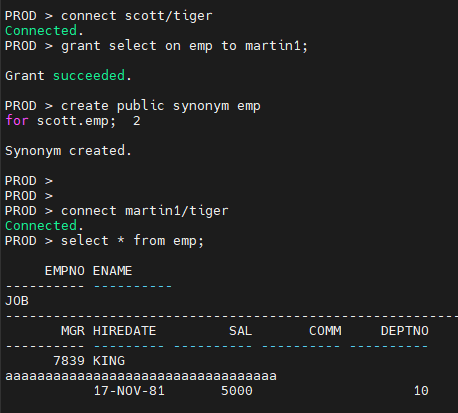
- scott 계정에서 martin1이 emp 테이블을 편하게 조회할 수 있도록 시너님을 생성
connect scott/tiger
create public synonym emp
for scott.emp;
emp = scott.emp 동의어다
public : 여러 유져들이 다 사용할 수 있도록 하겠다.
- martin1 계정에서 emp 테이블을 스키마 이름 없이 조회해 봅니다.
connect martin1/tiger
select * from emp;
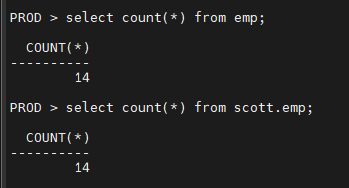
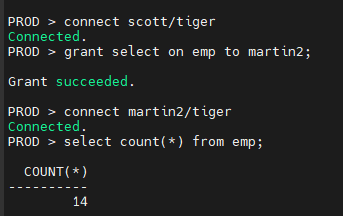
문제1. scott 계정에서 martin2 계정에게 emp 테이블을 select 할 수 있는 권한을 주고
martin2 계정에 emp 테이블을 select 할 수 있는지 확인하시오 !
문제2. scott 계정에서 martin2 계정에게 emp 테이블에 insert, update, delete 할 수 있는 권한을 주고
martin2 에서 emp 테이블에 insert, update, delete 가 가능한지 확인하시오 !
PROD > connect scott/tiger
Connected.
PROD > grant insert, update, delete on emp to martin2;
Grant succeeded.
insert into emp10 values(1111,'aaa');
grant unlimited tablespace to martin1, martin2;
※ martin1 처럼 본인이 만든 테이블은 insert, update, delete 권한을 따로 받지 않아도
unlimited tablespace 권한만 있으면 얼마든지 입력, 수정, 삭제를 할 수 있다.
그런데 scott 계정처럼 다른 계정이 만든 테이블을 martin1 이 insert, update, delete 를 하려면
따로 권한을 받아야한다.
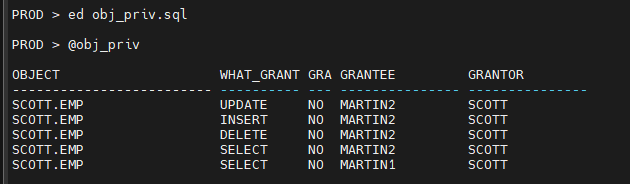
문제3. dba 에게 유용한 권한 관련 스크립트 2개를 저장하시오 !
- 내가 가지고 있는 시스템 권한 확인하기 !
select * from session_privs;
save system_priv.sql
- 내가 가지고 있는 객체 권한 확인하기 !
col object for a25
col grantee for a15
col grantor for a15
col what_granted for a10
select owner || '.' || table_name object,
privilege what_granted, grantable, grantee, grantor
from user_tab_privs;
PROD > ed obj_priv.sql
PROD > @obj_priv
저장했음 !!
grantable : 내가 받은 권한을 남에게 줄 수 있냐 ?
grantee : 권한 수혜자
grantor : 권한 수여자
▣ 예제 69. 내가 받은 시스템 권한을 남에게 주려면 with admin option 을 알아야 해요
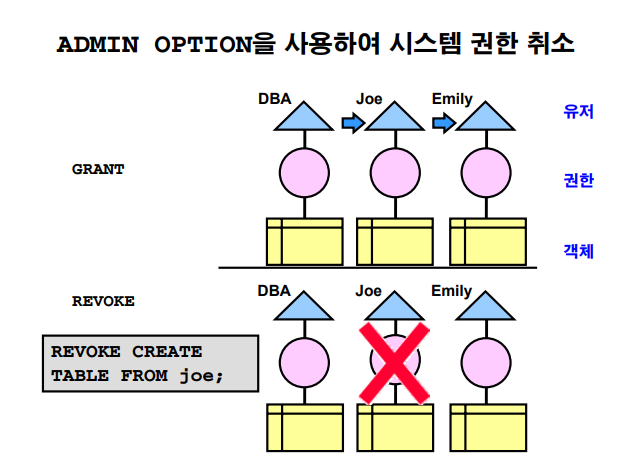
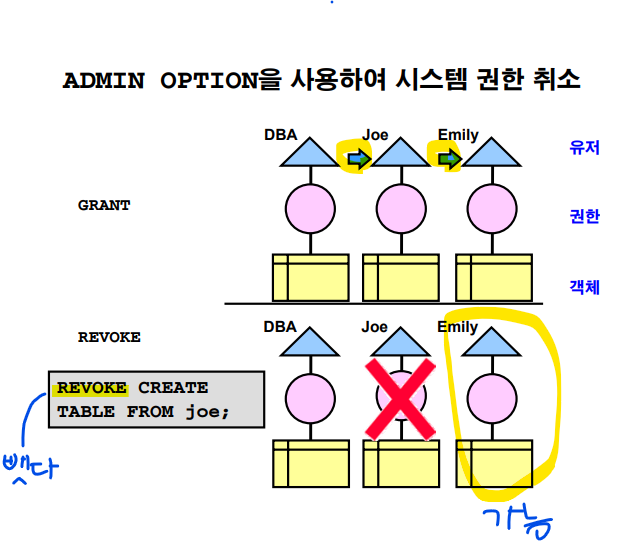
▶ 실습1. with admin option 사용하기 실습
#1. scott 계정에서 martin1 에게 create procedure 권한을 줍니다.
권한을 줄 때 with admin option 을 써서 줍니다.
connect scott/tiger
grant create procedure to martin1 with admin option;
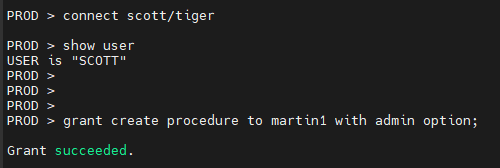
PROD > connect martin1/tiger
Connected.
PROD > @system_priv.sql
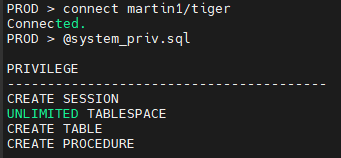
- martin1 계정에서 martin2 계정에 create procedure 권한을 부여합니다.
PROD > grant create procedure to martin2;
Grant succeeded.
- scott 계정에서 martin1 계정에게 부여했던 create procedure 권한을 취소합니다.
PROD > connect scott/tiger
Connected.
PROD > revoke create procedure from martin1;
Revoke succeeded.
- martin1 계정에서 create procedure 권한이 없어졌는지 확인합니다.
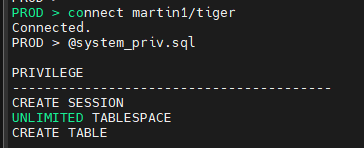
- martin2 계정에서 create procedure 권한이 없어졌는지 확인합니다 (중요 )
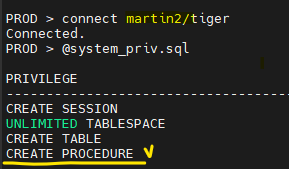
martin2 에 남아 있는 것을 확인
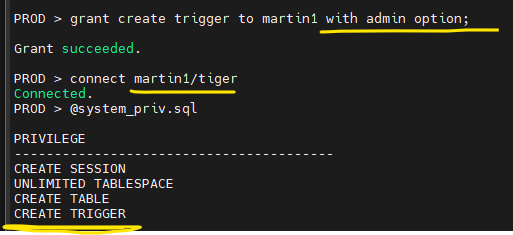
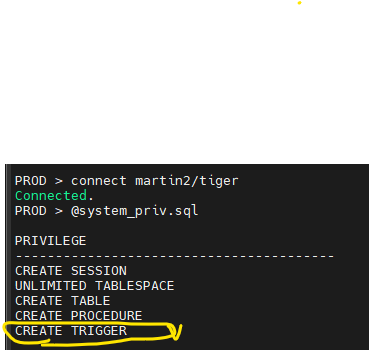
문제1. scott 계정에서 martin1 계정에게 create trigger 권한을 부여하고
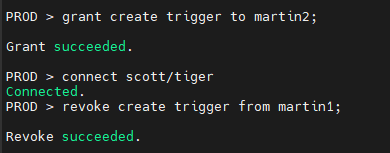
martin1 계정에서 martin2 계정에 create trigger권한을 부여하고
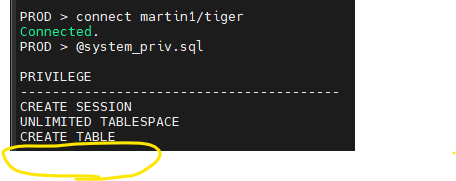
scott 계정에서 martin1 계정에 부여했던 create trigger 권한을 취소하면
martin1 과 martin2 에서 각각 가지고 있는 시스템 권한이 어떻게 되는지 확인하시오
grant create trigger to martin1 with admin option;
connect martin1/tiger
@system_priv.sql
grant create trigger to martin2;
connect scott/tiger
revoke create trigger from martin1;
PROD > connect martin1/tiger
Connected.
PROD > @system_priv.sql
PROD > connect martin2/tiger
Connected.
PROD > @system_priv.sql
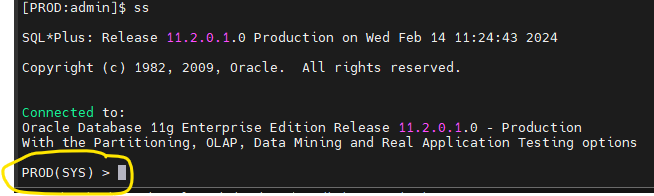
문제2. 앞으로 수업 받을 때 glogin.sql 을 수정해서 sqlplus 로 접속할 때 db 이름과 유져이름이 같이 나오게 하시오
[PROD:admin]$ cd
[PROD:admin]$ ls -l glogin.sql
[PROD:admin]$ vi glogin.sql
define _editor='vi'
set sqlprompt "_connect_identifier'('_user')' > "
▣ 예제70. 객체권한을 남에게 줄 수 있는 권한까지 같이 주려면 with grant option을
알아야해요
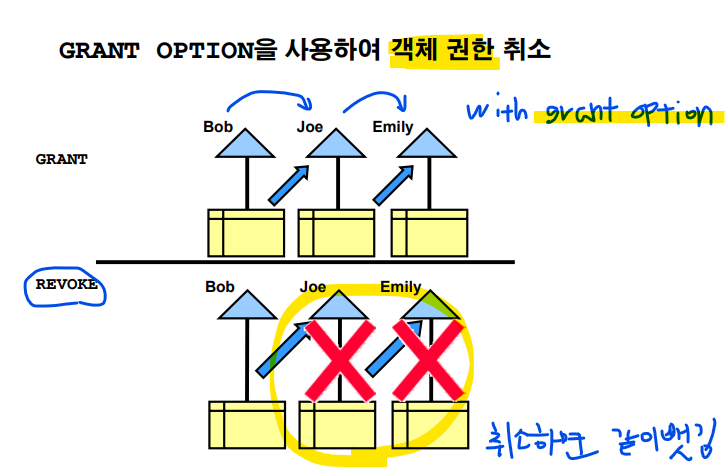
with admin option : 시스템 권한을 남에게 줄 수 있는 권한을 같이 줄 때 사용
with grant option : 객체 권한을 남에게 줄 수 있는 권한을 같이 줄 때 사용
with grant option 은 최초로 권한을 줬던 유저에게서 revoke 하면 전부 다 취소 됩니다.
■ 실습
- scott 계정에서 martin1 에게 dept 테이블을 select 할 수 있는 권한을 부여합니다.
이때 with grant option 을 써서 부여합니다.
connect scott/tiger
grant select on dept to martin1 with grant option;
create public synonym dept for scott.dept;
- martin1 에서 martin2 에게 scott 계정의 dept 테이블을 select 할 수 있는 권한을 부여합니다.
connect martin1/tiger
grant select on dept to martin2;
- scott 계정에서 martin2 에게 부여했던 dept 테이블을 select 할 수 있는 권한을 취소 합니다.
connect scott/tiger
revoke select on dept from martin1;
- martin1 계정에서 가지고 있는 객체 권한을 확인합니다.
connect martin1/tiger
@obj_priv.sql
- martin2 계정에서 가지고 있는 객체 권한을 확인합니다.
connect martin2/tiger
@obj_priv.sql
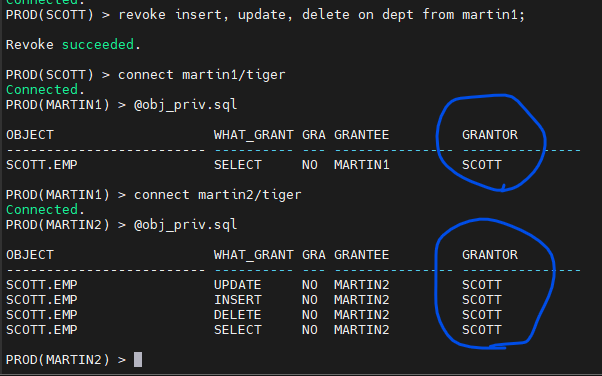
※ 객체 권한은 모두 취소 됩니다.
문제1. scott 계정에서 martin1 에게 dept 테이블을 insert, update, delete 할 수 있는 권한을 넣어주고
martin1 에서 martin2 에게 dept 테이블을 insert, update, delete 할 수 있는 권한을 넣어주고
scott 계정에서 martin1 에게 주었던 insert, update, delete 할 수 있는 권한을 revoke 하면
martin2 확인
connect scott/tiger
grant insert, update, delete on dept to martin1 with grant option;
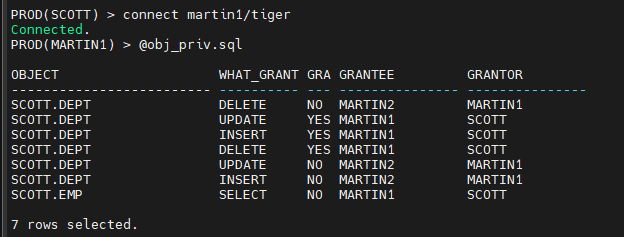
connect martin1/tiger
grant insert, update, delete on dept to martin2;
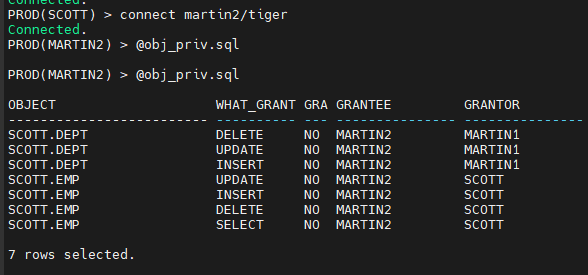
connect scott/tiger
revoke insert, update, delete on dept from martin1;
▣ 예제71. 롤(role) 을 사용하게 되면 편하게 권한 부여를 할 수 있습니다.

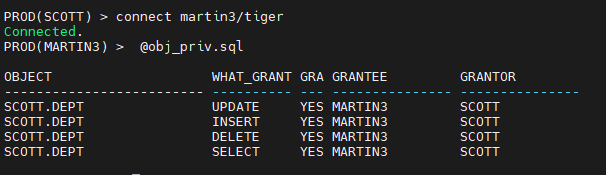
점심시간 문제. 지금 만든 martin3 유져가 scott 의 emp 테이블과 dept 테이블을
select, update, insert, delete 할 수 있도록 권한을 주는데
나중에 권한을 취소할때 martin3 가 남에게 줬던 권한까지 다 취소될수
있겠금 권한을 부여하시오 !
martin3 에서 @obj_priv.sql 을 수행한 결과
connect scott/tiger
grant select, insert, update, delete on dept to martin3 with grant option;
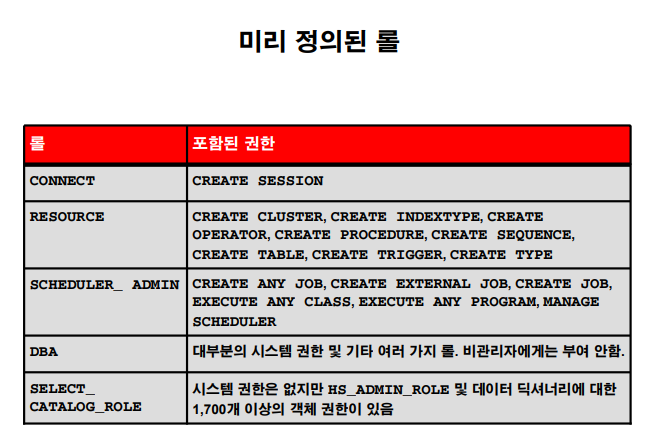
select catalog_role 중요해서 따로 빼놔져있는 것임
문제1. martin4 라는 유져를 생성하고 martin4 라는 유져에게 dba role 을 부여하고
martin4 유져가 어떤 권한을 받았는지 확인 하시오 !
create user martin4
identified by tiger;
grant dba to martin4;
connect martin4/tiger
@system_priv
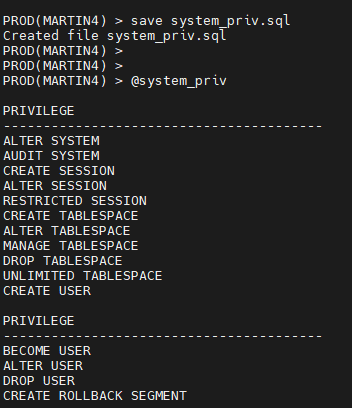
dba 라는 롤 하나만 받으면 모든 시스템 권한을 다 수행할 수 있게 되고
데이터 베이스에 있는 모든 테이블들을 다 조회할 수 있게 됩니다.
문제2 (현장사례) 내가 지금 dba 로 일하고 있는 회사에 외부 솔루션 엔지니어가 방문을 하였습니다.
그 솔루션 엔지니어가 다음과 같은 요청을 하였습니다.
-
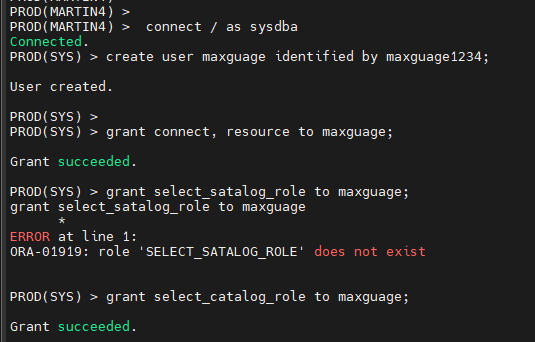
maxguage 유져 생성 패스워드 : maxguage1234
-
maxguage 유져에게 권한을 주는데 connect, resource, 데이터 딕셔너리를 조회할 수 있는 권한을 부여
select_catalog_role
답 : connect / as sysdba
create user maxguage identified by maxguage1234;
PROD(SYS) > grant connect, resource to maxguage;
Grant succeeded.
PROD(SYS) > grant select_catalog_role to maxguage;
Grant succeeded.
PROD(SYS) > connect maxguage/maxguage1234
Connected.
PROD(MAXGUAGE) > select count(*) from dba_tables;
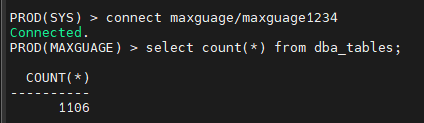
selectcatalog_role 은 dba 권한 없이도 dba 시작하는 데이터 딕셔너리를 볼 수 있게 해주는 role 입니다.
▣ 예제72. 우리회사에 맞는 role 을 직접 생성해서 사용하면 편하게 권한 관리를 할 수 있다.
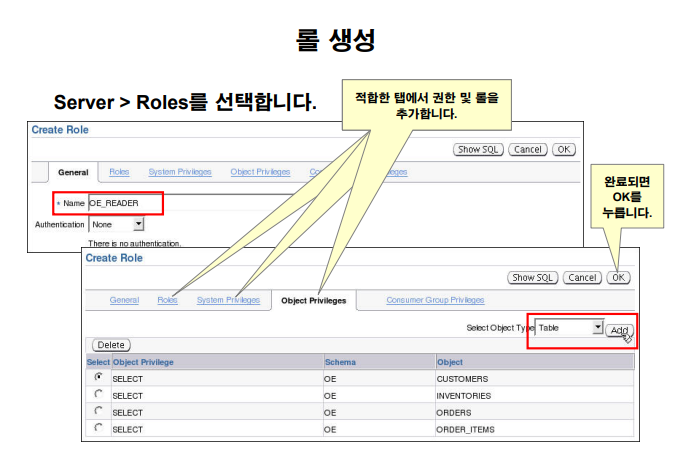
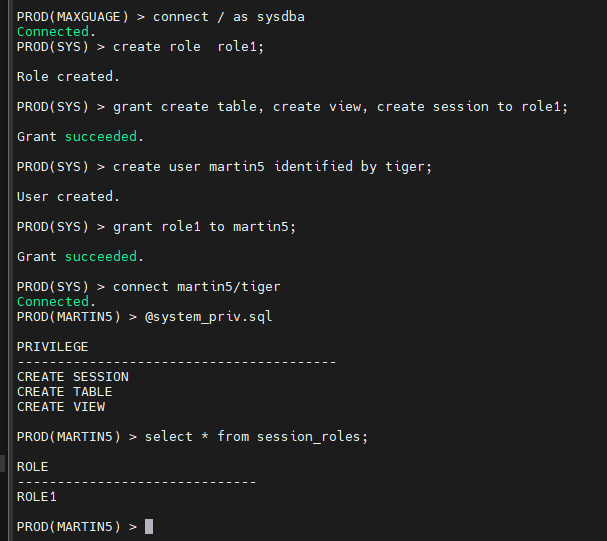
실습1. 롤(role) 생성하기
- role1 이라는 이름으로 role 을 생성
connect / as sysdba
create role role1;
- role1 에게 create table, crate view, create session 권한 부여
grant create table, create view, create session to role1;
- martin5 라는 유져 생성
create user martin5 identified by tiger;
- martin5 에게 role1 부여
grant role1 to martin5;
- martin5로 접속해서 martin5 가 가지고 있는 시스템 권한이 무엇인지 확인
connect martin5/tiger
@system_priv.sql
- martin5 가 부여받은 role 이 무엇인지 확인
select * from session_roles;
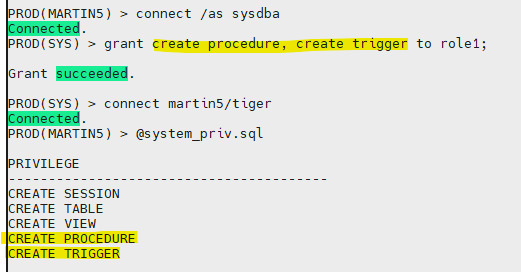
문제1. sys 유져에서 role1 에게 create procedure 와 create trigger 권한을 부여하고 나서
그냥 바로 martin5 로 접속해서 @system_priv 조회
PROD(MARTIN5) > connect /as sysdba
Connected.
PROD(SYS) > grant create procedure, create trigger to role1;
Grant succeeded.
PROD(SYS) > connect martin5/tiger
Connected.
PROD(MARTIN5) > @system_priv.sql
문제2. role1 을 sys 유져에서 drop 하시오
PROD(MARTIN5) > connect / as sysdba
Connected.
PROD(SYS) > drop role role1;
Role dropped.
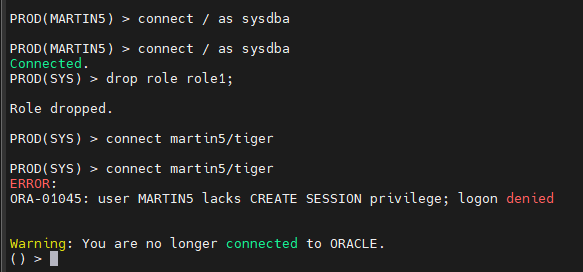
role1 에 create session 권한이 있었어서
들어가지지도 않음
▣ 예제73. 악성 sql 을 처음부터 수행 못하게 하려면 profile 이란걸 알아야 해요
모 은행의 사례
업무 시간에 악성 sql 이 되어서 자꾸 오라클에 접속한 유져들이 아무것도 못하는 일이 반복되니까
그 은행 dba 가 아침 9시부터 저녁 6시까지는 악성 sql 자체를 아예 실행이 안되게 막아버렸습니다.
악순환~~
profile 이란 ? 오라클의 특정 유져가 db의 리소스를 제한 없이 사용하는 것을 막는 기능이다.
-
Profile 로 관리할 수 있는 기능이 2가지 ?
-
리소스(resource) 관리(리소스 소비 제어)
★ resource_limit 파라미터에 영향을 받습니다. -
패스워드(password) 관리(계정 상태 및 암호 만료 관리)
★ resource_limit 파라미터에 영향을 받지 않습니다.(ocp시험문제)
-
■ 실습 1.
- scott 유져로 접속해서 dept 테이블을 select 해보고 몇개의 블럭을 읽어들였는지 확인한다.
connect scott/tiger
set autot on
select * from dept;

버퍼의 개수
disk 에서 읽은 block 의 개수
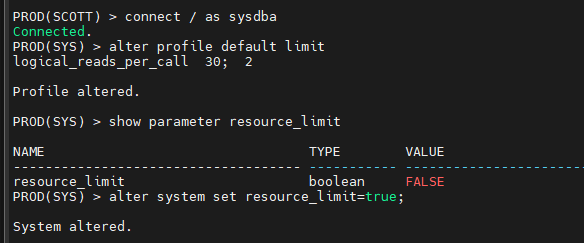
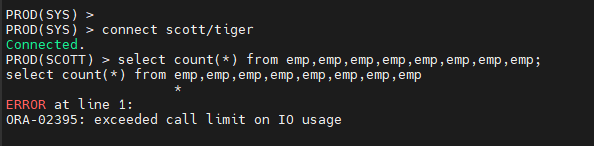
- sys 유져로 들어와서 악성 sql 이 수행 안되게 profile 을 적용한다
connect / as sysdba
alter profile default limit
logical_reads_per_call 30;
show parameter resource_limit
alter system set resource_limit=true;
- scott 로 접속해서 악성 sql 을 수행 해본다.
■ 실습 2. 패스워드 관리
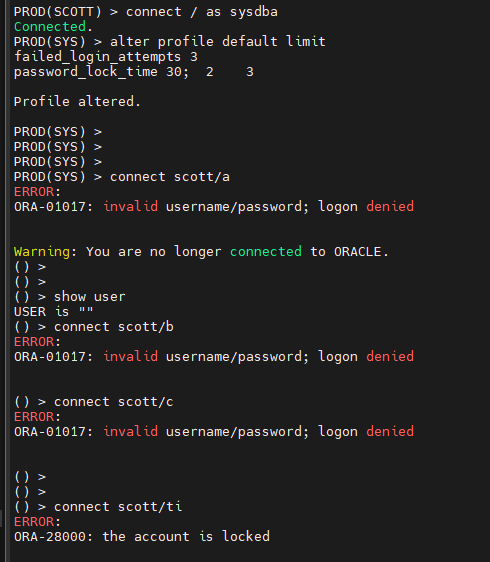
- sys 유져로 접속해서 패스워드를 3번 틀리면 오라클에 접속 못하게 락을 걸게 프로파일을 변경
connect / as sysdba
alter profile default limit
failed_login_attempts 3
password_lock_time 30;
패스워드 3번 실패하면 30일동안 lock 걸겠다.
- scott 유져로 접속을 시도하는데 일부러 틀리기
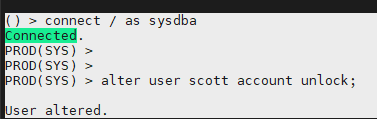
문제1. 다시 sys 유저로 접속해서 잠긴 scott 계정의 lock 를 해제하시오
() > connect / as sysdba
Connected.
PROD(SYS) >
PROD(SYS) >
PROD(SYS) > alter user scott account unlock;
User altered.
프로파일로 관리할 수 있는게 두가지라고 했잖아요
하나는 자원 할당 제한 다른 하나는 패스워드 관리
하지만 한두개가 있는게 아니에요
자원 할당 제한 --- resource_limit 이라는 파라미터가 true 여야 제한을 둡니다.
패스워드는 아님 파라미터가 false 여도 가능 !
col profile for a10
col limit for a10
set pages 400
select * from dba_profiles order by profile;
문제1. 1분동안 아무것도 안하고 있으면 자동으로 접속이 끊기게 default 프로파일을
변경하시오 !
connect / as sysdba
alter profile default limit
idle_time 1;
alter system set resource_limit=true;
connect scott/tiger
1분동안 아무것도 안합니다.

접속 실패 확인
-> 원래대로 돌려놓기 !
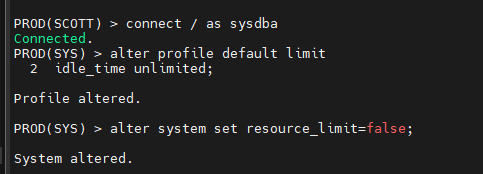
문제2. 원복시킵니다.
connect / as sysdba
alter profile default limit
idle_time unlimited;
alter system set resource_limit=false;
▣ 예제74. 더 엄격하게 패스워드 관리를 하려면 verify_function 함수를 사용하면 됩니다.
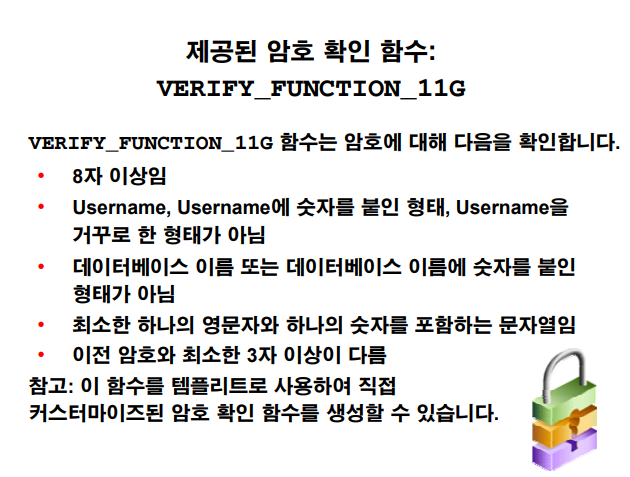
■ 실습
- sys 유져에서 아래의 스크립트를 돌려서 verify_function 함수를 생성하고 바로 default 프로파일에 적용합니다
PROD(SYS) >
PROD(SYS) >
PROD(SYS) > @?/rdbms/admin/utlpwdmg.sql
Function created.
Profile altered.
Function created.
PROD(SYS) >
- scott 의 패스워드를 tiger2 로 변경해보시오 !
alter user scott
identified by tiger2;
PROD(SYS) > SP2-0734: unknown command beginning "identified..." - rest of line ignored.
문제1. 어떻게든 scott 의 패스워드를 꼭 변경해보세요 !!
PROD(SYS) > alter user scott
2 identified by oracle_4U;
User altered.
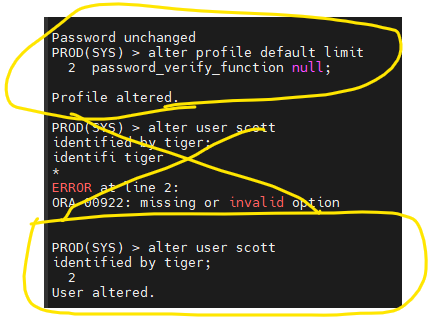
문제2. 다시 패스워드를 변경할 때 함수의 영향을 받지 않도록 원래대로 돌려놓으시오
alter profile default limit
password_verify_function null;
alter user scott
identified by tiger;
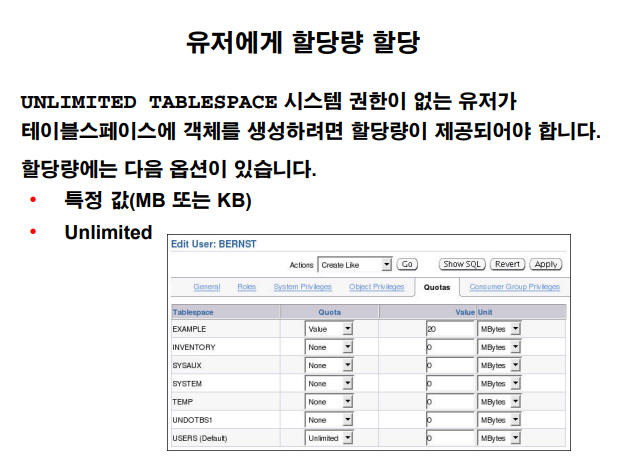
▣ 예제75. 유져에게 공간 할당을 제한하는 방법을 알아야해요
데이터 insert 하는 프로시져를 잘못 짜서 무한 루프가 돌면서 insert 가 무한히 일어나서
테이블 스페이스를 full을 내는 장애상황을 막으려면 할당량을 제한해야 합니다.
■ 실습
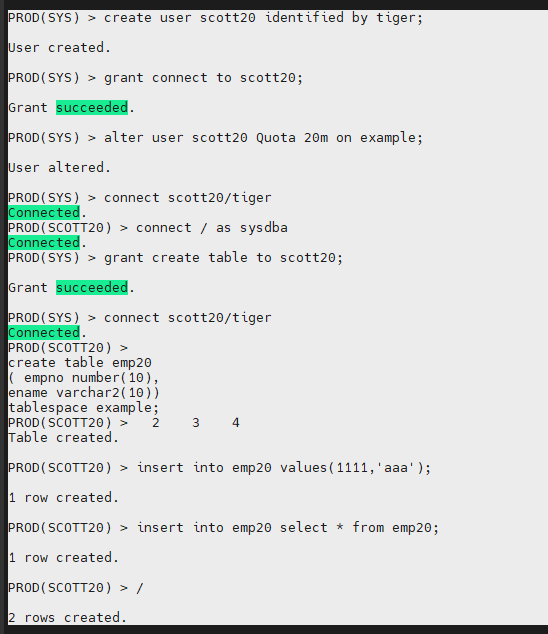
- scott20 유저 생성
create user scott20 identified by tiger;
- scott20 유져에게 접속할 수 있는 권한을 부여합니다.
grant connect to scott20;
grant create table to scott20;
- scott20 유져에게 example 테이블 스페이스를 20m 만 사용할 수 있도록 Quata 에 제한을 둡니다.
alter user scott20 Quota 20m on example;
- scott20 유져에서 테이블을 생성하고 데이터를 insert 여러번해서 Quota 를 20m 만 사용할 수 있는지 확인한다.
connect scott20/tiger
create table emp20
( empno number(10),
ename varchar2(10))
tablespace example;
insert into emp20 values(1111,'aaa');
insert into emp20 select * from emp20;
.
.
.
PROD(SCOTT20) >
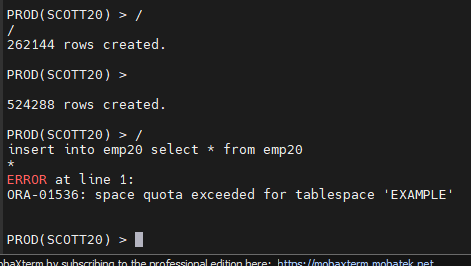
524288 rows created.
PROD(SCOTT20) > /
insert into emp20 select * from emp20
- ERROR at line 1:
ORA-01536: space quota exceeded for tablespace 'EXAMPLE'
문제1. 이 Quota 에 영향을 받지 않도록 하시오 !
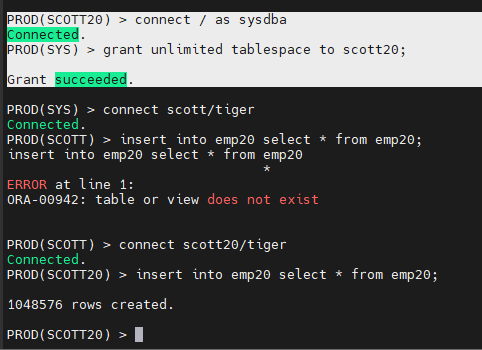
grant unlimited tablespace to scott20;
PROD(SCOTT20) > connect / as sysdba
Connected.
PROD(SYS) > grant unlimited tablespace to scott20;
Grant succeeded.
PROD(SCOTT) > connect scott20/tiger
Connected.
PROD(SCOTT20) > insert into emp20 select * from emp20;
1048576 rows created.
truncate table emp20;
까지 해야함 !
▣ 예제76. 유져들의 권한 관리는 최소 권한을 주는 것으로 원칙을 세워야 해요
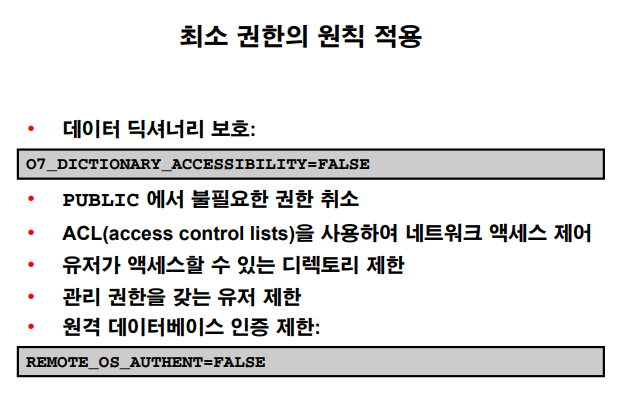
최소 권한의 원칙 적용
public 에서 불필요한 권한 취소
grant select on emp to public ---> emp 테이블에 select 할 수 있는 권한을 모두에게 준거임
-- > 나중에 걷어내야하는 때가 옴 ---> 그럼 조회 안될 수가 있음 ㅠㅠ... --> 유져이름 써서 특정 유져에게만 줘야함 !!!
자제할 것 !
ACL 을 사용하여 네트워그 엑세스 제어 : 특정 서버에 접속되는거 막으라는 소리
디렉토리 제한해야하고
dba 관리 권한 갖는 유져는 딱 정해져있어야함.
원격에서 데이터베이스에 접속하는 것도 회사 내에서만 접속 될 수 있도록 인증을 제한해줘야함.
예)) sqlnet.ora 에다가 아이피 주소 입력해야지만 들어올 수 있도록 했었던 거
☆
db 의 모든 테이블들을 다 조회하고 싶으면 dba 롤 또는 select any table 권한을 부여 받으면 다 조회가 가능하다.
select any table 권한을 받게 되면 데이터 딕셔너리도 조회가 된다.
그러면 우리 회사에 어떤 테이블이 있는지 조회를 할 수 있게 된다.
select table_name from dba_tables;
이게 된다 !!!
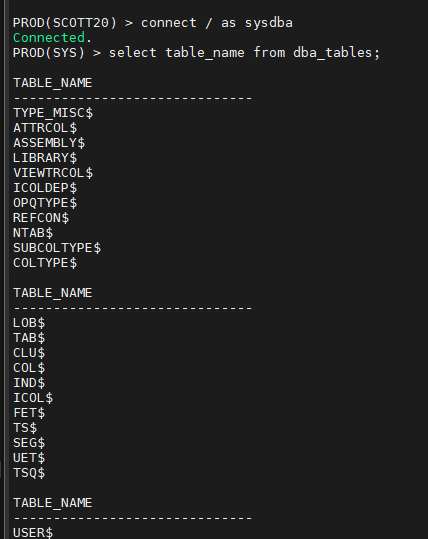
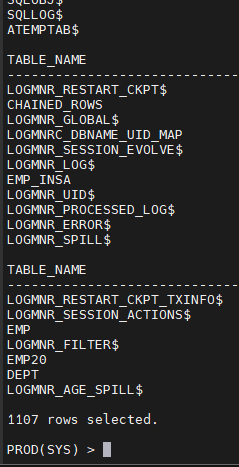
테이블명이 적나라하게 나오게 됨.
이걸 막아야함...
O7_DICTIONARY_ACCESSIBILITY=FALSE 를 true 로 켜면 된다 !!!
■ 실습1. O7_DICTIONARY_ACCESSIBILITY 파라미터 실습
o7_dictionary_accessibility
- maxguage2 라는 유져를 패스워드를 maxguage2 로 해서 생성합니다.
show user
sys
create user maxguage2 identified by maxguage2;
- maxguage2 유져에게 select any table 권한 부여합니다.
grant select any table to maxguage2;
grant connect to maxguage2; ( 접속할 수 있는 권한 부여)
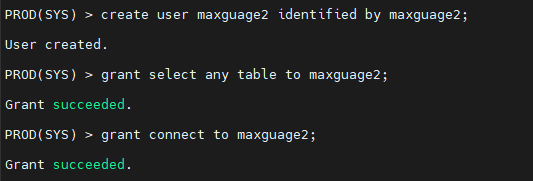
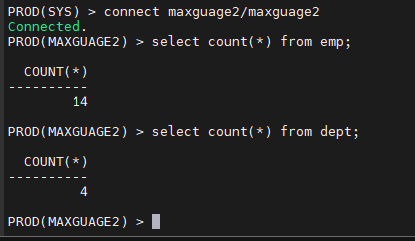
- maxguage2 유져로 접속해서 emp 테이블과 dept 테이블을 조회해봅니다.
connect maxguage2/maxguage2
select count(*) from emp;
select count(*) from dept;
- maxguage2 유져에서 select table_name from dba_tables; 를 조회합니다 이게 되는지 확인하는게 중요 @!
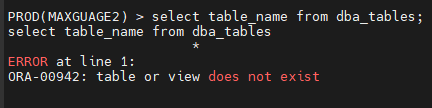
※
grant select any table to maxguage2; 을 받았는데도 왜 조회가 안되는가?
o7_dictionary_accessibility 파라미터를 확인해야 함
PROD(MAXGUAGE2) > connect / as sysdba
Connected.
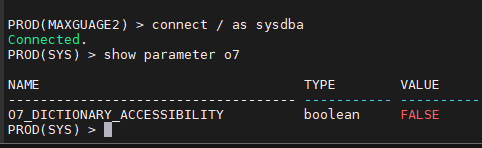
PROD(SYS) > show parameter o7
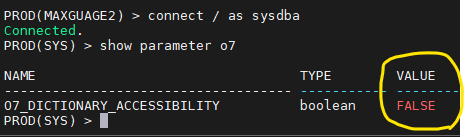
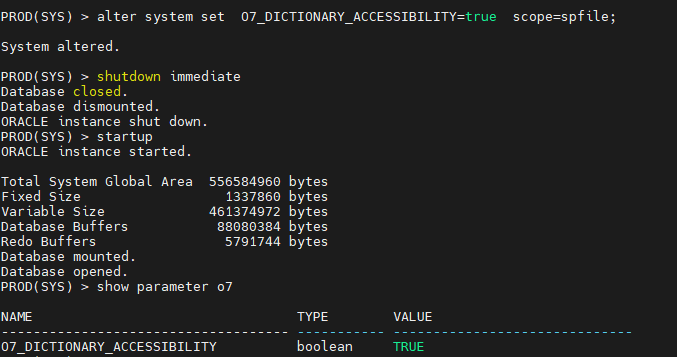
문제1. O7_DICTIONARY_ACCESSIBILITY 를 다시 true 로 변경하고 db를 내렸다가 올리시오
alter system set O7_DICTIONARY_ACCESSIBILITY=true scope=spfile;
System altered.
PROD(SYS) > shutdown immediate
Database closed.
Database dismounted.
ORACLE instance shut down.
PROD(SYS) > startup
ORACLE instance started.
PROD(SYS) > show parameter o7
O7_DICTIONARY_ACCESSIBILITY boolean TRUE
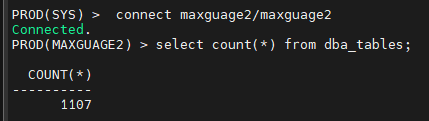
문제 2. 그럼 maxguage2 에서 dba_tables 조회하시오
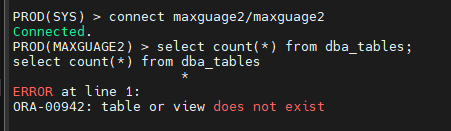
문제3. 다시 끄세요
alter system set O7_DICTIONARY_ACCESSIBILITY=false scope=spfile
PROD(SYS) > shutdown immediate
PROD(SYS) > startup

PROD(SYS) > connect maxguage2/maxguage2
PROD(MAXGUAGE2) > select count(*) from dba_tables;
PROD(MAXGUAGE2) > connect / as sysdba
Connected.
PROD(SYS) > show parameter o7
.
.
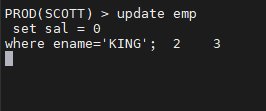
▣ 예제77. 락(lock) 이 database 에서 왜 필요한지 알아야해요
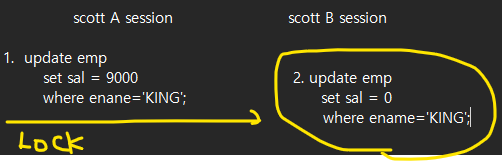
데이터 일관성을 위해 1 이 처리된 후에 락이 걸린다.
2는 안된다.
수행하기 전에 demobld.sql 스크립트를 scott 에서 수행하세요
PROD(SCOTT) > @demobld.sql
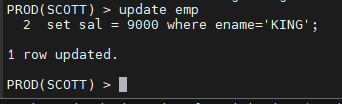
터미널 1
update emp
set sal = 9000
where enane='KING';
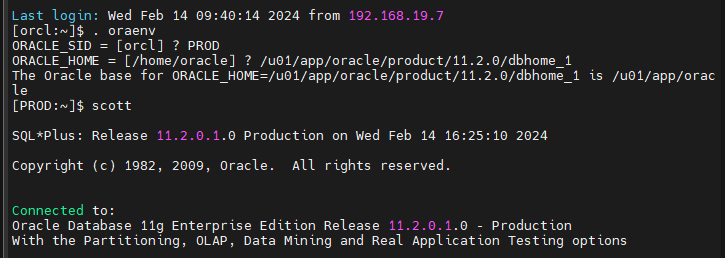
터미널 2
. oraenv
PROD /u01/app/oracle/product/11.2.0/dbhome_1
update emp
set sal = 0
where ename='KING';
오늘의 마지막 문제. king100 이라는 유져를 생성하고 king100 유져에게
다음의 권한을 부여하고 잘 부여됬는지 확인한 결과를 캡쳐해서
검사받으세요 ~~
객체권한 : 1. scott 의 emp 테이블을 select 할 수 있는 권한
2. scott 의 emp 테이블을 insert 할 수 있는 권한
3. scott 의 dept 테이블을 select 할 수 있는 권한
시스템 권한 : create table, create session, create procedure
롤 : select_catalog_role
connect / as sysdba
create user king100 identified by tiger;
connect scott/tiger
grant select , insert on emp to king100 with grant option;
grant select on dept to king100 with grant option;
grant connect to king100;
grant create table to king100;
grant create session to king100;
grant create procedure to king100;
connect / as sysdba
grant select_catalog_role to king100;
PROD(SYS) > connect king100/tiger
select count(*) from dba_tables;