6
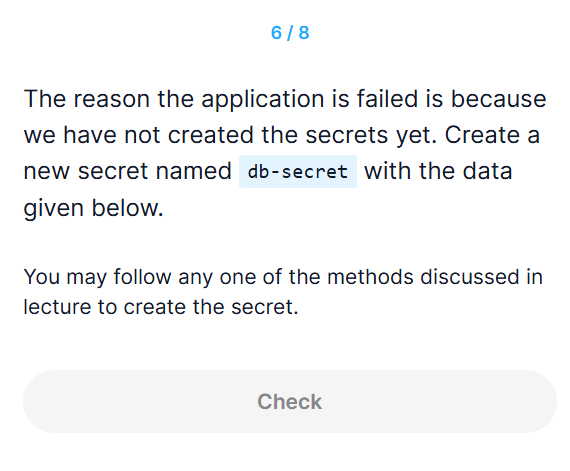
풀이
- yaml 파일로 만들면 base64로 변환해야 하므로 비추..
정답
kubectl create secret generic db-secret --from-literal=DB_Host=sql01 --from-literal=DB_User=root --from-literal=DB_Password=password123
힌트
k create secret generic --help
Create a secret based on a file, directory, or specified literal value.

 A single secret may package one or more key/value pairs.

 When creating a secret based on a file, the key will default to the basename of the file, and the value will default to the file content. If the basename is an invalid key or you wish to chose your own, you may specify an alternate key.

 When creating a secret based on a directory, each file whose basename is a valid key in the directory will be packaged into the secret. Any directory entries except regular files are ignored (e.g. subdirectories, symlinks, devices, pipes, etc).

Examples:
  # Create a new secret named my-secret with keys for each file in folder bar
  kubectl create secret generic my-secret --from-file=path/to/bar

  # Create a new secret named my-secret with specified keys instead of names on disk
  kubectl create secret generic my-secret --from-file=ssh-privatekey=path/to/id_rsa --from-file=ssh-publickey=path/to/id_rsa.pub

  # Create a new secret named my-secret with key1=supersecret and key2=topsecret
  kubectl create secret generic my-secret --from-literal=key1=supersecret --from-literal=key2=topsecret

  # Create a new secret named my-secret using a combination of a file and a literal
  kubectl create secret generic my-secret --from-file=ssh-privatekey=path/to/id_rsa --from-literal=passphrase=topsecret

  # Create a new secret named my-secret from env files
  kubectl create secret generic my-secret --from-env-file=path/to/foo.env --from-env-file=path/to/bar.env

Options:
    --allow-missing-template-keys=true:
        If true, ignore any errors in templates when a field or map key is missing in the template. Only applies to golang and jsonpath output formats.

    --append-hash=false:
        Append a hash of the secret to its name.

    --dry-run='none':
        Must be "none", "server", or "client". If client strategy, only print the object that would be sent, without sending it. If server strategy, submit server-side request without persisting the resource.

    --field-manager='kubectl-create':
        Name of the manager used to track field ownership.

    --from-env-file=[]:
        Specify the path to a file to read lines of key=val pairs to create a secret.

    --from-file=[]:
        Key files can be specified using their file path, in which case a default name will be given to them, or optionally with a name and file path, in which case the given name will be used.  Specifying a directory will iterate each named file in the directory that is a valid secret key.

    --from-literal=[]:
        Specify a key and literal value to insert in secret (i.e. mykey=somevalue)

    -o, --output='':
        Output format. One of: (json, yaml, name, go-template, go-template-file, template, templatefile, jsonpath, jsonpath-as-json, jsonpath-file).

    --save-config=false:
        If true, the configuration of current object will be saved in its annotation. Otherwise, the annotation will be unchanged. This flag is useful when you want to perform kubectl apply on this object in the future.

    --show-managed-fields=false:
        If true, keep the managedFields when printing objects in JSON or YAML format.

    --template='':
        Template string or path to template file to use when -o=go-template, -o=go-template-file. The template format is golang templates [http://golang.org/pkg/text/template/#pkg-overview].

    --type='':
        The type of secret to create

    --validate='strict':
        Must be one of: strict (or true), warn, ignore (or false).          "true" or "strict" will use a schema to validate the input and fail the request if invalid. It will perform server side validation if ServerSideFieldValidation is enabled on the api-server, but will fall back to less reliable client-side validation if not.                "warn" will warn about unknown or duplicate fields without blocking the request if server-side field validation is enabled on the API server, and behave as "ignore" otherwise.           "false" or "ignore" will not perform any schema validation, silently dropping any unknown or duplicate fields.

Usage:
  kubectl create secret generic NAME [--type=string] [--from-file=[key=]source] [--from-literal=key1=value1] [--dry-run=server|client|none] [options]

Use "kubectl options" for a list of global command-line options (applies to all commands).