portal로 만들어준 attendcountModal.tsx 파일에서
useEffect의 인자값을 //eslint-disable-line으로 강제로 린트를 껐다.
(최초의 한번만 뜨게하기 위해)
open,close를 넣으면 각각의 상태 업데이트 계속 해줘서 무한루프가 도는 문제가 생겼다...
 useEffect(() => {
    if (haveSeenModal === 'true') {
      return
    }

    open({
      title: `현재 참석자: ${wedding.attendCount} 명`,
      body: (
        <div>
          <input
            ref={$input}
            placeholder="참석 가능 인원을 추가해주세요"
            style={{ width: '100%' }}
            type="number"
          />
        </div>
      ),
      onLeftButtonClick: () => {
        localStorage.setItem('@have-seen-modal', 'true')
        close()
      },
      onRightButtonClick: async () => {
        if ($input.current == null) {
          return
        }

        await fetch('http://localhost:8888/wedding', {
          method: 'PUT',
          body: JSON.stringify({
            ...wedding,
            attendCount: wedding.attendCount + Number($input.current.value),
          }),
          headers: {
            'Content-Type': 'application/json',
          },
        })

        localStorage.setItem('@have-seen-modal', 'true')
        close()
      },
    })
  }, []) // eslint-disable-line

  return null
}

export default AttendCountModal
그래서 useCallback을 사용해서 open이 새롭지 않다고 해주자!
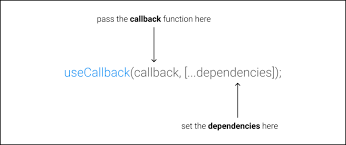
useCallback
useCallback
함수 정의를 캐시하는 React hook
= 리렌더링시에 새롭게 함수를 만들지 않겠다.
어떻게 사용하냐면 ~
const cachedFn = useCallback(fn,dependencies)dependencies에 따라서 함수를 새롭게 만들어내고
만약 dependencies가 비어있다면 그래도 캐시가 되는 함수가된다
아래는 Context 폴더 안 ModalContext.tsx이다
  const open = (options: ModalOptions) => {
    setModalState({ ...options, open: true })
  }
-> 아래처럼 요렇게 바꾼다
  const open = useCallback((options: ModalOptions) => {
    setModalState({ ...options, open: true })
  },[])

  const close = useCallback(() => {
    setModalState(defaultValues)
  },[])
그러면 외부 값 영향을 받지 않기 때문에 처음에 한번 만들어지면 그대로 캐시에서 사용해도 된다!
이렇게해서 value를 넘겨주는ㄷ데
 const values = {
  open,
  close,
}
이것도 캐시를 해줄 수 있음!
  const values = useMemo(
    () => ({
      open,
      close,
    }),
    [open,close],
  )
이러면 ~~ open,close 둘다 새롭게 매번 생기지 않고 캐시된함수가 된당
^__^
그래서
이 것들을 사용하는 AttendCountModal.tsx에서는 open,close는 캐시된 함수로 판단이 가능해지고
이 컴포넌트에
}, [open,close,wedding,haveSeenModal])이렇게 넣어도 무한루프 돌지않는다!~
devtool로 확인했을때도 불필요한 렌더링 줄일 수 있게됨
전체코드
//ModalContext.tsx
import { createContext, useContext, ComponentProps, useState, useCallback } from 'react'
import { createPortal } from 'react-dom'
import { useMemo } from 'react'
import Modal from '@shared/Modal'

type ModalProps = ComponentProps<typeof Modal>
type ModalOptions = Omit<ModalProps, 'open'>

interface ModalContextValue {
  open: (options: ModalOptions) => void
  close: () => void
}

const Context = createContext<ModalContextValue | undefined>(undefined)

const defaultValues: ModalProps = {
  open: false,
  body: null,
  onRightButtonClick: () => {},
  onLeftButtonClick: () => {},
}

export function ModalContext({ children }: { children: React.ReactNode }) {
  const [modalState, setModalState] = useState<ModalProps>(defaultValues)

  const $portal_root = document.getElementById('root-portal')

  const open = useCallback((options: ModalOptions) => {
    setModalState({ ...options, open: true })
  },[])

  const close = useCallback(() => {
    setModalState(defaultValues)
  },[])

  const values = useMemo(
    () => ({
      open,
      close,
    }),
    [open,close],
  )

  return (
    <Context.Provider value={values}>
      {children}
      {$portal_root != null
        ? createPortal(<Modal {...modalState} />, $portal_root)
        : null}
    </Context.Provider>
  )
}

export function useModalContext() {
  const values = useContext(Context)

  if (values == null) {
    throw new Error('ModalContext 안에서 사용해주세요')
  }

  return values
}
//AttendCountModal.tsx
import { Wedding } from '@models/wedding'
import { useModalContext } from '../../contexts/ModalContext'
import { useEffect, useRef } from 'react'
function AttendCountModal({ wedding }: { wedding: Wedding }) {
const { open, close } = useModalContext()
const $input = useRef<HTMLInputElement>(null)
const haveSeenModal = localStorage.getItem('@have-seen-modal')
useEffect(() => {
if (haveSeenModal === 'true') {
return
}
open({
title: `현재 참석자: ${wedding.attendCount} 명`,
body: (
<div>
<input
ref={$input}
placeholder="참석 가능 인원을 추가해주세요"
style={{ width: '100%' }}
type="number"
/>
</div>
),
onLeftButtonClick: () => {
localStorage.setItem('@have-seen-modal', 'true')
close()
},
onRightButtonClick: async () => {
if ($input.current == null) {
return
}
await fetch('http://localhost:8888/wedding', {
method: 'PUT',
body: JSON.stringify({
...wedding,
attendCount: wedding.attendCount + Number($input.current.value),
}),
headers: {
'Content-Type': 'application/json',
},
})
localStorage.setItem('@have-seen-modal', 'true')
close()
},
})
}, [open,close,wedding,haveSeenModal])
return null
}
export default AttendCountModal