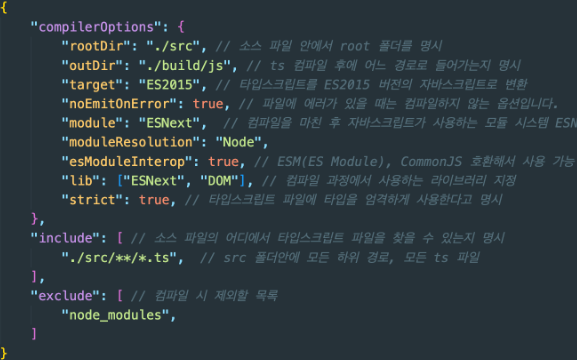
tsconfig.json설정
type assertion, Guard
TS에서 시스템이 추론 및 분석한 타입내용을 우리가 원하는대로 얼마든지 바꿀수 있다. 이때 type assertion이라는 타입단언이라 불리는 매커니즘을 사용한다.
TS의 타입단언은 프로그래머가 컴파일러에게 내가 너보다 타입에 더 잘 알고 있고 , 나의 주장에 대해 의심하지 말라고 하는것과 같다.
Type assertion을 사용하면 값의 type을 설정하고 컴파일러에 이를 유추하지 않도록 지시하는 것!!!!
var foo ={};
foo.bar =123;  //오류 :  속성 bar가 {}에 존재x
foo.bar = "hello"; //오류: 속성 bar가 {}에 존재x
컴파일러는 foo type이 속성이 없는 {}라고 가정하기 때문에 위에서 컴파일러 오류가 발생함.
근데 아래처럼 type assertion을 사용하면 피할수 있음
interface Foo{
  bar : number;
  bas : string;
}

var foo = {} as Foo;
foo.bar =123;
foo.bas ='hello';
예를 들자면 ~
const bodyElement = document.querySelector('body');
bodyElement.innerText = "Hello";
body요소는 무조건 있지만 TS입장에서 없다고생각할 수도 있어서

이런 오류를 보여준다.
그래서 어떻게 해결하냐면......~~
//1. type assertion해준다.
const bodyElement = document.querySelector('body') as HTMLBodyElement;
bodyElement.innerText = "Hello";

//2. ! not null 사용
const bodyElement = document.querySelector('body');
bodyElement1!.innerText = "Hello";

//3. type guard
const bodyElement = document.querySelector('body');
if(bodyElement2){
  bodyElement2.innerText="hello";
}
잘못된 예를 들자면 ~
function func(arg:string | null){
  return arg.toLowerCase();
}

func('hello');
func(null);
여기서 toLowerCase는 string일때만 사용가능하기때문에

이런 에러가 뜨는것이다.
function func(arg:string | null){
  return (arg as string).toLowerCase();
}

func('hello');
func(null);
그럼 이렇게 하면 되지 않을까.......?
근데 hello일때는 괜찮지만 null일때 오류가 생긴다.

진짜 해결방법은 type guard를 사용하면된다 ㅎㅎ
function func(arg:string | null){
  if(arg){  //null이 아닐때
    return (arg as string).toLowerCase();
  }
}

func('hello');
func(null);
