ChartJS 란?
디자이너와 개발자를 위한 간단하면서도 유연하게 사용할 수 있는 JavaScript Chart 라이브러리
Bootstrap 과 같이 이미 구현된 내용들은 class나 id 값으로 할당하여 쉽게 차트를 구성할 수 있습니다.
그래서 어떻게 사용하는데?
기본적으로 chartJS 를 다운 받거나 import 해오는데
CDN 방식
<script src="https://cdnjs.cloudflare.com/ajax/libs/Chart.js/2.9.4/Chart.min.js"></script>
NPM 방식
npm install react-chartjs-2 chartjsCDN 방식일 때,
<body>
	<canvas></canvas>
</body>
바디 속 canvas 태그를 통해서 그림을 표현하는데 사용한다.
그리고 JS 파일로 가서 차트를 그려주면 되는데, 방식은 이러하다.
let myChartOne = document.getElementById('myChartOne').getContext('2d');
let barChart = new Chart(myChartOne, {
type : 'bar',
// type은 그래프 모형이 bar형태이냐 pie형태이냐 지정할수 있습니다. pie, line, doughnut, palarArea 등등
data : { // data는 보통그래의 가로 기준 (ex.품목)
labels : [ '1월', '2월', '3월', '4월', '5월', '6월', '7월', '8월','9월', '10월', '11월', '12월' ],
// ㅣabels 은 data항목이 어떻게 전개될것이냐에 대한 값을 입력합니다.
datasets : [ {
label : '2020년', // 차트의 중제목??에 소분류?? 입니다.
data : [ 11, 20, 23, 15, 18, 24, 29, 40, 20, 12, 35, 12 ]
// 위의 latels는 가로의 값이였다면 이번에는 세로의 값입니다.
// 지금알아보고있는 차트는 세로의 기준을 따로 없고 해당값들의 가장높은 수를 기준으로 막대기의 길이가 결정됩니다.
} ]
}
})스타일 주기
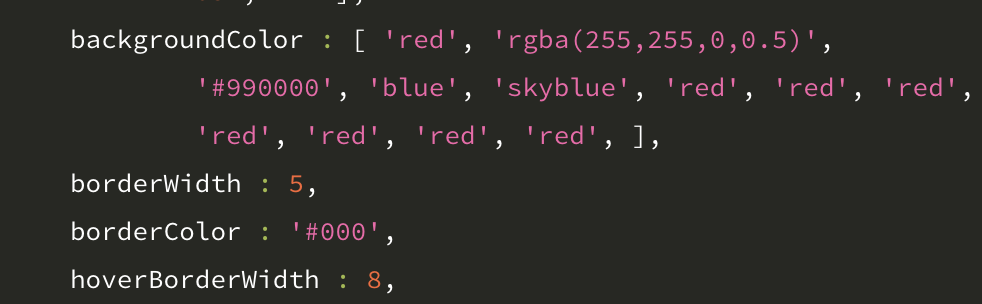
이런 식으로 JS 파일 속 datasets에서 스타일을 지정해주면 된다.
npm 형식으로 리액트 속에서 사용한다면?
const LineChart = () => {
  const chartContainer = useRef(null);

  useEffect(() => {
    let ctx = chartContainer.current.getContext("2d");
    let gradient = ctx.createLinearGradient(0, 0, 0, 300);
    gradient.addColorStop(0, "rgba(255, 0, 0, 0.3)");
    gradient.addColorStop(1, "rgba(255, 0, 0, 0.1)");
    new Chartjs(ctx, {
      type: "line",
      data: {
        labels: ["1960", "1970", "1980", "1990", "2000", "2010", "2020"],
        datasets: [
          {
            type: "line",
            label: "연도별 수도권 인구비중(%)",
            borderCapStyle: "round",
            borderColor: "red",
            backgroundColor: gradient,
            pointBackgroundColor: "rgba(255, 0, 0, 0.2)",
            pointOpacity: 0.5,
            pointRadius: 4,
            pointHoverRadius: 6,
            pointHoverBackgroundColor: "red",
            data: [
              { x: "1960", y: 20.8 },
              { x: "1970", y: 28.3 },
              { x: "1980", y: 35.5 },
              { x: "1990", y: 42.8 },
              { x: "2000", y: 46.3 },
              { x: "2010", y: 49.2 },
              { x: "2019", y: 50.0 },
              { x: "2020", y: 50.2 }
            ]
          }
        ]
      },
      options: {
        animation: {
          duration: 2000
        },
        responsive: true,
        maintainAspectRatio: false,
        tooltips: {
          mode: "x",
          intersect: false
        },
        legend: {
          display: false
        },
        scales: {
          xAxes: [
            {
              display: true,
              scaleLabel: {
                display: true,
                labelString: "연도"
              },
              type: "time",
              time: {
                unit: "year",
                unitStepSize: 10
              },
              ticks: {
                fontSize: 13
              }
            }
          ],
          yAxes: [
            {
              display: true,
              scaleLabel: {
                display: true,
                labelString: "수도권 인구비중"
              },
              ticks: {
                fontSize: 13,
                beginAtZero: true,
                callback: function (value, index, values) {
                  return value + "%";
                }
              }
            }
          ]
        }
      }
    });
  }, [chartContainer]);

  return (
    <Section>
      <Container>
        <Title>연도별 수도권 인구비중</Title>
        <Canvas>
          <canvas ref={chartContainer} />
        </Canvas>
      </Container>
    </Section>
  );
};

export default LineChart;
데이터를 다루는 product를 개발한다면 정말 유용하게 쓰일 수 있을것 같다.
특히 admin dashboard 와 같은 것.

미국에서 개발하고 있는 외노자