프로젝트에서 실시간 채팅을 구현하면서 기본 스크롤바가 전반적인 UI에 너무 안 어울려서 수정해야될 필요성을 느꼈다. 또한, 기본 스크롤바에 조사해보니 아래와 같은 단점들이 있었다.
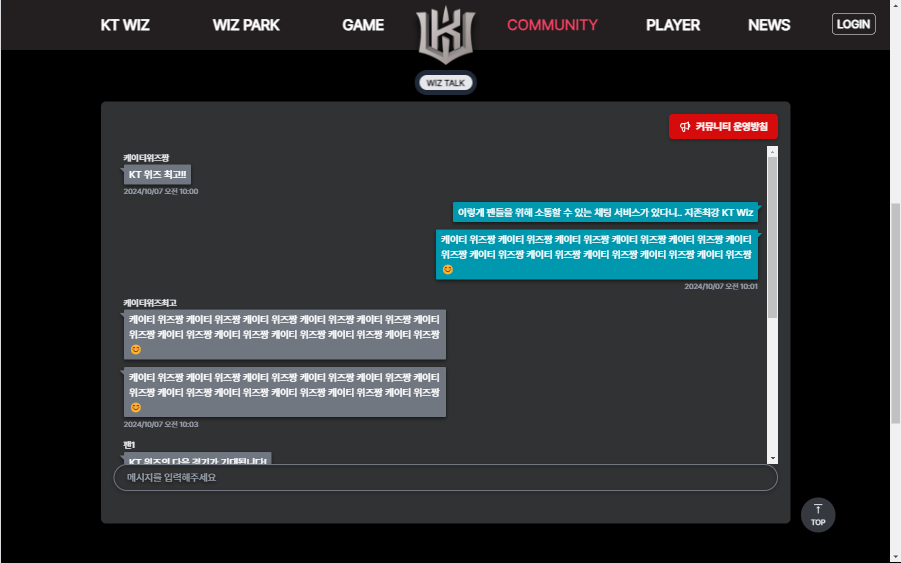
기본 스크롤바가 적용된 UI
- 전체 레이아웃이 왼쪽으로 밀리는 현상이 발생함
- 전반적인 UI의 어울리지 않는 스크롤바 사용으로 UI 일관성을 저해시킴
- 스크롤하지 않는 상태에서 스크롤바가 보여 비교적 주요 정보에 대한 집중력을 떨어트림
그리고 단순히 CSS만 바꾸는 게 아니라 카카오톡을 참고해서 다양한 기능을 넣을 수 있도록 구현해야겠다는 생각이 들어서 자료조사를 시작했다
커스텀 스크롤바를 구현하는 목적
1. UI 안정성 및 일관성 개선
- 기본 스크롤바를 사용할 경우, 스크롤바의 너비가 화면 너비에 포함되어 전체 레이아웃이 왼쪽으로 이동하는 현상을 발생하는 이슈를 개선할 수 있음
- 커스텀 스크롤바로 필요할 때만 나타나도록 설정하여 시각적 복잡도를 줄이고 사용자가 중요한 정보에 더 집중할 수 있음
- 웹사이트의 디자인 테마나 브랜드 아이덴티티에 맞춰 스크롤바의 색상, 모양, 크기 등을 커스텀하여 UI 전반에 일관성을 부여할 수 있음
2. 성능 최적화
- 스크롤이 없는 상태에서 스크롤바가 숨겨져 있으면 불필요한 렌더링 리소스를 줄일 수 있어 성능 최적화에도 기여할 수 있음
작업 내용
- 기술스택 :
ReactTypeScriptTailwindCSSFramer motion - 기본 스크롤바는 보이지 않도록 한다
- 커스텀 스크롤바를 공용 컴포넌트로 만들어 다양한 컴포넌트에서 사용할 수 있도록 한다
- 커스텀 스크롤바 기능
- 스크롤바의 기본 기능을 구현한다
- 스크롤이 없는 상태에서는 보이지 않게 한다
- 다양한 컴포넌트에서 사용할 수 있도록 스크롤바의 className을 변경할 수 있도록 한다
구현한 코드
기본 스크롤바는 보이지 않도록 한다
- tailwind css에서 스크롤바를 선택하는데 어려움이 있으므로 css 파일을 만든 후
display : none을 하면 스크롤바가 없어진다
/* CustomScrollbar.css */
.scrollbar-custom {
  overflow-y: auto;
}

.scrollbar-custom::-webkit-scrollbar {
  display: none;
}
스크롤바 기능 구현
- 아래 코드는 지정한 요소에 스크롤을 하면 작동하는 함수이다
- 아래 순서로 진행된다
① 스크롤될 콘텐츠의 길이에 따라 스크롤바의 길이가 변함
② 스크롤할 때마다 스크롤의 위치가 변경
③ 스크롤이 없는 상태에서는 보이지 않게 함
const handleScroll = () => {
    if (containerRef.current) {
      {/* 스크롤바 크기 조정 */}

      // 스크롤될 컨텐츠 요소 높이 계산
      // 무한 스크롤링이 될 수 있기 때문에 스크롤할 때마다 연산 필요
      const contentHeight = containerRef.current.children[0].clientHeight;

      const scrollbarHeightCalc =
        (containerHeight / contentHeight) * containerHeight;
      setScrollbarHeight(scrollbarHeightCalc);

      {/* 스크롤바 위치 조정 */}
      // 스크롤바가 요소의 끝을 넘지 않도록 제한
      const maxScrollTop = containerHeight - scrollbarHeightCalc;
      const newScrollTop =
        scrollYProgress.get() * (containerHeight - scrollbarHeightCalc);


      setScrollPercentage(Math.min(newScrollTop, maxScrollTop));

      {/* 스크롤을 할 때만 스크롤바가 보임 */}
      if (hideScrollbar) {
        setShowScrollbar(true)

        if (timeoutRef.current) {
          clearTimeout(timeoutRef.current);
        }

        timeoutRef.current = setTimeout(() => {
          setShowScrollbar(false);
        }, 1000);
      }
    }
  };
전체 코드
- 그외에도 옵셔널 파라미터를 통해서 커스텀을 할 수 있도록 했다
// CustomScrollbar.tsx
import { useState, useEffect, useRef } from 'react';

import { useScroll } from 'framer-motion';

import { cn } from '@/utils/cn';
import '@/styles/CustomScrollbar.css';

type CustomScrollbarProps = {
  children: React.ReactNode;
  containerClassName?: string;
  scrollbarClassName?: string;
  hideScrollbar?: boolean;
};

const CustomScrollbar = ({
  children,
  containerClassName = '',
  scrollbarClassName = '',
  hideScrollbar = true,
}: CustomScrollbarProps) => {
  const [showScrollbar, setShowScrollbar] = useState(
    hideScrollbar ? false : true,
  );
  const [scrollPercentage, setScrollPercentage] = useState(0);
  const [scrollbarHeight, setScrollbarHeight] = useState(0);
  const [containerHeight, setContainerHeight] = useState<number>(0);
  const containerRef = useRef<HTMLDivElement>(null);
  const timeoutRef = useRef<NodeJS.Timeout>();

  const { scrollYProgress } = useScroll({ container: containerRef });

  useEffect(() => {
    // 사용자가 보고 있는 요소 높이 계산
    // 고정된 크기이기 때문에 렌더링 때 한 번만 연산
    if (containerRef.current) {
      setContainerHeight(containerRef.current.clientHeight);
    }
  }, [containerRef]);

  const handleScroll = () => {
    if (containerRef.current) {
      {/* 스크롤바 크기 조정 */}

      // 스크롤될 컨텐츠 요소 높이 계산
      // 무한 스크롤링이 구현할 수 있기 때문에 스크롤할 때마다 연산 필요
      const contentHeight = containerRef.current.children[0].clientHeight;

      const scrollbarHeightCalc =
        (containerHeight / contentHeight) * containerHeight;
      setScrollbarHeight(scrollbarHeightCalc);

      {/* 스크롤바 위치 조정 */}
      // 스크롤바가 요소의 끝을 넘지 않도록 제한
      const maxScrollTop = containerHeight - scrollbarHeightCalc;
      const newScrollTop =
        scrollYProgress.get() * (containerHeight - scrollbarHeightCalc);


      setScrollPercentage(Math.min(newScrollTop, maxScrollTop));

      {/* 스크롤을 할 때만 스크롤바가 보임 */}
      if (hideScrollbar) {
        setShowScrollbar(true)

        if (timeoutRef.current) {
          clearTimeout(timeoutRef.current);
        }

        timeoutRef.current = setTimeout(() => {
          setShowScrollbar(false);
        }, 1000);
      }
    }
  };

  useEffect(() => {
    // 타이머 클린업 함수
    return () => {
      if (timeoutRef.current) {
        clearTimeout(timeoutRef.current);
      }
    };
  }, []);

  return (
    <div className={cn('relative', containerClassName)}>
      <div
        ref={containerRef}
        onScroll={handleScroll}
        className="scrollbar-custom h-full"
      >
        {children}
      </div>
      <div
        className={cn(
          'absolute right-0 top-0 h-full w-3 bg-transparent transition-opacity duration-300',
          showScrollbar ? 'opacity-100' : 'opacity-0',
        )}
      >
        <div
          className={cn(
            'absolute w-full rounded-full bg-kt-gray-2',
            scrollbarClassName,
          )}
          style={{
            top: `${scrollPercentage}px`,
            height: containerRef.current ? `${scrollbarHeight}px` : '20%',
          }}
        />
      </div>
    </div>
  );
};

export default CustomScrollbar;
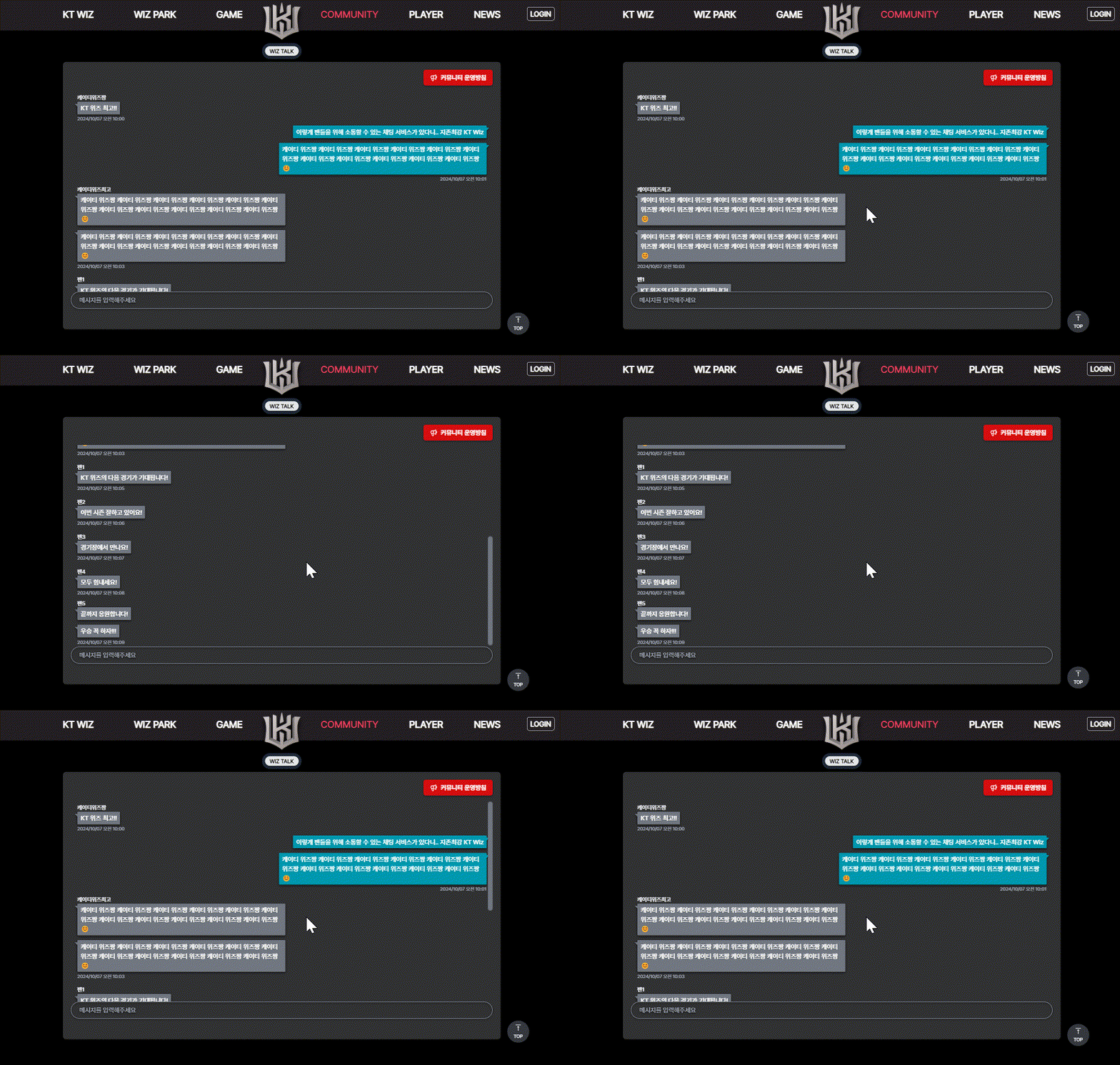
커스텀 스크롤바 적용 화면
- 스크롤바에 absolute을 적용하여 왼쪽으로 밀리는 현상을 개선함
- 전반적인 UI와 어울리는 스크롤바로 개선
- 스크롤하지 않는 상태에서는 스크롤바가 보이지 않아 사용자가 주요 정보에 집중할 수 있도록 함
이제 채팅창 무한 스크롤을 구현하면서 성능에도 더 신경써서 미흡한 부분은 고쳐봐야겠다

효효 개발공부로그