📌 Docker Engine
: Docker Engine은 컨테이너를 빌드하고 실행하는 데 사용되는 핵심 기술입니다. 클라이언트-서버(Client-Server) 아키텍처로 구성되어 있으며, 세 가지 주요 구성 요소로 이루어져 있습니다.
📌 Docker Images
: Docker Images는 컨테이너를 만들기 위한 읽기 전용 템플릿입니다. 이미지는 애플리케이션을 실행하는 데 필요한 모든 것(코드, 라이브러리, 런타임 환경, 환경 변수 등)을 패키징한 상태로, 컨테이너의 청사진 역할을 합니다.
📌 Docker Containers
: Docker Container는 Docker 이미지의 인스턴스를 실행하는 경량의 독립적인 실행 단위입니다. 컨테이너는 애플리케이션과 그에 필요한 모든 것(코드, 런타임, 시스템 도구, 라이브러리 등)을 패키지화하여, 어떤 환경에서든 일관되게 실행될 수 있도록 보장합니다.
Docker image vs container
Docker 이미지 (붕어빵 틀):
-
정적(static): 한번 만들어지면 변하지 않습니다.
-
읽기 전용(read-only): 틀 자체를 수정할 수는 없죠.
-
청사진: 붕어빵을 만들기 위한 설계도이자 템플릿입니다. 애플리케이션과 그에 필요한 모든 설정(코드, 런타임, 라이브러리 등)이 이 안에 담겨 있습니다.
-
docker pull 또는 docker build 명령어로 이미지를 다운로드하거나 직접 만들 수 있습니다.
Docker 컨테이너 (붕어빵):
-
실행 가능한 인스턴스: 붕어빵 틀에서 찍어낸 실제 붕어빵입니다.
-
독립적: 여러 개의 붕어빵을 동시에 만들 수 있듯이, 한 이미지로 여러 개의 컨테이너를 실행할 수 있습니다. 각 컨테이너는 서로 영향을 주지 않는 독립적인 환경에서 실행됩니다.
-
휘발성(ephemeral): 붕어빵을 먹고 나면 사라지듯이, 컨테이너는 정지하거나 삭제하면 그 안에 저장된 데이터가 사라집니다. (그래서 데이터를 영구적으로 저장하기 위해 볼륨을 사용합니다.)
📌 Dockerfile
: Dockerfile은 Docker 이미지를 빌드하기 위한 명령어를 담은 텍스트 파일입니다. Docker는 이 Dockerfile에 나열된 순서대로 명령어를 실행하여 최종 이미지를 생성합니다.
📌 Docker Compose
: Docker Compose는 여러 개의 컨테이너로 구성된 애플리케이션을 정의하고 실행하기 위한 도구입니다. YAML 파일 하나를 사용하여 모든 컨테이너의 설정(이미지, 네트워크, 볼륨, 환경 변수 등)을 정의하고, 단일 명령어로 전체 애플리케이션을 빌드하고 실행할 수 있습니다.
📌 Docker Hub
: Docker Hub는 공개 Docker 이미지 레지스트리입니다. 개발자들이 만든 Docker 이미지를 공유하고 저장하는 클라우드 기반 서비스로, GitHub가 코드 저장소 역할을 하는 것과 유사합니다.
busybox
docker run -it --rm busybox
Docker Commands
docker --version
: Displays the installed Docker version
docker info
: Shows system-wide information about Docker
docker help
: Lists all available Docker commands and options
Image Management
docker images
: Lists all images on the local machine
docker pull [image-name]
: Downloads an image from Docker Hub or another registry
docker build -t [image-name]
: Builds a Docker image using a Dockerfile in the current directory and tags it with a name
docker tag [source-image] [target-image:tag]
docker push [image-name]
docker rmi [image-id]
Container Management
docker ps
: Lists all running containers
docker ps -a
: Lists all containers, including stopped ones
docker rm [container-id/name]
: Remove a Container
docker rm -f [container-id/name]
: Forces the removal of a running container
docker stop [container-id/name]
: Stops a running container
docker start [container-id/name]
: Starts a stopped container
docker restart [container-id/name]
: Restarts a container
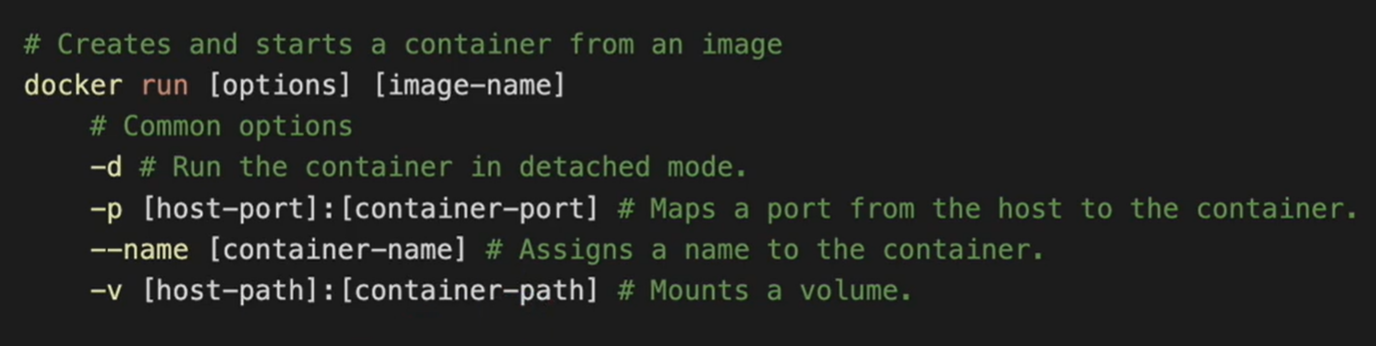
Container Interaction
docker exec [container-id/name] [command]
: Runs a command inside a running container
docker attach docker logs [container-id/name]
: Attaches your terminal to a running container's standard input/output.
# Shows logs from a container

docker logs [options] [container-id/name]
	-- follow: Streams logs in real-time.


# Forcing Immediate Termination. Sends SIGKILL

docker kill [options] [container-id/name]
	--signal, -s: Specifies the signal to send to the container. By default, it uses SIGKILL.