console.log('start')

fetch('https://jsonplaceholder.typicode.com/users')
  .then((response) => response.text())
  콜백을 등록만 하고 실행은 안함
  .then((result) => {console.log(result)})
console.log('end')- 리퀘스트를 보내고 리스폰스가 왔을 때 실행할 콜백을 then 메소드로 등록만 하고 그 다음 줄 코드 실행
- 콜백은 나중에 리스폰트가 도착했을 때 실행된다.
console.log('Start');
fetch 함수(리퀘스트 보내기 및 콜백 등록)
console.log('End');
리스폰스가 오면 2. 에서 then 메소드로 등록해뒀던 콜백 실행
- 결과는 start, end 부터 출력되고 result가 출력된다.
이러한 현상을 '비동기 실행'이라고 한다. 동일한 작업을 더 빠른 시간 내 처리할 수가 있다. 반면 fetch 함수에서 리턴값을 받을 때까지 기다리고 End를 출력한다면 동기 실행 이라고 하며, 시간을 낭비할 수 있는 단점이 존재한다.
Promise
- 어떤 작업에 관한 "상태 정보"를 갖고 있는 객체
fetch 함수는 promise 객체를 리턴한다. 작업이 진행중이라면 pending, 성공적이라면 fulfilled, 실패했다면 rejected를 갖게 된다. fulfilled는 작업 성공 결과(서버가 보내준 리스폰스)를 갖게되며, rejected 상태인 경우에는 작업 실패 정보를 갖게 된다.
이제 fetch 함수 뒤에 오는 then 메소드에 대해 이해할 수가 있다. 프로미스 객체가 fulfilled 상태가 되었을 때 실행할 콜백을 등록하는 메소드라고 생각하면 된다.
Promise Chaining
- then 메소드를 연속적으로 붙이는 것. 즉, 프로미스 객체들을 계속해서 연결해 나가는 것. 이게 가능한 이유는 then 메소드가 새로운 프로미스 객체를 리턴하기 때문이다.
console.log('start')

fetch('https://jsonplaceholder.typicode.com/users')
  .then((response) => response.text())
  .then((result) => {
    const users = JSON.parse(result)
    return users[0]
  })
  .then(user) => {
    console.log(user)
    const {address} = user
    return address
  })
  .then(address) => {
    console.log(address)
    const {geo} = address
    return geo
  }
console.log('end')
then 메소드들이 각각 별개의 프로미스 객체들을 리턴한다. response를 잘 받게되면 text 메소드가 리턴하는 프로미스 객체는 fulfilled 상태이고, 그 작업 성공 결과로 리스폰스의 내용을 갖고있다.
- 중요한 사실
then 메소드가 리턴한 프로미스 객체는 처음에 pending 상태임. 나중에 then 메소드를 등록한 콜백이 실행되고 콜백에서 어떤 값을 리턴하면 then 메소드가 리턴했던 프로미스 객체가 영향을 받는다. (콜백에서 어떤 값을 리턴하느냐에 따라 받는 영향이 달라진다.)
- 콜백 안에서 프로미스 객체를 리턴하는 경우
- then 메소드가 리턴했던 프로미스 객체는 콜백이 리턴한 프로미스 객체와 동일한 상태와 결과를 갖게 된다. 예를들어 콜백이 리턴한 프로미스 객체가 fulfilled 상태가 되면 then 메소드가 리턴했던 프로미스 객체도 fulfilled 상태가 되고 동일한 작업 성공 결과를 갖게 된다.
콜백이 리턴한 프로미스 객체가 rejected 상태가 되면 then 메소드가 리턴했던 프로미스 객체도 rejected 상태가 되고 동일한 작업 실패 정보를 갖게 된다.
- 콜백 안에서 프로미스 객체가 아닌 값을 리턴하는 경우
- 프로미스 객체가 아닌 단순 숫자, 문자열, 일반 객체를 리턴하면 then 메소드가 리턴했던 프로미스 객체는 fulfilled 상태가 되고, 콜백의 리턴값을 작업 성공 결과로 갖게 된다.
text 메소드, json 메소드
-
fetch 함수로 리스폰스를 잘 받게 되면 response 객체의 text 메소드는 fulfilled 상태이면서 리스폰스의 바디에 있는 내용을 string 타입으로 변환한 값을 '작업 성공 결과'로 가진 Promise 객체를 리턴한다. 이때 작업 성공 결과가가 string 타입이므로 JSON 데이터 일 경우 parse 메소드를 사용해야 한다.
-
fetch 함수로 리스폰스를 잘 받게 되면 response 객체의 json 메소드는 fulfilled 상태이면서 리스폰스의 바디에 있는 JSON 데이터를 자바스크립트 객체로 Deserialize해서 생긴 객체를 '작업 성공 결과'로 가진 Promise 객체를 리턴한다. 만약 리스폰스의 바디에 있는 내용이 JSON 타입이 아니면 에러가 발생하며 Promise 객체는 rejected 상태가 되며 '작업 실패 정보'를 갖게 된다.
-
then 메소드가 리턴했던 Promise 객체는 그 콜백에서 리턴한 Promise 객체와 동일한 상태와 결과를 갖게 되는데 즉, 콜백에서 리턴한 Promise 객체로부터 새로운 Chain이 시작된다는 말과 같다. 따라서 response 객체의 text 메소드 또는 json 메소드 이후에 등장하는 then 메소드부터는 string 타입의 값이나 자바스크립트 객체를 갖고 바로 원하는 작업을 할 수 있게 된다.
rejected 상태가 온다면?
fetch('http://jsonplaceholder.typicode.com/users')
.then((response) => response.text(), (error) => {console.log(error)})
.then((result) => {console.log(result)})
위 코드처럼 promise 객체가 rejected 상태가 되면 then 메소드의 두 번째 파라미터가 실행된다. 파라미터에는 작업 실패 정보가 담기게 된다.
catch 메소드
- 프로미스 객체가 rejected일 경우 catch 메소드를 사용해도 된다.
fetch('https://jsonplaceholder.typicode.commmmmm/users')
	.then((response) => response.text())
    .catch((error) => {console.log(error);})
    .then((result) => {console.log(result);});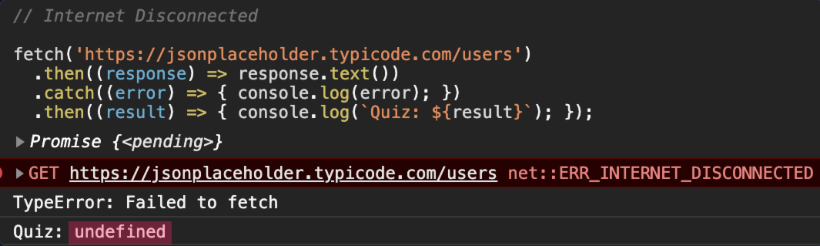
-
catch 문 안의 콜백이 리턴한 값이 없으므로 undefined를 리턴하게 된다. 따라서 마지막 then 메소드의 result는 undefined가 된다.
-
catch 메소드는 then 메소드를 약간 변형시킨 것과 동일하다.
.then(undefined, (error) => {console.log(error);})fetch('https://jsonplaceholder.typicode.commmmm/users')
.then((response) => response.text())
.then((result) => {
console.log(result);
throw new Error('test');
})
.catch((error) => {console.log(error);});- 프로미스 체이닝에서 어느 프로미스 객체가 rejected 상태가 되더라도 잘 대응하기 위해서는 catch 메소드는 마지막에 사용해야 한다.
finally
프로미스 객체가 fulfilled 상태가 되든 rejected 상태가 되든 상관없이 항상 실행하고 싶은 콜백이 있을 때 사용한다.
catch 메소드보다 뒤에 사용하며 파라미터도 필요없다.
프로미스 체이닝에서 작업을 수행하기 위해 사용했던 자원을 정리하던지, 로그 기록을 남겨야 한다던지, 어떠한 경우든 항상 특정 변수 값을 변경해 줘야 할때 자주 사용한다.
문제
fetch('https://www.error.www') 1
  .then((response) => response.text()) 2
  .then((result) => { console.log(result); }) 3
  .catch((error) => { console.log('Hello'); throw new Error('test'); }) 4
  .then((result) => { console.log(result); })  5
  .then(undefined, (error) => { })  6
  .catch((error) => { console.log('JS'); }) 7
  .then((result) => { console.log(result); }) 8
  .finally(() => { console.log('final'); }); 9
- 1에서 유효하지 않는 URL을 fetch 했으므로 rejected 상태가 된다. 2,3 then 콜백함수에 두 번째 파라미터가 없으므로 (4)catch 메소드로 가게 된다.
- 그럼 Hello가 가장 먼저 출력되고, 임의로 'test' 에러를 발생시킨다.
- 4번에서 에러를 발생시켰기 때문에 rejected 상태가 되며 catch 메소드와 동일한 역할인 (6)으로 이동한다.
- (6)의 2번째 파라미터에서 빈 객체만 존재하므로 undefined 값을 갖게 된다. (상태는 fulfilled)
- 상태가 fulfilled 이므로 (7)을 건너뛰고 8로 이동하여 (6)의 undefined 값을 출력하게된다.
- finally는 무조건 실행이 되므로 final이 출력된다.
따라서 Hello, undefined, final 순으로 값이 출력된다.
Promise 객체 직접 생성
const p = new Promise((resolve,reject) => {
  setTimeout(()=>{resolve('success')},2000)
})
p.then((result) => {console.log(result)})- p라는 프로미스 객체가 2초 후에 fulfilled 상태가 됨.
- resolve 안에 넣은 success 문자열이 작업 성공 결과가 된다.
const p = new Promise((resolve,reject) => {
  setTimeout(()=>{reject(new Error('fail'));},2000)
})
p.catch((error) => {console.log(error)})- 생성되는 프로미스 객체를 rejected 상태로 만든다.
- argument로 넣은 Error 객체는 작업 실패 정보가 된다.
resolve: 생성될 프로미스 객체를 fulfilled 상태로 만들수 있는 함수가 연결
rejected: 생성될 프로미스 객체를 rejected 상태로 만들 수 있는 함수가 연결