Kubernetes in Action, Second Edition MEAP V15 정리중
Kubernetes API란?
Kubernetes cluster 안의 정보들을 CRUD하기 위한 http based RESTful API
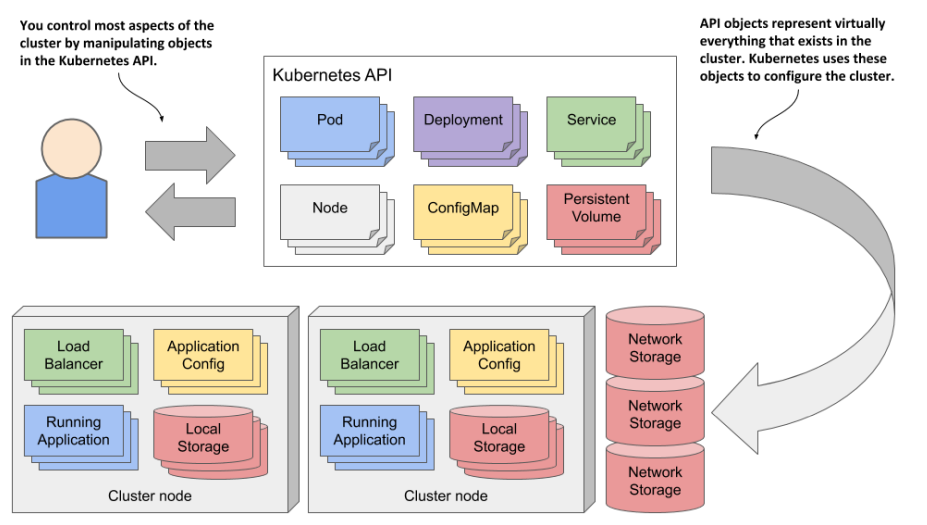
REST API를 통해 CRUD할 수 있는 cluster의 구성정보들을 resource나 object라고 부른다.
resource는 /apis/apps/v1/namespaces/myns/deployments/mydeploy 이런 느낌으로 카테고리 > 세부문서 > 카테고리 > 세부문서 로 파싱 가능하다.
object의 구성요소 4가지:
1. Metadata - object의 type을, type이 속한 그룹, 버전들을 나타낸다.
2. Object Metadata - object의 이름, 생성 날짜, 소유자 등을 나타낸다.
3. Spec - object가 되기를 바라는 상태(desired state)를 나타낸다. Pod의 경우 이는 Pod의 컨테이너, 저장공간 크기 등이다.
4. Status - object의 실제 상태(actual state)를 나타낸다. Pod의 경우 이는 Pod의 상태, 각 컨테이너의 상태, IP 주소, 실행 중인 노드 등과 같이 Pod에 대한 현재 상황을 나타내는 정보이다.
Kubernetes Control plane은 각각의 type에 맞는 type controller를 사용해 Spec의 내용을 읽어와 desired state가 되도록 수행하고, 결과를 Status에 저장하여 보내준다.

Kubernetes API 예제
Node 배치 확인
예를 들어서 kubectl get nodes 명령시 다음과 같은 결과가 나왔다고 해보자.
$ kubectl get nodes
NAME STATUS ROLES AGE VERSION
kind-control-plane Ready master 1h v1.18.2
kind-worker Ready <none> 1h v1.18.2
kind-worker2 Ready <none> 1h v1.18.2
그러면 Kubernetes API는 그림과 같이 구성된다. API 안의 node object들은 각각 실제 node(즉 실제 컴퓨터)와 대응된다.
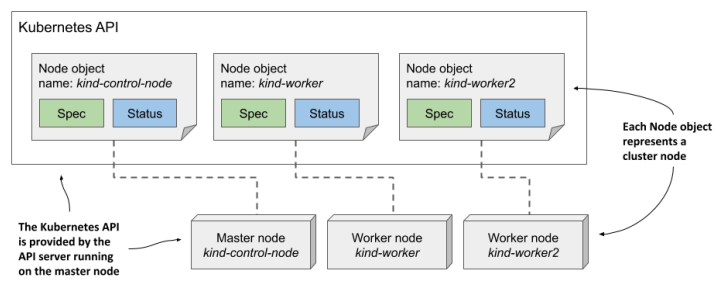
kubectl get node
node object의 정보를 자세히 확인하려면 kubectl get node <node-name> -o yaml 명령을 입력한다. object의 4가지 구성요소가 있는것을 확인할 수 있다.
$ kubectl get node kind-control-plane -o yaml
apiVersion: v1
kind: Node
metadata:
 annotations: ...
 creationTimestamp: "2020-05-03T15:09:17Z"
 labels: ...
 managedFields: ...
 name: kind-control-plane
 resourceVersion: "3220054"
 selfLink: /api/v1/nodes/kind-control-plane
 uid: 16dc1e0b-8d34-4cfb-8ade-3b0e91ec838b
spec:
 podCIDR: 10.244.0.0/24
 podCIDRs:
 - 10.244.0.0/24
 taints:
 - effect: NoSchedule
 key: node-role.kubernetes.io/master
status:
 addresses:
 - address: 172.18.0.2
 type: InternalIP
 - address: kind-control-plane
 type: Hostname
 allocatable: ...
 capacity:
 cpu: "8"
 ephemeral-storage: 401520944Ki
 hugepages-1Gi: "0"
 hugepages-2Mi: "0"
 memory: 32720824Ki
 pods: "110"
 conditions:
 - lastHeartbeatTime: "2020-05-17T12:28:41Z"
 lastTransitionTime: "2020-05-03T15:09:17Z"
 message: kubelet has sufficient memory available
 reason: KubeletHasSufficientMemory
 status: "False"
 type: MemoryPressure
 ...
 daemonEndpoints:
 kubeletEndpoint:
 Port: 10250
 images:
 - names:
 - k8s.gcr.io/etcd:3.4.3-0
 sizeBytes: 289997247
 ...
 nodeInfo:
 architecture: amd64
 bootID: 233a359f-5897-4860-863d-06546130e1ff
 containerRuntimeVersion: containerd://1.3.3-14-g449e9269
 kernelVersion: 5.5.10-200.fc31.x86_64
 kubeProxyVersion: v1.18.2
 kubeletVersion: v1.18.2
 machineID: 74b74e389bb246e99abdf731d145142d
 operatingSystem: linux
 osImage: Ubuntu 19.10
 systemUUID: 8749f818-8269-4a02-bdc2-84bf5fa21700
사실 너무 길어서 처음부터 무슨말인지 알아보기 힘들다..
conditions
node의 status 필드의 한 예시로 conditions라는 부분이 있다. conditions란 object가 현재 처한 상황들을 배열로 저장해놓은 것이다. 디버깅할 때 많이 쓰이므로, 각 구성요소만 짧게 알아보자.
lastTransitionTime: conditions가 마지막으로 업데이트된 시점
lastHeartbeatTime: conditions 업데이트가 마지막으로 controller에게 전달된 시점
message, reason: 현재 상태
type: 어느 영역에서 해당 conditions가 나타나는지
status: conditions를 True, False, Unknown으로 알려줌
kubectl explain
필드들에 대한 자세한 설명은 kubectl explain <kind> 아니면 kubectl explain <kind>.<subkind> 이런식으로 입력하면 각 object들의 field에 대한 설명이 나온다.
$ kubectl explain nodes
KIND: Node
VERSION: v1
DESCRIPTION:
 Node is a worker node in Kubernetes. Each node will have a unique
 identifier in the cache (i.e. in etcd).
FIELDS:
 apiVersion <string>
 APIVersion defines the versioned schema of this representation of an
 object. Servers should convert recognized schemas to the latest...
 kind <string>
 Kind is a string value representing the REST resource this object
 represents. Servers may infer this from the endpoint the client...
 metadata <Object>
 Standard object's metadata. More info: ...
 spec <Object>
 Spec defines the behavior of a node...
 status <Object>
 Most recently observed status of the node. Populated by the system.
 Read-only. More info: ...
kubectl describe
kubectl describe라는 명령도 입력해볼 수 있다. 이것은 아까 했던 kubectl get node <node-name> -o yaml를 조금 간략하게 정리해주고, 자원 할당량과 최근 이벤트들을 표시한다.
$ kubectl describe node kind-worker-2
Name: kind-worker2
Roles: <none>
Labels: beta.kubernetes.io/arch=amd64
 beta.kubernetes.io/os=linux
 kubernetes.io/arch=amd64
 kubernetes.io/hostname=kind-worker2
 kubernetes.io/os=linux
Annotations: kubeadm.alpha.kubernetes.io/cri-socket: /run/contain...
 node.alpha.kubernetes.io/ttl: 0
  volumes.kubernetes.io/controller-managed-attach-deta...
CreationTimestamp: Sun, 03 May 2020 17:09:48 +0200
Taints: <none>
Unschedulable: false
Lease:
 HolderIdentity: kind-worker2
 AcquireTime: <unset>
 RenewTime: Sun, 17 May 2020 16:15:03 +0200
Conditions:
 Type Status ... Reason Message
 ---- ------ --- ------ -------
 MemoryPressure False ... KubeletHasSufficientMemory ...
 DiskPressure False ... KubeletHasNoDiskPressure ...
 PIDPressure False ... KubeletHasSufficientPID ...
 Ready True ... KubeletReady ...
Addresses:
 InternalIP: 172.18.0.4
 Hostname: kind-worker2
Capacity:
 cpu: 8
 ephemeral-storage: 401520944Ki
 hugepages-1Gi: 0
 hugepages-2Mi: 0
 memory: 32720824Ki
 pods: 110
Allocatable:
 ...
System Info:
 ...
PodCIDR: 10.244.1.0/24
PodCIDRs: 10.244.1.0/24
Non-terminated Pods: (2 in total)
 Namespace Name CPU Requests CPU Limits ... AGE
 --------- ---- ------------ ---------- ... ---
 kube-system kindnet-4xmjh 100m (1%) 100m (1%) ... 13d
 kube-system kube-proxy-dgkfm 0 (0%) 0 (0%) ... 13d
Allocated resources:
 (Total limits may be over 100 percent, i.e., overcommitted.)
 Resource Requests Limits
 -------- -------- ------
 cpu 100m (1%) 100m (1%)
 memory 50Mi (0%) 50Mi (0%)
 ephemeral-storage 0 (0%) 0 (0%)
 hugepages-1Gi 0 (0%) 0 (0%)
 hugepages-2Mi 0 (0%) 0 (0%)
Events:
 Type Reason Age From Message
 ---- ------ ---- ---- -------
 Normal Starting 3m50s kubelet, kind-worker2 ...
 Normal NodeAllocatableEnforced 3m50s kubelet, kind-worker2 ...
 Normal NodeHasSufficientMemory 3m50s kubelet, kind-worker2 ...
 Normal NodeHasNoDiskPressure 3m50s kubelet, kind-worker2 ...
 Normal NodeHasSufficientPID 3m50s kubelet, kind-worker2 ...
 Normal Starting 3m49s kube-proxy, kind-worker2 ...
event object
controller가 current state과 desired state를 맞춰가기 위해 작업한 목록들을 적어놓은 object이다. Normal 타입의 이벤트는 정상적으로 처리된 것, Warning 타입은 뭔가가 방해한 것이다.
event object는 controll plane의 etcd에 저장되고, 생성되고 1시간 후에 지워진다.
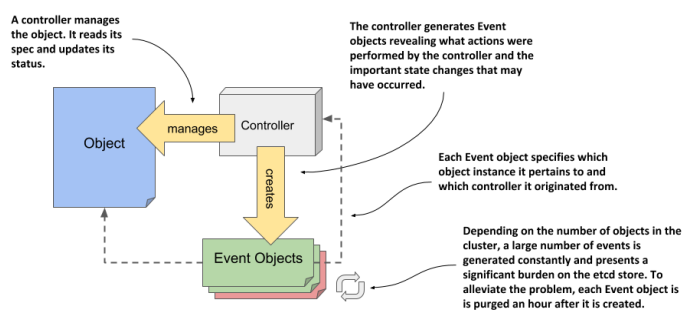
event object들도 kubectl get 커맨드로 볼 수 있다.
Type이 Warning인 것만 보려면, kubectl get ev --field-selector type=Warning 이렇게 검색하면 된다.