파이널 프로젝트를 진행하며 제일 후회 했던 것 중 하나가 처음부터 Lint와 Formatter를 설정하지 않은 것이다! 컴포넌트 생성(화살표 함수 vs 일반 함수), quotation( ' ' vs " "), 그리고 사용하지도 않는 변수를 만들어 놓고 git에 push 하고, 테스트로 console.log() 찍어놓고 push하고.. 정말.. 어지러운 코드 덩어리가 만들어졌다. 토이 프로젝트 같은경우 끝나고 리팩토링을 하며 코드에 일관성을 주었는데, 파이널 프로젝트 같은 경우는.. 진짜 답이 없더라..! 내가 봐도 보기 힘든 코드인데, 제 3자는 얼마나 더 보기 힘들까..^^!...그러면서 궁금했던게.. 그럼 현업에서는 더 많은 사람들이 같이 코드를 짤텐데 어떻게 일관적인 코드를 유지하는지 궁금했다. 찾아보니 팀으로 작업을 할 때는 여러 작업자들의 코딩 스타일을 일치시키기 위한 Linter와 Code Formatter를 사용하는 것이 좋다고 한다.
Linter & Code Formatter
- Linter와 Code Formatter를 사용하게 되면 어떤 형태의 문법을 지향하고 지양할지, 포맷팅은 쌍따옴표를 사용할지, 홑따옴표를 사용할지, 혹은 몇 자마다 줄바꿈을 할지, 문장의 끝에 세미콜론을 사용할지 등의 여부를 고민하지 않고 코드 작성 자체에 집중할 수 있도록 도와준다.
- 자바스크립트 진영에서는 Linter로 ESLint를, Code Formatter 로는 Prettier를 사용하는것이 일반적!
ESLint
- 일관성 유지
- 버그를 피할수 있는 코드를 짜기위해서 만들어진 코드 분석 툴
- 작성된 코드의 구문을 분석하여 버그가 발생할 여지가 있거나, 불필요한 코드, 혹은 보안상 위험한 코드 등에 대한 경고를 띄워준다.
- 설정 커스터마이징 가능 -> 필요 규칙들을 커스텀해서 적용 가능하다.
Prettier
- 코드 포맷팅 툴, 포맷팅 룰 커스터마이징 가능
- 포맷팅 툴을 사용함으로서 팀원 모두가 같은 포맷팅 스타일 공유 가능
설치
- eslint
npm install eslint --save-dev- CRA의 경우 내장되어 있다.
- prettier
npm install prettier --save-dev
- eslint-config-prettier
- eslint는 linting 기능을, prettier는 formatting을 담당하는 구조가 이상적이다.
- 하지만, eslint에는 일부 formatting 관련된 rule도 포함되어 있기 때문에 이 rule들이 prettier와 다른 설정을 가지고 있다면 설정 충돌이 발생한다.
- 따라서, eslint에서 formatting 관련 rule들을 모두 해제해야할 필요가 있다.
- 수동으로 진행할 수도 있지만, 이를 적용해주는 eslint plugin이 존재한다.
npm install eslint-config-prettier --save-dev
설정
- 패키지를 설치하면 eslint와 prettier를 사용할 수 있게 된다. 그러나 팀원들간의 일관적인 규칙(설정)을 지정해줘야 한다!
- 파일은 최상단에!
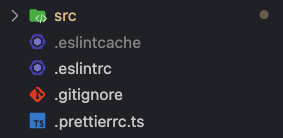
- ESLint 설정 예시
// .eslintrc

{
  "extends": ["react-app", "eslint:recommended", "prettier"],
  "env": {
    "es6": true
  },
  "rules": {
    "no-var": "error", // var 금지
    "no-multiple-empty-lines": "error", // 여러 줄 공백 금지
    "no-console": ["error", { "allow": ["warn", "error", "info"] }], // console.log() 금지
    "eqeqeq": "error", // 일치 연산자 사용 필수
    "dot-notation": "error", // 가능하다면 dot notation 사용
    "no-unused-vars": "error" // 사용하지 않는 변수 금지
  }
}
참고자료 : rule Reference, configuration, Configure Plugins
- Prettier 설정 예시
module.exports = {
  printWidth: 100, // printWidth default 80 => 100 으로 변경
  singleQuote: true, // "" => ''
  arrowParens: "avoid", // arrow function parameter가 하나일 경우 괄호 생략
};
참고자료: prettier options
Husky
- 아무리 패키지를 설치하고, 룰을 설정해도 작업자가 사용하지 않으면 효과가 없다. 강제성이 없으면 누구는 적용하고 누구는 적용하지 않는 상황이 발생한다.
- 자동화를 통해 신경쓰지 않아도 자동으로 적용되게 하자!
- commit된 코드는 무조건 formatting이 완료되어야 하고, push된 코드는 무조건 eslint가 pass된 상태에서push가 되도록 자동화를 구축해야 한다!
- 자동화를 위해 git hook을 도입 -> - git hook 설정은 까다롭고, 모든 팀원들이 사전에 repo를 클론받고 메뉴얼하게 사전 과정을 수행해야지만 hook이 실행됨을 보장할 수 있다.
- 실수로라도 사전 과정을 시행하지 않는다면 hook이 실행되지 않는다.
- 해결법은? husky!!
Husky?
- git hook 설정을 도와주는 npm package
- 번거로운 git hook 설정이 편함 + npm install 과정에서 사전에 세팅해둔 git hook을 다 적용시킬 수 있어서 모든 팀원이 git hook 실행이 되도록 하기가 편하다.
- husky를 통해서 pre-commit, pre-push hook을 설정 가능하다.
Husky 적용
-
npm install husky --save-dev -
(처음 husky 세팅하는 사람만 실행 필요)
npx husky installnpx husky install: husky에 등록된 hook을 실제 .git에 적용시키기 위한 스크립트- add postinstall script in package.json
- 이후에 clone 받아서 사용하는 사람들은 npm install후에 자동으로
husky install이 될 수 있도록 하는 설정{ "scripts": { "postinstall": "husky install" }, }
- 이후에 clone 받아서 사용하는 사람들은 npm install후에 자동으로
-
scripts 설정
Husky를 실행할때마다 매번 다 검사를 할 수는 없으니 cache 설정을 해주자!// package.json { "scripts": { "postinstall": "husky install", "format": "prettier --cache --write .", "lint": "eslint --cache .", }, } -
add pre-commit, pre-push hook
npx husky add .husky/pre-commit "npm run format"npx husky add .husky/pre-push "npm run lint"
- pre-commit?
- lint-staged와 결합해서 사용
- lint-staged를 사용할 시 아래의 장점을 얻을 수 있다.
- 포맷팅을 수행 한 뒤 git add 명령어를 자동으로 수행되게 할 수 있다.
- 포맷팅을 전체 파일 대상이 아닌 현재 git stage에 올라온 변경사항 대상으로만 수행할 수 있다.

방금 태어난 개발자