일단 완성본부터!
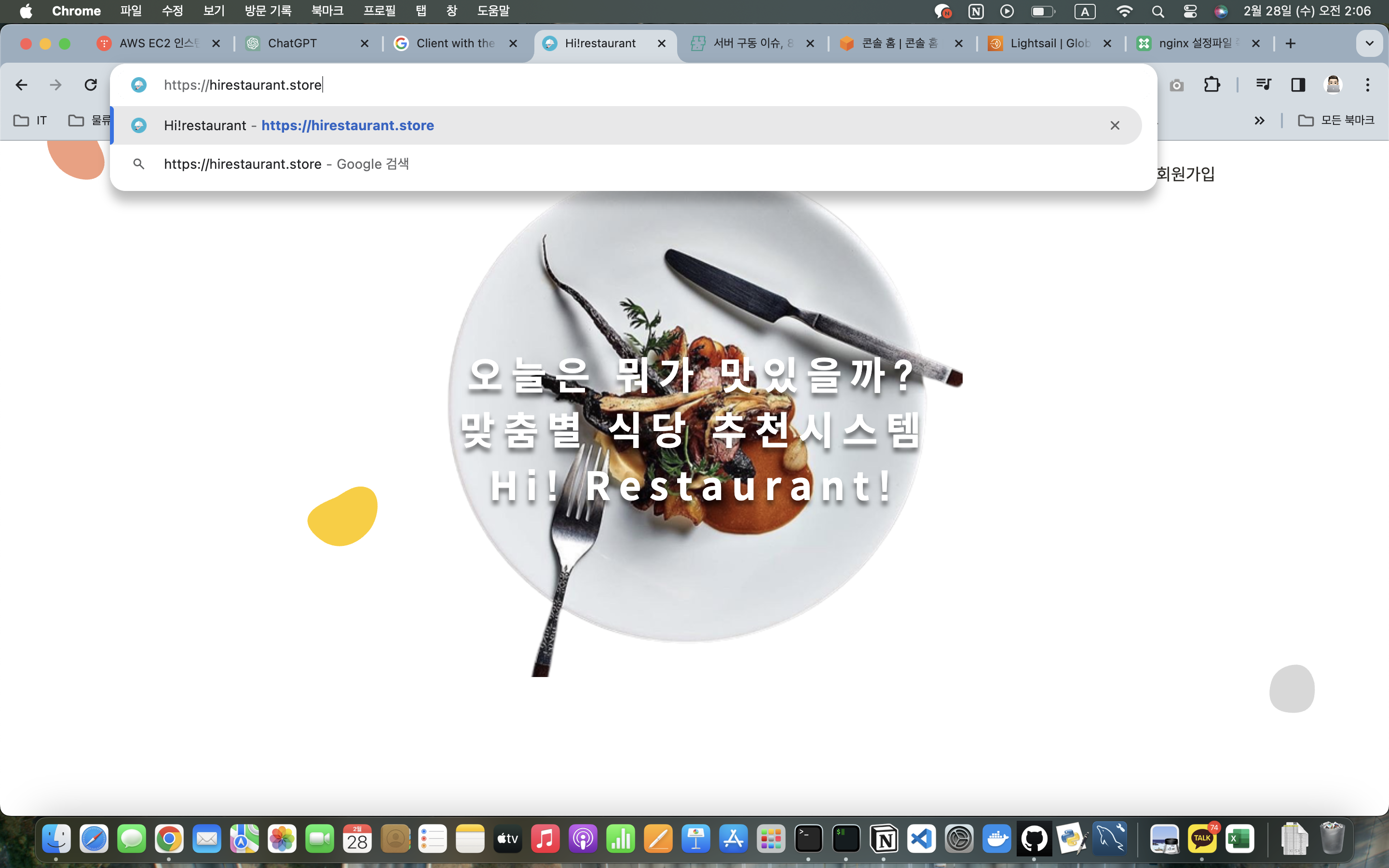
결론부터 말하자면 쉽지 않았다
왜냐?
꽁짜 좋아하면 대머리 된다는 으른들 말이 사실이고 나는 한낱 방구석에서 방댕이 벅벅 긁는 취준생이기 때문에 포트폴리오에 있어서는 최대한 비용을 줄이는게 최선이라고 생각했기 때문이다.
그리고 그냥 SSL를 발급한게 아니라, Docker Container에서 작업을 했기에 난이도가 더욱 어려웠다

엄마 미안해... 서른 두살 처먹고 나잇값 못해서 정말 미안.... 더 밤새고 공부하고 내 몸 불사지르면서 꼭 취뽀할게 ...
각설하고! 어떻게 했냐?
- letsencrypt
영국의 비영리 재단 뭐시기라는데.. 아무튼 꽁짜래서 걍 입 다물고 이걸로 셀렉트했습니다
여기서 SSL 키를 발급 받아서 Nginx에 적용시키면 되는데, 문제가 있습니다
90일이면 재발급 받아야하지롱ㅋㅋㅋㅋㅋ
그렇기에 cron job이나 docker command를 이용해서 스케쥴링을 실시해줘야 한다.
- Docker에 이식하기
시작하기 전에 사전 준비물이 필요하다
준비물
- docker : 없으면 설치
- docker-compose : 없으면 설치
- 미리 사놓은 도메인 주소(가비아 추천)
- 리모트 서버의 80번 포트와 443 포트 열어놓기! (ec2 보안그룹 인바운드 규칙에서 443,80 port)
여기서부턴 순서대로! 해야한다! 순서대로 안하면 정말 많은 시간 삽질을 한다
1-1. 본인 docker-compose.yml(yaml)파일 vi 에디터로 편집
vim docker-compose.ymlvi 에디터에 들어간 이후,
/root/는 작성한 폴더 경로는 폴더를 따로 생성해주지 않아도 compose하면서 생성되기에 그냥 편하게 작성하면 된다. 나는 참고한 자료에서 data경로를 사용해서 아래와 같이 작성해줬다.
그렇지만 여기에서 가장 주의할 점은 nginx container에 적어준 certbot volumes 폴더 경로와 certbot container에 적어준 certbot volumes 폴더 경로가 같아야 한다
또한 Certbot이 인식하는 이름은 docker-compose.yml 등 이다. certbot이 인식을 바로할 수 있게 확인 작업이 필요함
version: '3'
services:
  nginx:
    image: nginx:latest
    volumes:
      - ./conf/nginx.conf:/etc/nginx/nginx.conf
      - ./root/certbot/conf:/etc/letsencrypt
      - ./root/certbot/www:/var/www/certbot
    restart: always
    ports:
      - 80:80
      - 443:443
  certbot:
    image: certbot/certbot
    restart: unless-stopped
    volumes:
      - ./root/certbot/conf:/etc/letsencrypt
      - ./root/certbot/www:/var/www/certbot
      # /root/는 본인이 커스텀하기 편한 디렉토리 명으로 지정시킨다.
      # nginx와 certbot이 볼륨 값 경로가 같죠? 이거 잘 보셔야 합니다
필자가 만든 compose
version: '3'
services:
  nginx:
    image: nginx:latest
    volumes:
      - ./conf/nginx.conf:/etc/nginx/nginx.conf
      - ./data/certbot/conf:/etc/letsencrypt
      - ./data/certbot/www:/var/www/certbot
    restart: always
    ports:
      - 80:80
      - 443:443
  certbot:
    image: certbot/certbot
    restart: unless-stopped
    volumes:
      - ./data/certbot/conf:/etc/letsencrypt
      - ./data/certbot/www:/var/www/certbot
1-2 nginx.conf 작성
nginx를 사용하기 위해선 nginx의 conf 파일을 작성해줘야한다.
dockercompose.yml파일이 있는 폴더에 conf폴더를 만들어주고 nginx.conf 파일을 작성하겠다.
mkdir conf
vi conf/nginx.conf

# 본인 도커 환경에 따라
nginx 디렉토리 안에서 nginx.conf를 만들어도 무방함
nginx.conf
server {
     listen 80;

     server_name 구매한 도메인;

     location /.well-known/acme-challenge/ {
             allow all;
             root /var/www/certbot;
     }
}
그 상태에서 docker-compose를 실행시켜준다
실행
유의사항
본인 컨테이너가 살아있는지 certbot도 살아있는지 확인하는게 중요
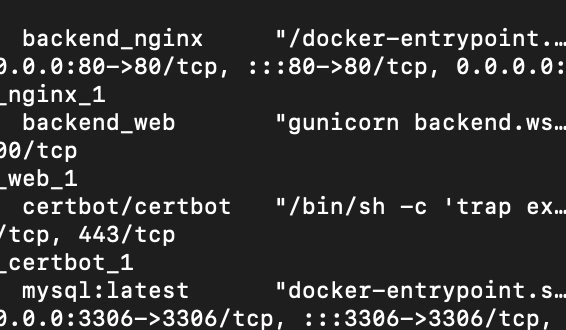
살아있다 싶으면
http로 감싸져 있는 구매했던 링크를 접속해서 한번 확인 작업 들어가보십쇼

자 구매한 도메인에 문제가 없다 싶으면 다음 작업 시작하면 됩니다
1-3. 인증서 다운로드
curl -L https://raw.githubusercontent.com/wmnnd/nginx-certbot/master/init-letsencrypt.sh > init-letsencrypt.sh
chmod +x init-letsencrypt.sh
대략적인 인증서가 다운로드 됩니다
내용은 ...
#!/bin/bash

if ! [ -x "$(command -v docker-compose)" ]; then
  echo 'Error: docker-compose is not installed.' >&2
  exit 1
fi

domains=(구매한 도메인 www.구매한 도메인) # 복수로 집어넣으셔도 됩니다 띄어쓰기 엄격하게 맞추시길
rsa_key_size=4096
data_path="./data/certbot" # 이건 아까 docker-compose에서 만들어줬던 certbot의 경로 그대로 넣으십쇼
email="이메일" # Adding a valid address is strongly recommended
staging=0 # Set to 1 if you're testing your setup to avoid hitting request limits

if [ -d "$data_path" ]; then
  read -p "Existing data found for $domains. Continue and replace existing certificate? (y/N) " decision
  if [ "$decision" != "Y" ] && [ "$decision" != "y" ]; then
    exit
  fi
fi


if [ ! -e "$data_path/conf/options-ssl-nginx.conf" ] || [ ! -e "$data_path/conf/ssl-dhparams.pem" ]; then
  echo "### Downloading recommended TLS parameters ..."
  mkdir -p "$data_path/conf"
  curl -s https://raw.githubusercontent.com/certbot/certbot/master/certbot-nginx/certbot_nginx/_internal/tls_configs/options-ssl-nginx.conf > "$data_path/conf/options-ssl-nginx.conf"
  curl -s https://raw.githubusercontent.com/certbot/certbot/master/certbot/certbot/ssl-dhparams.pem > "$data_path/conf/ssl-dhparams.pem"
  echo
fi

echo "### Creating dummy certificate for $domains ..."
path="/etc/letsencrypt/live/$domains"
mkdir -p "$data_path/conf/live/$domains"
docker-compose run --rm --entrypoint "\
  openssl req -x509 -nodes -newkey rsa:$rsa_key_size -days 1\
    -keyout '$path/privkey.pem' \
    -out '$path/fullchain.pem' \
    -subj '/CN=localhost'" certbot
echo


echo "### Starting nginx ..."
docker-compose up --force-recreate -d nginx
echo

echo "### Deleting dummy certificate for $domains ..."
docker-compose run --rm --entrypoint "\
  rm -Rf /etc/letsencrypt/live/$domains && \
  rm -Rf /etc/letsencrypt/archive/$domains && \
  rm -Rf /etc/letsencrypt/renewal/$domains.conf" certbot
echo


echo "### Requesting Let's Encrypt certificate for $domains ..."
#Join $domains to -d args
domain_args=""
for domain in "${domains[@]}"; do
  domain_args="$domain_args -d $domain"
done

# Select appropriate email arg
case "$email" in
  "") email_arg="--register-unsafely-without-email" ;;
  *) email_arg="--email $email" ;;
esac

# Enable staging mode if needed
if [ $staging != "0" ]; then staging_arg="--staging"; fi

docker-compose run --rm --entrypoint "\
  certbot certonly --webroot -w /var/www/certbot \
    $staging_arg \
    $email_arg \
    $domain_args \
    --rsa-key-size $rsa_key_size \
    --agree-tos \
    --force-renewal" certbot
echo

echo "### Reloading nginx ..."
docker-compose exec nginx nginx -s reload
그래도 모르시는 분들을 위해
domains=(sexy_guy_cheol.com www.sexy_guy_cheol.com)
rsa_key_size=4096
data_path="./data/certbot"
email="goni@ttajja.com # Adding a valid address is strongly recommended
대강 이런식으로 작성하시면 됩니다
작성하시면 sudo 권한으로 실행시켜야합니다
sudo ./init-letsencrypt.sh왜 sudo를 쓰느냐?
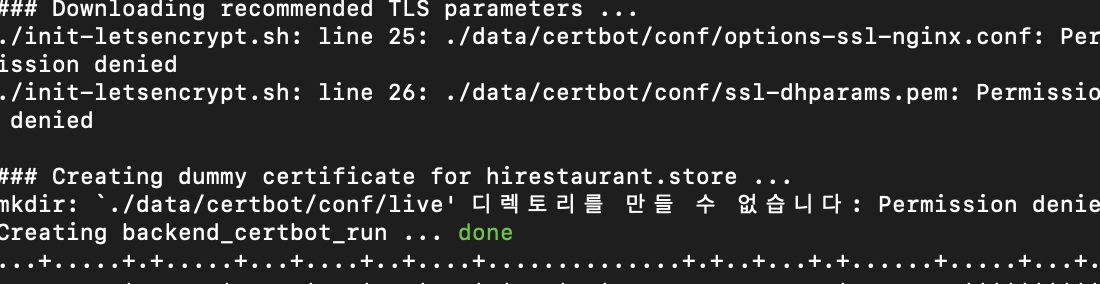

그 이후에 다시 nginx.conf 파일을 vi 에디터로 편집해준다
server {
        listen 80;
        server_name 도메인 이름 www.도메인이름; # 복수 가능
        server_tokens off;

        location /.well-known/acme-challenge/ {
                root /var/www/certbot;
        }


    	location / {
        	return 301 https://$host$request_uri;
    	}

}
server {
        listen 443 ssl;
        server_name 도메인 이름;
        server_tokens off;

        ssl_certificate /etc/letsencrypt/live/도메인 이름/fullchain.pem;
        ssl_certificate_key /etc/letsencrypt/live/도메인 이름/privkey.pem;
        include /etc/letsencrypt/options-ssl-nginx.conf;
        ssl_dhparam /etc/letsencrypt/ssl-dhparams.pem;

        location / {
        ...
}
왜 이렇게 하는지?
인증서를 발급받고 나서 각각 도커에 저장된 fullchain.pem, privkey.pem 펨키들을 소환하고 난 뒤에 https를 정식적으로 쓸 수 있게 만들 수 있기 때문에 이 부분들을 후술한 것이다
초반에 왜 순서를 강조했냐면
- 내가 순서 어기고 내 마음대로 했다가
....+...+.+...+......+......+..............+.+...........+.........+.+...+............+..+.+.........+..+....+.....+.......+..............+.+..............+...+...+............+............+.+....................+....+.....+....+..+.............+.....+.....................+.........+.+.....+++++
req: Can't open "/etc/letsencrypt/live/hirestaurant.store/privkey.pem" for writing, No such file or directory
ERROR: 1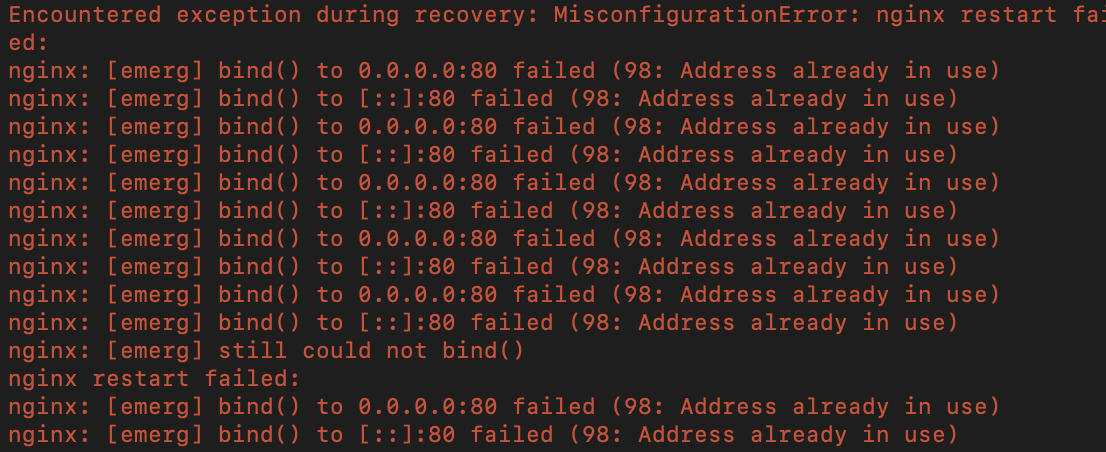
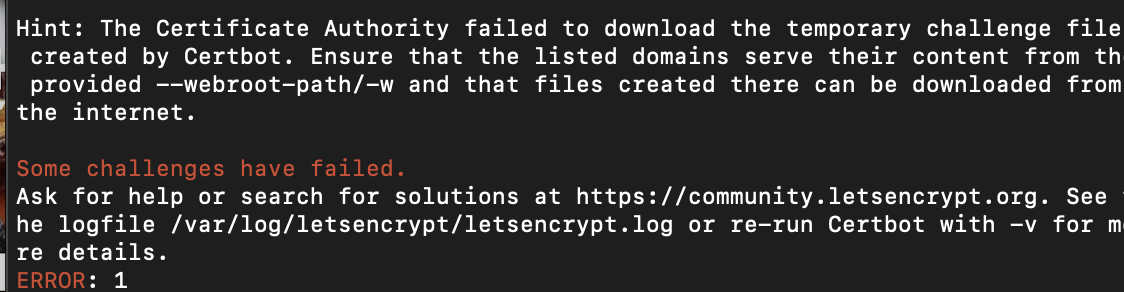
뭐 이런 오류들을 붙잡고 장장 8시간을 삽질을 했기 때문에
추후에 서버를 조금 더 정교하게 만들고 싶은 분들이나, 아니면 내가 까먹을까봐 더 삽질하지 않았으면 하는 마음에 일단 적어둠
마지막으로 docker-compose 내역을 수정해준다
version: "3"
services:
  proxy:
    image: "nginx:latest"
    ports:
      - "80:80"
      - "443:443"
    restart: always
    volumes:
      - ./nginx/default.conf:/etc/nginx/conf.d/default.conf
      - ./root/certbot/conf:/etc/letsencrypt
      - ./root/certbot/www:/var/www/certbot
    command: '/bin/sh -c ''while :; do sleep 6h & wait $${!}; nginx -s reload; done & nginx -g "daemon off;"'''

  certbot:
    image: "certbot/certbot"
    restart: unless-stopped
    volumes:
      - ./root/certbot/conf:/etc/letsencrypt
      - ./root/certbot/www:/var/www/certbot
    entrypoint: "/bin/sh -c 'trap exit TERM; while :; do certbot renew; sleep 12h & wait $${!}; done;'"
강조할점은!
command가 추가됐다! (nginx,certbot)둘 다
docker-compose up -d 하면 된다
회고
- cetbot이 뭔가요?
- SSL을 자동갱신 해주는 이미지고 그냥 다운받을 수 있으나 도커 이미지로도 있음
각각 command entrypoint 간략하게 설명하자면- nginx command : Nginx 서버를 실행하고, 매 6시간마다 SSL/TLS 인증서를 갱신하는 역할을 함. 즉, 이 명령은 Nginx를 실행하고, 6시간마다 Let's Encrypt 서버에서 인증서를 갱신하고, 이후 Nginx에게 변경된 인증서를 적용하도록 한다
- certbot entrypoint : 컨테이너가 시작될 때 실행되는 명령을 정의. 이 경우, certbot을 사용하여 인증서를 갱신하고, 12시간마다 인증서 갱신 작업을 반복하도록 함. 따라서 컨테이너가 실행될 때마다 인증서 갱신을 시작함.
- 결과적으로 크론잡을 도커식으로 변형한게 맞다
- 오류 표류기
* 순서를 무시한 자의 최후- 구매한 도메인이 무조건 살아 있어야한다 그렇지 못하면 ssl이 식별키를 내려주지 못함
- 그렇기 때문에 docker , nginx 내에서도 코드를 옮기는 순서가 매우 중요하고 엄격함
- cs지식이 조금만 깊었으면 오래 삽질하지 않았을거라 생각은 들지만
- 이런 경험이 날 더 코딩의 지옥으로 몰고가는 좋은 사례인 것 같다
- 아쉬운점
* 그런게 어디있어 빨리 취업하고 싶은게 너무 아쉬운데- 그리고 여러분 도메인 싼거라도 삽시다... 생각해보니까 내 포트폴리오가 빈약해 보였던건 그런 사소한 부분(도메인,https)까지 챙기지 못했어서 그런 것 같다
끝
인용
<- 특히 이분께는 우연히 만날 기회가 생기면 그랜절 드리고 싶음 이분덕에 밤 안샜음 ...