회고
😄 느낀점
- 배열 선언 부분에서 다양한 방법이 있어서 헷갈린 부분이 있었다. 해당 부분은 아래에 설명해놨다.
- Spring Boot의 이론적인 부분이 많이 어려웠다. 실습은 어노테이션이 어떤 기능을 하는지 알면 쉽다.
😁 목표
- 스터디 DP 유형 공부
알고리즘(Hash)
Hash 충돌
현재 문제점
같은 키값을 갖는 데이터가 있다면 덮어쓰기되어 기존 데이터가 날아감
key, value 표현법
중괄호로 시작해서 중괄호로 끝남(전세계 표준)
(대괄호 = 리스트, 중괄호 = 오브젝트)
ex. Type은 key가 String, value가 Integer일때, {key:value, key:value}의 형태로 담김
👉 {"Yoonseo":1}
해결방법
-
저장할 때 key에는 hash값, value에 key값과 value를 리스트로 만들어서 오브젝트로 넣음
👉 최악의 경우 : 한칸에 모두 들어가는 경우
👉 찾을 때 : 해당 value를 전체 스캔해서 key가 같으면 return -
일단 넣고 중복이 발생하면 다른 빈칸을 찾아서 넣음
(찾을 때 해당 key가 없는 경우 중복이므로 주변 칸들을 검색하면서 key가 같으면 그 값을 뽑음)
해결방법1로 구현
- key와 value를 같이 넣어주기 위해 Node 클래스 선언
- 2중 배열 선언
- 이전에 값을 넣은 적이 없으면 ArrayList 객체를 생성, 아니라면 Node 추가
- 찾을 때는 해당 hash값의 value에서 key값을 찾아 그 Node의 value값을 리턴
import java.util.ArrayList;
import java.util.List;

public class HashTableFunctionImprove {
    class Node {
        private String key;
        private Integer value;

        public Node(String key, Integer value) {
            this.key = key;
            this.value = value;
        }

        public String getKey() {
            return key;
        }

        public Integer getValue() {
            return value;
        }
    }

    private int size = 1000;
    private List<Node>[] table = new ArrayList[1000];

    public HashTableFunctionImprove() {
    }

    public HashTableFunctionImprove(int size) {
        this.size = size;
        this.table = new ArrayList[size];
    }

    public int hash(String key) {
        int asciiSum = 0;
        for (int i = 0; i < key.length(); i++) {
            asciiSum += key.charAt(i);
        }
        return asciiSum % size;
    }

    public void insert(String key, Integer value) {
        int hashCode = hash(key);
        if(this.table[hashCode] == null){
            this.table[hashCode] = new ArrayList<>();
        }
        // Map, Object
        this.table[hashCode].add(new Node(key, value));
        System.out.println(key + " " + hashCode + "방에 저장이 완료되었습니다.");
    }

    public Integer search(String key) {
        List<Node> nodes = this.table[hash(key)];

        for (Node node : nodes) {
            if(key.equals(node.getKey())){
                return node.getValue();
            }
        }
        return null;
    }

    public static void main(String[] args) {
        HashTableFunctionImprove ht = new HashTableFunctionImprove();
        ht.insert("Yoonseo", 1);
        ht.insert("Seoyoon", 2);

        int result = ht.search("Yoonseo");
        if(result == 1) {
            System.out.println("테스트 성공");
        } else{
            System.out.println("테스트 실패");
        }

        result = ht.search("Seoyoon");
        if(result == 2) {
            System.out.println("테스트 성공");
        } else{
            System.out.println("테스트 실패");
        }
    }
}
배열 선언 방식
1차원 배열
int[] a = new int[10];: int를 담는 크기가 10인 배열 생성(크기 정적)List<Node>[] table = new ArrayList[1000];: Node를 담는 크기가 1000인 배열 생성(크기 정적)List<Node> table = new ArrayList<>();: Node를 담는 리스트 생성(크기 동적)
2차원 배열
int[][] arr = new int[10][20];: int를 담는 10*20 배열 생성(크기 정적)List<Integer>[] table = new List[1000]; 이후 for문으로 table [i] = new ArrayList<>() 생성: 이 방식으로 만들 수도 있음(외부는 1000고정, 내부는 동적)
(🔸 단, List에는 primitive type으로 제네릭을 걸 수 없음)List<List<Integer>>: 두 크기 모두 동적
Spring Boot
개념
Spring boot 목적
엔터프라이즈 애플리케이션 개발
(엔터프라이즈 애플리케이션 : 개인용이 아닌 여러 사람이 쓰는 애플리케이션)
개발자가 직접 제어한다는 뜻
new를 직접 사용 (객체를 직접 생성)
의존성 주입 방법 3가지
🟢 Spring boot에서는 해당 코드 위에 @Autowired를 붙여서 의존성 주입
- 생성자
- 필드 객체 선언
- setter 메서드
Spring AoP(관점 지향 프로그래밍)
- 핵심기능(비즈 로직)과 부가기능(로깅, 모니터링, 트랜잭션)으로 나누는 디자인 방식
- Spring은 비즈니스 로직에 집중할 수 있도록, 생산성을 높일 수 있는 방향으로 진화하고 있음
- TDD가 가능하도록 하는 것
(TDD할 때 비즈니스 로직만 테스트하고 부가기능은 이미 검증된 구현체를 쓰도록하여 부가기능은 테스트에서 가급적이면 배제할 수 있으면 배제함.)
Spring boot 장점
Spring boot를 쓰지 않으면 많은 설정과 테스트가 필요함
(이들은 서로 충돌이 발생할 수도 있음 - 버전 충돌)
👉 Spring boot가 등장하면서 설정 시간이 많이 단축됨
ex) 전에 DAO 실습할 때 dependencies에 spring-boot-starter-jdbc, spring-boot-starter-test를 사용했음 👉 원래 Spring만 사용하려고 했다면 많은 설정이 필요함)
Spring boot 오해
SpringBoot는 WAS가 아님
(Web Application Server - Tomcat, Jetty)
(WAS를 포함하고 있지만 WAS는 아님)
MSA
MSA : Microservice Architecture
과거에는 서비스 규모가 하나로 이루어졌지만, MSA는 쪼개져서 서버 간 통신 API로 함
영속성
DB에 저장되었을 때 (저장하는 단계라면 영속성이 아직 없다고 볼 수 있음)
Rest의 설계 규칙
- URI의 마지막에는
/을 포함하지 않음 - 언더바(
_)를 사용하지 않음. 대신 하이픈(-)을 사용함 - URI에는 행위(동사)가 아닌 결과(명사)를 포함
- URI는 소문자로 작성해야 함
- 파일의 확장자는 URI에 포함하지 않음
실습
Maven이란?
Gradle과 비슷한 도구(Gradle보다 먼저 나옴)
라이브러리(dependency) 관리 + 빌드 관리 도구
IntelliJ에서 Spring Initializr에서 maven으로 생성
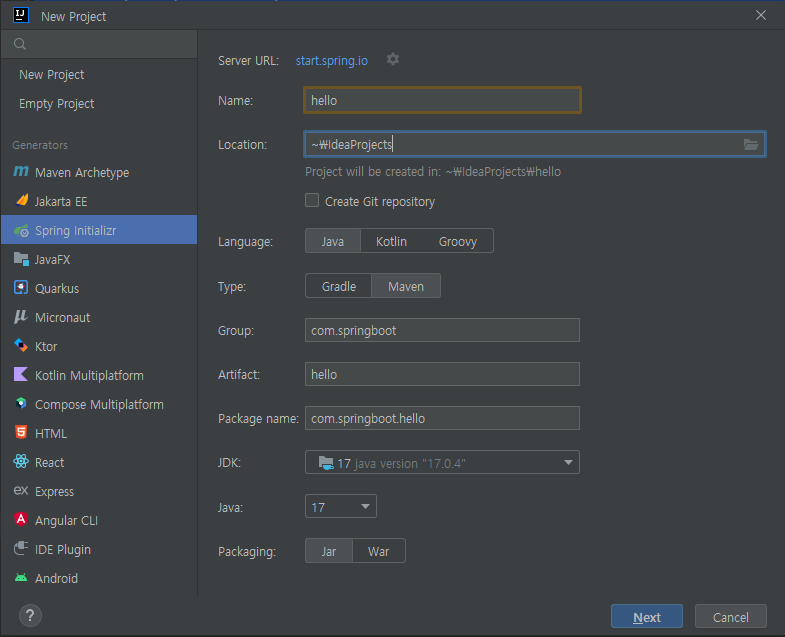
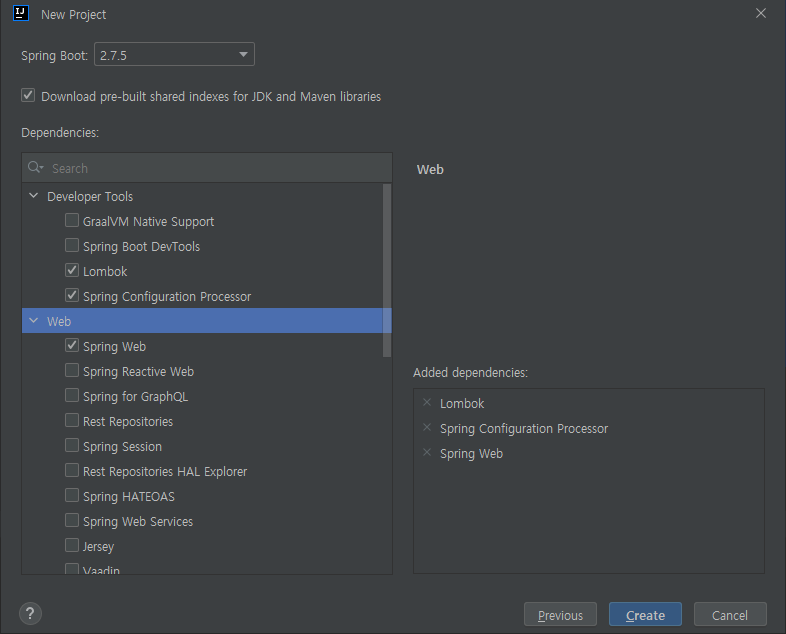
- New Project의 Spring Initializr
- Type은 Maven (우리는 Maven을 사용할 예정)
- Dependencies에
Lombok,Spring Configuration Processor,Spring Web추가 후 생성
생성 후 자동으로 만들어진 java실행
결과
8080포트에 연결됨
👉 http://localhost:8080에 접속 가능
Package 실행하여 .jar생성 후 실행
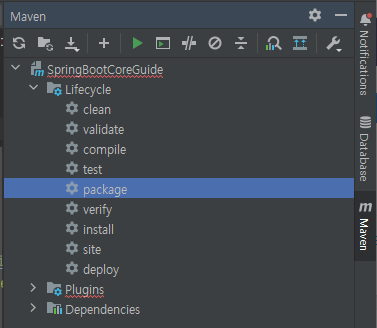
- Maven의 Lifecycle의 package 더블클릭 실행
- target 디렉토리에 .jar 생성
- Terminal에서 target으로 이동(cd target)
- java -jar 파일명.jar하면 실행됨.
@RestController, @RequestMapping(path)
- @RestController : dispatcherServlet이 매핑해줄 Controller로 등록
- @RequestMapping(path) : Controller가 할당된 후 어떤 Method를 실행할지 연결해주는 어노테이션(path에 경로지정)
포트 변경 방법
application.properties에서 server.port = 8081 : 8081로 변경됨
테스트 방식
Talend API Tester or PostMan 중 Talend로 테스트
Talend API Tester : API를 만들고 테스트 할 수 있는 Tool
크롬 화장프로그램으로 Talend API Tester을 추가 후 실행
HTTP 메소드
-
종류 : GET, POST, PUT, DELETE
👉 그냥 RequestMapping은 Post, Get, Delete, Put이 다 됨 -
특정 요청만 받고 싶을 때 : RequestMapping의 method에 RequestMethod.GET
👉 하지만 스프링 4.3이후로 바뀜
👉 @GetMapping처럼 앞에 메소드를 붙여서 나옴(PostMapping, PutMapping, DeleteMapping) -
클래스 위에 RequestMapping(path)로 입력하면 기본 경로 변경
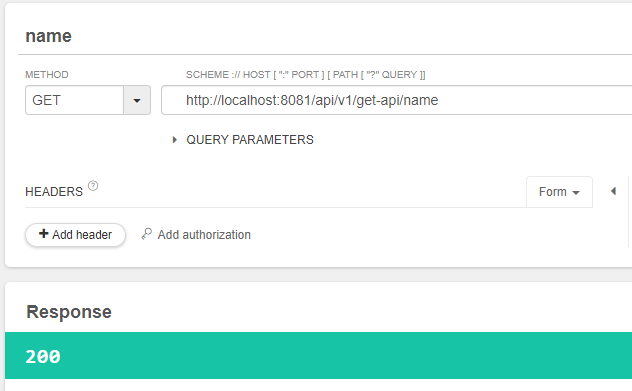
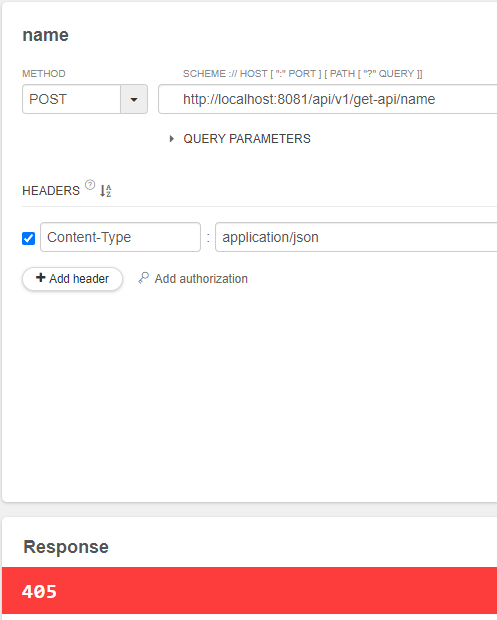
🟢 GET은 통과, POST는 실패
import org.springframework.web.bind.annotation.*;

@RestController
@RequestMapping("/api/v1/get-api")
public class HelloController {
    @RequestMapping(value = "/hello", method = RequestMethod.GET)
    public String hello() {
        return "Hello World";
    }

    @GetMapping(value = "/name")
    public String getName() {
        return "Kwanwun";
    }
}
@PathVariable
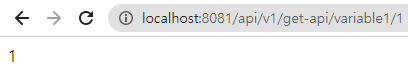
- @PathVariable : 주소의 경로를 통해 variable을 넘기고 싶을때
- /variable1/{variable}에서 {variable}에 1을 넣으면 1을 리턴하는 형식
👉 이때 variable와 @PathVariable에서 지정한 변수이름을 동일하게
👉 이에 지장이 있다면 @PathVariable("variable") String var로 @PathVariable 매개변수로 GetMapping에 있는 변수를 넣어주고 리턴은 var로
import org.springframework.web.bind.annotation.*;

@RestController
@RequestMapping("/api/v1/get-api")
public class HelloController {
    @GetMapping(value = "/variable1/{variable}")
    public String getVariable1(@PathVariable String variable) {
        return variable;
    }

    @GetMapping(value = "/variable2/{variable}")
    public String getVariable2(@PathVariable("variable") String var) {
        return var;
    }
}