필요성
- aws의 ec2는 켜진 시간마다 돈이나간다.
팀프로젝트를 하고 있는데, 아직 개발단계라 개발용으로 ec2 인스턴스를 쓰는데 비용이 꽤 많이 나가서 cicd를 하거나 production(=ec2 위에서 잘 작동하나) 확인하기 위해서 껐다켰다하고 있는데 이게 상당히 불편하다.
왜냐하면 계속 aws에 들어가서 로그인하고 ec2탭에 들어가서 인스턴스 클릭하고 시작->중지 누르는 게 번거롭다고 느꼈기 때문이다.
따라서 AWS SDK인 boto3로 이 과정을 간단하게 처리할 수 있도록 리모컨을 만들었다.
몇시부터 몇시까지만 꺼줘 같은 복잡한 작업은 수행하지 않고 그냥 간단한 on-off 및 상태확인 기능만 있다.
AWS IAM
AWS access key를 얻기 위해서 우선 사용자를 만들어야한다
그런데 ec2를 그저 키고 끄는 거만 할 것이기 때문에 딱 그것만 할 수 있도록 기능을 제한하도록 하겠다.
- 정책만들기
- 사용자 그룹만들고 정책 부여하기
- 사용자 만들고 사용자 그룹 부여하기
- Access key 만들기
정책만들기
{
	"Version": "2012-10-17",
	"Statement": [
		{
			"Sid": "VisualEditor0",
			"Effect": "Allow",
			"Action": [
				"ec2:DescribeInstances",
				"ec2:StartInstances",
				"ec2:StopInstances"
			],
			"Resource": "*"
		}
	]
}
Configuration
- oto3 클라이언트를 위한 설정방법에는 3가지 방법이 있다
- Config 객체 사용
- 환경변수
- ~/.aws/config
이 글에서는 Config object과 환경변수 사용하는 법만 다룰 예정이다.
그리고 프로젝트에서는 Config object를 사용할 생각인데, 왜냐하면 gui exe파일을 배포할때 config 파일을 같이 배포하면 되는 간단함이 있기 때문이다.
.aws는 aws-cli를 사용한다.
환경변수 설정하기
boto3 공식문서 : Configuration#using-environment-variables
설정에 필요한 AWS 환경변수가 다 정해져있는데 그 중 아래의 3개가 가장 중요하다 할 수 있다.AWS_ACCESS_KEY_ID AWS_SECRET_ACCESS_KEY AWS_DEFAULT_REGION
각자 환경에 맞는 값을 넣고 .env 파일 설정하길 바란다.
그리고 python-dotenv를 사용하여 아래와 같이 코드를 작성해서 boto3가 ec2 client를 생성할 수 있는지 확인해보자
import os
from dotenv import load_dotenv
import boto3

load_dotenv() # .env 파일로부터 환경변수 로드

AWS_ACCESS_KEY_ID = os.getenv('AWS_ACCESS_KEY_ID')
AWS_SECRET_ACCESS_KEY= os.getenv('AWS_SECRET_ACCESS_KEY')
AWS_DEFAULT_REGION = os.getenv('AWS_DEFAULT_REGION')

print(AWS_ACCESS_KEY_ID)
print(AWS_SECRET_ACCESS_KEY)
print(AWS_DEFAULT_REGION)

ec2 = boto3.client('ec2')
response = ec2.describe_instances() # 인스턴스에 대한 설명 메서드
print(response)
오류 없이 실행되는 지 확인해보자
Config 객체 사용하기
config 파일 가져오기
config 파일은 그냥 json으로 구성했다
def get_path():
    if getattr(sys, 'frozen', False):
        return os.path.dirname(sys.executable)
    else:
        return os.getcwd()

def load_config_file():
    if not os.path.exists(os.path.join(get_path(), "config.json")):
        return {}
    try:
        with open(os.path.join(get_path(), "config.json"), "r", encoding="utf-8") as file:
            return json.load(file)
    except (json.JSONDecodeError, FileNotFoundError) as e:
        return {}
exe 파일로 실행되는 경우라면 exe 파일과 같은 경로에서, 그렇지 않다며 cwd, 프로젝트의 작업 디렉토리 위치에서 가져오도록 하였다.
config 적용하기
def ec2_handler_factory(config):
    INSTANCE_ID = config['INSTANCE_ID']
    AWS_ACCESS_KEY_ID = config['AWS_ACCESS_KEY_ID']
    AWS_SECRET_ACCESS_KEY = config['AWS_SECRET_ACCESS_KEY']
    AWS_DEFAULT_REGION = config['AWS_DEFAULT_REGION']
    config = Config(
        region_name=AWS_DEFAULT_REGION
    )
    client = boto3.client('ec2', aws_access_key_id=AWS_ACCESS_KEY_ID, aws_secret_access_key=AWS_SECRET_ACCESS_KEY, config=config)
    return Ec2Handler(client, INSTANCE_ID)
AWS_ACCESS_KEY_ID와 같은 정보는 Config 객체에 들어가지 않고, boto3.client에 들어간다.
Ec2Handler는 boto3가 아니라 내가 만든 class이다.
Ec2Handler
GetState
    def get_state(self):
        try:
            response = self.client.describe_instances(InstanceIds=[self.instace_id], DryRun=True)
        except ClientError as e:
            if 'DryRunOperation' not in str(e):
                raise DryRunFailException(str(e))
        except Exception as e:
            raise RuntimeError(str(e))
        try:
            response = self.client.describe_instances(InstanceIds=[self.instace_id])
            """
                0 : Pending
                16 : running
                32 : shutting-down
                48 : Termnated
                64 : Stopping
                80 : Stopped
            """
            return Ec2State(response['Reservations'][0]['Instances'][0]['State']['Code'])
        except ClientError as e:
            raise Ec2ClientException(str(e))
왜 describe_instances를 사용했냐면, 좀 찾아봤는데 깔끔하게 state만 나오는 api가 없었다.
"The intended state of the instance. DescribeInstanceStatus requires that an instance be in the running state."
boto3 공식문서 - DescribeInstanceStatus
DescribeInstanceStatus도 있는데 이거를 실행하려면 Instance가 running 상태여야한다기에 사용하지 않았다.
class Ec2State(Enum):
    PENDING = 0
    RUNNING = 16
    SHUTTINGDOWN = 32
    TERMINATED = 48
    STOPPING = 64
    STOPPED = 80
Enum으로 만들어 다루기 쉽게 하였다.
Start Instance
    def start_instance(self):
        state = None
        try:
            state = self.get_state()
        except Exception as e:
            raise e
        try:
            self.client.start_instances(InstanceIds=[self.instace_id], DryRun=True)
        except ClientError as e:
            if 'DryRunOperation' not in str(e):
                raise DryRunFailException(str(e))
        except Exception as e:
            raise RuntimeError(str(e))

        if (state == Ec2State.RUNNING or state == Ec2State.PENDING):
            return False
        try:
            self.client.start_instances(InstanceIds=[self.instace_id], DryRun=False)
            return True
        except Exception as e:
            raise Ec2ClientException(str(e))
미리 상태를 확인하고 Pending상태(시작준비중)거나 Running상태면 start_instances를 실행하지 않도록 하였다.
Stop Instance
    def stop_instance(self):
        state = None
        try:
            state = self.get_state()
        except Exception as e:
            raise e
        try:
            self.client.stop_instances(InstanceIds=[self.instace_id], DryRun=True)
        except ClientError as e:
            if 'DryRunOperation' not in str(e):
                raise DryRunFailException(str(e))
        except Exception as e:
            raise RuntimeError(str(e))

        if(state == Ec2State.STOPPED or state == Ec2State.STOPPING):
            return False
        try:
            self.client.stop_instances(InstanceIds=[self.instace_id], DryRun=False)
            return True
        except Exception as e:
            raise Ec2ClientException(str(e))
미리 상태를 확인하고 Stopped상태거나 Stoping상태면 stop_instances를 실행하지 않도록 하였다.
DryRun이란?
dryRun은 실제로 api를 실행하지 않고, api를 실행할 권한이 있는지 확인하는 옵션이다.
실행할 권한이 있다면 DryRunOperation이라는 Exception이 발생한다
실행
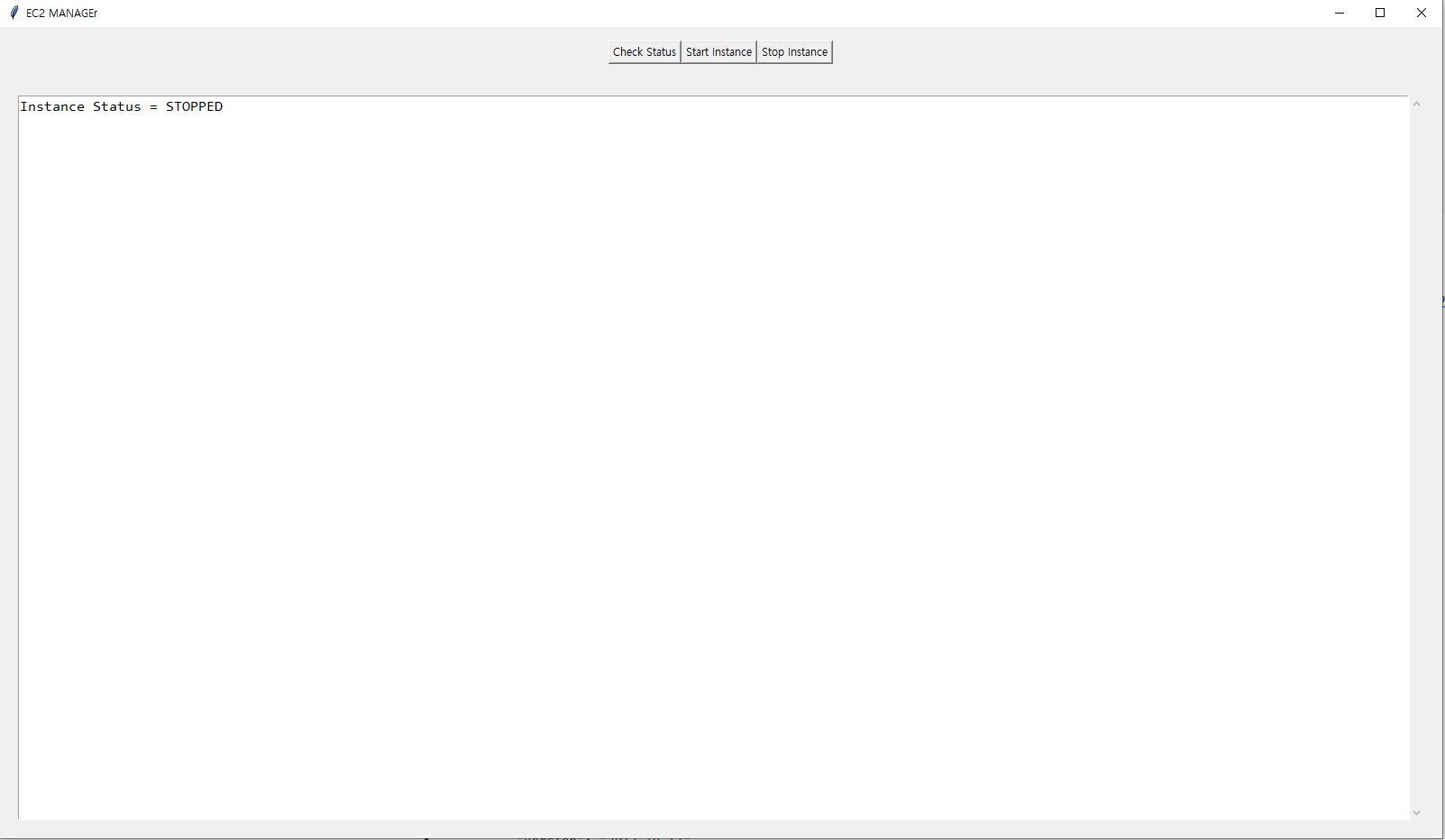
GUI는 tkinder를 사용하였고, pyinstaller를 사용해 exe로 빌드하였다.
참고링크
https://boto3.amazonaws.com/v1/documentation/api/latest/reference/services/ec2/client/stop_instances.html
https://boto3.amazonaws.com/v1/documentation/api/latest/guide/ec2-example-managing-instances.html
https://boto3.amazonaws.com/v1/documentation/api/latest/reference/services/ec2/client/start_instances.html
https://boto3.amazonaws.com/v1/documentation/api/latest/reference/services/ec2/paginator/DescribeInstanceStatus.html
https://boto3.amazonaws.com/v1/documentation/api/latest/reference/services/ec2/paginator/DescribeInstances.html
https://boto3.amazonaws.com/v1/documentation/api/latest/guide/configuration.html
