트윙클.. 아자아자홧팅이다
0. 터미널 명령어 (전반적인 흐름)
npx create-react-app .
npm start
npm run build
npx serve -s build
1. react 파일 생성
npx create-react-app . 명령어를 통해 현재 위치(.)에 react app을 만든다
npm start 명령어를 통해 포트 번호(주로 3000, 사용 중일 경우 3001... )에 서버를 지정한다.
- 처음 터미널에서 오류가 난다면 우측 + 버튼 눌러 shell 종류를 바꿔보기
초반 설정 powershell일텐데, 나는 command prompt로 바꾸고 해결
2. react 파일 수정
react 디렉터리 구조와 파일 중 우선적으로 봐야할 것
(1) src
src/index.js
import React from 'react';
import ReactDOM from 'react-dom/client';
import './index.css';
import App from './App';
import reportWebVitals from './reportWebVitals';

const root = ReactDOM.createRoot(document.getElementById('root'));
root.render(
  <React.StrictMode>
    <App />
  </React.StrictMode>
);
:npx create-react-app을 했을 때, 컴퓨터는 index.js를 찾고 실행시킴. 서비스의 입구같은 존재. src/index.css, App.js 등등 필요한 거 싹 다 이 index.js 파일에 임포트하게 됨.
- ./App.js에서 .js는 생략할 수 있다.
두 번째 문단 코드의 의미는 "App이라는 태그가, id값이 root인 태그로 렌더링 되어라."이다. 실제로 개발자 도구 이용해서 웹사이트 살펴보면
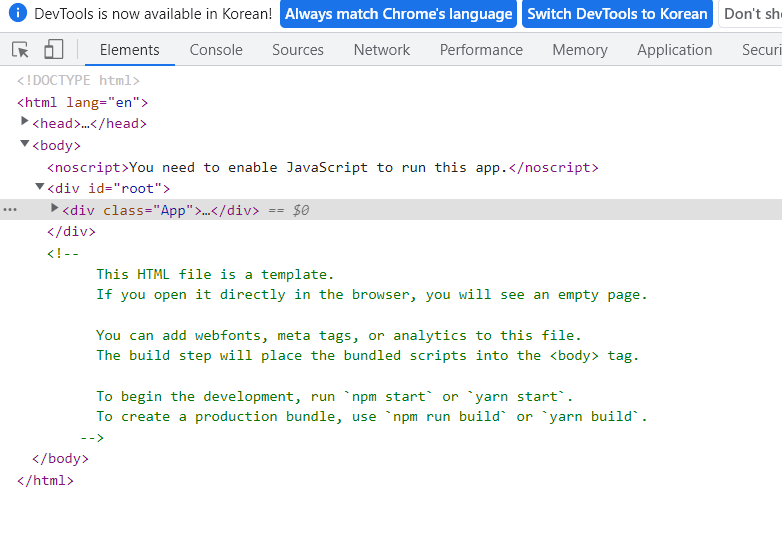
root 태그 안에 App 태그가 들어가 있는 것을 볼 수 있다.
index.js에서 정의되지 않은 div id="root"는 어디에서 데리고 오는 걸까? 바로 public/index.html이다.
react가 아무리 js 기반이라고 해도 웹사이트를 만드는 것이기 때문에 dom이 필요하다. public/index.html를 src/index.js에 임포트 시키는 방식은 아니다. 빌드하면 프로그램이 자체적으로 엮어서 실행해준다.
다만 html 파일에서의 태그, js 파일에서의 태그를 따로 정의하고 나중에 묶는 이유가 궁금한데 (헷갈리지 않나..?) 강의를 더 들어보면 알 수 있을 것 같다.
(2)public
public/index.html
<!DOCTYPE html>
<html lang="en">
  <head>
    <meta charset="utf-8" />
    <link rel="icon" href="%PUBLIC_URL%/favicon.ico" />
    <meta name="viewport" content="width=device-width, initial-scale=1" />
    <meta name="theme-color" content="#000000" />
    <meta
      name="description"
      content="Web site created using create-react-app"
    />
    <link rel="apple-touch-icon" href="%PUBLIC_URL%/logo192.png" />
    <link rel="manifest" href="%PUBLIC_URL%/manifest.json" />
    <title>React App</title>
  </head>
  <body>
    <noscript>You need to enable JavaScript to run this app.</noscript>
    <div id="root"></div>
    <!--
      This HTML file is a template.
      If you open it directly in the browser, you will see an empty page.

      You can add webfonts, meta tags, or analytics to this file.
      The build step will place the bundled scripts into the <body> tag.
      -->
  </body>
</html>
:당연하게도 웹사이트의 기본 정보들을 담고 있다. 참고할 만한 것은 root 태그 내부의 주석이다. 이 html 파일은 단지 템플릿이라서, 이 파일 자체를 실행시키면 텅 빈 페이지가 뜬다. build를 하면 src 파일에 만들어놨던 javascript 파일들을 번들링해서 html의 body 태그 안에 위치 시키게 된다. 위에서 App 태그를 root 태그로 렌더링 시킨 것과 연관이 있을 듯
- 번들링(Bundling)이란 따로따로 분리해서 작업했던 파일들(=모듈)을 하나로 묶어주는 작업이다. 파일이 너무 커서 한 파일 안에서 작업할 수 없을 때, 따로 따로 작업했다면 번들링을 통해서 마지막에 하나로 모아준다.
Q. 그냥 모듈들끼리 import, export하면 되는 거 아냐?
-> 여러 개의 파일을 브라우저에서 로딩한다면 네트워크 속도 저하
-> 모듈 간 충돌 가능성 O
(3)build
build 명령어 실행 후 생기는 디렉토리이다.
배포 단계에서 설명.
3. react 파일 배포
npm run build 명령어로 용량을 최대한 줄인 배포판을 생성한다.
npx serve -s build 명령어로 서비스를 실행
우리가 작업하던 index.js 같은 파일은 개발자가 읽기 용이하도록 주석, 공백, 들여쓰기가 되어 있다. build 명령어를 실행하면 컴퓨터가 효율적으로 웹을 띄울 수 있도록 공백 등등을 모두 뺀 build/index.html이 만들어진다. 즉 작업용 파일 -> only 실행용 파일을 만드는 과정이 배포이다.
