AI Video Generator Output Still Needs Korean Localization
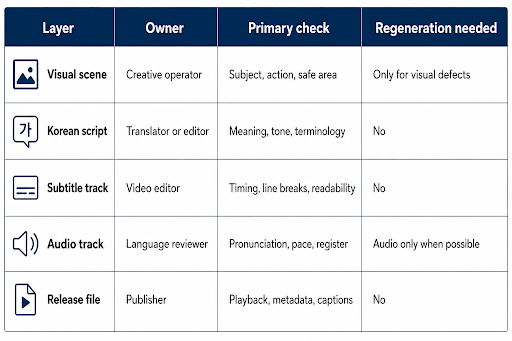
A generated scene can cross a language boundary before the message does. The picture may look polished while the Korean subtitle is cramped, the honorific level feels wrong, or the audio uses a name that local viewers would pronounce differently. An AI Video Generator can create the visual base, but localization remains a separate engineering and editorial workflow.
MakeShot supports text-to-video and image-to-video work across multiple models, including options with native audio. Those capabilities can reduce the time needed to prototype a scene. They do not automatically produce a Korean release package. Teams still need a source script, terminology list, subtitle timing, audio review, cultural review, and a reproducible final export.
Separate the Visual Master From Language Assets
Create a clean visual master before embedding Korean text. Generated letters are not reliable enough for product names, prices, legal notices, or interface labels. Keep those elements in a subtitle or graphics layer that can be edited without regenerating the scene. The same separation makes later corrections and additional language versions much cheaper.
Freeze Names Numbers and Product Terms
Build a small terminology file containing the approved Korean product name, English source term, pronunciation note, units, and words that must not be translated. Include the current campaign line and any required spacing. The file should be reviewed before voice or captions are produced. A one-character error repeated across every output is easier to prevent than to repair after publishing.
Choose a Clear Subtitle Safe Composition
Reserve clean space near the lower part of the frame without placing important faces, products, or actions behind it. Korean text can become visually dense, especially when an English source line was already long. The localization team should be allowed to shorten for reading speed while preserving meaning. Do not solve overflow by shrinking text until it is technically present but practically unreadable.
Prepare a simple overlay guide before generation. Mark the subtitle area, platform control area, logo position, and any region that must remain visually quiet. Use that guide during source selection and crop review. It is cheaper to move the subject before generation than to repair a finished shot whose action sits directly behind two lines of Korean text.
Review Native Audio as a Draft
Native audio can be valuable for concept testing because sound, dialogue, and motion arrive together. It should not be treated as approved localization. Extract or transcribe the words, compare them with the source message, and ask a Korean reviewer to check pronunciation, speech level, pacing, and emotional fit. Background effects also need review because they can change how a scene is understood.
Check Honorific Level Against the Audience
A casual creator tutorial, enterprise onboarding video, customer apology, and public-service message require different language choices. Machine output may be grammatically correct and socially wrong. Define the speaker, listener, relationship, and channel in the localization brief. Keep that decision consistent across narration, on-screen text, captions, and the surrounding post.
Record disputed terms instead of letting each reviewer rewrite them independently. A product manager may prefer the global English name, while support staff know the Korean term customers actually search. Resolve that choice in the terminology file and note the reason. The same applies to spacing, loanwords, and units. Consistency is an operational outcome, not a translator’s personal habit.
Use the AI Video Generator for the visual or audio-visual draft, then move approved language into editable tracks. MakeShot should not be asked to regenerate a visually accepted clip merely because one Korean line changed. Separating the layers protects accepted work and makes the correction traceable.
Test Captions on Real Mobile Screens
Review the video at the size and connection conditions viewers will use. Check two-line breaks, punctuation, contrast, background movement, and whether platform controls cover the text. Watch once without sound and once without looking at the picture. The first pass tests subtitle completeness; the second reveals meaning carried only by visuals that may need an audio description or clearer narration.
Measure reading speed with the final font and device, not in a script document. Korean lines may need different segmentation from the source audio. Avoid splitting names, numbers, or grammatical units across cuts. Give viewers enough time to finish a line before it disappears, especially in training, support, and product explanation content where missing one phrase changes the instruction.
Build a Versioned Korean Release Package
Store the visual master, source script, Korean script, terminology file, subtitle file, audio file, review notes, and final export under one release identifier. Use text-based subtitle formats when the destination supports them. They are easier to diff, correct, and reuse than burned-in text. Record the reviewer and approval date for any name, number, or regulated claim.
Add a lightweight automated check in the repository or publishing pipeline. It can confirm that the expected subtitle file exists, its language code is correct, no cue has a negative duration, and the release manifest references the approved script version. Automation cannot judge tone, but it can catch missing or mismatched assets before upload.
Keep the final platform metadata in the same package: Korean title, description, disclosure text, thumbnail copy, and caption setting. A correct video can still fail localization when the surrounding post uses an old product name or English-only description. Review the release as a complete viewer experience.
- Keep the generated visual separate from editable Korean language tracks.
- Review names, numbers, units, and honorifics before final rendering.
- Test subtitles on mobile with platform controls visible.
- Preserve a source-to-release record for later corrections.
Generation Ends Before Localization Is Complete
MakeShot can help a Korean product or content team prototype the scene, compare visual approaches, and sometimes hear an early audio direction. It fits best when the team treats that output as one layer inside a controlled release process.
It is not a substitute for a Korean editor, pronunciation review, subtitle engineering, or cultural judgment. A localized video is finished when local viewers can read, hear, and trust the message—not when the first generated clip looks complete.
Run one final review with a person who did not see the source workflow. If that viewer can explain the message, read the captions comfortably, and notice no unexplained language shift, the package is ready for a controlled release.
Collect corrections from support, community, sales, and search teams after the first release. Add confirmed terminology changes to the shared file, increment the package version, and replace affected language tracks without discarding an approved visual master or repeating a finished generation.