배열시작
public class Array1 {
    public static void main(String[] args) {
        int st1 = 90;
        int st2 = 80;
        int st3 = 70;
        int st4 = 60;
        int st5 = 50;

        System.out.println("st1 = " + st1);
        System.out.println("st2 = " + st2);
        System.out.println("st3 = " + st3);
        System.out.println("st4 = " + st4);
        System.out.println("st5 = " + st5);
    }
}
학생을 몇명 추가해야 한다면 변수를 선언하는 부분 & 점수를 출력 하는 부분 코드 추가
하지만 100명을 추가해야 한다면...? 끔찍하다
이런 상황을 대비해, 배열을 사용
배열의 선언과 생성
public class ArrayRef1 {
    public static void main(String[] args) {
        int[] students = new int[5]; //배열 변수 선언과 동시에 배열 생성

        //변수 값 선언
        students[0] = 90;
        students[1] = 80;
        students[2] = 70;
        students[3] = 60;
        students[4] = 50;

        //변수 값 사용
        System.out.println("students1 = " + students[0]);
        System.out.println("students2 = " + students[1]);
        System.out.println("students3 = " + students[2]);
        System.out.println("students4 = " + students[3]);
        System.out.println("students5 = " + students[4]);
    }
}
- 배열 변수 선언
int[] students // 배열 변수 선언
students = new int[5]; // 배열 생성
- 배열 생성
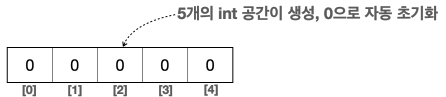
new int[5]라고 입력하면 5개의 int형 변수가 만들어진다
new는 새로 생성한다는 의미, int[5]는 int형 변수 5개라는 뜻
-배열 초기화
new int[5]라고 하면 총 5개 int형 변수가 생성
숫자는 0, boolean은 false, String은 null
- 배열 참조값 보관
new int[5]로 배열 생성 -> 배열 크기 만큼 메모리 확보
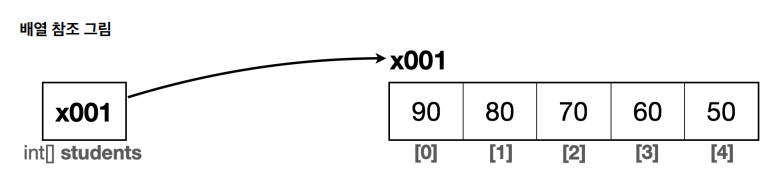
배열을 생성하고 나면 자바는 메모리 어딘가에 있는 배열에 접근 할 수 있는 참조값(주소)을 반환
앞서 선언한 배열 변수인 int[] students에 생성된 배열의 참조값을 보관
이 변수는 참조값을 소유, 참조값을 통해 배열을 참조할 수 있다.
참고로 배열을 생성하는 new int[5] 자체에는 이름 X. 그냥 int형 변수를 5개 연속 만드는 것
int[] students = new int[5]; //1. 배열 생성
int[] students = x001; //2. new int[5]의 결과로 x001 참조값 반환
students = x001 //3. 최종 결과
배열 사용
인덱스
배열은 변수와 사용법이 비슷. 차이가 있다면 [] 사이에 숫자 번호를 넣어주면 된다.
배열은 0부터 시작
new int[5]와 같이 5개의 요소를 갖는 int형 배열을 만들었다면,
인덱스는 0,1,2,3,4가 존재한다. 여기서 주의할 점은 인덱스는 0부터 시작.
배열의 요소를 5개로 생성했지만, 인덱스는 0부터 싲가
따라서 사용 가능한 인덱스 범위는 0 ~ n-1
범위 넘어갈 경우
->
Exception in thread "main" java.lang.ArrayIndexOutOfBoundsException: Index 5 out
of bounds for length 5 at array.Array1Ref1.main(Array1Ref1.java:14코드를 입력하세요
배열에 값 대입
배열에 값을 대입하든, 값을 사용하든 일반적인 변수와 사용법은 같다.
students[0] = 90; //1. 배열에 값을 대입
x001[0] = 90; //2. 변수에 있는 참조값을 통해 실제 배열에 접근. 인덱스를 사용해서 해당 위치의 요소에
접근, 값 대입

students[1] = 80; //1. 배열에 값을 대입
x001[1] = 80; //2. 변수에 있는 참조값을 통해 실제 배열에 접근. 인덱스를 사용해서 해당 위치의 요소에
접근, 값 대입
배열 값 읽기
//1. 변수 값 읽기
System.out.println("학생1 점수: " + students[0]);
//2. 변수에 있는 참조값을 통해 실제 배열에 접근. 인덱스를 사용해서 해당 위치의 요소에 접근
System.out.println("학생1 점수: " + x001[0]);
//3. 배열의 값을 읽어옴
System.out.println("학생1 점수: " + 90)
기본형 VS 참조형
기본형 -> int, long, double, boolean처럼 변수에 사용할 값을 직접 넣을 수 잇는 데이터 타 입을 기본형
참조형 -> data 접근하기 윟나 참조를 저장 = 참조형.
참고)
- 기본형은 선언과 동시에 크기가 fix. 크기가 동적으로 변경X, 참조형은 크기를 동적으로 할당 할 수 있다. 기본형은 선언과 동시에 사이즈가 정적을 고정,
참조형을 사용하면 동적으로 변경 -> 유연성 제공
배열 리펙토링
public class ArrayRef2 {
    public static void main(String[] args) {
        int[] students = new int[5];

        System.out.println(students.length);

        students[0] = 90;
        students[1] = 80;
        students[2] = 70;
        students[3] = 60;
        students[4] = 50;

        for (int i = 0; i < students.length; i++) {
            System.out.println("학생" + (i + 1) +  " " + students[i]);
        }
    }
}
    public static void main(String[] args) {
        int[] students = new int[]{90, 80, 70, 60, 50}; //배열 생성과 초기화

        for (int i = 0; i < students.length; i++) {
            System.out.println(students[i]);
        }
    }
}
public class ArrayRef4 {
    public static void main(String[] args) {
        int[] students = {90, 80, 70, 60, 50};

        for (int i = 0; i < students.length; i++) {
            System.out.println("i = " + students[i]);
        }
    }
}
2차원 배열

2차원 배열은 int[][] arr = new int[2][3]
행은 row, 열은 column
arr[행][열], arr[row][column]
public class ArrayDi1 {
    public static void main(String[] args) {
        int[][] arr = new int[2][3]; //행 열

        arr[0][0] = 1;
        arr[0][1] = 2;
        arr[0][2] = 3;
        arr[1][0] = 4;
        arr[1][1] = 5;
        arr[1][2] = 6;

        for (int i = 0; i < 2; i++) {
            System.out.print(arr[i][0] + " ");
            System.out.print(arr[i][1] + " ");
            System.out.print(arr[i][2] + " ");
            System.out.println();
        }
    }
}
2차원 배열 리펙토링
//0행 출력
System.out.print(arr[0][0] + " "); //0열 출력
System.out.print(arr[0][1] + " "); //1열 출력
System.out.print(arr[0][2] + " "); //2열 출력
System.out.println(); //한 행이 끝나면 라인을 변경한다.
//1행 출력
System.out.print(arr[1][0] + " "); //0열 출력
System.out.print(arr[1][1] + " "); //1열 출력
System.out.print(arr[1][2] + " "); //2열 출력
System.out.println(); //한 행이 끝나면 라인을 변경한다
code가 반복되는 것을 볼 수있다.
public class ArrayDi2 {
    public static void main(String[] args) {
        int[][] arr = new int[2][3]; //행 열

        arr[0][0] = 1;
        arr[0][1] = 2;
        arr[0][2] = 3;
        arr[1][0] = 4;
        arr[1][1] = 5;
        arr[1][2] = 6;

        for (int i = 0; i < 2; i++) { //행
            for (int j = 0; j < 3; j++) { //열
                System.out.print(arr[i][j] + " ");
            }
            System.out.println();
        }
    }
}
for문을 통해서 row을 반복해서 접근, 각 행 안에서 column이 3개,
arr[row][0], arr[row][1], arr[row][2] 3번 출력,
-> row = 0 for문이 실행 -> arr[0][0], arr[0][1], arr[0][2]
-> row = 1 for문 실행 -> arr[1][0], arr[1][1], arr[1][2]
public class ArrayDi3 {
    public static void main(String[] args) {
        int[][] arr = new int[][] {
                {1,2,3},
                {4,5,6}
        };

        for (int row = 0; row < arr.length; row++) {
            for (int col = 0; col < arr[row].length; col++) {
                System.out.print(arr[row][col] + " ");
            }
            System.out.println();
        }
    }
}
for문을 2번 중첩해서 사용, 외각 for문은 행, 내각 for문은 열 탐색
1. arr.length -> 행의 길이
2. arr[row].length -> 열의 길이
구조 개선 값
public class ArrayDi4 {
    public static void main(String[] args) {
        int[][] arr = new int[3][3];

        int i = 1; //하나씩 순서대로 값 증가

        for (int row = 0; row < arr.length; row++) {
            for (int col = 0; col < arr[row].length; col++) {
                arr[row][col] = i++;
                //후의 증감 연산자를 사용해서 값을 먼저 대입한 다음 증가
            }
        }

        //2차원 배열의 길이를 활용
        for (int row = 0; row < arr.length; row++) {
            for (int col = 0; col < arr[row].length; col++) {
                System.out.print(arr[row][col] + " ");
            }
            System.out.println();
        }
    }
}
향상된 for문
for (변수 : 배열 또는 컬렉션) {
 // 배열 또는 컬렉션의 요소를 순회하면서 수행할 작업
public class EnhancedFor1 {
public static void main(String[] args) {
int[] numbers = {1,2,3,4,5};
//인덱스를 직접 선언하고 배열의 루프를 직접 다 돌리고
for (int i = 0; i < numbers.length; i++) {
int number = numbers[i];
System.out.println(number);
}
//배열을 하나씩 전부다 순회
for (int number:
numbers) {
System.out.println(number);
}
//foreach문을 사용 할 수 없는 경우
//증가하는 index 값이 필요 -> foreach문 사용 할 수 없다.
for (int i = 0; i < numbers.length; i++) {
System.out.println("i = " + i);
System.out.println(numbers[i]);
}
}
}
for (int number:
numbers) {
System.out.println(number);
}
-> 일반 for문과 동일하게 작동
-> 향상된 for문은 배열의 인덱스를 사용하지 않고, 종료조건을 주지 않아도 된디 단순히 배열의 처음부터 끝까지 탐색
-> :의 오른쪽에 numbers와 같이 탐색할 배열을 찾고 :의 왼쪽에 int number와 같이 반복 할때
마다 찾은 값을 지정할 변수를 선언, 배열의 값을 하나씩 꺼내서 왼쪽에 있는 number에 담고,
for문 수행. for문의 끝에 가면 다음 값을 꺼내서 number에 담고, for문을 반복 수행
인덱스를 사용하지 않고도 배열의 요소를 순회 할 수 있기때문에 간결
향상된 for문을 사용하지 못하는 경우
인덱스를 직접 사용해야 하는경우에는 사용 할 수 없다.
연습문제
public class Practice01 {
    public static void main(String[] args) {
        int[] students = {90,80,70,60,50};

        int total = 0;
        double avg = 0;
        for (int i = 0; i < students.length; i++) {
            total += students[i];
        }
        System.out.println(total);

        avg =(double) total / 5 ;
        System.out.println(avg);

        System.out.println();
    }
}
public class Practice02 {
    public static void main(String[] args) {
        Scanner sc = new Scanner(System.in);
        System.out.println("5개 정수를 입력하세요 :");
        int[] numbers = new int[5];

        for (int i = 0; i < numbers.length; i++) {
            numbers[i] = sc.nextInt();
        }
        System.out.println("출력");
        for (int i = 0; i < numbers.length; i++) {
            System.out.println(numbers[i]);
            if (i < numbers.length - 1){
                System.out.println(", ");
            }
        }

    }
}
public class Practice03 {
    public static void main(String[] args) {
        Scanner sc = new Scanner(System.in);
        int[] arr = new int[5];

        System.out.println("5개 정수를 입력하세요");
        for (int i = 0; i < arr.length; i++) {
            arr[i] = sc.nextInt();
        }

        System.out.println("입력한 정수를 역으로 출력");
        for (int i = arr.length; i >0 ; i--) {
            System.out.println(arr[i]);
            if (i > 0){
                System.out.println(", ");
            }
        }
    }
}
public class Practice04 {
    public static void main(String[] args) {
        Scanner sc = new Scanner(System.in);
        System.out.println("5개의 정수를 입력하세요");
        int[] num = new int[5];

        int totalSum = 0;
        double avg = 0;
        for (int i = 0; i < num.length; i++) {
            num[i] = sc.nextInt();
            totalSum += num[i];
        }
        System.out.println(totalSum);
        avg = (double) totalSum / 5;
        System.out.println(avg);
    }
}
public class Practice05 {
    public static void main(String[] args) {
        Scanner sc = new Scanner(System.in);

        System.out.print("입력 받을 숫자의 개수를 입력하세요 : ");
        int cnt = sc.nextInt();

        int[] arr = new int[cnt];
        System.out.println(cnt + "개의 정수를 입력하세요 :");
        int total = 0;
        double avg = 0;

        for (int i = 0; i < arr.length; i++) {
            arr[i] =sc.nextInt();
            total += arr[i];
        }

        System.out.println(total);

        avg = (double) total / cnt;
        System.out.println(avg);
    }
}
public class Practice1 {
public static void main(String[] args) {
Scanner sc = new Scanner(System.in);
System.out.print("입력받을 숫자의 개수를 입력하세요: ");
int cnt = sc.nextInt();
int[] arr = new int[cnt];
for (int i = 0; i < arr.length; i++) {
System.out.println("숫자를 입력하세요");
arr[i] = sc.nextInt();
}
int minNum = Integer.MAX_VALUE;
int maxNum = Integer.MIN_VALUE;
for (int i = 0; i < arr.length; i++) {
if (arr[i] < minNum){
minNum = arr[i];
}
if (arr[i] > maxNum){
maxNum = arr[i];
}
}
System.out.print("가장 작은 정수 : " + minNum);
System.out.println();
System.out.println("가장 큰 정수 : " + maxNum);
}
}public class Practice2 {
public static void main(String[] args) {
Scanner sc = new Scanner(System.in);
int[][] scores = new int[4][3];
String[] subject = new String[]{"국어", "영어", "수학"};
for (int i = 0; i < scores.length; i++) {
System.out.println((i + 1) + "번 학생의 점수를 입력하세요 ");
for (int j = 0; j < scores[i].length; j++) {
System.out.print(subject[j] + " 점수");
scores[i][j] = sc.nextInt();
}
}
for (int i = 0; i < scores.length; i++) {
int total = 0;
for (int j = 0; j < scores[i].length; j++) {
total += scores[i][j];
}
double avg = 0;
avg = (double) total / 3;
System.out.println((i + 1) + " 번 학생의 총점 :" + total + " 평균 :" + avg);
}
}
}public class Practice3 {
public static void main(String[] args) {
Scanner sc = new Scanner(System.in);
System.out.println("학생수를 입력하세요 :");
int studentsTotalCnt = sc.nextInt();
String[] subject = new String[]{"국어", "영어", "수학"};
int[][] arr = new int[studentsTotalCnt][3];
for (int i = 0; i < arr.length; i++) {
System.out.println((i +1) + " 번 학생의 성적을 입력하세요");
for (int j = 0; j < arr[i].length; j++) {
System.out.println(subject[j] + "점수");
arr[i][j] = sc.nextInt();
}
}
for (int i = 0; i < studentsTotalCnt; i++) {
int total = 0;
for (int j = 0; j < arr[i].length; j++) {
total += arr[i][j];
}
System.out.println((i + 1) + "번째 " + total);
double avg = total / 3;
System.out.println((i + 1) + "번째 " +avg);
}
}
}
public class Practice4 {
    public static void main(String[] args) {
        int maxProdcut = 10;
        int productCnt = 0;
        String[] productNames = new String[maxProdcut];
        int[] priceProduct = new int[maxProdcut];


        Scanner sc = new Scanner(System.in);


        while (true){
            System.out.print("1. 상품등록 | 2. 상품 목록 | 3. 종료");
            int menu = sc.nextInt();
            sc.nextLine();

            if (menu == 1){
                if (productCnt >= maxProdcut){
                    System.out.println("더이상 상품을 등록할 수 없습니다.");
                    continue;
                }
                System.out.println("상품 이름을 등록하세요 ");
                productNames[productCnt] = sc.nextLine();

                System.out.println("상품 가격을 입력하세요");
                priceProduct[productCnt] = sc.nextInt();

                productCnt++;
            } else if (menu == 2){
                if (productCnt == 0){
                    System.out.println("등록된 상품이 없습니다.");
                    continue;
                }

                for (int i = 0; i < productCnt; i++) {
                    System.out.println(productNames[i] + " : " + priceProduct[i]);
                }
            } else if (menu == 3){
                System.out.println("프로그램을 종료합니다");
                break;
            } else {
                System.out.println("잘못된 메뉴를 선택하셨습니다");
            }
        }
    }
}