인터럽트 시작 1
public class ThreadStopMainV1 {
    public static void main(String[] args) {
        MyTask task = new MyTask();
        Thread thread = new Thread(task, "work");
        thread.start();

        sleep(4000);
        log("작업 중단 지시 runFlag = false");
        task.runFlag = false;
    }

    static class MyTask implements Runnable {
        volatile boolean runFlag = true;

        //작업이 다 돌아간 뒤에 작업이 나간 걸 확인 뒤 작업 중단
        //중간에 중지 안됨
        public void run() {
            while (runFlag) {
                log("작업중");
                sleep(3000);
            }

            log("자원 정리");
            log("작업 종료");
        }
    }
}
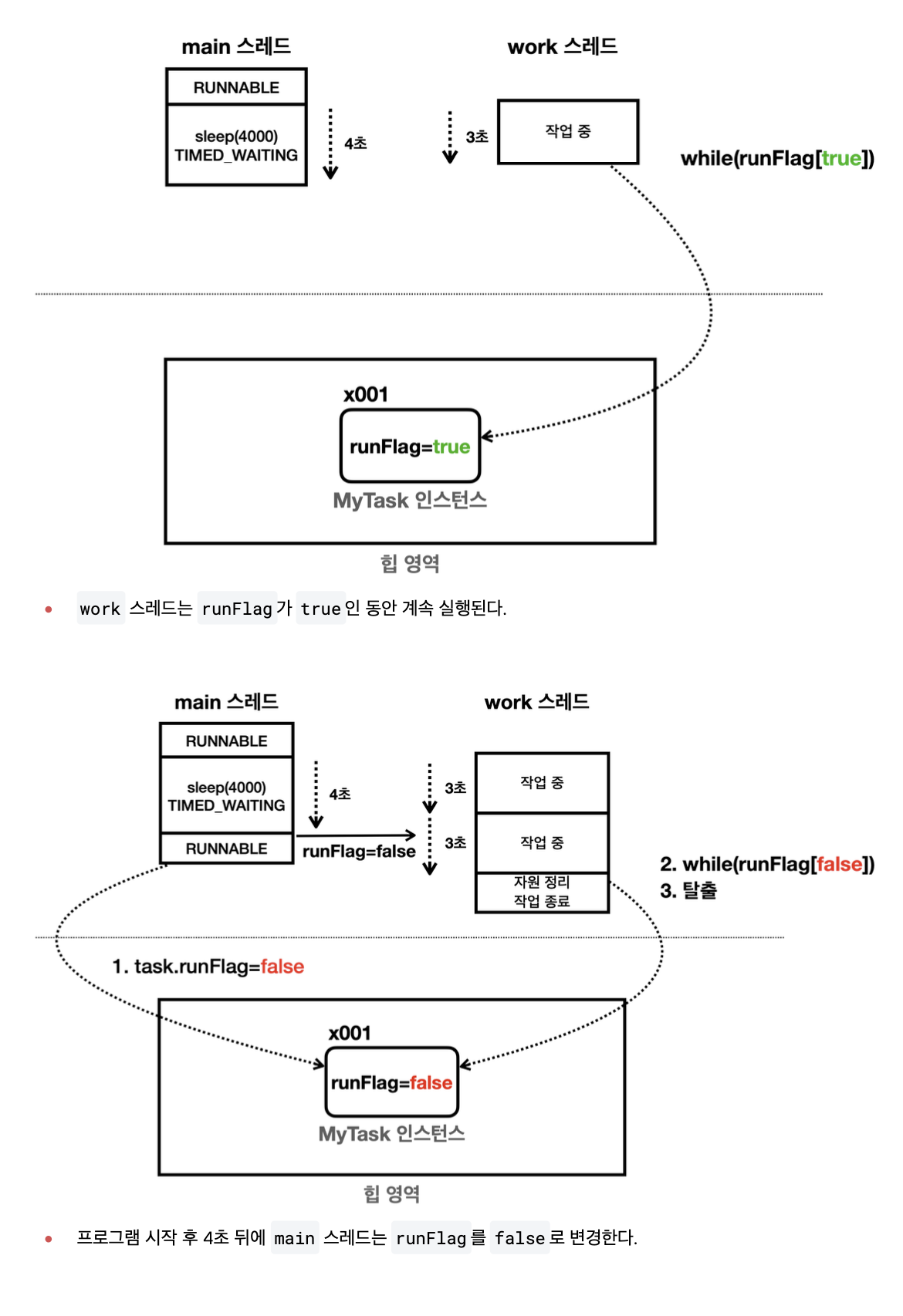
문제점
main 스레드가 runFlag=false를 통해 작업 중단 지시. work 스레드는 즉각 반응 X
가장 큰 문제는 sleep
main 스레드가 runFlag를 false
로 변경해도, work 스레드는 sleep(3000)을 통해 3초간 잠들어 있
다. 3초간의 잠이 깬 다음에 while(runFlag) 코드를 실행해야, runFlag를 확인하고 작업을 중단할 수 있다.
인터럽트 시작 2
Thread.sleep()을 통해 쉬고 있는데 처리해야 하는 작업이 들어와 해당 스레드를 급하게 꺠워야 하는 경우, sleep으로 쉬고 있는 스레드는 더는 일이 없으니 작업 종료 지시
인터럽트를 사용하면 WAITING, TIMED_WAITING 같은 대기 상태의 스레드를 직접 깨워 RUNNABLE
public class ThreadStopMainV2 {
    public static void main(String[] args) throws InterruptedException {
        MyTask task = new MyTask();
        Thread thread = new Thread(task, "work");
        thread.start();

        sleep(4000);
        log("작업 중단 지시 상태"); //main 스레드가 인터럽트 실행
        thread.interrupt();
        log("work 스레드 인터럽트 상태 1 : " + thread.isInterrupted()); //work thread -> 인터럽트 상태
    }

    static class MyTask implements Runnable {

        //작업이 다 돌아간 뒤에 작업이 나간 걸 확인 뒤 작업 중단
        //중간에 중지 안됨
        public void run() {
            try {
                while (true) {
                    log("작업중");
                    Thread.sleep(3000); //sleep을 만나면 exception이 터진다. -> interrupt 상태가 풀린다.
                }
            } catch (InterruptedException e) { //예외가 터지면서 인터럽트 상태에서 풀리는 것
                log("work 스레드 인트럽트 상태 2 : " + Thread.currentThread().isInterrupted()); // -> false로 변경
                log("interrupt message : " + e.getMessage());
                log("state : " + Thread.currentThread().getState());
            }
            log("자원 정리");
            log("작업 종료");
        }
    }
}
인터럽트 발생 -> interruptedException이 발생
인터럽트 받은 스레드는 대기 상태에서 깨어나 Runnable 상태가 되고, 코드는 정상수행
InterruptedException -> catch 로 잡아 정상흐름 이어나감
work 스레드는 TIMED_WAITNG RUNNABLE 상태로 변경되면서 InterruptedException 예외
가 발생한다. Runnable 상태가 되어야 catch 코드도 실행 가능
main 스레드 4초 뒤 work 스레드에 인터럽트 건다 -> work 스레드는 인터럽트 상태 (true)가 된다.
스레드가 인터럽트 상태 -> sleep, 처럼 interruptException이 발생하는 메서드 호출, 이미 호출하고 대기 중, InterruptedException 발생
work 스레드는 TIMED_WAITING 상태에서 RUNNABLE 상태로 변경되고, InterruptedException 예외를 처리하면서 반복문을 탈출한다.
work 스레드는 인터럽트 상태가 되었고, 인터럽트 상태이기 때문에 인터럽트 예외가 발생한다.
인터럽트 상태에서 인터럽트 예외가 발생하면 work 스레드는 다시 작동하는 상태가 된다. 따라서 work
스레드의 인터럽트 상태는 종료된다.
work 스레드의 인터럽트 상태는 false로 변경된다.
인터럽트 - 시작 3
while문에서 인터럽트 상태 체크 한다면 ?
public class ThreadStopMainV3 {
    public static void main(String[] args) throws InterruptedException {
        MyTask task = new MyTask();
        Thread thread = new Thread(task, "work");
        thread.start();

        sleep(100);
        log("작업 중단 지시 상태"); //main 스레드가 인터럽트 실행
        thread.interrupt();
        log("work 스레드 인터럽트 상태 1 : " + thread.isInterrupted()); //work thread -> 인터럽트 상태
    }

    static class MyTask implements Runnable {

        //작업이 다 돌아간 뒤에 작업이 나간 걸 확인 뒤 작업 중단
        //중간에 중지 안됨
        public void run() {
            while (!Thread.currentThread().isInterrupted()) { //인터럽트 상태 변경 X
                log("작업중");
            }
            log("work 스레드 인트럽트 상태 2 : " + Thread.currentThread().isInterrupted()); //계속 인터럽트 상태

            try {
                log("자원 정리 시도");
                Thread.sleep(1000); //sleep을 만나면 exception이 터진다. -> interrupt 상태가 풀린다.
                log("자원 정리 완료");
            } catch (InterruptedException e) { //예외가 터지면서 인터럽트 상태에서 풀리는 것
                log("자원 정리 실패 : 자원 정리중 인터럽트 발생 ");
                log("work 스레드 인트럽트 상태 3 : " + Thread.currentThread().isInterrupted()); //인터럽트 풀리는 상태가 된다.

            }
            log("작업 종료");
        }
    }
}
문제점은 ?? work 스레드가 true로 유지 -> sleep을 발생한다면?? 해당 코드에서 인터럽트 예외 발생
인터럽트 익셉션은 탈출용이지, 다른 곳에서 예외를 바라지는 않았음
인터럽트 상태를 false로 돌리는 것은 이런 이유 때문
인터럽트 시작 - 4
public class ThreadStopMainV4 {
    public static void main(String[] args) throws InterruptedException {
        MyTask task = new MyTask();
        Thread thread = new Thread(task, "work");
        thread.start();

        sleep(100);
        log("작업 중단 지시 상태"); //main 스레드가 인터럽트 실행
        thread.interrupt();
        log("work 스레드 인터럽트 상태 1 : " + thread.isInterrupted()); //work thread -> 인터럽트 상태 true
    }

    static class MyTask implements Runnable {

        //작업이 다 돌아간 뒤에 작업이 나간 걸 확인 뒤 작업 중단
        //중간에 중지 안됨
        public void run() {
            while (!Thread.interrupted()) { //인터럽트 상태 변경한다.
                log("작업중");
            }
            log("work 스레드 인트럽트 상태 2 : " + Thread.currentThread().isInterrupted()); //계속 인터럽트 상태 false

            try {
                log("자원 정리 시도");
                Thread.sleep(1000); //sleep을 만나면 exception이 안터짐
                log("자원 정리 완료");
            } catch (InterruptedException e) { //예외가 터지면서 인터럽트 상태에서 풀리는 것
                log("자원 정리 실패 : 자원 정리중 인터럽트 발생 ");
                log("work 스레드 인트럽트 상태 3 : " + Thread.currentThread().isInterrupted()); //인터럽트 풀리는 상태가 된다.

            }
            log("작업 종료");
        }
    }
}
직접 체크해서 사용할 때는 Thread.interrupted()를 사용해야 함
인터럽트 상태가 true -> false
false이면 유지
스레드의 인터럽트 상태를 정상으로 돌리지 않으면 이후에도 계속 인터럽트가 발생하게 된다.
인터럽트의 목적을 달성하면 인터럽트 상태를 다시 정상으로 돌려두어야 한다.
예시
public class MyPrinterV1 {
    public static void main(String[] args) {
        Printer printer = new Printer();
        Thread printerThread = new Thread(printer, "printer");
        printerThread.start();

        Scanner sc = new Scanner(System.in);

        while (true) {
            System.out.print("프린터할 문서를 입력하세요, 종료 (q) : ");
            String input = sc.nextLine();
            if (input.equals("q")) {
                printer.work = false;
                break;
            }
            printer.addJob(input);
        }
    }

    //main 스레드가 넣어주는 것
    static class Printer implements Runnable{
        volatile boolean work = true; //여러 스레드가 동시에 접근 하는 변수에는 volatile 키워드 붙여주다.
        Queue<String> queue = new ConcurrentLinkedQueue<>(); //여러 스레드가 돌아가는 경우 Concurrent가 들어있어야 한다.

        public void run() {
            while (work) {
                if (queue.isEmpty()) {
                    continue;
                }

                String job = queue.poll();
                log("출력 시작 : " + job + " 대기 문서: " + queue);
                sleep(3000);
                log("출력 완료 : " + job);
            }

            log("프린터 종료");
        }

        public void addJob(String input) {
            queue.offer(input);
        }
    }
}
volatile : 여러 스레드가 동시에 접근하는 변수에는 volatile 키워드 붙이는 것이 안전
ConcurrentLinkedQueue : 여러 스레드 동시 접근, 컬렉션 프레임워크가 제공하는 일반적이 자료구조를 사용하면 안전하지 않음
이 코드에 문제점은 ? q를 입력해도 바로 반응 X,
printer가 스레드 반복문을 빠져나오려면 while문 체크, printer가 스레드 sleep(3000)을 통해 대기 상태에 빠져 작동 X
인터럽트 도입
public class MyPrinterV2 {
    public static void main(String[] args) {
        Printer printer = new Printer();
        Thread printerThread = new Thread(printer, "printer");
        printerThread.start();

        Scanner sc = new Scanner(System.in);

        while (true) {
            System.out.print("프린터할 문서를 입력하세요, 종료 (q) : ");
            String input = sc.nextLine();
            if (input.equals("q")) {
                printer.work = false;
                printerThread.interrupt();
                break;
            }
            printer.addJob(input);
        }
    }

    //main 스레드가 넣어주는 것
    static class Printer implements Runnable {
        volatile boolean work = true; //여러 스레드가 동시에 접근 하는 변수에는 volatile 키워드 붙여주다.
        Queue<String> queue = new ConcurrentLinkedQueue<>(); //여러 스레드가 돌아가는 경우 Concurrent가 들어있어야 한다.

        public void run() {
            while (work) {
                if (queue.isEmpty()) {
                    continue;
                }

                try {
                    String job = queue.poll();
                    log("출력 시작 : " + job + " 대기 문서: " + queue);
                    Thread.sleep(3000);
                    log("출력 완료 : " + job);
                } catch (InterruptedException e) {
                    log("인터럽트");
                    break;
                }
            }
            log("프린터 종료");
        }

        public void addJob(String input) {
            queue.offer(input);
        }
    }
}
인터럽트 : sleep 상태에서 빠져나온다.
인터럽트 코드 개선
public class MyPrinterV3 {
    public static void main(String[] args) {
        Printer printer = new Printer();
        Thread printerThread = new Thread(printer, "printer");
        printerThread.start();

        Scanner sc = new Scanner(System.in);

        while (true) {
            System.out.print("프린터할 문서를 입력하세요, 종료 (q) : ");
            String input = sc.nextLine();
            if (input.equals("q")) {
                //printer.work = false;
                printerThread.interrupt();
                break;
            }
            printer.addJob(input);
        }
    }

    //main 스레드가 넣어주는 것
    static class Printer implements Runnable {
        Queue<String> queue = new ConcurrentLinkedQueue<>(); //여러 스레드가 돌아가는 경우 Concurrent가 들어있어야 한다.

        public void run() {
            while (!Thread.interrupted()) {
                if (queue.isEmpty()) {
                    continue;
                }

                try {
                    String job = queue.poll();
                    log("출력 시작 : " + job + " 대기 문서: " + queue);
                    Thread.sleep(3000);
                    log("출력 완료 : " + job);
                } catch (InterruptedException e) {
                    log("인터럽트");
                    break;
                }
            }
            log("프린터 종료");
        }

        public void addJob(String input) {
            queue.offer(input);
        }
    }
}
yield
특정 스레드가 크게 바쁘지 않은 상황 -> CPU 다른 스레드에게 실행 기회를 양보하고 싶을 수 도있음.
public class YieldMain {
    static final int THREAD_COUNT = 1000;

    public static void main(String[] args) {
        for (int i = 0; i < THREAD_COUNT; i++) {
            Thread thread = new Thread(new MyRunnable());
            thread.start();
        }
    }

    static class MyRunnable implements Runnable {

        @Override
        public void run() {
            for (int i = 0; i < 10; i++) {
                System.out.println(Thread.currentThread().getName() + " - " + i); // Thread가 0 ~ 9 까지 출력

                //sleep(1);
                Thread.yield();
            }
        }
    }
}
스레드가 Runnable 상태 -> 운영체제의 스케줄링은 Running + Ready
스레드가 자발적으로 CPU 양보, 다른 스레드가 실행 될 수 있도로 한다.
Runnable 상태를 유지 -> CPU 양보
Thread.yield(); -> 자신에게 할당된 실행 시간 포기, 다른 스레드에게 실행 기회를 줌
public class MyPrinterV4 {
    public static void main(String[] args) {
        Printer printer = new Printer();
        Thread printerThread = new Thread(printer, "printer");
        printerThread.start();

        Scanner sc = new Scanner(System.in);

        while (true) {
            System.out.print("프린터할 문서를 입력하세요, 종료 (q) : ");
            String input = sc.nextLine();
            if (input.equals("q")) {
                //printer.work = false;
                printerThread.interrupt();
                break;
            }
            printer.addJob(input);
        }
    }

    //main 스레드가 넣어주는 것
    static class Printer implements Runnable {
        Queue<String> queue = new ConcurrentLinkedQueue<>(); //여러 스레드가 돌아가는 경우 Concurrent가 들어있어야 한다.

        public void run() {
            while (!Thread.interrupted()) {
                if (queue.isEmpty()) {
                    Thread.yield();
                    continue;
                }

                try {
                    String job = queue.poll();
                    log("출력 시작 : " + job + " 대기 문서: " + queue);
                    Thread.sleep(3000);
                    log("출력 완료 : " + job);
                } catch (InterruptedException e) {
                    log("인터럽트");
                    break;
                }
            }
            log("프린터 종료");
        }

        public void addJob(String input) {
            queue.offer(input);
        }
    }
}
yield 도입