
멀티 모듈 도입기 - 멀티모듈 생성 (1) 에 이어 컨벤션 플러그인을 구현하고 프로젝트에 적용하는 방법을 정리합니다.
본론에 앞서, 제가 구현한 모든 내용과 코드를 공개하려 합니다. (저장소는 private 입니다.)
다만, 모든 프로젝트에는 정답이 없고 완벽함은 없듯이
제가 한 방식과 구현 방법이 정답이 아니란 것을 인지하고 참고만 하시길 부탁드립니다.
본 포스트의 목적은 심화 탐구가 아닌, 그저 하나로 정리된 구현 방법이 구글링 상에 많이 있지 않아 하나로 정리된 컨벤션 플러그인 구현 방법을 나열하여 공유하기 위한 것임을 밝힙니다.
[목차]
1️⃣ 멀티모듈 생성 직후의 문제점
2️⃣ 컨벤션 플러그인의 장점
3️⃣ 컨벤션 플러그인 구현
4️⃣ 모듈별 사용한 플러그인
5️⃣ 플러그인별 적용된 모듈
구현 내용을 원하시면 3️⃣번 단락으로 바로 가시면 됩니다!
1️⃣ 멀티모듈 생성 직후의 문제점
1. 중복되는 코드 + 사진
예시로 안드로이드 라이브러리 내부에는 모두 아래의 코드가 작성되어 있다.
android {
    namespace = "com.roomiblog.roomiandroid.core.data.impl"
    compileSdk = 36

    defaultConfig {
        minSdk = 28

        testInstrumentationRunner = "androidx.test.runner.AndroidJUnitRunner"
    }

    buildTypes {
        release {
            isMinifyEnabled = false
        }
    }
    compileOptions {
        sourceCompatibility = JavaVersion.VERSION_11
        targetCompatibility = JavaVersion.VERSION_11
    }
    kotlinOptions {
        jvmTarget = "11"
    }
}
또한
:feature모듈- Compose 를 사용하는
:core모듈 - Hilt 를 사용하는
:core,:feature모듈
위 모듈들에 공통된 플러그인과 의존성이 적용되어 있는 것을 확인할 수 있다.
2. 변경에 취약함
기술 스택의 변경
ConverterFactory:
Kotiln Seriliazer->Gson
DI:Hilt->Koin
Remote:Retrofit->Ktor
기초 설정 변경
minSdk, compileSdk, Java Version 등 변경
수정 사항에 대해 변경된 기술 스택을 사용하는 모든 모듈에 대한 변경 소요가 필요함
3. 확장성 고려
프로젝트 기능 확장에 따른 관리의 어려움
새롭게 결제 기능이 추가되었다고 가정해볼 때,
개발자는 안드로이드 라이브러리인 :feature:payment 모듈을 생성합니다.
그 후에 build.gradle.kts 파일 내부에 어떠한 코드가 필요없는 지, 어떠한 플러그인과 의존성이 필요한 지 파악하고 적용해야 하는 번거로움이 있습니다.
이를 매번 수행해야한다면 의미 없는 노가다 작업이 될 수 있습니다.
또한 새로운 기술 스택이 추가되었을 때, 해당 기술 스택을 사용하는 모든 모듈에 추가해주어야 합니다.
ex) Firebase Ananlytics, Landscapist 등등
기존 Android 프로젝트를 Kotlin Multiplatform 으로의 확장 시에도 모든 모듈에 대해서 변화된 의존성을 적용해주어야 합니다.
2️⃣ 컨벤션 플러그인의 장점
우선 컨벤션 플러그인이란 다음을 의미합니다.
여러 모듈에서 중복되는 Gradle 설정을 통합하기 위해 만든 커스텀 Gradle 플러그인
Convention(규약) + Plugin
1. 중복되는 코드
Android Library모듈:feature모듈- Compose 를 사용하는
:core모듈 - Hilt 를 사용하는
:core,:feature모듈
위 모듈들에 공통적으로 포함되어 있는 Gradle 설정을 Convention Plugin으로 관리하여 모듈에서 가져다 쓰는 방식으로 사용할 수 있습니다. ( 3️⃣번 단락 참고 )
2. 변경에 취약함
Gradle 설정 변경에 대해서 기존엔 모든 모듈에 수정사항을 적용했어야 하는데,
Convention Plugin을 공유하고 있으므로, 플러그인만 수정해도 됩니다.
1️⃣번 단락에서 제가 "모든" 이란 단어에 볼드 처리를 적용한 이유입니다.
컨벤션 플러그인 클래스의 수정만 적용되어도, 해당 플러그인을 사용하는 모든 모듈에 대해 적용할 수 있습니다.
3. 확장성 고려
Convention Plugin 에 추가된 기능에 대한 의존성/플러그인을 추가하면 연관된 모듈들에 반영이 되고,
새로운 Convention Plugin을 추가하여 아예 새로운 기능들도 관리할 수 있습니다.
3️⃣ 컨벤션 플러그인 구현
1. Overview
- 멀티모듈화를 완료한
:app모듈의build.gradle.kts
import org.jetbrains.kotlin.gradle.dsl.JvmTarget

plugins {
    alias(libs.plugins.android.application) // AndroidApplicationConventionPlugin
    alias(libs.plugins.kotlin.android) // AndroidApplicationConventionPlugin
    alias(libs.plugins.kotlin.compose) // AndroidApplicationComposeConventionPlugin
    alias(libs.plugins.hilt.android) // HiltConventionPlugin
    alias(libs.plugins.kotlin.serialization) // AndroidRetrofitConventionPlugin
    alias(libs.plugins.ksp) // HiltConventionPlugin
    alias(libs.plugins.google.services) // AndroidFirebaseConventionPlugin
    alias(libs.plugins.detekt) // AndroidApplicationConventionPlugin
    alias(libs.plugins.openapi.generator)
    alias(libs.plugins.download)
}
// OpenApi Generator Task...

android {
    namespace
    compileSdk = 36 // AndroidApplicationConventionPlugin

    defaultConfig {  // AndroidApplicationConventionPlugin
        applicationId
        minSdk = 28
        targetSdk = 36
        versionCode
        versionName

        testInstrumentationRunner = "androidx.test.runner.AndroidJUnitRunner"
        // buildConfigField : 필요한 모듈에서 추가하면 됨
        // manifestPlaceholders : 필요한 모듈에서 추가하면 됨
    }

    buildTypes {...}
    signingConfigs {...}
    compileOptions { // AndroidApplicationConventionPlugin
        sourceCompatibility = JavaVersion.VERSION_11
        targetCompatibility = JavaVersion.VERSION_11
    }
    kotlin { // AndroidApplicationConventionPlugin
        compilerOptions {
            jvmTarget.set(JvmTarget.JVM_11)
        }
    }
    buildFeatures {
        compose = true // AndroidApplicationComposeConventionPlugin
        buildConfig = true
    }
}

dependencies {

    implementation(libs.androidx.core.ktx)
    implementation(libs.androidx.lifecycle.runtime.ktx)
    implementation(libs.androidx.activity.compose)
    implementation(platform(libs.androidx.compose.bom)) // AndroidApplicationComposeConventionPlugin
    implementation(libs.androidx.ui)
    implementation(libs.androidx.ui.graphics)
    implementation(libs.androidx.ui.tooling.preview) // AndroidApplicationComposeConventionPlugin
    implementation(libs.androidx.material3)
    implementation(libs.androidx.navigation.compose)
    debugImplementation(libs.androidx.ui.tooling) // AndroidApplicationComposeConventionPlugin
    debugImplementation(libs.androidx.ui.test.manifest)

    // Test
    testImplementation(libs.junit)
    androidTestImplementation(libs.androidx.junit)
    androidTestImplementation(libs.androidx.espresso.core)
    androidTestImplementation(platform(libs.androidx.compose.bom)) // AndroidApplicationComposeConventionPlugin
    androidTestImplementation(libs.androidx.ui.test.junit4)

    // Hilt
    implementation(libs.hilt.android) // HiltConventionPlugin
    implementation(libs.hilt.core) // HiltConventionPlugin
    implementation(libs.hilt.navigation.compose)
    ksp(libs.hilt.android.compiler) // HiltConventionPlugin

    // Play Services & WebKit
    implementation(libs.play.services.location)
    implementation(libs.androidx.webkit)

    // Coil
    implementation(libs.coil.compose)
    implementation(libs.coil.network.okhttp)

    // Accompanist
    implementation(libs.accompanist.permissions)

    // CameraX
    implementation(libs.camerax.core)
    implementation(libs.camerax.camera2)
    implementation(libs.camerax.lifecycle)
    implementation(libs.camerax.view)

    // Network
    implementation(platform(libs.okhttp.bom)) // AndroidRetrofitConventionPlugin
    implementation(libs.okhttp) // AndroidRetrofitConventionPlugin
    implementation(libs.okhttp.logging.interceptor) // AndroidRetrofitConventionPlugin
    implementation(libs.retrofit) // AndroidRetrofitConventionPlugin
    implementation(libs.retrofit.kotlin.serialization.converter) // AndroidRetrofitConventionPlugin
    implementation(libs.kotlinx.serialization.json) // AndroidRetrofitConventionPlugin
    implementation(libs.kotlinx.collections.immutable)

    // Firebase
    implementation(platform(libs.firebase.bom)) // AndroidFirebaseConventionPlugin
    implementation(libs.firebase.auth) // AndroidFirebaseConventionPlugin
    implementation(libs.androidx.credentials) // AndroidFirebaseConventionPlugin
    implementation(libs.androidx.credentials.play.services.auth) // AndroidFirebaseConventionPlugin
    implementation(libs.googleid) // AndroidFirebaseConventionPlugin
    implementation(libs.firebase.messaging) // AndroidFirebaseConventionPlugin

    // Lint
    detektPlugins(libs.detekt.formatting) // AndroidApplicationConventionPlugin

    // Naver Map SDK
    implementation(libs.naver.map.compose)

    // ExoPlayer
    implementation(libs.androidx.media3.exoplayer)
    implementation(libs.androidx.media3.ui)
    implementation(libs.androidx.media3.ui.compose)

    // DataStore
    implementation(libs.androidx.datastore.preferences)

    // Core modules
    implementation(project(":core:common"))
    implementation(project(":core:data:api"))
    implementation(project(":core:data:impl"))
    implementation(project(":core:datastore"))
    implementation(project(":core:designsystem"))
    implementation(project(":core:firebase"))
    implementation(project(":core:model"))
    implementation(project(":core:navigation"))
    implementation(project(":core:network"))
    implementation(project(":core:ui"))

    // Feature modules
    implementation(project(":feature:addfeed"))
    implementation(project(":feature:splash"))
    implementation(project(":feature:notification"))
    implementation(project(":feature:follow"))
    implementation(project(":feature:login"))
    implementation(project(":feature:sample"))
    implementation(project(":feature:location"))
    implementation(project(":feature:volunteer"))
    implementation(project(":feature:chat"))
    implementation(project(":feature:map"))
    implementation(project(":feature:home"))
    implementation(project(":feature:community"))
    implementation(project(":feature:mypage"))
    implementation(project(":feature:otherprofile"))
    implementation(project(":feature:profile"))
    implementation(project(":feature:signup"))
    implementation(project(":feature:main"))
}
숨길 내용들은 주석처리 + 삭제했습니다.
모듈 의존성 주입에 대해 ,enableFeaturePreview("TYPESAFE_PROJECT_ACCESSORS")구문을 추가하면 Type Safe 하게 모듈을 추가할 수 있습니다.
implementation(project(":feature:main")) > implementation(project.feature.main)
2. 구현할 컨벤션 플러그인
AndroidApplicationConventionPluginAndroidApplicationComposeConventionPluginAndroidLibraryConventionPluginAndroidLibraryComponseConventionPluginAndroidRetrofitConventionPluginAndroidFeatureConventionPluginHiltConventionPluginJvmKotlinConventionPlugin
위 플러그인들이 대부분 사용되는 플러그인이고,
제 프로젝트에서는 파이어베이스 관련 플러그인을 추가했습니다.
AndroidFirebaseConventionPlugin
3. 컨벤션 플러그인 구현 코드
본 포스트의 목적은 처음으로 멀티모듈을 경험하는 사람들이 딥다이브 대신 우선 한 번 해볼 수 있도록, 코드를 공유하는 것을 목표로 합니다.
따라서 자세한 코드의 설명은 하지 않을 예정입니다.
코드에 대한 이해를 하고 싶으신 분들은 참고 블로그, Gradle Convention Plugins 공식 문서를 확인하시면 좋을 것 같습니다!
1. :build-logic:convention 모듈 생성
2. 그 후 :build-logic 우클릭 > New > Kotlin Script > settings.gradle.kts 생성
3. 아래 코드 삽입
dependencyResolutionManagement {
    repositories {
        google()
        mavenCentral()
        gradlePluginPortal()
    }

    versionCatalogs {
        create("libs") {
            from(files("../gradle/libs.versions.toml"))
        }
    }
}

rootProject.name = "build-logic"
include(":convention")
4. Project 의 settings.gradle.kts 에 아래 구문 추가
pluginManagement {
	includeBuild("build-logic")
	...
}
...
5. 아래 사진처럼 모듈 구성
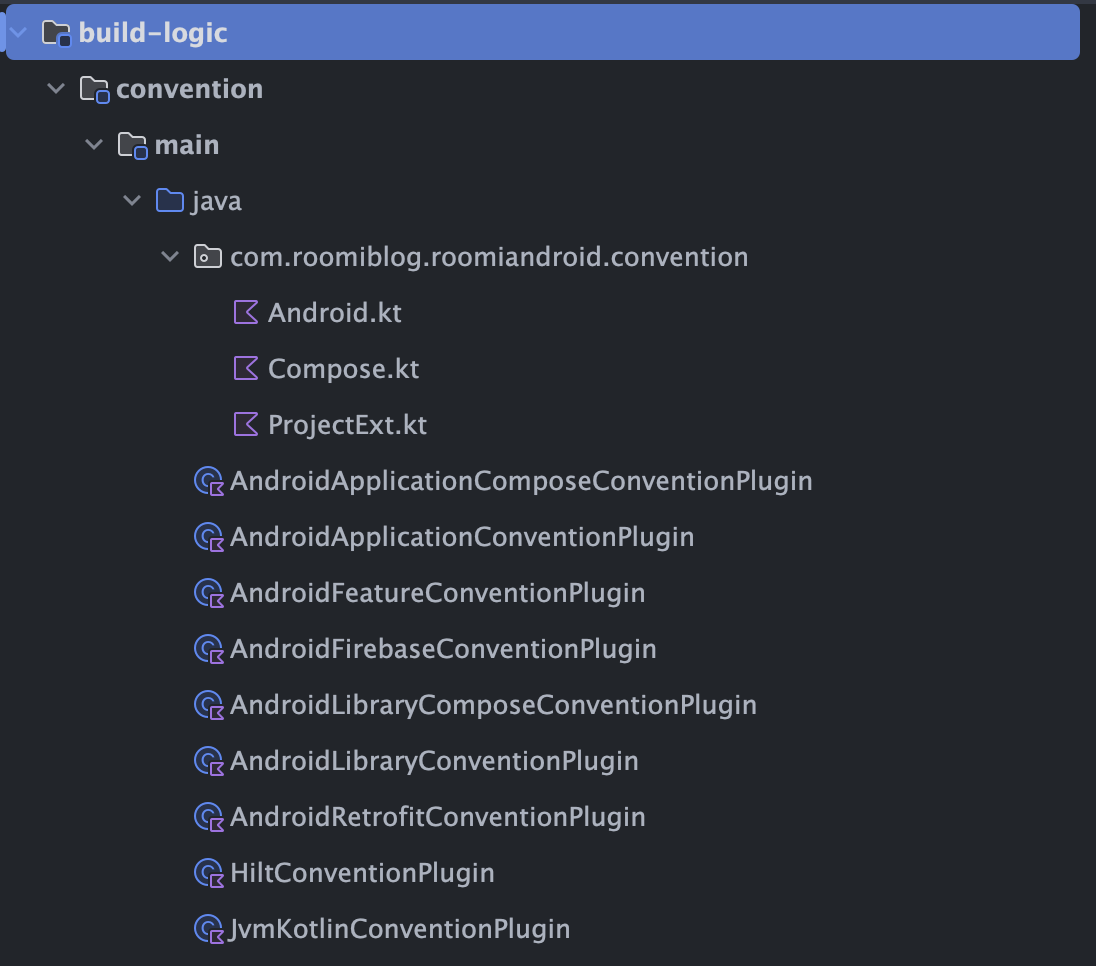
Android.kt
Application과 Library 모듈의 공통 Android 설정 함수 제공
함수: Project.configureAndroid(extension: CommonExtension<*, *, *, *, *, *>)
Gradle 설정
compileSdk = 36minSdk = 28compileOptions.sourceCompatibility = JavaVersion.VERSION_11compileOptions.targetCompatibility = JavaVersion.VERSION_11tasks.withType<KotlinCompile>().compilerOptions.jvmTarget = JVM_11
의존성
detektPlugins(detekt.formatting)
Compose.kt
Application과 Library 모듈의 공통 Compose 설정 함수 제공
함수: Project.configureAndroidCompose(extension: CommonExtension<*, *, *, *, *, *>)
Gradle 설정
buildFeatures.compose = truemetricsDestination(enableComposeCompilerMetrics로 활성화)reportsDestination(enableComposeCompilerReports로 활성화)stabilityConfigurationFiles(compose_compiler_config.conf)
의존성
implementation(platform(androidx-compose-bom))androidTestImplementation(platform(androidx-compose-bom))implementation(androidx-ui-tooling-preview)debugImplementation(androidx-ui-tooling)
ProjectExt.kt
Version Catalog 접근을 위한 확장 프로퍼티 제공
확장 프로퍼티: Project.libs: VersionCatalog
용도: 모든 컨벤션 플러그인에서 libs.versions.toml의 의존성 및 버전 정보에 타입 안전하게 접근
AndroidApplicationConventionPlugin
:app모듈에 사용, 기본 설정을 담당
사용된 플러그인
com.android.applicationorg.jetbrains.kotlin.android
사용된 의존성
detektPlugins(detekt.formatting)
그 외 사용된 Gradle 설정
applicationId(version catalog에서 읽음)versionCode(version catalog에서 읽음)versionName(version catalog에서 읽음)configureAndroid()
AndroidApplicationComposeConventionPlugin
:app모듈에 사용, 컴포즈 관련 설정을 담당
사용된 플러그인
org.jetbrains.kotlin.plugin.compose
사용된 의존성
implementation(platform(androidx-compose-bom))androidTestImplementation(platform(androidx-compose-bom))implementation(androidx-ui-tooling-preview)debugImplementation(androidx-ui-tooling)
그 외 사용된 Gradle 설정
configureAndroidCompose()
AndroidLibraryConventionPlugin
- Android Library 모듈에 사용
사용된 플러그인
com.android.libraryorg.jetbrains.kotlin.android
사용된 의존성
detektPlugins(detekt.formatting)
그 외 사용된 Gradle 설정
defaultConfig.testInstrumentationRunner = "androidx.test.runner.AndroidJUnitRunner"configureAndroid()
AndroidLibraryComposeConventionPlugin
- Compose 를 사용하는 Android Library 모듈에 사용
사용된 플러그인
org.jetbrains.kotlin.plugin.compose
사용된 의존성
implementation(platform(androidx-compose-bom))androidTestImplementation(platform(androidx-compose-bom))implementation(androidx-ui-tooling-preview)debugImplementation(androidx-ui-tooling)
그 외 사용된 Gradle 설정
configureAndroidCompose()
AndroidRetrofitConventionPlugin
- Retrofit 관련 네트워크 통신 설정을 담당
사용된 플러그인
org.jetbrains.kotlin.plugin.serialization
사용된 의존성
implementation(platform(okhttp-bom))implementation(okhttp)implementation(okhttp.logging.interceptor)implementation(retrofit)implementation(retrofit.kotlin.serialization.converter)implementation(kotlinx.serialization.json)
AndroidFeatureConventionPlugin
- Feature 모듈에 적용되는 설정을 담당
사용된 플러그인
roomi.android.libraryroomi.android.library.composeroomi.hilt
사용된 의존성
implementation(project(":core:ui"))implementation(project(":core:common"))implementation(project(":core:data:api"))implementation(project(":core:designsystem"))implementation(project(":core:model"))implementation(project(":core:navigation"))implementation(hilt.navigation.compose)implementation(androidx.navigation.compose)implementation(androidx.lifecycle.runtime.ktx)
HiltConventionPlugin
- Hilt 의존성 주입 관련 설정을 담당
사용된 플러그인
dagger.hilt.android.plugincom.google.devtools.ksp
사용된 의존성
ksp(hilt.android.compiler)implementation(hilt.core)implementation(hilt.android)
JvmKotlinConventionPlugin
- 순수한 Kotlin/JVM 모듈에 사용
사용된 플러그인
java-libraryorg.jetbrains.kotlin.jvm
사용된 의존성
detektPlugins(detekt.formatting)
그 외 사용된 Gradle 설정
sourceCompatibility = JavaVersion.VERSION_11targetCompatibility = JavaVersion.VERSION_11tasks.withType<KotlinCompile>().compilerOptions.jvmTarget = JVM_11
AndroidFirebaseConventionPlugin
- Firebase 관련 설정을 담당
사용된 플러그인
com.google.gms.google-services
사용된 의존성
implementation(platform(firebase-bom))implementation(firebase.auth)implementation(androidx.credentials)implementation(androidx.credentials.play.services.auth)implementation(googleid)implementation(firebase.messaging)
6. libs.versions.toml 파일에 아래 내용 추가
[versions]
androidTools = "31.13.0"

[libraries]
# Gradle
gradle-android = { group = "com.android.tools.build", name = "gradle", version.ref = "agp" }
gradle-kotlin = { group = "org.jetbrains.kotlin", name = "kotlin-gradle-plugin", version.ref = "kotlin" }
android-tools-common = { group = "com.android.tools", name = "common", version.ref = "androidTools" }
ksp-gradlePlugin = { group = "com.google.devtools.ksp", name = "com.google.devtools.ksp.gradle.plugin", version.ref = "ksp" }
compose-compiler-extension = { group = "org.jetbrains.kotlin", name = "compose-compiler-gradle-plugin", version.ref = "kotlin" }

[plugins]
# Convention Plugins
service-android-application = { id = "service.android.application", version = "unspecified" }
service-android-application-compose = { id = "service.android.application.compose", version = "unspecified" }
service-android-feature = { id = "service.android.feature", version = "unspecified" }
service-android-firebase = { id = "service.android.firebase", version = "unspecified" }
service-android-library = { id = "service.android.library", version = "unspecified" }
service-android-library-compose = { id = "service.android.library.compose", version = "unspecified" }
service-android-retrofit = { id = "service.android.retrofit", version = "unspecified" }
service-hilt = { id = "service.hilt", version = "unspecified" }
service-jvm-library = { id = "service.jvm.library" }
7. :build-logic:convention 모듈의 build.gradle.kts 파일에 아래 내용 설정
plugins {
    `kotlin-dsl`
}

gradlePlugin {
    plugins {
        register("androidApplicationCompose") {
            id = "service.android.application.compose"
            implementationClass = "AndroidApplicationComposeConventionPlugin"
        }
        register("androidApplication") {
            id = "service.android.application"
            implementationClass = "AndroidApplicationConventionPlugin"
        }
        register("androidLibrary") {
            id = "service.android.library"
            implementationClass = "AndroidLibraryConventionPlugin"
        }
        register("androidLibraryCompose") {
            id = "service.android.library.compose"
            implementationClass = "AndroidLibraryComposeConventionPlugin"
        }
        register("hilt") {
            id = "service.hilt"
            implementationClass = "HiltConventionPlugin"
        }
        register("androidFeature") {
            id = "service.android.feature"
            implementationClass = "AndroidFeatureConventionPlugin"
        }
        register("androidFirebase") {
            id = "service.android.firebase"
            implementationClass = "AndroidFirebaseConventionPlugin"
        }
        register("androidRetrofit") {
            id = "service.android.retrofit"
            implementationClass = "AndroidRetrofitConventionPlugin"
        }
        register("jvmLibrary") {
            id = "service.jvm.library"
            implementationClass = "JvmKotlinConventionPlugin"
        }
    }
}

java {
    sourceCompatibility = JavaVersion.VERSION_11
    targetCompatibility = JavaVersion.VERSION_11
}
kotlin {
    compilerOptions {
        jvmTarget = org.jetbrains.kotlin.gradle.dsl.JvmTarget.JVM_11
    }
}

dependencies {
    compileOnly(libs.android.tools.common)
    compileOnly(libs.gradle.android)
    compileOnly(libs.gradle.kotlin)
    compileOnly(libs.ksp.gradlePlugin)
    compileOnly(libs.compose.compiler.extension)
}
service 자리에 알맞은 이름을 삽입하면 됩니다. ex) nowinandroid
4️⃣ 모듈별 사용한 플러그인
:app 모듈
적용된 컨벤션 플러그인:
AndroidApplicationConventionPluginAndroidApplicationComposeConventionPluginHiltConventionPluginAndroidFirebaseConventionPlugin
:feature 모듈
적용된 컨벤션 플러그인:
AndroidFeatureConventionPlugin
:core:common
적용된 컨벤션 플러그인:
AndroidLibraryConventionPluginAndroidLibraryComposeConventionPluginHiltConventionPlugin
:core:data:api
적용된 컨벤션 플러그인:
AndroidLibraryConventionPlugin
:core:data:impl
적용된 컨벤션 플러그인:
AndroidLibraryConventionPluginHiltConventionPlugin
:core:datastore
적용된 컨벤션 플러그인:
AndroidLibraryConventionPluginHiltConventionPlugin
:core:designsystem
적용된 컨벤션 플러그인:
AndroidLibraryConventionPluginAndroidLibraryComposeConventionPlugin
:core:firebase
적용된 컨벤션 플러그인:
AndroidLibraryConventionPluginHiltConventionPlugin
:core:model
적용된 컨벤션 플러그인:
JvmKotlinConventionPlugin
:core:navigation
적용된 컨벤션 플러그인:
AndroidLibraryConventionPluginAndroidLibraryComposeConventionPluginHiltConventionPlugin
:core:network
적용된 컨벤션 플러그인:
AndroidLibraryConventionPluginHiltConventionPluginAndroidRetrofitConventionPlugin
:core:ui
적용된 컨벤션 플러그인:
AndroidLibraryConventionPluginAndroidLibraryComposeConventionPluginHiltConventionPlugin
5️⃣ 후기
컨벤션 플러그인을 적용하고 빌드를 성공적으로 마무리했습니다.
하지만 각 모듈에 포함된 의존성들을 완전히 최적화하기엔 어려움이 있습니다.
nowinandroid 를 참고하고 적용했으나, 코드베이스가 다르기 때문에 build.gradle.kts 또한 달라지게 되면서 아직은 불필요하게 남아있는 모듈들이 있을 수도 있습니다.
- 프로젝트 특성에 따라 android 의존성 없이 순수한 Kotlin 모듈로 수정할 수 있는 모듈이 있을 수도 있고
implementation(libs.androidx.appcompat)등 필요없는 의존성이 남아있을 수 있습니다.
Ctrl+Shift+F 로 검색 범위를 Directory로 한정해서 해당 의존성이 포함되어 있는지 확인해서 최적화를 수행해야 할 것 같습니다.
(클코로 딸깍해도 될 것 같기도 합니다.)
나중엔 안드로이드 숙련도를 쌓으며 멀티모듈화를 할 때 이 의존성은 딱봐도 필요 없겠다. 하는 경지에 도달하는 미래를 그리며 열심히 공부해야겠습니다.
긴 글 읽어주셔서 감사합니다.
Reference