[Flutter] Deprecated imperative apply of Flutter's Gradle plugins
Deprecated imperative apply of Flutter's Gradle plugins
잠시 접어두었던 플러터를 다시 해보려 하니 그레들 관련 로그가 떴다.
You are applying Flutter's app_plugin_loader Gradle plugin imperatively using the apply script method, which is deprecated and will be removed in a future release. Migrate to applying Gradle plugins with the declarative plugins block: https://flutter.dev/go/flutter-gradle-plugin-apply
링크도 주고 있고 deprecated 되었다고 하니 간단하게 수정을 해보자.
본 글에선 간단하게 어떻게 수정했는지만 적어보고 자세한 내용은 링크에 들어가서 해보세요.
1. android/build.gradle
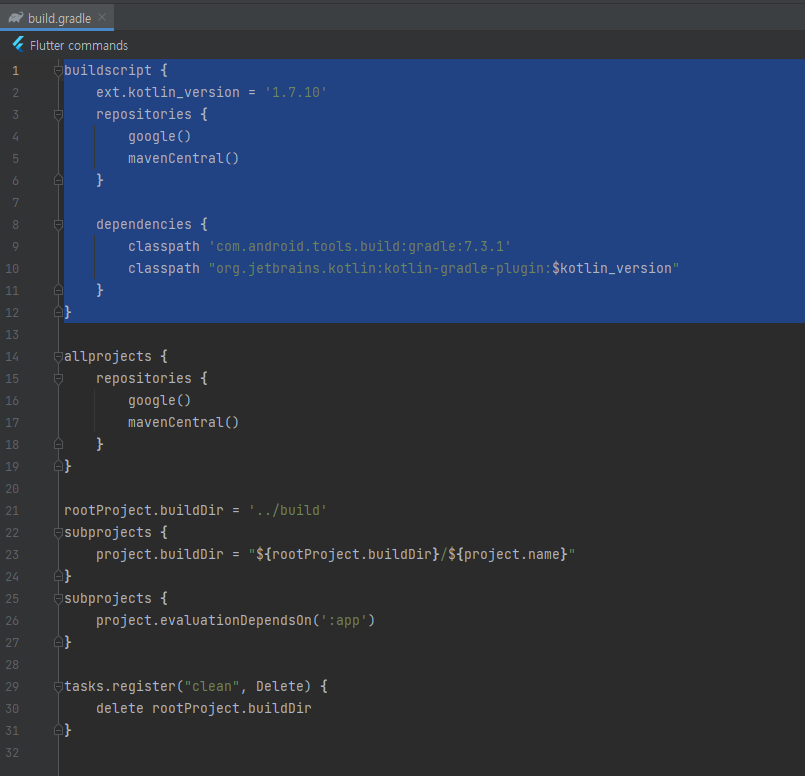
현재 Android Gradle Plugin (AGP)와 Kotlin 버전 알아두기.

2. android/settings.gradle
pluginManagement {
    def flutterSdkPath = {
        def properties = new Properties()
        file("local.properties").withInputStream { properties.load(it) }
        def flutterSdkPath = properties.getProperty("flutter.sdk")
        assert flutterSdkPath != null, "flutter.sdk not set in local.properties"
        return flutterSdkPath
    }()

    includeBuild("$flutterSdkPath/packages/flutter_tools/gradle")

    repositories {
        google()
        mavenCentral()
        gradlePluginPortal()
    }
}

plugins {
    id "dev.flutter.flutter-plugin-loader" version "1.0.0"
    id "com.android.application" version "{agpVersion}" apply false
    id "org.jetbrains.kotlin.android" version "{kotlinVersion}" apply false
}

include ":app"
위의 코드로 교체후에 agpVersion와 kotlinVersion 를 아까 본 값으로 수정을 한다.
3.android/build.gradle
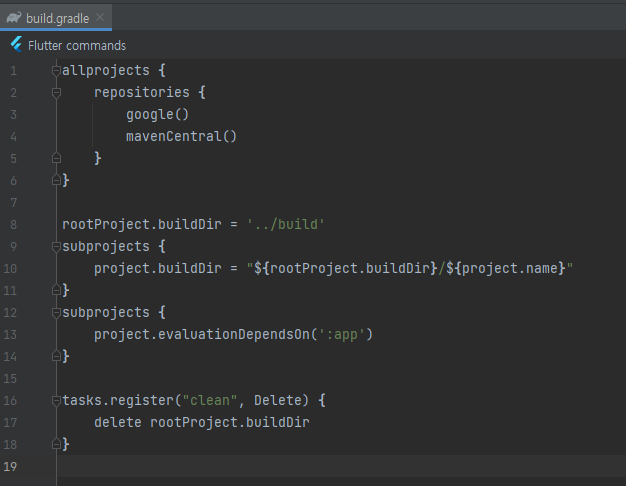
buildscript 코드 부분을 제거
전
후
4.android/app/build.gradle
문서상에서는 수정 내용이 있었지만 내 코드에서는 해당 코드가 없어서 생략했다.
5.flutter run
실행을 해보면 이전에 뜨던 에러는 뜨지 않는게 확인 되었다.
