📂Spring boot 3 이상에서 Swagger 사용하기
이전 프로젝트를 진행할 때, Springfox swagger 의존성을 추가하여서 Swagger를 사용했다. 하지만 이번 프로젝트를 진행할 때는 계속 에러가 났다.
의존성을 추가하고 빌드했을 때는 괜찮았지만, SwaggerConfig를 쓰면 계속 아래와 같은 에러가 났다.
void org.springframework.util.Assert.notNull(java.lang.Object)
The calling method's class, org.springframework.plugin.core.support.AbstractTypeAwareSupport$BeansOfTypeTargetSource, was loaded from the following location:

jar:file:/C:/Users/.gradle/caches/modules-2/files-2.1/org.springframework.plugin/spring-plugin-core/1.2.0.RELEASE/f380e7760032e7d929184f8ad8a33716b75c0657/spring-plugin-core-1.2.0.RELEASE.jar!/org/springframework/plugin/core/support/AbstractTypeAwareSupport$BeansOfTypeTargetSource.class
The called method's class, org.springframework.util.Assert, is available from the following locations:

jar:file:/C:/Users/.gradle/caches/modules-2/files-2.1/org.springframework/spring-core/6.1.1/22d73bef97aff8a74a992716fe1aafc8f8a8a68d/spring-core-6.1.1.jar!/org/springframework/util/Assert.class
The called method's class hierarchy was loaded from the following locations:
spring-core-6.1.1.jar 파일에서 org.springframework.util.Assert 클래스를 찾을 수 없다는 오류였다.
그래서 찾아보니 SpringBoot 3 이상 버전에서는 Springfox Swagger를 이용할 수 없었다. 그래서 나는 springdoc openapi를 이용했다.
의존성 추가
implementation 'org.springdoc:springdoc-openapi-starter-webmvc-ui:2.0.2'해당 의존성을 추가하고
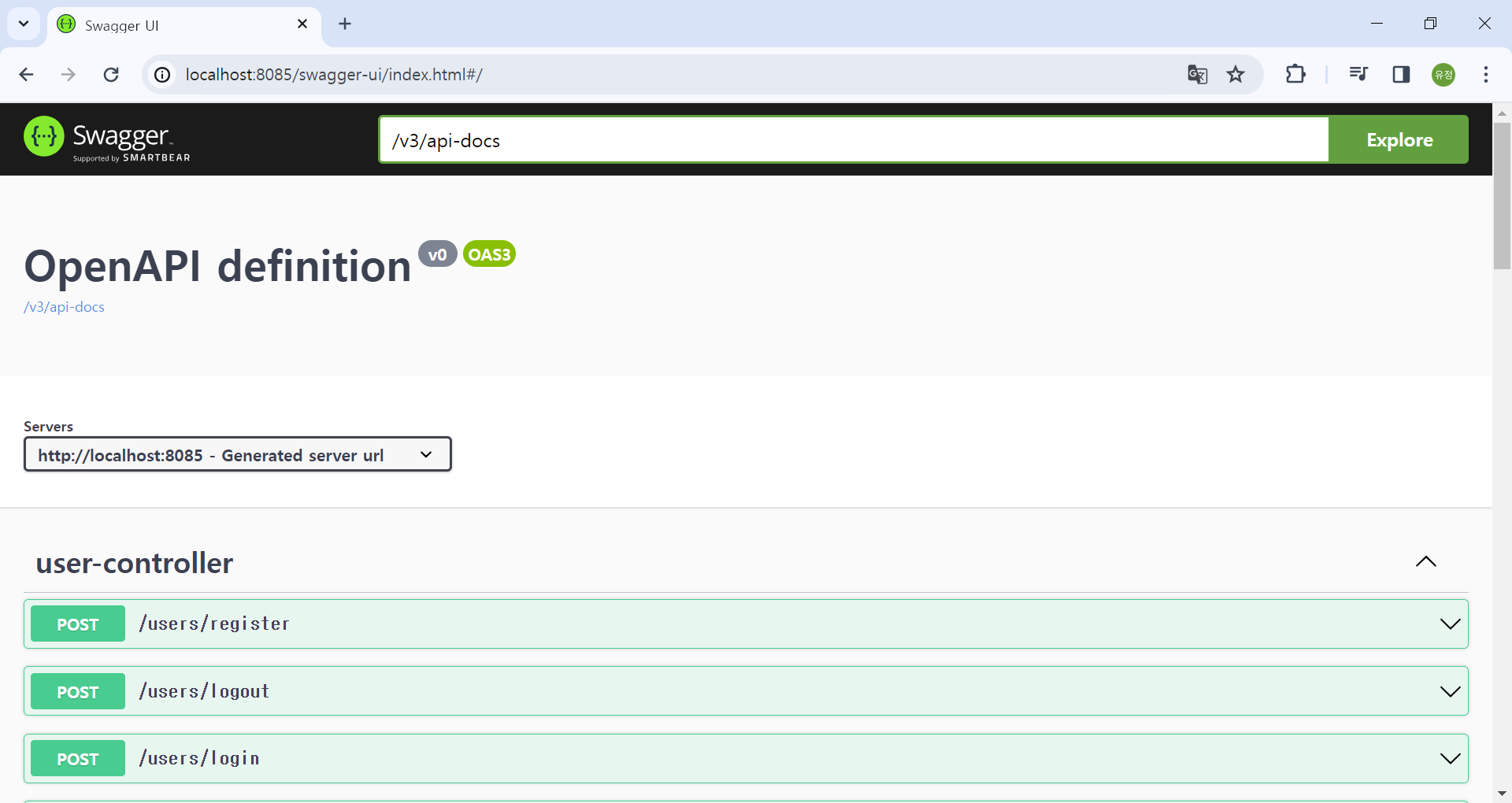
localhost:{포트}/swagger-ui/index.html 에 접속하면 Swagger가 잘뜨는 것을 확인할 수 있다.
SwaggerConfig 추가
이번에는 API를 정의하고자 SwaggerConfig파일을 추가하였다.
나는 config 폴더를 따로 파서 거기에 파일을 추가했다.
import io.swagger.v3.oas.annotations.OpenAPIDefinition;
import io.swagger.v3.oas.annotations.info.Info;
import lombok.RequiredArgsConstructor;
import org.springdoc.core.models.GroupedOpenApi;
import org.springframework.context.annotation.Bean;
import org.springframework.context.annotation.Configuration;

@OpenAPIDefinition(
        info = @Info(title = "Sample API",
                description = "연습용 api명세서입니다.",
                version = "v1"))
@RequiredArgsConstructor
@Configuration
public class SwaggerConfig {

    @Bean
    public GroupedOpenApi SampleOpenApi() {
        String[] paths = {"/**"};

        return GroupedOpenApi.builder()
                .group("Sample v1")
                .pathsToMatch(paths)
                .build();
    }
}
@OpenAPIDefinition: OpenAPI 스펙을 따르는 API 문서의 전체적인 정보를 정의하는 어노테이션으로 API의 버전, 제목, 설명 등을 설정할 수 있다.
GroupedOpenApi: API를 그룹화하여 관리하기 위한 클래스이다.
pathsToMatch: API 오퍼레이션에 해당하는 경로이다. 나는 기능별로 폴더를 나눠서 controller를 추가하였기 때문에, 전체경로로 설정했다.
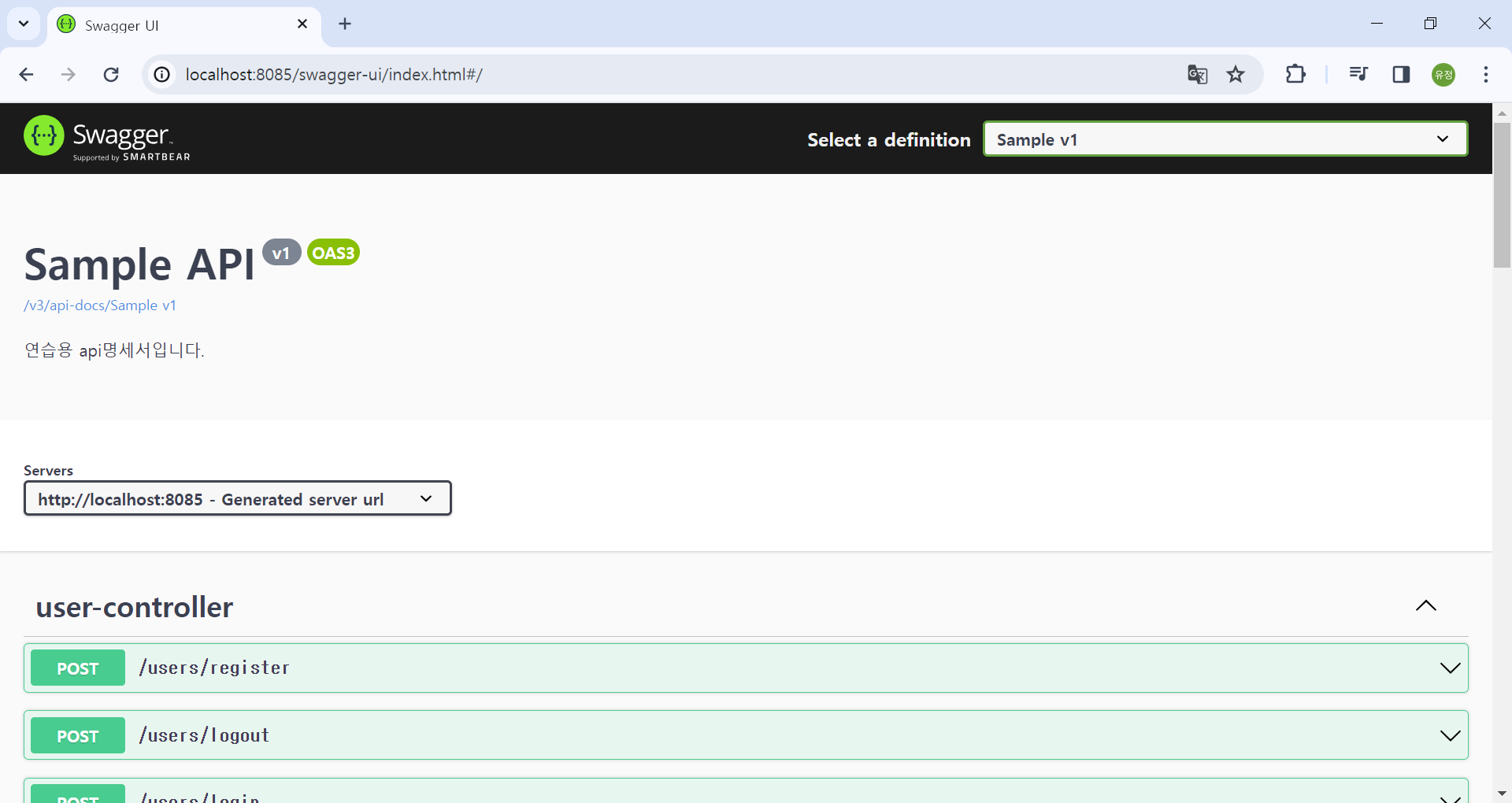
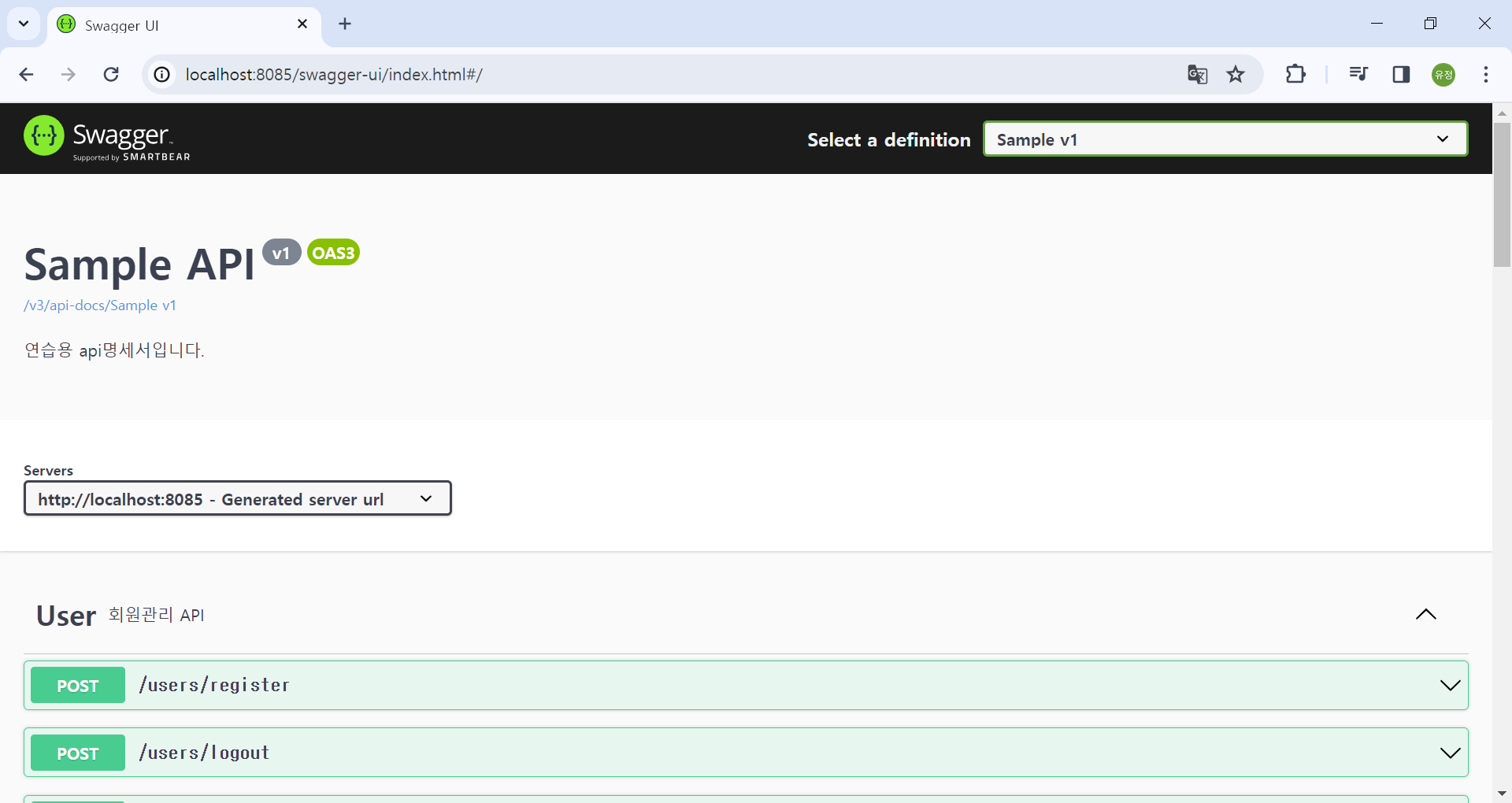
SwaggerConfig를 추가하면 다음과 같이 변경된 것을 확인할 수 있다.
GroupedOpenAPi는 여러개를 작성할 수 있다.
    @Bean
    public GroupedOpenApi SampleUserOpenApi() {
        String[] paths = {"/user/**"};

        return GroupedOpenApi.builder()
                .group("Sample v1-user")
                .pathsToMatch(paths)
                .build();
    }
    @Bean
    public GroupedOpenApi SampleTodoOpenApi() {
        String[] paths = {"/todo/**"};

        return GroupedOpenApi.builder()
                .group("Sample v1-todo")
                .pathsToMatch(paths)
                .build();
    }
이와 같이 코드를 작성하면 아래처럼 그룹으로 API 문서를 나눠서 볼 수 있다.
하지만 나는 한 창에서 확인하는게 편해서 그냥 하나로 해서 전체 경로를 확인하였다.

API 문서화
@Schema
: 객체 모델의 구조와 속성에 대한 정보를 정의하는 어노테이션. 객체의 속성 이름, 타입, 설명 등을 설정할 수 있다.
@Schema(description = "회원가입DTO")
public class UserDTO {
    @Schema(description = "닉네임", required = true, type = "String", example = "사용자1")
    private String nickname;
    @Schema(description = "이메일", required = true, type = "String", example = "user@naver.com")
    private String email;
    @Schema(description = "비밀번호", required = true, type = "String", example = "password1")
    private String password;

}
descrpition: 스키마에 대한 설명
requered: 필요한지 여부
type: 해당 매개변수의 타입
example: 입력 값 예시
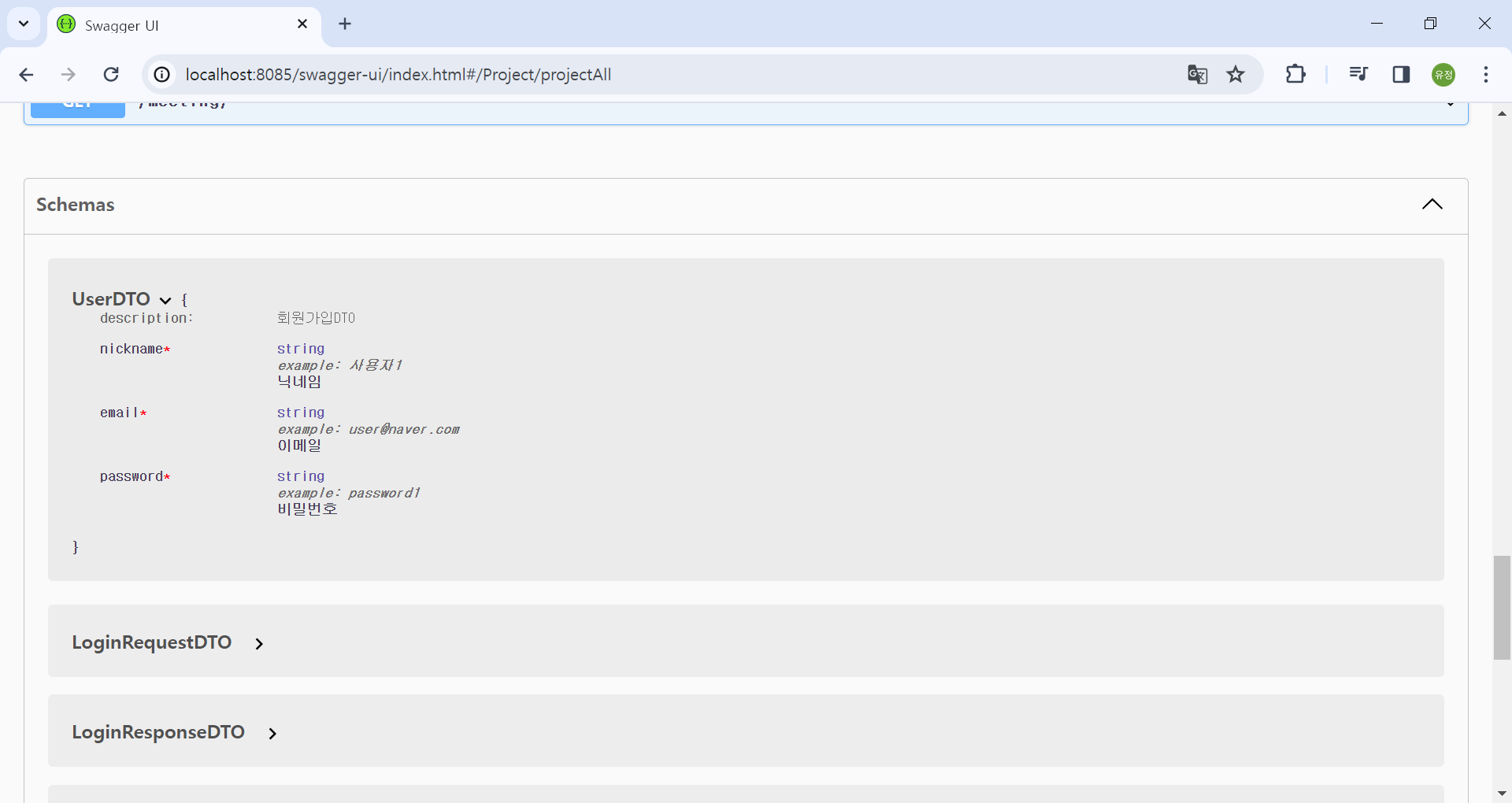
위 코드로 적용한 결과값은 다음과 같다.
@Tag
: API를 그룹화하기 위한 태그 정보를 정의하는 어노테이션. API 구분하기 위해 사용
@Slf4j
@Tag(name = "User", description = "회원관리 API")
@RestController
@RequiredArgsConstructor
public class UserController {
    private final UserService userService;

    @PostMapping("/users/register")
    public ResponseEntity<String>register(@RequestBody UserDTO userdto){
    }
name: 해당 API 그룹의 이름. 쉽게 말해서 controller의 이름을 적어준다고 생각하면 된다.
descrpition: API의 대한 간단한 설명
@Tag 어노테이션을 쓰면 이전 화면과 다르게 user-controller가 내가 지정한 이름으로 변경되고 설명도 같이 작성된 것을 확인 할 수 있다.
@Operation
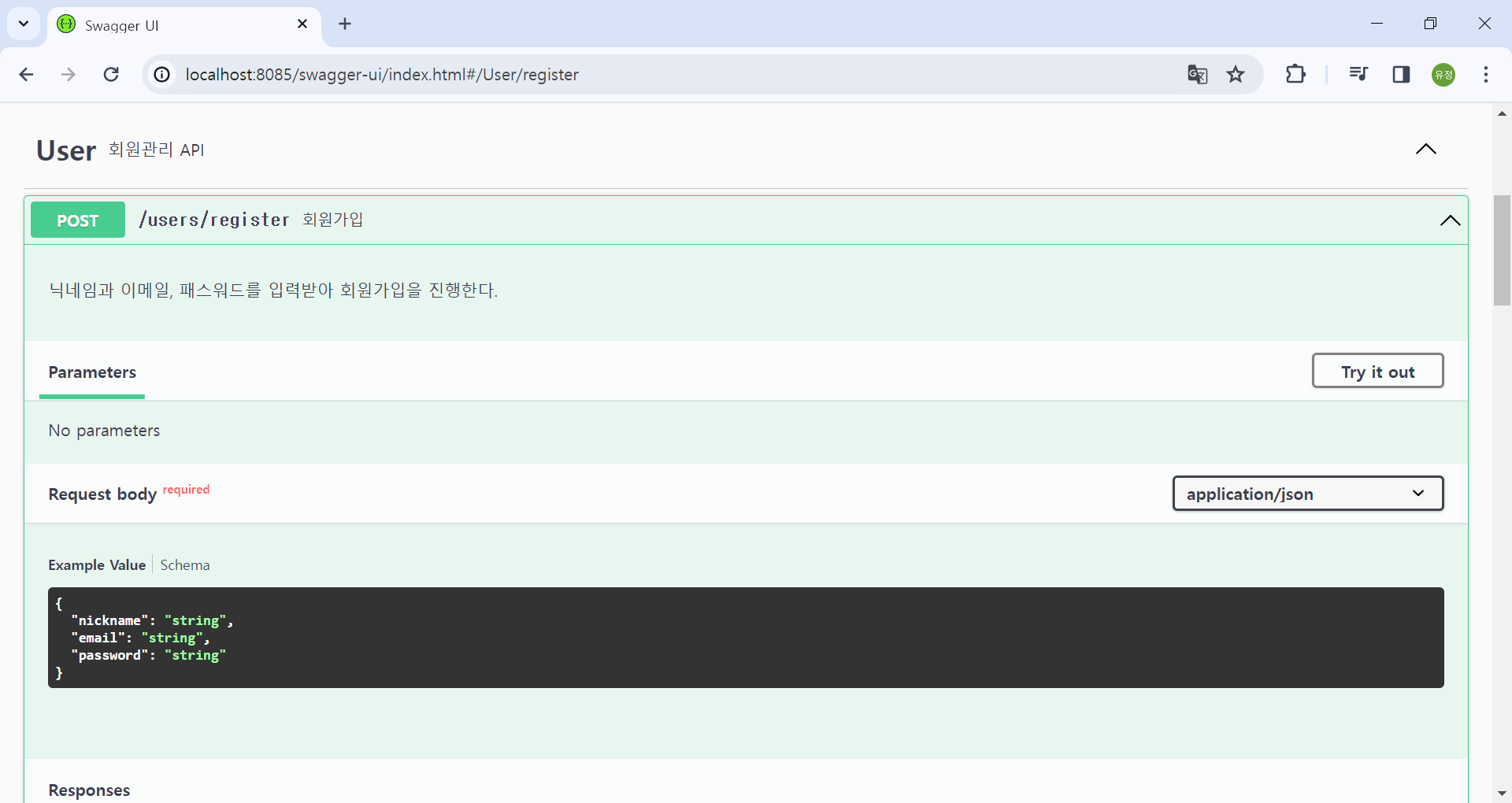
: 개별 API 메소드에 대한 정보를 정의하는 어노테이션. 요약, 설명을 설정할 수 있다.
@Operation(summary = "회원가입", description = "닉네임과 이메일, 패스워드를 입력받아 회원가입을 진행한다.")
    @PostMapping("/users/register")
    public ResponseEntity<String>register(@RequestBody UserDTO userdto){
    }
summary: 해당 API의 기능에 대한 요약
description: API가 하는 기능
@Parameter
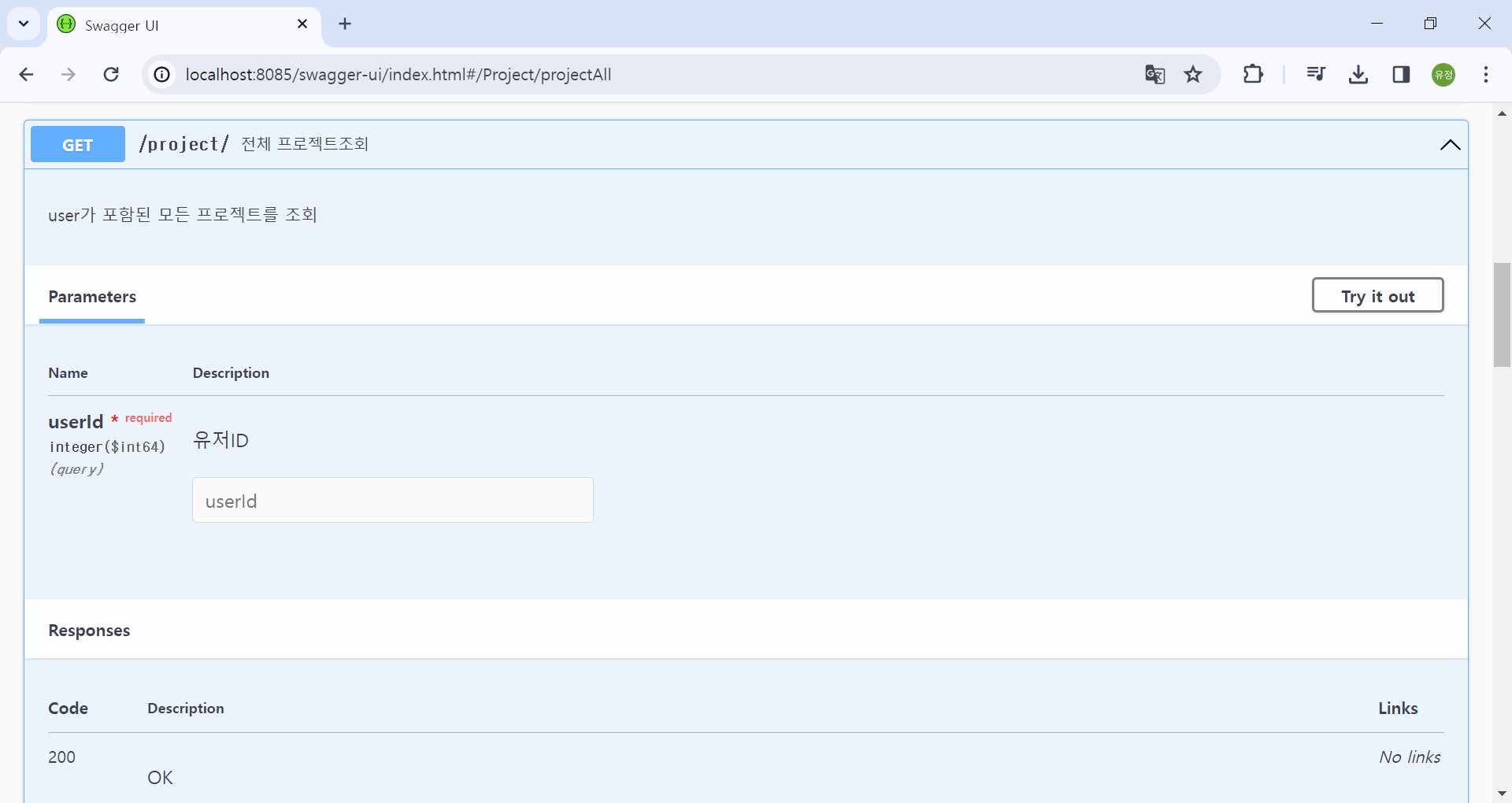
: API 메소드의 매개변수에 대한 정보를 정의하는 어노테이션. 매개변수의 이름, 설명, 타입, 위치 등을 설정할 수 있다. 대체로 get요청일 때, 사용한다.
    @GetMapping("/")
    @Operation(summary = "전체 프로젝트조회", description = "user가 포함된 모든 프로젝트를 조회")

    public ResponseEntity<List<ProjectResponseDTO>> projectAll(@Parameter(description = "유저ID", required = true) @RequestParam("userId") Long userId){
        return ResponseEntity.ok(projectService.projectAll(userId));

    }
@RequestBody
: API 메소드의 요청 본문에 대한 정보를 정의하는 어노테이션. 요청 본문의 타입, 설명 등을 설정할 수 있다. post요청일 때 사용한다.
@RequestBody같은 경우, Http 요청에서 본문을 추출하기 위해 사용하는 어노테이션이기 때문에 따로 API작성을 위한 어노테이션이라고 보기 어렵다.
그냥 통신을 위해 쓰는데, Swagger에서도 문서 정의가 가능하다.
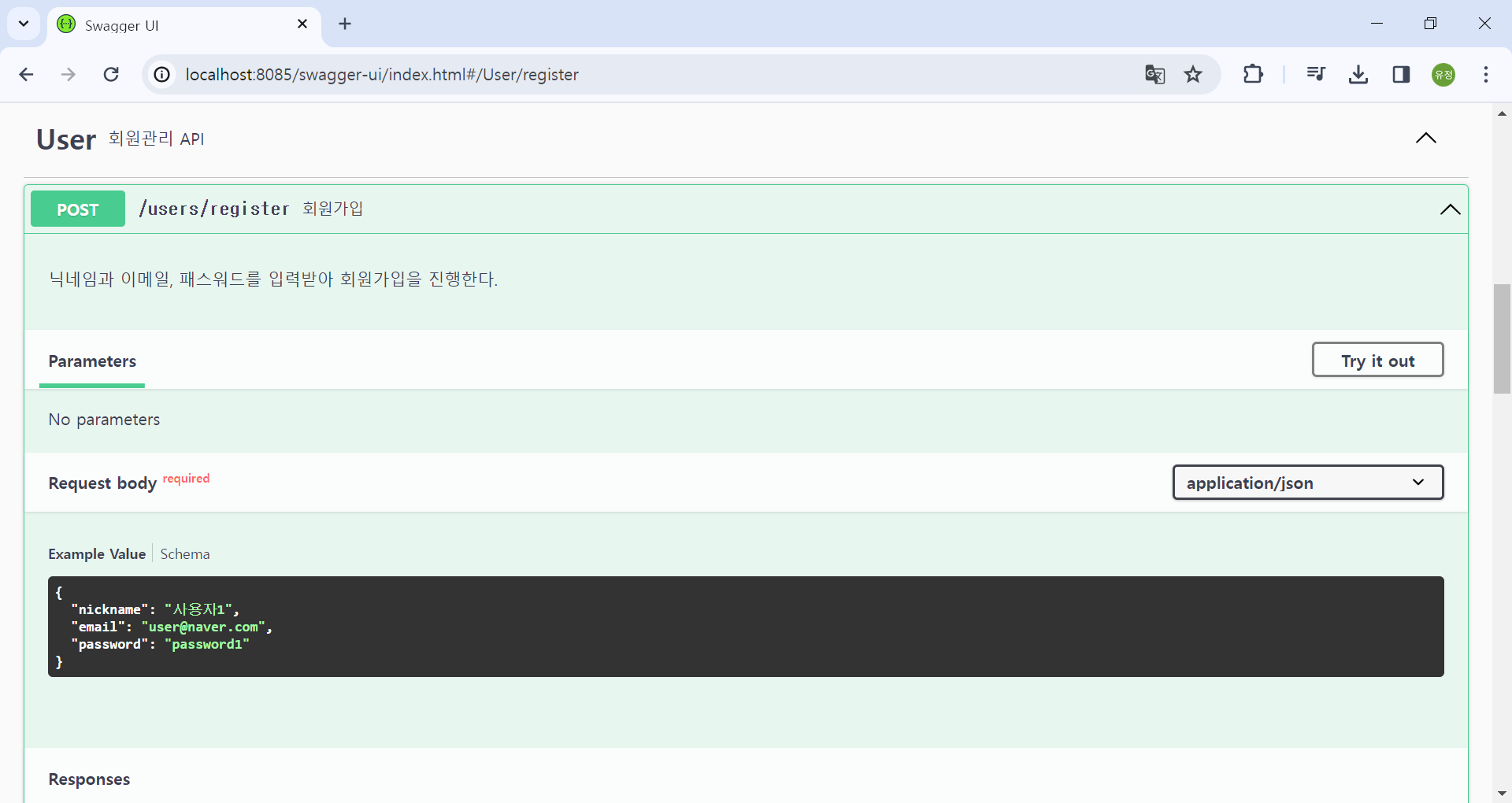
위에서 @Schema로 UserDTO를 정의하였기 때문에, 그 때 작성한 example에 맞게 나온다.
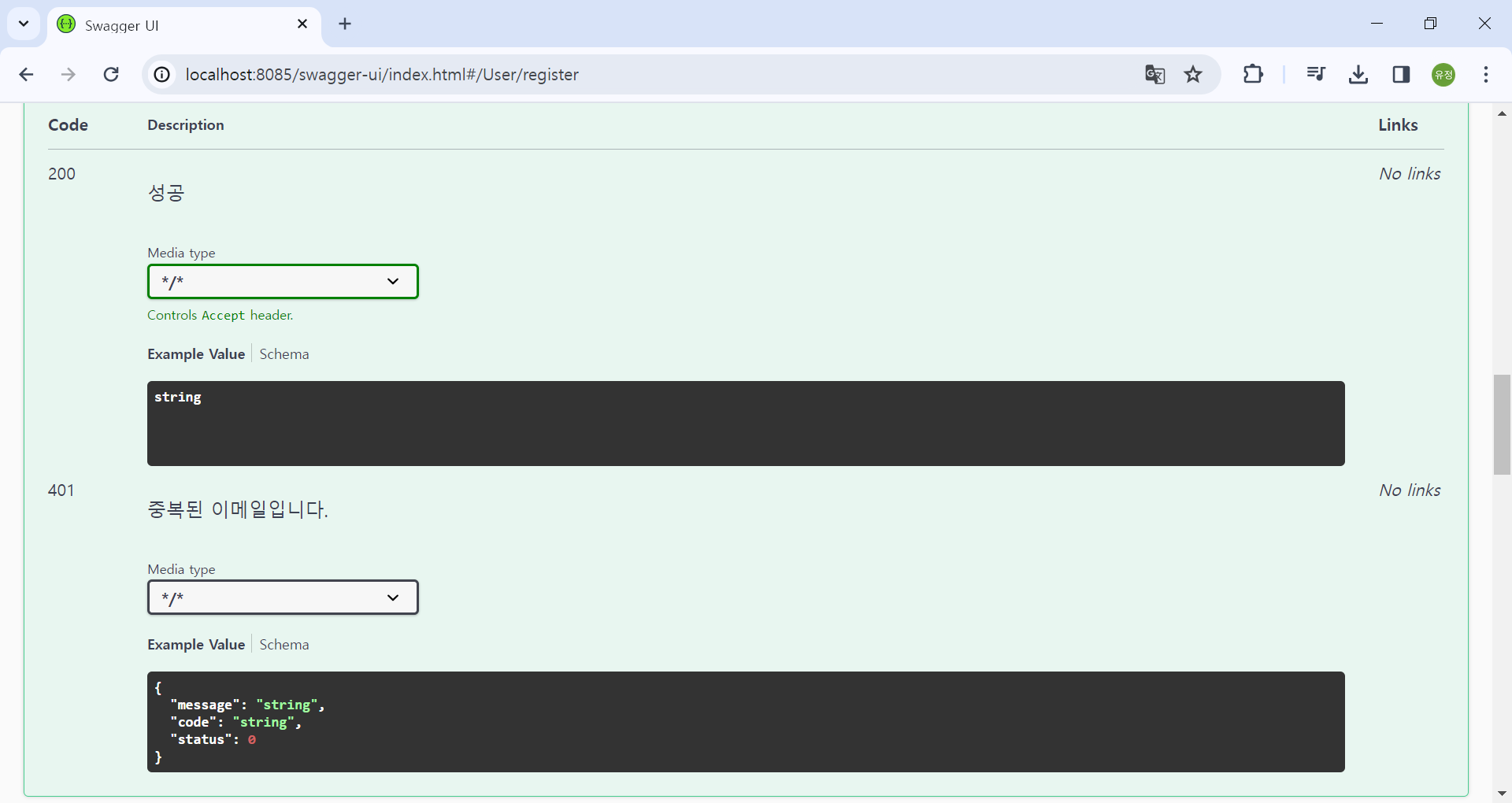
@ApiResponses
: 여러 개의 @ApiResponse 어노테이션을 그룹으로 묶어 API의 다양한 응답 상황에 대한 정보를 정의할 수 있는 어노테이션.
응답이 여러가지 있을 때 사용하는데, 에러에 대한 응답도 정의해야하기 때문에 여러가지가 나올 수 밖에 없다.
@ApiResponse
: API 응답에 대한 정보를 정의하는 어노테이션. 응답의 상태 코드, 설명, 응답 본문의 타입 등을 설정할 수 있다.
    @Operation(summary = "회원가입", description = "닉네임과 이메일, 패스워드를 입력받아 회원가입을 진행한다.")
    @ApiResponses({
            @ApiResponse(responseCode = "200", description = "성공", content = @Content(schema = @Schema(implementation = String.class))),
            @ApiResponse(responseCode = "401", description = "중복된 이메일입니다.", content = @Content(schema = @Schema(implementation = ErrorResponse.class)))

    })
    @PostMapping("/users/register")
    public ResponseEntity<String>register( @RequestBody  UserDTO userdto){
    }
responseCode: 돌아오는 응답 코드 (성공시 200, 에러 발생시, 에러 코드 응답)
description: 응답 내용
content: 응답 형식
schema: 응답으로 돌아오는 type 선언
나는 ErrorResponse를 따로 추가했기 때문에, message, code, status에 맞게 나오는 것을 확인 할 수 있다.
+) 에러 코드를 미리 선언해둔 상태였기 때문에 example에 나오게 하고 싶었다. @Schema로 example을 작성하면 모든 errorResponse가 특정 errorCode로만 나오게 된다. 그래서 이부분은 추가로 찾아보고 성공하면 추가적으로 작성할 예정이다.
참고
[Swagger] Open API 3.0 Swagger v3 상세설정 : https://jeonyoungho.github.io/posts/Open-API-3.0-Swagger-v3-%EC%83%81%EC%84%B8%EC%84%A4%EC%A0%95/
Spring Boot 3에 Swagger 적용하기(springdoc-openapi) : https://velog.io/@najiexx/Spring-Boot-3%EC%97%90-Swagger-%EC%A0%81%EC%9A%A9%ED%95%98%EA%B8%B0springdoc-openapi