Vue로 PWA 개발 - 그랜파 개발자
52. Cloud에서 FCM 전송 구현
Cloud에서 알림을 전송하는 기능을 구현합니다. ChatGPT가 알려준 코드에서 사용된 sendToDevice API는 더 이상 사용하지 않는다고 합니다. 그래서 구글 검색을 통하여 찾은 sendEachForMulticast를 사용하여 푸시 메시지를 보내는 기능을 구현하였습니다.
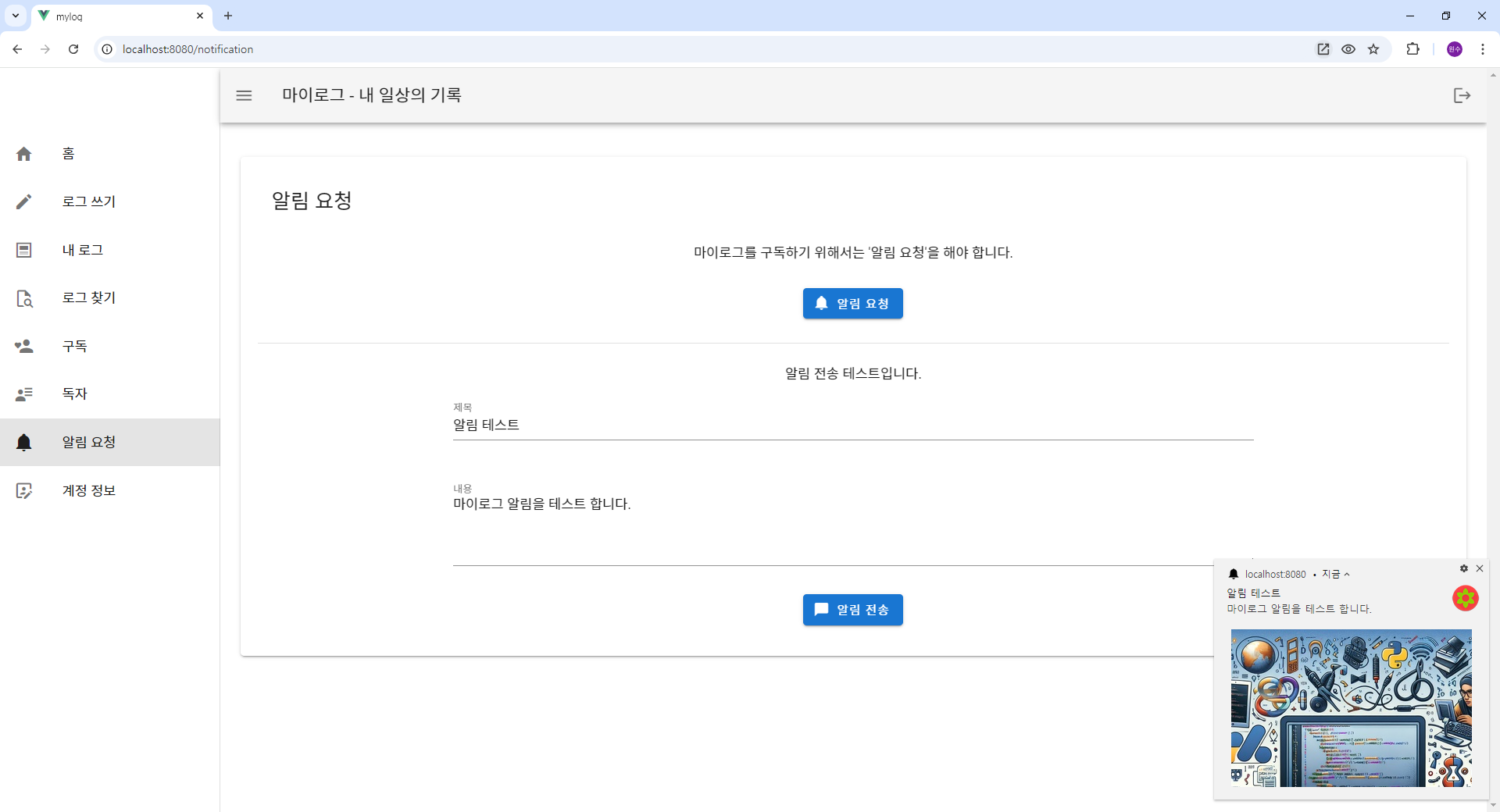
기능 구현은 다음과 같은 단계를 따릅니다.
1. Firebase Cloud Functions를 설정
firebase init functions
2. Firebase admin SDK 설치
- 'functions/' 디렉터리로 이동합니다.
- 'functions/' 디렉터리 내에 Firebase Admin SDK를 설치합니다.
cd functions
npm install firebase-admin
3. FCM을 전송하는 Cloud 함수 만들기
functions/index.js
// functions/index.js
const {onRequest} = require("firebase-functions/v2/https");
const logger = require("firebase-functions/logger");

//const functions = require('firebase-functions');
const admin = require('firebase-admin');
const cors = require('cors')({ origin: true }); // Allow all origins

// Initialize Firebase Admin
admin.initializeApp();

// Reference to Firestore
const db = admin.firestore();

// Cloud Function to send push notifications
exports.sendPushNotification = onRequest(async (req, res) => {
  cors(req, res, async () => {
    try {
      // Retrieve the FCM token(s) from Firestore or request body
      const {userId, title, body } = req.body;  //.userId;
      const tokenSnapshot = await admin.firestore().collection('fcmTokens').doc(userId).get();

      if (!tokenSnapshot.exists) {
        return res.status(404).send('User not found');
      }
      // 한 회원이 여러 토큰을 가진다. PC, 모바일 등
      const tokens = tokenSnapshot.data().tokens;
      console.log('tokens: ', tokens);

      // Token을 배열에 넣는다.
      const fcmTokens = [];
      tokens.forEach((token) => {
        // doc.data() is never undefined for query doc snapshots
        fcmTokens.push(token.token);
      });

      try {
        const response = await admin.messaging().sendEachForMulticast({
          tokens: fcmTokens,
          notification: {
              title: title,
              body: body,
          }
        });

        // Check the results of the notifications
        response.responses.forEach((response, idx) => {
          if (response.success) {
            console.log(`Message sent successfully to token: ${fcmTokens[idx]}`);
          } else {
            console.error(`Failed to send message to token: ${fcmTokens[idx]}`, response.error);
          }
        });
        return res.status(200).send('Notification sent successfully');
      } catch (error) {
        console.error('Error sending multicast notifications:', error);
      }
    } catch (error) {
      console.error('Error sending notification:', error);
      return res.status(500).send('Failed to send notification');
    }
  })
});
4. Firebase에 functions를 배포하기
firebase deploy --only functions
5. 알림 요청 및 알림 전송 테스트
src/views/NotificationView.vue
<!-- src/views/NotificationView.vue -->
<template>
  <v-container class="mt-4" fluid>
    <v-row align="center" justify="center">
      <v-col class="text-center" cols="12">
        <v-card class="pa-5">
          <v-card-title>
            <span class="text-h5">알림 요청</span>
          </v-card-title>

          <v-list-item-title class="pa-4">
            마이로그를 구독하기 위해서는 '알림 요청'을 해야 합니다.
          </v-list-item-title>

          <v-col class="text-center mb-4" cols="10" offset="1" sm="8" offset-sm="2">
            <v-btn color="primary"  @click="requestFCMToken">
              <v-icon left>mdi-bell</v-icon>
              알림 요청
            </v-btn>
          </v-col>

          <v-divider></v-divider>

          <v-row class="pt-5 pb-4">
            <v-list-item-title class="pa-4">
              알림 전송 테스트입니다.
            </v-list-item-title>

            <v-row>
              <v-col cols="10" offset="1" sm="8" offset-sm="2">
                <v-text-field autofocus name="title" label="제목" type="text" v-model="notiTitle"></v-text-field>
              </v-col>
              <v-col cols="10" offset="1" sm="8" offset-sm="2">
                <v-textarea rows="3" name="content" label="내용" type="text" v-model="notiContent"></v-textarea>
              </v-col>
            </v-row>

            <v-col class="text-center" cols="10" offset="1" sm="8" offset-sm="2">
              <v-btn color="primary" dark @click="sendNotification">
                <v-icon left>mdi-message</v-icon>알림 전송
              </v-btn>
            </v-col>
          </v-row>

        </v-card>
      </v-col>
    </v-row>

    <v-row align="center" justify="center">
      <v-col cols="10" offset="1">
        <!-- v-alert : type="success" "info" "warning"  "error" -->
        <v-alert v-if="error" type="info" dismissible @input="resetErrorMsg" class="my-alert">{{ error }}</v-alert>
      </v-col>
    </v-row>
  </v-container>

</template>

<script>
import { mapActions, mapGetters } from "vuex";

export default {
  name: "NotificationView",
  data() {
    return {
      notiTitle: '',
      notiContent: ''
    };
  },
  computed: {
    ...mapGetters('fcm',['error']),
  },
  methods: {
    ...mapActions('fcm', ['getAndSaveFCMToken', 'resetError']),
    async requestFCMToken() {
      try {
        const userId = this.$store.state.auth.user.id;
        await this.getAndSaveFCMToken(userId);

        this.ShowNotification();
      } catch (error) {
        console.error("Error requesting FCM token:", error);
      }
    },
    resetErrorMsg() {
      this.resetError();
    },
    ShowNotification() {
      const title = "마이로그-일상의 기록";
      const options = {
        body: "알림 서비스 가입을 환영합니다!",
        icon: "/img/push-noti.png",
        badge: "/img/push-badge-icon.png",
        image: "/img/push-image.jpg",
        data: [
           { action: "like", title: "링크를 클릭하세요.", icon: "/img/push-coffee.png", url: 'https://velog.io/@inetsos/posts'}
        ],
        vibrate: [500, 100, 500]
      };
      navigator.serviceWorker.ready
      .then(function(swreg) {
        swreg.showNotification(title, options);
      });
    },

    sendNotification() {
      const user = this.$store.state.auth.user;
      if(user) {
        const userId = user.id;
        this.triggerNotification(userId);
      }
    },
    async triggerNotification(userId) {
      if(this.notiTitle == '' || this.notiContent == '') {
        this.setError("제목과 내용을 입력하세요.");
        return;
      }
      try {
        const response = await fetch('https://sendpushnotification-m65i6rbula-uc.a.run.app', {
          method: 'POST',
          headers: {
            'Content-Type': 'application/json',
          },
          body: JSON.stringify({
            userId: userId,
            title: this.notiTitle, //"알림 테스트",
            body: this.notiContent,  //"알림을 보냅니다. 받아 주세요....."
          }),
        });

        if (response.ok) {
          console.log('Notification sent successfully');
        } else {
          console.error('Failed to send notification');
        }
      } catch (error) {
        console.error('Error:', error);
      }
    }
  }
};
</script>

<style scoped>
.my-alert {
  text-align: justify;
  bottom: 30px;
  margin: 20px 0;
}

#blog-link:hover {
  color: blue;
  cursor: pointer;
}
</style>
ChatGPT와 함께 Vue PWA을 공부합니다.