Vue로 PWA 개발 - 그랜파 개발자
46. 마이로그 알림 요청
구독 신청을 하고 알림을 받기 위해서는 알림 요청을 해야 합니다. 알림 요청을 하면 알림 표시 권한을 허용할 것인지 묻습니다. 허용을 하면 알림을 받을 수 있습니다.
1. service worker
앱이 백그라운드에 있을 때 알림을 처리하려면 서비스 워커가 필요합니다. 프로젝트의 루트 디렉터리(index.html이 있는 위치)에 firebase-messaging-sw.js 파일을 만듭니다.
// firebase-messaging-sw.js
importScripts('https://www.gstatic.com/firebasejs/10.13.0/firebase-app-compat.js');
importScripts('https://www.gstatic.com/firebasejs/10.13.0/firebase-messaging-compat.js');

// Your web app's Firebase configuration (same as in your firebase.js)
const firebaseConfig = {
  apiKey: "your-api-key",
  authDomain: "your-auth-domain",
  projectId: "your-project-id",
  storageBucket: "your-storage-bucket",
  messagingSenderId: "your-messaging-sender-id",
  appId: "your-app-id",
};

// Initialize Firebase
firebase.initializeApp(firebaseConfig);

// Retrieve Firebase Messaging object.
const messaging = firebase.messaging();

messaging.onBackgroundMessage(function (payload) {
  console.log('Received background message ', payload);
  const notificationTitle = payload.notification.title;
  const notificationOptions = {
    body: payload.notification.body,
    icon: '/firebase-logo.png', // Optional
  };

  self.registration.showNotification(notificationTitle, notificationOptions);
});
src/main.js
// src/main.js

import Vue from 'vue'
import App from './App.vue'
import './registerServiceWorker'
import router from './router'
import store from './store'
import vuetify from './plugins/vuetify'

Vue.config.productionTip = false

new Vue({
  router,
  store,
  vuetify,
  render: h => h(App),
  created() {
    // Set up Firebase auth state change listener
    const { dispatch } = this.$store;
    // Initialize Firebase authentication to check for the logged-in user
    dispatch('auth/initializeAuth');
    dispatch('auth/fetchUsers');

    dispatch('mylogs/fetchMylogs');

    if ('serviceWorker' in navigator) {
      navigator.serviceWorker.register('/firebase-messaging-sw.js')
      .then((registration) => {
        console.log('Service Worker registered with scope:', registration.scope);
      }).catch((err) => {
        console.error('Service Worker registration failed:', err);
      });
    }
  }
}).$mount('#app')
2. 알림 요청
알림 요청을 하면 알림 표시를 허용할 것인지 요청을 하고 허용을 하면 해당 기기의 FCM 토큰을 얻어 Firestore에 저장을 합니다.
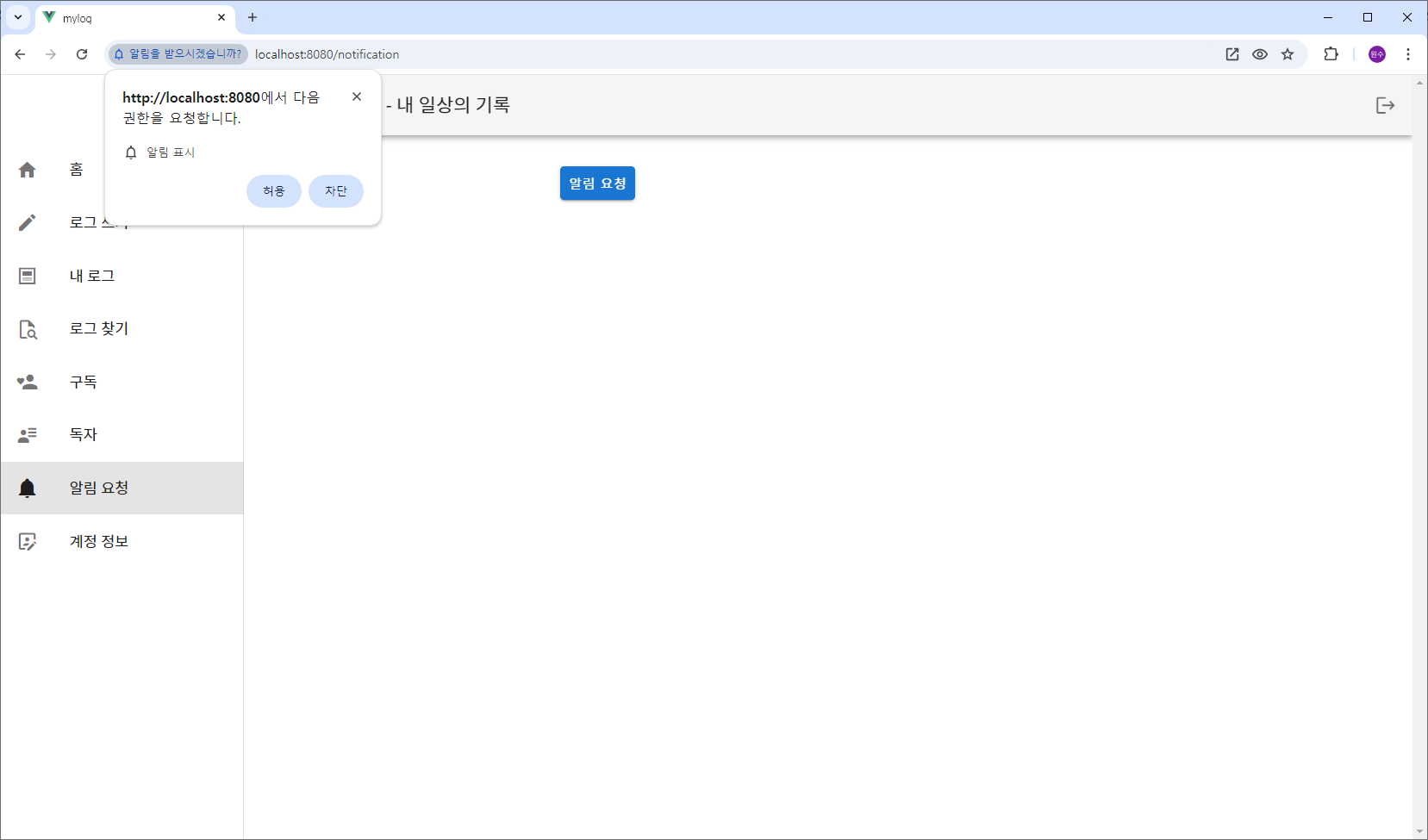
3. src/views/NotificationView.vue
<!-- src/views/NotificationView.vue -->
<template>
  <v-container class="mt-4s" fluid>
    <v-row align="center" justify="center">
      <v-col class="text-center" cols="10" offset="1" sm="8" offset-sm="2">
        <v-card-actions>
          <v-btn color="primary" @click="requestFCMToken"> 알림 요청 </v-btn>
        </v-card-actions>
      </v-col>
    </v-row>
  </v-container>
</template>

<script>
import { mapActions, mapGetters } from "vuex";

export default {
  name: "NotificationView",
  data() {
    return {

    };
  },
  methods: {
    ...mapActions('fcm', ['getAndSaveFCMToken']),
    async requestFCMToken() {
      try {
        const userId = this.$store.state.auth.user.id;
        this.getAndSaveFCMToken(userId);
      } catch (error) {
        console.error("Error requesting FCM token:", error);
      }
    }
  }
};
</script>
4. src/store/modules/fcm.js
// src/store/modules/fcm.js
import { messaging } from '@/firebase';
import { getToken } from "firebase/messaging";
import { db, collection, doc, setDoc } from "@/firebase";

const state = {
};

const mutations = {
};

const actions = {
  async getAndSaveFCMToken({ dispatch }, userId) {
    try {
      // Request permission from the user to send notifications
      const permission = await Notification.requestPermission();
      if (permission === "granted") {
        console.log("Notification permission granted.");

        // Get the FCM token
        const token = await getToken(messaging, { vapidKey: process.env.VUE_APP_VAPID_KEY });
        if (token) {
          console.log("FCM Token: ", token);
          // Save the FCM token to Firestore
          dispatch('saveFCMTokenToFirestore', { userId, token });
        } else {
          console.log("No registration token available.");
        }
      } else {
        console.log("Notification permission denied.");
      }
    } catch (error) {
      console.error("An error occurred while getting the FCM token:", error);
    }
  },

  // Save the FCM token to Firestore
  async saveFCMTokenToFirestore({}, {userId, token}) {
    try {
      // Create a reference to the document in the 'fcmTokens' collection with the user's ID as the document ID
      const tokenRef = doc(db, 'fcmTokens', userId);
      // Set the document with the token data
      // setDoc은 기존의 데이터를 덮어쓴다.
      setDoc(tokenRef, {
        token: token,
        createdAt: new Date()
      });

      console.log(`Token for user ${userId} saved to Firestore.`);
    } catch (error) {
      console.error('Error saving token to Firestore:', error);
    }
  },

};

const getters = {
};

export default {
  namespaced: true,
  state,
  mutations,
  actions,
  getters
};
ChatGPT와 함께 Vue PWA을 공부합니다.