React Hook의 기본 동작 원리
기본 react hook동작원리 코드
1. useState는 클로저(Closure)를 활용하여 상태를 관리합니다.
ex )
export const React = (() => {
  let hook = [];
  let index = 0;
  function useState(initialValue) {
    const state = hook[index] || initialValue;
    const currentIndex = index;
    const setState = newValue => {
      hook[currentIndex] = newValue;
    };
    index++;
    return [state, setState];
  }
  function render(component) {
    index = 0;
    const C = component();
    return C;
  }
  return {
    useState,
    render,
  };
})();
2. 클로저(Closure)를 활용하여 만든 useState 구현 코드
-
먼저 카운터 컴포넌트를 정의합니다.
function Counter() { const [count, setCount] = React.useState(0); return { click: () => setCount(count + 1), render: () => console.log('count:', count) }; } -
컴포넌트를 렌더링합니다.
let App = React.render(Counter); -
초기 상태를 출력합니다.
App.render(); // 출력: count: 0 -
클릭 이벤트를 시뮬레이션합니다.
App.click(); -
변경된 상태로 다시 렌더링합니다.
App.render(); // 출력: count: 1
3. 더 나아가 기본hook 원리에 todolist 넣기
-
할일 목록 컴포넌트
function TodoList() { const [todos, setTodos] = React.useState([]); const [inputText, setInputText] = React.useState(''); return { addTodo: (text) => { setTodos([...todos, text]); setInputText(''); }, updateInput: (text) => { setInputText(text); }, render: () => { console.log('Current todos:', todos); console.log('Input value:', inputText); } }; } -
사용 예시
let TodoApp = React.render(TodoList); TodoApp.render(); // 초기 상태 출력 -
입력값 업데이트
TodoApp.updateInput('새로운 할일'); TodoApp = React.render(TodoList); TodoApp.render(); -
할일 추가
TodoApp.addTodo('새로운 할일');
TodoApp = React.render(TodoList);
TodoApp.render();
상태관리 매커니즘
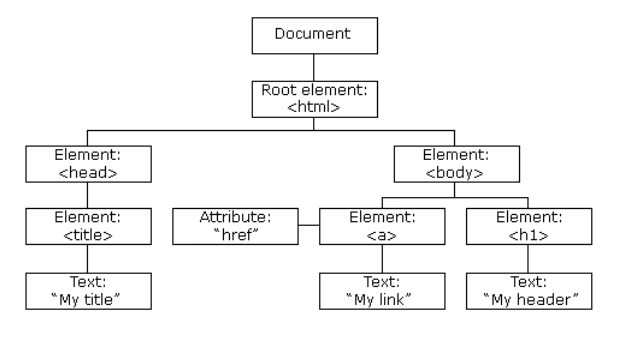
Fiber는 JavaScript 객체 형태로 구현된 단일 연결 리스트(Linked List) 구조입니다.
작업단위
- Fiber는 작업의 최소 단위로 동작
- 각 Fiber 노드는 하나의 컴포넌트에 대응합니다.
- 작업을 작은 단위로 분할하여 중단과 재개가 가능합니다.
- 우선순위에 따라 작업을 스케줄링 가능합니다.
이러한 구조를 통해 React는 렌더링 작업을 더 효율적으로 관리하고 사용자 경험을 개선할 수 있습니다.
트리 구조
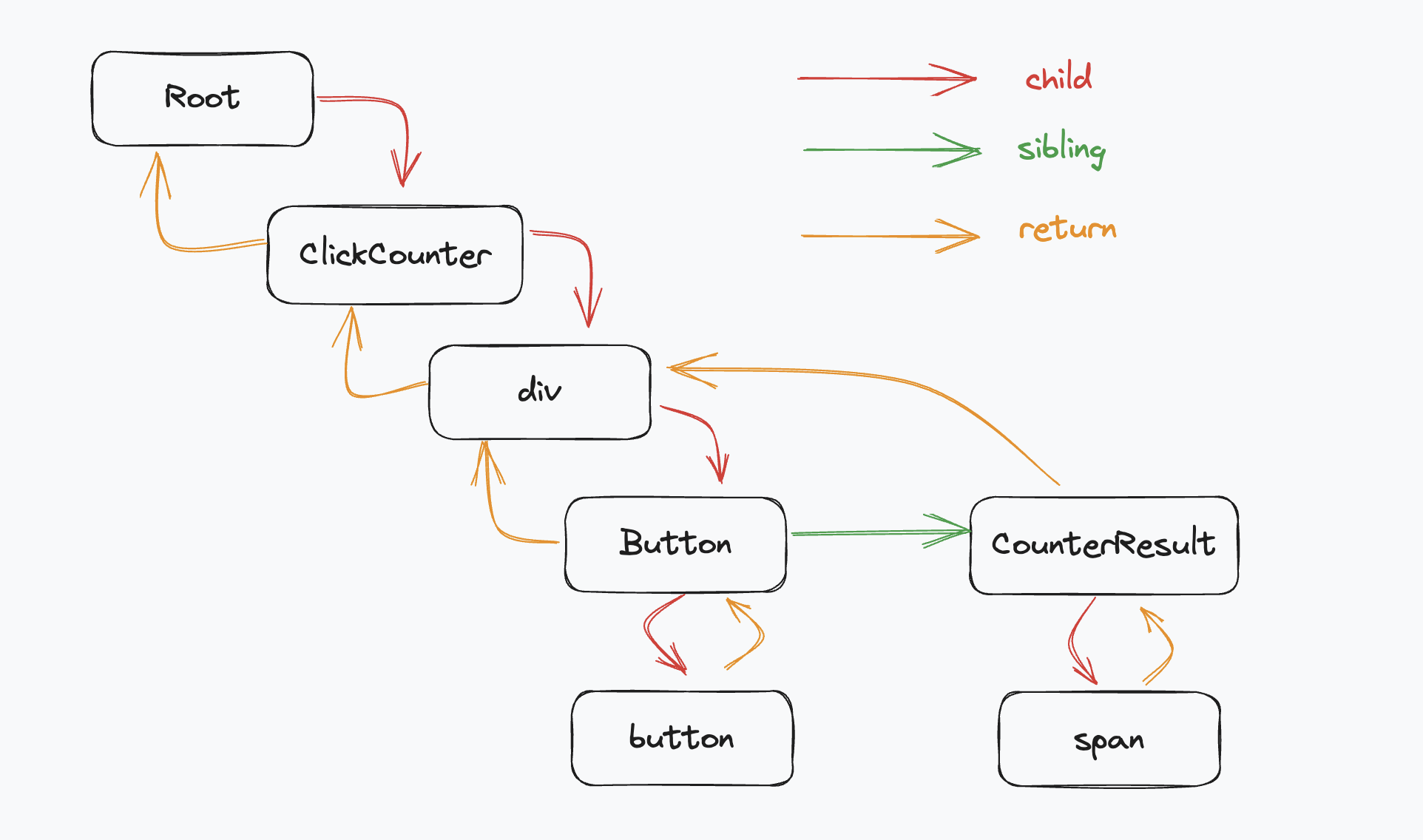
1. child : 자식 노드를 가리킵니다.
2. sibling : 같은 부모를 가진 형제 Node를 가리킵니다.
3. return : 부모 Node를 가리킵니다.(작업 완료 후 돌아갈 노드)
자주사용되는 React Hook
1. useState
- react에서 함수형 컴포넌트에서 상태를 관리할 수 있도록 해주는 React 내장 Hook입니다.
동작방식
- 컴포넌트가 처음 랜더링이 될때 그때 초기값을 가져오고 해당 초기값을 기준으로 상태를 관리합니다.
- 초기값을 가져오고 그 값을 상태관리한다고 했는데 값이 변경될 경우에는 setState 담당합니다.
const [상태관리 값, 변경된 것을 받아서 처리하는 상태관리 값] = useState(초기값)
const [state, setState]=useState(initState)
참고사항
- 모듈 스코프에서 val변수를 통해서 상태를 저장을 합니다.
const UseStateComponent = () => {
  const [count, setCount] = useState(0);
  const handleClick = () => {
    setCount(count + 1);
  };
  return <button onClick={handleClick}>Count : {count}</button>;
};
export default UseStateComponent;
2. useEffect
- 컴포넌트의 부수효과를 처리하기 위한 Hook입니다.
동작원리
-
컴포넌트가 렌더링이 된 후에 실행됩니다. 해당 컴포넌트에서 useEffect가장 늦게 읽힌다.
-
useEffect(()=>{useEffect가 실행되면 동작할 부분},[의존성 배열]) -
의존성 배열은 useEffect가 랜더링이 언제 일어날지를 알려주는 것입니다.
-
의존성 배열의 값이 변경될때마다 useEffect는 실행이 됩니다.
-
cleanup는 unMounting 일때 발생합니다.
-
cleanup 함수를 반환하여 정리 작업을 수행할 수 있습니다.
const UseEffectComponent = () => {
  const [name, setName] = useState('korea');
  const [count, setCount] = useState(0);
  const [windowSize, setWindowSize] = useState({
    width: window.innerWidth,
    height: window.innerHeight,
  });
  console.log('코드가 읽힙니다.');
    useEffect(() => {
      // state와 setState동시에 사용하는 경우에는 의존성배열 사용된 어떠한 state값도 넣지말라 넣으면 무한 랜더링이 진행된다.
    setCount(count + 1);
  }, [count]); // 의존성배열이 반값이라면 딱 첫 랜더링이후에 읽혀지는 것만 진행
  // 의존성배열이 없다면 그것은 그냥 useState와 동일하게 동작합니다.
  useEffect(() => {
    console.log('name effect');
  }, [name]);
  console.log('코드가 전부 읽혔습니다.');
  return (
    <div>
      <h2>현재 윈도우 사이즈 :</h2>
      <p>width :{windowSize.width}px</p>
      <p>height :{windowSize.height}px</p>
      <p onClick={() => setName('KOREAKROEA')}>버튼</p>
    </div>
  );
};
export default UseEffectComponent;
3. useRef
- useState와 useEffect문제점 -> 랜더링
- useState 무분별함 : 연관성이 없는 아이도 랜더링에 참여한다.
- useEffect 무분별함 : 무한루프, 실제로 변경되어야 할 값이 변경되지 않는 버그생성,*렌더링에 전혀 영향을 주지 않는다.
- 렌더링에 영향을 주지 않는 가변값을 저장하는 컨테이너입니다.
동작방식
- .current 현개 가변 값은?
- .current 프로퍼티(속성)을 통해서 값을 저장하고 접근합니다.
- 값이 변경되어도 랜더링이 일어나지 않는다.
- DOM에 직접적으로 접근한다.*
단점
- .current에 들어가있던 저장된 값은 랜더링을 하지 않는 이상 현재 저장된 값을 보여주지 못하고 처음 초기값으로 들어간 값만 보여준다.
const UseRefComponent = () => {
  // const [count, setCount] = useState(0);
  const [render, setRender] = useState(0);
  const countRef = useRef(0);
  // const handleCountUpdate = () => {
  //   setCount(count + 1);
  // };
  const handleRenderUpdate = () => {
    setRender(render + 1);
  };
  // Ref는 아무리 수정해도 컴포넌트를 re-rendering을 시키지 않는다.
  const handleRefUpdate = () => {
    countRef.current = countRef.current + 1;
    console.log('Ref값 올라가유 : ', countRef);
  };
  console.log('렌더링을 합니다 🎢');
  // console.log("Ref값 올라갈까유? : ", countRef);
  return (
    <div style={{ backgroundColor: 'lightblue', fontSize: '20px' }}>
      <p>State : {render}</p>
      <p>useRef : {countRef.current}</p>
      {/* <button onClick={handleCountUpdate}>state값 올라갑니다</button> */}
      <button onClick={handleRenderUpdate}>리 랜더링 되유 값이 이제 바껴유</button>
      <button onClick={handleRefUpdate}>ref값 올라갑니다</button>
    </div>
  );
};
export default UseRefComponent;
4. useCallback
- 메모이제이션된 callback을 반환하는 Hook입니다.
- callback 함수와 의존성 배열을 인자로 받습니다.
해당 useCallback은 의존성배열 내의 값이 변경될때만 새로운 함수를 반환합니다.
그렇지 않으면 이전의 메모이제이션된 함수를 반환합니다.
장점
- 불필요한 리 렌더링을 방지합니다.
- 성능 최적화를 진행합니다.
- 동일성을 보장합니다.
주의사항
- 모든 함수의 useCallback을 사용하면 오히려 성능이 떨어질 수 있습니다.
(캐싱되는것이 많이 때문) - 의존성 배열의 올바른 관리가 필요합니다.
(무한적으로 랜더링이 될 수 있기 때문)
사용부분
- 복잡한 상태 로직을 다룰 때 사용합니다.
- 다음 상태가 이전 상태의 의존적일때 사용됩니다.
- 여러 하위 값을 포함하는 객체를 상태로 다룰 때 사용됩니다.
5. useMemo
- 계산 비용이 높은 함수의 결과값을 메모이제이션하는 Hook입니다.
- 생성 함수와 의존성 배열을 인자로 받습니다.
- 의존성 배열의 값이 변경될때만 생성 함수를 재 실행합니다.
그렇지 않으면 이전의 메오이제이션된 값을 반환합니다.
장점
- 성능을 최적화 합니다.
- 불필요한 계산을 방지합니다.
- 랜더링 성능을 향상 시킵니다.
주의사항
- 모든 계산의 useMemo를 사용하면 메모리 사용량이 증가할 수 있습니다.
(캐싱되는것이 많기 때문) - 간단한 연산에는 사용하지 않는 것이 좋습니다.
사용부분
- 복잡한 계산이 필요한 값을 랜더링 할 경우 사용합니다.
- 객체 참조의 안정성이 필요할 때 사용합니다.
- 부모 컴포넌트의 리렌더링으로 인한 불필요한 계산을 방지할 때 사용합니다.
6. React.memo
- 컴포넌트를 메모이제이션하는 고차 컴포넌트 입니다.
- React.memo로 감싼 컴포넌트는 props가 변경되지 않으면 리렌더링되지 않게 합니다.
기본적으로 얕은 비교를 수행합니다.
필요한 경우 사용자 정의 비교 함수를 제공합니다.
장점
- 불필요한 리렌더링을 방지합니다.
- 성능을 최적화 합니다.
- 큰 컴포넌트 트리에서 효과적으로 사용됩니다.
주의사항
- 모든 컴포넌트를 메모로 감싸는 것은 권장되지 않습니다.
- 함수나 객체를 props로 전달할때는 useCallback이나 useMemo와 함께 사용해야 효과적입니다.
- 컴포넌트가 자주 리렌더링되지 않게 하거나 렌더링이 따른 경우에는 메모가 필요하지 않습니다.
7. useContext
- React 컴포넌트 트리 전체에 걸쳐 데이터를 공유할 수 있게 하는 Hook입니다.
- context 객체를 인자로 받아 해당 context의 현재 값을 반환합니다.
context의 값이 변경이 되면 컴포넌트가 리렌더링 됩니다.
장점
- 컴포넌트 트리 전체를 걸쳐서 데이터를 쉽게 공유할 수 있습니다.
- props drilling 문제를 해결합니다.
주의사항
- context를 사용하면 컴포넌트 재 사용성이 어려워집니다.
- 자주변경되는 값을
context로 관리하면 성능 문제가 발생합니다. - 여러
context를 중첩해서 사용할 경우 컴포넌트 트리가 더욱더 복잡해 질 수 있습니다.
사용방법
- 전역 상태관리가 필요할 때 사용됩니다.
( ex ) 사용자 인증 정보, 테마 설정 시 ) - 중첩 구조에서 props drilling를 피하고자 할 때 사용됩니다.
- 여러 컴포넌트에서 공유해야하는 데이터가 있을 때 사용됩니다.
8. useReducer
- 복잡한 상태 로직을 관리하는 데 사용되는 Hook입니다.
- 현재 상태와 엑션을 받아 새로운 상태를 반환하는 Reducer 함수와 초기상태를 인자로 받습니다.
userReducer 는 현재 상태와 dispatch 함수를 반환합니다.
장점
- 복잡한 상태 변화를 예측 가능하게 만듭니다.
- 상태 업데이트로 로직을 분리할 수 있습니다.
- 테스트하기 쉬운 순수 함수로 상태 변화를 표현합니다.
주의사항
- 간단한 상태 관리는 useState가 더 적합할 수 있습니다.
- Reducer 함수가 더욱더 복잡할수록 구조화를 잘 구성해야 합니다.
사용방법
- 복잡한 상태의 로직이 필요할 때 사용합니다.
- 다음 상태가 이전 상태에 의존할 때 사용합니다.
- 여러 하위 값을 포함하는 객체 상태를 다룰 때 사용합니다.
9. customHook
Custom Hook은 React의 기본 Hook(useState, useEffect 등)을 조합하여 재사용 가능한 로직을 캡슐화한 함수입니다. 특정 기능을 여러 컴포넌트에서 반복적으로 사용할 때 유용합니다.
장점
- 로직의 재사용성 증가 → 여러 컴포넌트에서 동일한 기능을 쉽게 사용 가능
- 컴포넌트의 가독성 향상 → UI와 비즈니스 로직을 분리하여 코드가 깔끔해짐
- Side Effect 관리 용이 → useEffect 등을 활용한 API 호출, 이벤트 리스너 관리
주의사항
이름은 반드시 use로 시작해야 함 → React가 Hook으로 인식하도록
1. 컴포넌트 또는 다른 Hook 내부에서 호출해야 함
2. React의 규칙을 준수해야 함 → 조건문이나 반복문 안에서 호출하지 않기
사용방법
- Custom Hook 작성
import { useState } from "react";
export const useInput = (initialValue) => {
  const [value, setValue] = useState(initialValue);
  const handleChange = (event) => setValue(event.target.value);
  return [value, handleChange, setValue];
};
- 컴포넌트에서 사용
import React from "react";
import React from "react";
import { useInput } from "./useInput";
export const MyComponent = () => {
  const [name, handleNameChange] = useInput("");
  return (
    <input
      type="text"
      value={name}
      onChange={handleNameChange}
    />
  );
};
- useFetch
import { useFetch } from "./customHook/useFetch";
const FETCH_URL = "https://jsonplaceholder.typicode.com/posts";
const FETCH_URL_TODO = "https://jsonplaceholder.typicode.com/todos";
const CustomHookFetch = () => {
  const { data, isLoading, error } = useFetch(FETCH_URL);
  if (isLoading)
    return (
      <div style={{ display: "flex", width: "100%", height: "100vh", justifyContent: "center", alignItems: "center" }}>
        Loading...
      </div>
    );
  if (error) return <div>Error</div>;
  return (
    <div>
      <ul>
        {data.map((post) => (
          <li key={post.id}>
            <h3>제목 : {post.title}</h3>
            <p>내용 : {post.body}</p>
          </li>
        ))}
      </ul>
    </div>
  );
};
export default CustomHookFetch;

백엔드 개발자에서 프론드엔드 개발자로