진짜 말그대로 dependency 추가만 해봤다..
https://webfirewood.tistory.com/115 참고했다.
여기 글 정리 잘해주셔서 이거 보면서 JWT 까지해서 회원가입, 로그인 기능 구현하는 게 목표다.
1. dependency 추가하기
implementation 'org.springframework.boot:spring-boot-starter-security'
build.gradle
dependencies {
	/* Spring */
	implementation 'org.springframework.boot:spring-boot-starter-web'
	testImplementation 'org.springframework.boot:spring-boot-starter-test'
	/* lombok */
	implementation 'org.projectlombok:lombok' // lombok
	/* DB */
	implementation 'mysql:mysql-connector-java' // mysql
	implementation 'org.springframework.boot:spring-boot-starter-data-jpa' // jpa
	/* Spring Security */
	implementation 'org.springframework.boot:spring-boot-starter-security' // Spring Security
}
2. datasourl url에 allowPublicKeyRetrieval 추가
application.properties
spring.datasource.url=jdbc:mysql://127.0.0.1:3306/selfmemory_db?useSSL=false&useUnicode=true&serverTimezone=Asia/Seoul&allowPublicKeyRetrieval=true서버 실행했을 때 아래와 같은 에러나서 allowPublicKeyRetrieval=true 추가했다.
java.sql.SQLNonTransientConnectionException: Public Key Retrieval is not allowed
	at com.mysql.cj.jdbc.exceptions.SQLError.createSQLException(SQLError.java:110) ~[mysql-connector-java-8.0.29.jar:8.0.29]
	at com.mysql.cj.jdbc.exceptions.SQLExceptionsMapping.translateException(SQLExceptionsMapping.java:122) ~[mysql-connector-java-8.0.29.jar:8.0.29]
	at com.mysql.cj.jdbc.ConnectionImpl.createNewIO(ConnectionImpl.java:828) ~[mysql-connector-java-8.0.29.jar:8.0.29]
3. User Entity와 Repository 추가
package com.example.demo.entity;

import javax.persistence.Column;
import javax.persistence.Entity;
import javax.persistence.GeneratedValue;
import javax.persistence.GenerationType;
import javax.persistence.Id;

import lombok.AllArgsConstructor;
import lombok.Builder;
import lombok.Getter;
import lombok.NoArgsConstructor;

@Getter
@NoArgsConstructor
@AllArgsConstructor
@Builder
@Entity
public class User {

	@Id
	@GeneratedValue(strategy = GenerationType.IDENTITY)
	private Long id;

	@Column(length = 100, nullable = false, unique = true)
	private String email;

	@Column(length = 300, nullable = false)
	private String password;
}
package com.example.demo.repository;

import org.springframework.data.jpa.repository.JpaRepository;

import com.example.demo.entity.User;

public interface UserRepository extends JpaRepository<User, Long> {

}
4. WebSecurityConfig 추가
package com.example.demo.config;

import org.springframework.security.config.annotation.web.builders.HttpSecurity;
import org.springframework.security.config.annotation.web.configuration.EnableWebSecurity;
import org.springframework.security.config.annotation.web.configuration.WebSecurityConfigurerAdapter;

@EnableWebSecurity
public class WebSecurityConfig extends WebSecurityConfigurerAdapter {

	@Override
	protected void configure(HttpSecurity http) throws Exception {
		http.httpBasic()
			.and()
			.authorizeRequests()
			.antMatchers("/admin/**").hasRole("ADMIN")
			.antMatchers("/user/**").hasRole("USER")
			.antMatchers("/**").permitAll();
	}

}
WebSecurityConfigurerAdapter 클래스 deprecated라고 뜸... 인터넷 대충 찾아보니 해당 클래스 상속받지 않고 대신 메소드들 다 Bean으로 등록하는 식으로 바뀐 것 같다. 나중에 바꿔보자..
5. 테스트
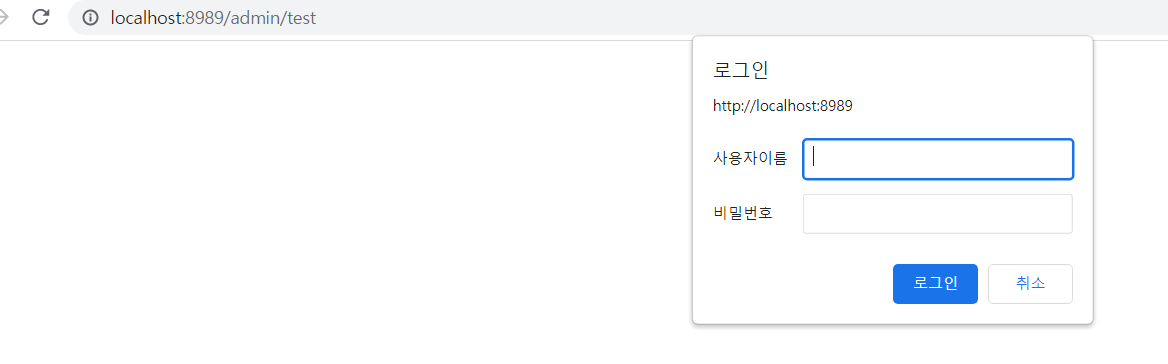
/admin/~~ 에 들어가면 로그인 창이 뜬다. 성공.

지금은 네이버 블로그만 해요... https://blog.naver.com/chero77